Page 5 of 7
Re: NVIDIA G-Sync Pulsar monitor - Acer Predator XB273U F5
Posted: 30 Jul 2026, 05:42
by Tell
RynoW wrote: ↑29 Jul 2026, 15:06
Is there a reason not to go for this one over the others, given the price delta? The reviews on Amazon and Newegg aren't good but it's always hard to tell what is and isn't user error
If you buy from woot you're only getting 90 days of warranty instead of the normal 3 years just fyi
Re: NVIDIA G-Sync Pulsar monitor - Acer Predator XB273U F5
Posted: 31 Jul 2026, 17:11
by zyb3z
Tell wrote: ↑30 Jul 2026, 05:42
RynoW wrote: ↑29 Jul 2026, 15:06
Is there a reason not to go for this one over the others, given the price delta? The reviews on Amazon and Newegg aren't good but it's always hard to tell what is and isn't user error
If you buy from woot you're only getting 90 days of warranty instead of the normal 3 years just fyi
this is not true, you get a 90 day warranty with woot but the 3 year from acer overrides it.
i just received this monitor and it is amazing, selling my 360hz oled, i really missed the motion clarity at lower frame rates, i don't see myself going back to oled until they figure that out.
Re: NVIDIA G-Sync Pulsar monitor - Acer Predator XB273U F5
Posted: 08 Aug 2026, 10:50
by nuninho1980
brownvim wrote: ↑07 Jul 2026, 17:36
I think its possible within Windows, I made a custom resolution of 50hz with the CRU program and it seems to work, I would need someone else to confirm. CRU settings below:
---image---
I did play a 50fps video on YouTube and it looked smooth and clear:
https://www.youtube.com/watch?v=-HqB15g_sCA&t=21s
Note this mode flickers even more than the 60hz mode! The 60hz mode flicker doesn't bother me but I think this would bother me using it an extended time.
The pulse width adjustments are still available in this mode too.
Checked UFO test and it confirms its 50hz, it also says on the Acer OSD that its running at 50hz.
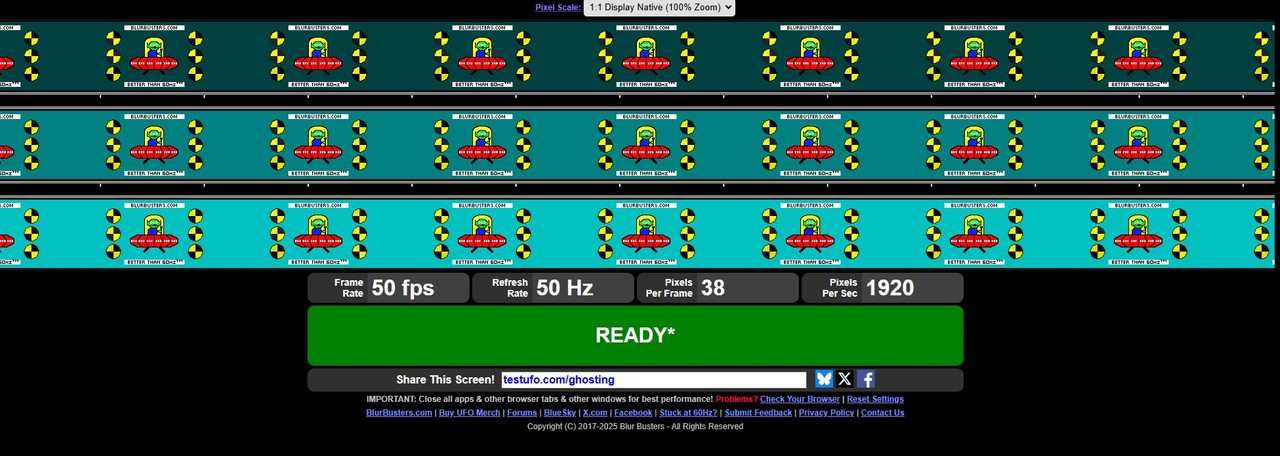
Hi. I've new same monitor as your and I add and test 50Hz by... HDMI port but my monitor can't enable ULMB2 for 50Hz.
Running Win 10 without G-SYNC, my new monitor has firmware v1.1.6 and RTX 4090 with Studio 596.36 driver.
Re: NVIDIA G-Sync Pulsar monitor - Acer Predator XB273U F5
Posted: 08 Aug 2026, 11:09
by Bahn Yuki
Just picked up one of these myself and it's pretty great for the $370 price. I'm a bit confused on how ULMB2 works for 60fps content. For instance in Virtua Fighter 5, do I keep it at 60hz? Or do I set it to 360hz and enable gsync? What about borderless window mode? Can't I just run all the games in borderless for gsync pulsar to work?
Most fighting games are hard locked to 60hz, but there are some exceptions as noted above.
Re: NVIDIA G-Sync Pulsar monitor - Acer Predator XB273U F5
Posted: 08 Aug 2026, 16:55
by RealNC
Bahn Yuki wrote: ↑08 Aug 2026, 11:09
I'm a bit confused on how ULMB2 works for 60fps content.
You need to disable G-SYNC in the nvidia control panel or the nvidia app, then switch Windows to 60Hz, then enable ULMB in the monitor's OSD.
Re: NVIDIA G-Sync Pulsar monitor - Acer Predator XB273U F5
Posted: 09 Aug 2026, 09:12
by Bahn Yuki
Ok, so despite Virtua Fighter 5(SFXTEKKEN is another one)running at 360hz, I should still set windows to 60hz? Sorry for the noob questions, but most fighting games don't allow you to run beyond 60hz, so disabling gsync and putting windows at 60hz is what I've been doing for 90% of the games I play.
This is why I ask about running in a borderless window(i can check with Intel presentmon) to see what sort of hardware flip it's using.
60hz games = disable gsync/set windows to 60hz in windows for ULMB2
360hz games = enable gsync/set refresh rate to 360hz for pulsar
360hz games that are locked to 60fps=? This is where my confusion begins
60hz games with a borderless full screen mode=? Do i go with ULMB2 or Pulsar?
Re: NVIDIA G-Sync Pulsar monitor - Acer Predator XB273U F5
Posted: 09 Aug 2026, 19:20
by RealNC
Bahn Yuki wrote: ↑09 Aug 2026, 09:12
Ok, so despite Virtua Fighter 5(SFXTEKKEN is another one)running at 360hz, I should still set windows to 60hz? Sorry for the noob questions, but most fighting games don't allow you to run beyond 60hz, so disabling gsync and putting windows at 60hz is what I've been doing for 90% of the games I play.
This is why I ask about running in a borderless window(i can check with Intel presentmon) to see what sort of hardware flip it's using.
60hz games = disable gsync/set windows to 60hz in windows for ULMB2
360hz games = enable gsync/set refresh rate to 360hz for pulsar
360hz games that are locked to 60fps=? This is where my confusion begins
60hz games with a borderless full screen mode=? Do i go with ULMB2 or Pulsar?
60Hz ULMB2 means the display needs to run at 60Hz and g-sync needs to be disabled. It's intended for 60FPS games or 60Hz sources (like consoles.) It doesn't matter if a games runs at 60FPS in 360Hz mode. It's the display refresh rate that matters here, not the game's FPS.
If you want to play with 60Hz ULMB, you need to switch to 60Hz and disable g-sync. If you use pulsar mode instead (meaning both ULMB and g-sync are active at the same time,) then it can't do 60Hz strobing anymore. It only goes down to 75Hz I believe.
It doesn't matter if the game is borderless windowed or not. It doesn't even matter if you're even running a game. Or a PC. You can connect a DVD player even and use 60Hz ULMB there. Or a PlayStation. It doesn't matter to the monitor what's being shown. All it needs is running at 60Hz and (in case the source is a PC), g-sync needs to be disabled.
Whether you use it or not is up to you. If you like the look and feel (latency-wise) of 60Hz ULMB, use it. If not, don't use it.
Re: NVIDIA G-Sync Pulsar monitor - Acer Predator XB273U F5
Posted: 10 Aug 2026, 12:01
by Chief Blur Buster
AFAIK, minimum ULMB2 Hz is 60 Hz. I wasn't able to convince NVIDIA to go even lower, but at least we've got 60 Hz. It took the creator community and us collectively to convince NVIDIA.
Re: NVIDIA G-Sync Pulsar monitor - Acer Predator XB273U F5
Posted: 14 Aug 2026, 13:50
by Lunatic
Chief Blur Buster wrote: ↑10 Aug 2026, 12:01
AFAIK, minimum ULMB2 Hz is 60 Hz. I wasn't able to convince NVIDIA to go even lower, but at least we've got 60 Hz. It took the creator community and us collectively to convince NVIDIA.
Such insane level of motion clarity at only 60hz/60fps is absolutely worth the mild flickering. So thank you for that.
Re: NVIDIA G-Sync Pulsar monitor - Acer Predator XB273U F5
Posted: 14 Aug 2026, 22:02
by RynoW
What setting are people using for ULMB pulse width on 120Hz and 60Hz? If I'm being honest I don't see a real difference in clarity from 50 to the lowest setting (10).
Also was pleased to see it came with a color calibration measurement certificate.