05/22/2020 UPDATE. The IPS 240hz monitor tier list.(I've measured/tried the all) and my honest explanation why.

Everything about displays and monitors. 120Hz, 144Hz, 240Hz, 4K, 1440p, input lag, display shopping, monitor purchase decisions, compare, versus, debate, and more. Questions? Just ask!
Locked
User avatar
Chief Blur Buster
Site Admin
Posts: 12133
Joined: 05 Dec 2013, 15:44
Location: Toronto / Hamilton, Ontario, Canada
Contact:

Re: 04/18/2020. The IPS 240hz monitor tier list.(I've measured/tried the all) and my honest explanation why.

Post by Chief Blur Buster » 21 Apr 2020, 14:48

RLCScontender wrote:
21 Apr 2020, 04:49
Heres'a n example. They had the viewsonic elite xg270qg at 5.2ms response time and the lg 27gl850-b at 4.17ms response time. Yet almost EVERY review company (TFT, Prad.de, Snowman, etc) easily had the viewsonic faster than the LG. Another example is the LG 32gk850-f, tft had it at 8ms response time while hardware unboxed had the same panel at 4.3ms respones time. TWo different revieweres, with vastly DIFFERENT g2g averages
GtG measurements are pretty tough to nail down to a single trusted number

Also different parts of the curve can be faster than others.

1. GtG curve SHAPE differences on GtG graphs.
Start of might be faster than competitor, but end of curve might be slower than competitor. While only one of the two might be more visible in-game for specific games. Even dark games can make parts of a GtG curve more important, while brighter games make different parts of a GtG curve more important. The famous VA slowness in darks is a famous example but also affects TN and IPS to lesser extents.

2. Colors measured. Different colors have different GtG.
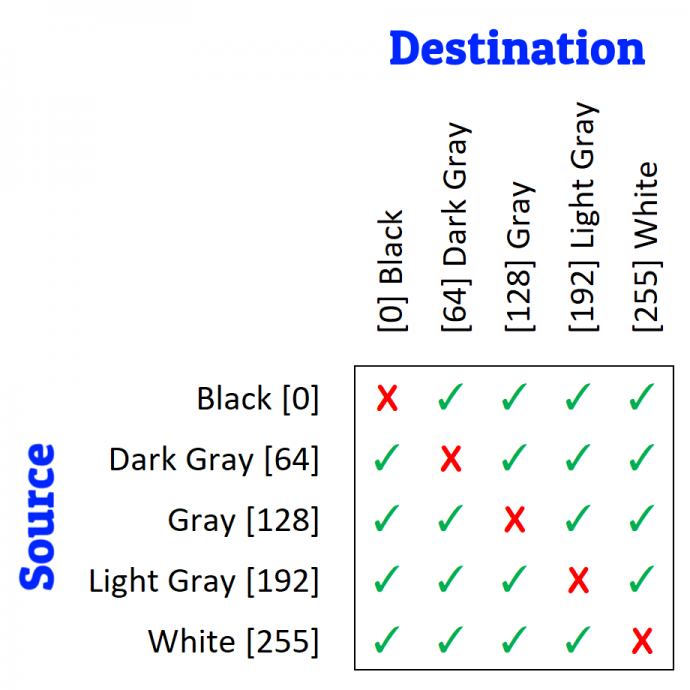
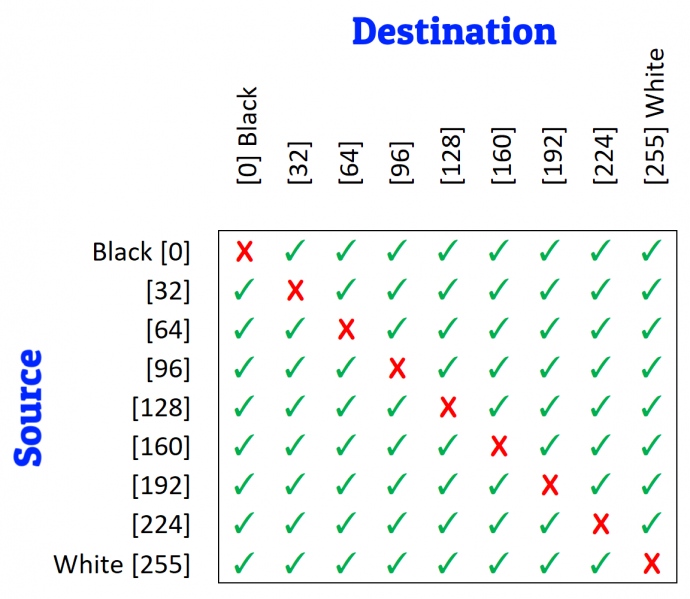
For an 8-bit panel, there are over 60,000 different GtG color values -- 256x256 color combination minus the no-change colors (256), for 8-bit = 65536-256 = 65280 different GtG numbers! But most reviewers only test a 5x5 grid, which is too small to get accurate averages on VA panels.

3. Temperature differences. Even 1 degrees colder can create 1ms slower on some VA panels on some colors.
Ever used a frozen LCD in a freezing car in middle-winter? GtG measured in seconds. But even 1 degree differences is important.

4. Warm-up differences. Receive a monitor by FedEx in winter versus summer. GtG tests will be different.
You need 24hr warm-up to room temp, followed by at least 30-60 minutes of full power-on time in a temperature-controlled room (20C).

5. Panel lottery factor, You know those black nonuniformities that can't be explained-away as backlight bleed etc?
That, too, can affect GtG by fractions of milliseconds

6. Sensor location factor. You know the cold corner of the LCD and the hot corner of the LCD where the power supply is?
That, too, can affect GtG speeds, just by position of your GtG measuring sensor

7. Aging differences.
Yup, yup. I've seen different numbers after 400 hours of breaking-in.

So... See, it's a bigger rabbit hole than you thought, eh?

Image

TL;DR Review Quality GtG Lab Analysis Preparation
  • If freshly received by Amazon, wait 24 hours till monitor equalizes to the temperature of your home.
  • Get 2 accurate lab thermometers and place them 2 meters aparts on left/right side of monitors.
    Two is preferred as a verifier of each other, and to verify lack of room hotspots
  • Make sure no computer nearby (Keep hot computers far away from monitor -- preferably moved to UNDER the desk or next to desk side, and diagonally away from monitor to prevent hot rising air from computer). Prevents temperature interference from hot GPUs etc.
  • Thermostat your room until 20C reads on both thermometers sitting a meter away from both sides of monitor
    There are also different temperature standards, but I use 20C as a standardized room temperature
    Make sure your computer desk is far away from your heat vents, e.g. no baseboard heater or air conditioner near monitor
  • Power up the monitor for an hour or so minimum
  • Measure consistent position (i.e. screen dead centre) Never, never, never, never, never randomize sensor position.
  • Measure a grid, the biggest you can. For VA panels, even 5x5 grid vs 9x9 grid makes big diff because of small size of GtG slowness hotspot in the dim area of the color gamut.
  • Disclose your GtG measurement standard. For example, use VESA GtG cutoff points 10% and 90% accurately. Make sure your oscilloscope is sensitive enough not to be noisy at GtG10%. Many cheap oscilloscopes are, and will massively change your GtG number.
  • Average the numbers for GtG averages.
  • You can color-code it as a GtG heatmap (like TFTCentral and ApertureGrille, etc)
This is the TL;DR simplified version. GtG measurement standard can get more complex than the above. Caveat emptor. HUGE rabbit hole. Harder to get reliable GtG averages than measuring contrast ratios.

See? Monitor manufacturers aren't necessarily "lying". They just are following imperfect standards of GtG measurements which are sometimes inconsistent with each other. GtG is hard to measure accurately at these accuracy levels.
Image

Image

TL;DR: Do a full disclosure of the limitations of your GtG measurements. Anything less than an attempt at perfection will guarantee even-more-different results.

Head of Blur Busters - BlurBusters.com | TestUFO.com | Follow @BlurBusters on: BlueSky | Twitter | Facebook

Image
Forum Rules wrote:  1. Rule #1: Be Nice. This is published forum rule #1. Even To Newbies & People You Disagree With!
  2. Please report rule violations If you see a post that violates forum rules, then report the post.
  3. ALWAYS respect indie testers here. See how indies are bootstrapping Blur Busters research!

User avatar
Chief Blur Buster
Site Admin
Posts: 12133
Joined: 05 Dec 2013, 15:44
Location: Toronto / Hamilton, Ontario, Canada
Contact:

Re: 04/18/2020. The IPS 240hz monitor tier list.(I've measured/tried the all) and my honest explanation why.

Post by Chief Blur Buster » 21 Apr 2020, 14:58

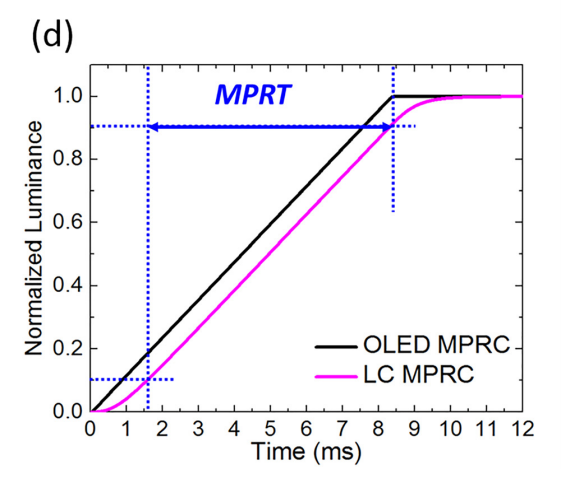
Cutoff points are a point of contentious debate. Humans see GtG and MPRT issues below 10% and above 90%.

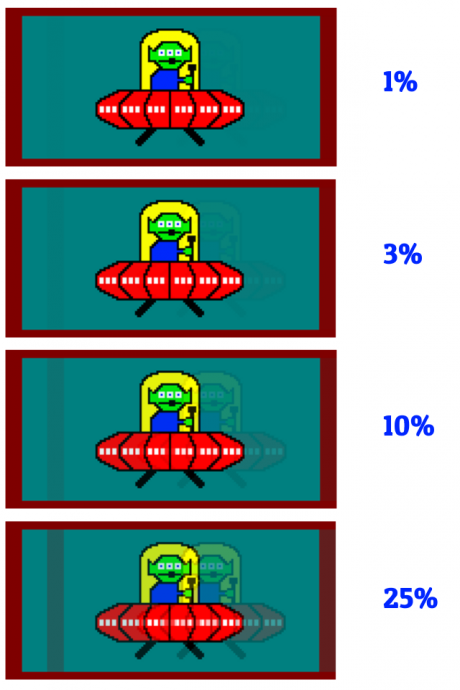
For MPRT, here's an example of strobe crosstalk (representations of www.testufo.com/crosstalk at different % incompleteness).

Image

(From Pixel response FAQ).

MPRT(90%) can be great but can still have bad stobe crosstalk because of that EXTRA millisecond!

Now, do you choose 100% cutoff point? No, because you see how faint 1% is. Sometimes we don't care if GtG99% takes 20ms, if GtG97% takes only 5ms.

The moral of the story is that you should have fair disclosure of your GtG testing policy (not all websites do).
- Specify temperature you measured at, including warmup time specs and accuracy of warmup temperature monitoring.
- Specify your GtG grid test size. Do you test 5x5 or 9x9 or 17x17 or what?
- Specify your GtG cutoff point.
- Etc.

Fair disclosure of your GtG test process is good. It is okay for one to be casual and simply say "I tested GtG from black to white, at my room temperature of approximately 71F give or take, and here's this oscilloscope graph" in casual hobbyist GtG test. But don't label it as an absolutism. Or label it as apples-vs-apples to the professionally tested GtG numbers. It is still useful hobbyist sharing -- but disclosure is important to make sure others can replicate your GtG result which is almost impossible to replicate without a fair disclosure.

That extra millisecond added to even the GtG10%, can accidentally cause GtG to overlap a 2nd refresh cycle, creating amplified strobe crosstalk issues. Another reason, why, the humble millisecond matters, in a multifaceted way (unrelated to lag).

For GtG:
Image

For MPRT:
Image

Varying Cutoff "standards":
Remember the three little piglets? GtG 90% is too cold, GtG 100% is too hot, and GtG "Just Right" is hard to determine. Choose your preferred porridge.
  • 90% cutoff: It's VESA standard, but misses human visible things beyond 10%-to-90%
  • 100% cutoff: DOA. Almost impossible apples-vs-apples for darks, due to varying noisefloors of different oscilloscopes. Also who cares about GtG99.9% anyway if that visibility is below human noisefloor. Big whoop. GtG97% failure to not overlap 2nd refresh cycle still creates visible strobe crosstalk, but measuring to GtG100% almost feels like trying to reach the speed of light especially when you're trying to measure GtG between two near-black shades below your oscilloscope's noisefloor! So give up the GtG100% dream, it's a waste of hobbyist and reviewer time. Skip. But if you still want to resemble GtG100%, you can use GtG99% as a surrogate for GtG100%, as long as you disclose it in your GtG measurement policy. The problem is GtG98.5% vs GtG99% vs GtG99.5% is almost visually identical to human eye (tho slightly amplified for strobe crosstalk contexts), yet have dramatically different numbers on some panels due to noisefloors and the super slowness at the very end of curves. So trying to get reliable numbers very close to 100% is a huge problem.
  • 99%+ cutoff: A good compromise stand-in for the impossibility of perfect 100% cutoff
  • 95-98% cutoff: Other perfectly reasonable non-standard cutoffs
  • First-80% cutoff: I've seen someone do this, but I don't like this. Sometimes simpler mathematically but non-standard (e.g. measuring 0%-thru-80% instead of 10%-thru-90%)
It's a cesspool of compromise trying to map numbers to human brain. 10%-thru-90% is mathematically convenient that produces much more reliable nearly-non-varying numbers (in proper laboratory testing conditions, as described several paragraphs above the images).
Head of Blur Busters - BlurBusters.com | TestUFO.com | Follow @BlurBusters on: BlueSky | Twitter | Facebook

Image
Forum Rules wrote:  1. Rule #1: Be Nice. This is published forum rule #1. Even To Newbies & People You Disagree With!
  2. Please report rule violations If you see a post that violates forum rules, then report the post.
  3. ALWAYS respect indie testers here. See how indies are bootstrapping Blur Busters research!

DaveN
Posts: 34
Joined: 22 Apr 2020, 14:09

Re: 04/18/2020. The IPS 240hz monitor tier list.(I've measured/tried the all) and my honest explanation why.

Post by DaveN » 22 Apr 2020, 19:09

Talking about those pesky csgo players... hey there, thats me!

I'm currently using an ASUS VG248QE, which I had for... I guess about 7 years now.
I figured it's time for an upgrade, stepping up to 240Hz, but the more I read, the more confused I get.
The competitive aspect is the most important aspect to me, so I really only need a monitor which gives me the best advantage possible at a budget of max 400€.
I was actually about to pull the trigger on the HP Omen X 25f since it was available for 279€, but I missed the offer by a few hours.

So I took the time to read up some more info, but I am quite a bit overwhelmed with all the information.
The whole TN vs those new IPS panels debate in here got me even more uncertain what i need for a pure competitive environment.

I do play single player games too, but it probably only takes up about 20% of my total gaming time - some nicer colors would be cool, however I want to dedicate my 400€ to the competitive aspect, since I was also fine with playing single player games on my VG248QE so far, and even a newer TN panel would most likely be an upgrade color wise.

Would be really nice if someone in here could give me a bit of guidance! Cheers! :)
Old: ASUS VG248QE 144Hz TN Current: HP Omen X 25f 240Hz TN
Main Rig
2nd Rig

sk1p
Posts: 132
Joined: 21 Mar 2020, 01:21

Re: 04/18/2020. The IPS 240hz monitor tier list.(I've measured/tried the all) and my honest explanation why.

Post by sk1p » 22 Apr 2020, 23:01

DaveN wrote:
22 Apr 2020, 19:09
Talking about those pesky csgo players... hey there, thats me!

I'm currently using an ASUS VG248QE, which I had for... I guess about 7 years now.
I figured it's time for an upgrade, stepping up to 240Hz, but the more I read, the more confused I get.
The competitive aspect is the most important aspect to me, so I really only need a monitor which gives me the best advantage possible at a budget of max 400€.
I was actually about to pull the trigger on the HP Omen X 25f since it was available for 279€, but I missed the offer by a few hours.

So I took the time to read up some more info, but I am quite a bit overwhelmed with all the information.
The whole TN vs those new IPS panels debate in here got me even more uncertain what i need for a pure competitive environment.

I do play single player games too, but it probably only takes up about 20% of my total gaming time - some nicer colors would be cool, however I want to dedicate my 400€ to the competitive aspect, since I was also fine with playing single player games on my VG248QE so far, and even a newer TN panel would most likely be an upgrade color wise.

Would be really nice if someone in here could give me a bit of guidance! Cheers! :)
I used Benq XL2410T from 2012, then Acer XF240H(from 2017), then Asus VG248QE during 2 years and from 2017 tried many 240 hz TN panels: XL 2540, AW2518HF, LG 27GK750F, Acer XF252QX - experience in CS GO became worse with all of them(XF252QX was one of the best for me, but no so good as VG248QE - I'm rate in quality how I can play CS GO), but now more the month I have VG279QM and my experience in CS GO became better from the first day with this monitor(Global MM, 6 level faceit, but I am old)) and only amateur player), so highly recommend to go VG279QM/259QM or MSI MAG. Finally, sold my VG248QE after 2 years using.

niros
Posts: 77
Joined: 26 Oct 2019, 14:50

Re: 04/18/2020. The IPS 240hz monitor tier list.(I've measured/tried the all) and my honest explanation why.

Post by niros » 22 Apr 2020, 23:39

sk1p wrote:
22 Apr 2020, 23:01
DaveN wrote:
22 Apr 2020, 19:09
Talking about those pesky csgo players... hey there, thats me!

I'm currently using an ASUS VG248QE, which I had for... I guess about 7 years now.
I figured it's time for an upgrade, stepping up to 240Hz, but the more I read, the more confused I get.
The competitive aspect is the most important aspect to me, so I really only need a monitor which gives me the best advantage possible at a budget of max 400€.
I was actually about to pull the trigger on the HP Omen X 25f since it was available for 279€, but I missed the offer by a few hours.

So I took the time to read up some more info, but I am quite a bit overwhelmed with all the information.
The whole TN vs those new IPS panels debate in here got me even more uncertain what i need for a pure competitive environment.

I do play single player games too, but it probably only takes up about 20% of my total gaming time - some nicer colors would be cool, however I want to dedicate my 400€ to the competitive aspect, since I was also fine with playing single player games on my VG248QE so far, and even a newer TN panel would most likely be an upgrade color wise.

Would be really nice if someone in here could give me a bit of guidance! Cheers! :)
I used Benq XL2410T from 2012, then Acer XF240H(from 2017), then Asus VG248QE during 2 years and from 2017 tried many 240 hz TN panels: XL 2540, AW2518HF, LG 27GK750F, Acer XF252QX - experience in CS GO became worse with all of them(XF252QX was one of the best for me, but no so good as VG248QE - I'm rate in quality how I can play CS GO), but now more the month I have VG279QM and my experience in CS GO became better from the first day with this monitor(Global MM, 6 level faceit, but I am old)) and only amateur player), so highly recommend to go VG279QM/259QM or MSI MAG. Finally, sold my VG248QE after 2 years using.
I honestly dont get it. why the VG 279QM was a game changer for you? it seems wierd that all the other models you tried felt less good than your old 144hz monitor..
maybe the fact that you went to 27 felt a game changer for you?

DaveN
Posts: 34
Joined: 22 Apr 2020, 14:09

Re: 04/18/2020. The IPS 240hz monitor tier list.(I've measured/tried the all) and my honest explanation why.

Post by DaveN » 23 Apr 2020, 07:24

sk1p wrote:
22 Apr 2020, 23:01
I used Benq XL2410T from 2012, then Acer XF240H(from 2017), then Asus VG248QE during 2 years and from 2017 tried many 240 hz TN panels: XL 2540, AW2518HF, LG 27GK750F, Acer XF252QX - experience in CS GO became worse with all of them(XF252QX was one of the best for me, but no so good as VG248QE)
How would you explain your experience? Shouldn't all of those newer 2019 TN panels be better in any regards, from a pure technical standpoint? Are you sure it wasn't just the difference itself that might have put you off for a while?
sk1p wrote:
22 Apr 2020, 23:01
But now more the month I have VG279QM and my experience in CS GO became better from the first day with this monitor (Global MM, 6 level faceit, but I am old)) and only amateur player), so highly recommend to go VG279QM/259QM or MSI MAG. Finally, sold my VG248QE after 2 years using.
I'm quite surprised that your experience with those new IPS panels is better than with the 2019 TNs for competitive gaming, but it might be down to your individual perception. I'm actually quite similarly ranked on Faceit (lvl 7) - and I appreciate your answer, however I don't think it got me any closer to making a decision haha. :lol:
Old: ASUS VG248QE 144Hz TN Current: HP Omen X 25f 240Hz TN
Main Rig
2nd Rig

sk1p
Posts: 132
Joined: 21 Mar 2020, 01:21

Re: 04/18/2020. The IPS 240hz monitor tier list.(I've measured/tried the all) and my honest explanation why.

Post by sk1p » 23 Apr 2020, 09:14

niros wrote:
22 Apr 2020, 23:39
sk1p wrote:
22 Apr 2020, 23:01
DaveN wrote:
22 Apr 2020, 19:09
Talking about those pesky csgo players... hey there, thats me!

I'm currently using an ASUS VG248QE, which I had for... I guess about 7 years now.
I figured it's time for an upgrade, stepping up to 240Hz, but the more I read, the more confused I get.
The competitive aspect is the most important aspect to me, so I really only need a monitor which gives me the best advantage possible at a budget of max 400€.
I was actually about to pull the trigger on the HP Omen X 25f since it was available for 279€, but I missed the offer by a few hours.

So I took the time to read up some more info, but I am quite a bit overwhelmed with all the information.
The whole TN vs those new IPS panels debate in here got me even more uncertain what i need for a pure competitive environment.

I do play single player games too, but it probably only takes up about 20% of my total gaming time - some nicer colors would be cool, however I want to dedicate my 400€ to the competitive aspect, since I was also fine with playing single player games on my VG248QE so far, and even a newer TN panel would most likely be an upgrade color wise.

Would be really nice if someone in here could give me a bit of guidance! Cheers! :)
I used Benq XL2410T from 2012, then Acer XF240H(from 2017), then Asus VG248QE during 2 years and from 2017 tried many 240 hz TN panels: XL 2540, AW2518HF, LG 27GK750F, Acer XF252QX - experience in CS GO became worse with all of them(XF252QX was one of the best for me, but no so good as VG248QE - I'm rate in quality how I can play CS GO), but now more the month I have VG279QM and my experience in CS GO became better from the first day with this monitor(Global MM, 6 level faceit, but I am old)) and only amateur player), so highly recommend to go VG279QM/259QM or MSI MAG. Finally, sold my VG248QE after 2 years using.
I honestly dont get it. why the VG 279QM was a game changer for you? it seems wierd that all the other models you tried felt less good than your old 144hz monitor..
maybe the fact that you went to 27 felt a game changer for you?
Honestly, 27 it's only one thing which irritates me with this monitor. I'm connected good experience in CS GO with really low input lag, I can shoot as good as with VG248QE and sometimes better, but with all previous 240hz monitors my aim become worse.

sk1p
Posts: 132
Joined: 21 Mar 2020, 01:21

Re: 04/18/2020. The IPS 240hz monitor tier list.(I've measured/tried the all) and my honest explanation why.

Post by sk1p » 23 Apr 2020, 09:23

DaveN wrote:
23 Apr 2020, 07:24
sk1p wrote:
22 Apr 2020, 23:01
I used Benq XL2410T from 2012, then Acer XF240H(from 2017), then Asus VG248QE during 2 years and from 2017 tried many 240 hz TN panels: XL 2540, AW2518HF, LG 27GK750F, Acer XF252QX - experience in CS GO became worse with all of them(XF252QX was one of the best for me, but no so good as VG248QE)
How would you explain your experience? Shouldn't all of those newer 2019 TN panels be better in any regards, from a pure technical standpoint? Are you sure it wasn't just the difference itself that might have put you off for a while?
sk1p wrote:
22 Apr 2020, 23:01
But now more the month I have VG279QM and my experience in CS GO became better from the first day with this monitor (Global MM, 6 level faceit, but I am old)) and only amateur player), so highly recommend to go VG279QM/259QM or MSI MAG. Finally, sold my VG248QE after 2 years using.
I'm quite surprised that your experience with those new IPS panels is better than with the 2019 TNs for competitive gaming, but it might be down to your individual perception. I'm actually quite similarly ranked on Faceit (lvl 7) - and I appreciate your answer, however I don't think it got me any closer to making a decision haha. :lol:
Partly answer in previous message. I had many doubts before purchasing of IPS 240 that I was sure before that competetive gaming only connected with TN, but now I believe that IPS 240hz panels can be better in some cases as exactly for colors and I think input lag lower then all my previous TN 240hz.(as I read before tftcentral: xf252qx 3.3ms, but VG279QM 2.3ms). For me right now the one drawback of IPS it's default colors makes CS GO dark in some corners and I use Shadow Boost level 1 for better visibility.

jnashville
Posts: 80
Joined: 17 Apr 2020, 21:14

Re: 04/18/2020. The IPS 240hz monitor tier list.(I've measured/tried the all) and my honest explanation why.

Post by jnashville » 23 Apr 2020, 11:56

I am enjoying csgo on my vg259qm at 280hz

User avatar
axaro1
Posts: 628
Joined: 23 Apr 2020, 12:00
Location: Milan, Italy

Re: 04/18/2020. The IPS 240hz monitor tier list.(I've measured/tried the all) and my honest explanation why.

Post by axaro1 » 23 Apr 2020, 12:05

jnashville wrote:
23 Apr 2020, 11:56
I am enjoying csgo on my vg259qm at 280hz
Can I ask you a couple of questions?
- Do you notice any benefit going from 240 to 280(OC)?
- Is ELMB-Sync any good?
- Do you like IPS 240hz motion clarity/can you compare it to TN?
- Is the panel 10 bit? (I heard that it uses the same panel as the MAG251RX but I'm not sure)
XL2566K* | XV252QF* | LG C1* | HP OMEN X 25 | XL2546K | VG259QM | XG2402 | LS24F350[RIP]
*= currently owned


MONITOR: XL2566K custom VT: https://i.imgur.com/ylYkuLf.png
CPU: 5800x3d 102mhz BCLK
GPU: 3080FE undervolted
RAM: https://i.imgur.com/iwmraZB.png
MOUSE: Endgame Gear OP1 8k
KEYBOARD: Wooting 60he

Locked