sunisc wrote: ↑18 Nov 2021, 01:20
Does PureXP automatically switch depending on the frames that are being pushed? I try to push 240HZ but my game doesn't always hit 240. So it'll fluctuate between 180 to 240 depending on what's happening in the game.
PureXP in XG2431 does not currently support VRR strobing, so not at this time.
It supports custom refresh rates so you can create a custom Hz to create a custom strobe rate. For best fixed-Hz strobe quality, strobe rate is necessarily hardware-linked to refresh rate for all fixed Hz modes from ~59 Hz to ~241 Hz, giving you plenty of flexibility to create a custom fixed-Hz mode with perfect strobe tuning (with assistance of Strobe Utility) for the best possible motion blur reduction that the 23.8" Innolux LCD panel in the XG2431 can give you.
Latency Priority Strobing
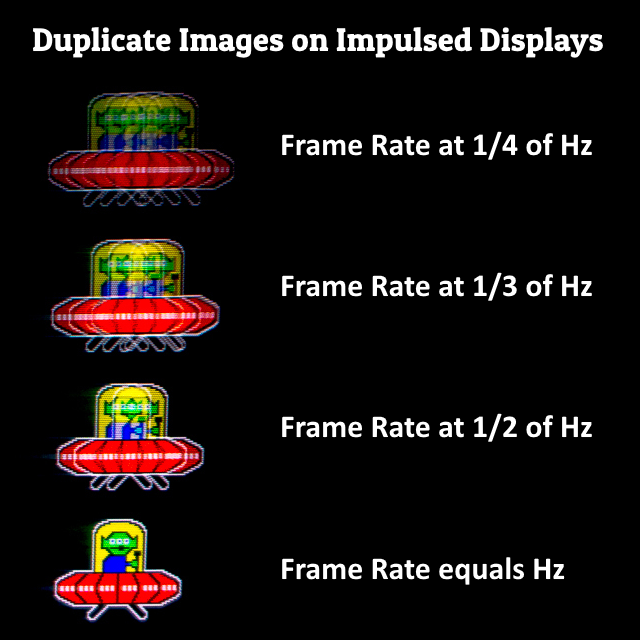
If you are doing lag-priority strobing, just run uncapped VSYNC OFF as you normally do. Like you'd do with other brands such as DyAc. Lowest input lag is via max Hz and via VSYNC OFF. You just get a little bit more strobe crosstalk but that might not be as important to you as input lag. But everybody is picky about different things. Tearing? Crosstalk? Stutter? Etc. If you hate crosstalk (double image effects) then you want to do quality priority strobing.
Quality Priority Strobing
However, if you are doing quality-priority strobing, you definitely need to decrease refresh rate to get your strobe rate = frame rate = refresh rate. For a more faithful CRT motion clarity experience you want to decrease frame rate to match contemporary CRT refresh rates such as 100 Hz or thereabouts, since
refresh rate headroom improves strobe quality massively. 120Hz strobing on a 240Hz LCD is much better looking than 120Hz strobing on a 144Hz LCD, which is why you should always buy more refresh rate than you need if you want to purchase the best strobed LCD.
sunisc wrote: ↑18 Nov 2021, 01:20
If I was to cap to 144 hz, I have to do this through Nvidia control panel right? And then cap it in game as well.
For quality-priority strobing, you can just use almost any method of capping framerate=Hz
- Ordinary VSYNC ON combined with NVIDIA Ultra Low Latency
-
Low-Lag VSYNC HOWTO
- RTSS frame rate cap
- RTSS Scanline Sync
- In-game framerate cap (not as accurate as RTSS)
- NVIDIA frame rate cap (instead of RTSS)
The instructions for the various methods are different.
You don't need to use all the above, but microsecond-precise frame rate caps will usually produce better results.
If you want a good compromise of latency-priority strobing and quality-priority strobing, you want to use scanline sync methods built into either RTSS or Special-K. Reportedly, the new scanline sync in Special K is superior to RTSS but a lot of anticheat software doesn't like Special K but doesn't mind RTSS. Your mileage will vary.
If you want easy and high quality, just use VSYNC ON. The extra lag won't be noticeable in casual play for most. The other methods require more configuring -- the tradeoff is lower latency methods of framerate=Hz requires more configuring.
sunisc wrote: ↑18 Nov 2021, 01:20
Also wanted to ask if I play games on 60hz do I have to cap frames from nvidia as well or can I just do it in-game?
Easy 60Hz blur reduction mode:
VSYNC ON is an automatic frame rate cap. Most 60Hz games are VSYNC ON, such as emulators, so you're already covered. Just switch to 60Hz, turn on PureXP, and you can SEGA Sonic Hedgehog away (fast scrollers) in CRT motion clarity.
Be noted that 60Hz will flicker a lot, so don't enable 60Hz PureXP for bright Windows apps (painfully bright flicker), only enable 60Hz PureXP in-game. To dim 60Hz strobe flicker a bit, use Extreme or Ultra for PureXP, as dimmer flicker can be a good compromise. Sit a little further away from your monitor too. Then the 60Hz flicker is okay for those 60Hz fast-scroller use cases.
Ideally you want more frame rate and refresh rate to stop the 60Hz flicker, but you know.... Retro emulator games don't do more than 60fps. So you gotta emulate that flickery 60hz CRT if you want to say goodbye to 60Hz motion blur.
If you don't mind 60Hz flicker for the best-in-class 60Hz motion blur reduction -- then XG2431 is currently the gold standard in "60Hz CRT emulating" direct-view LCD on the market at the moment at three-figure prices. I've never seen a desktop LCD mimick the motion clarity of a 60Hz CRT as well as the XG2431 can in this cost class.
Optional: For advanced users, if you want zero crosstalk at 60 Hz, you'll want to use the Vertical Total 4500 mode (Quick Frame Transport) for lower-latency strobing at 60 Hz with perfect zero duplicate images with zero strobe crosstalk top/center/bottom, in a crosstalkless LCD. The instructions are at the bottom of www.blurbusters.com/xg2431
If you do these tweaks, you can even eliminate the ultra-faint crosstalk to perfect zero strobe crosstalk. It does it even better than the old gold standards (XL2411's etc) and it can do massively bigger vertical totals too, which manages to fully zero-out strobe crosstalk double images at 60Hz even for top/bottom edge. The only other LCD I've seen do CRT motion clarity as well as XG2431 (after QFT mode tuning + Strobe Utility tuning) is the Oculus Quest 2 VR LCD and the Valve Index VR LCD. As you are already aware, a mandatory criteria of Blur Busters Approved 2.0 is retro-friendly motion blur reduction. but as far as motion clarity without strobing, its pretty impressive. I have it on ultra fast response time and honestly haven’t noticed any sort of ghosting. It’s probably the cleanest image in motion that ive seen. And I’ve owned the alienware aw2521hf, Asus xg248q, asus vg258qm, BenQ xl2540-2540k, Benq xl2411, Viewsonic xg2530 and the xg2402. Most recently coming from the LG 27GP83B 1440p 165hz but I for some reason always end up back at 1080p 240hz lol