LFC full range as HighFrameRate Blur Reduction?
Posted: 18 Oct 2022, 08:54
I was wondering about whether operating on a base fps of say 120fps to 125fps, or 200fps with LFC as if that whole range was considered "low" frame rate would be viable, at least someday tech wise, in order to get very high fps on an up to 1000Hz OLED.
That is, taking ~125fps (at 4k, 10bit HDR, slight dsc perhaps over hdmi 2.1 if necessary) x 8, or 200fps x 5 to 250fps x 4 over dp 2.0, to achieve 1000fpsHz on a 1000Hz OLED.
I realize that LFC, in this scenario 200fps and less is considered "Low", is not interpolating or inserting frames but is instead repeating them or their refresh but I'd like to know if this would be theoretically viable as a way to take a healthy base frame rate motion articulation/definition wise and then increase motion clarity on the display end in order to bypass the bottleneck of ports and cables and "fatten up" the signal on the display end.
Additionally perhaps AI upscaling hardware on the display end as well once we get 8k screens in order to upscale 4k to 8k, again bypassing the port+cable bandwidth bottleneck of sending 10bit 8k 1000fps.
. .
4k 10bit 200fpsHz = ~ 59.72 Gbps.
4k 10bit 250fpsHz = 74.65 Gbps
. .
DisplayPort 1.3–1.4 = 25.92 Gbit/s
HDMI 2.1 = 41.92 Gbit/s
DisplayPort 2.0 = 77.37 Gbit/s
. . . . . . . . . . . . . . . . . .
3840 x 2160, 4k at 500fpsHz = 12 bit: 4,147,200,000 pixels/second = 174.18 Gbit/second, 10bit: 149.30 Gbps
3840 x 2160 4k at 1000fpsHz = 12bit: 8,294,400,000 pixels/second = 348.36 Gbps , 10bit: 298.60 Gbps Gbps
7680 x 4320 8k at 500fpsHz = 12 bit: 16,588,800,000 pixels/second = 696.73 Gbps , 10bit: 597.20 Gbps
7680 x 4320 8k at 1000fpsHz = 12bit: 1,393.46 Gbps, 10 bit: 1,194.39 Gbps
We could use DSC 2:1 rather than 3:1 and get some reductions but it again wouldn't be a pure native result anymore so lets put that aside for the moment.
. . . . . . . . . . . . . . . . . .
VR is also going to need some serious frame duplication beyond what it is doing in the longer future outlook whenever VR/MR/AR display resolution gets high enough per eye to actually get decent PPD. Some of the best VR headsets now are only around 30 to 32 ppd and that is only in the very center. They have to run two different screens too so once they get very high rez to say 60 - 80 ppd those combined resolution's bandwidth is going to be crazy.
. . . . . . . . .
=============================================================
The things in quotes are from blurbusters.com
. . .
. . .
. . .
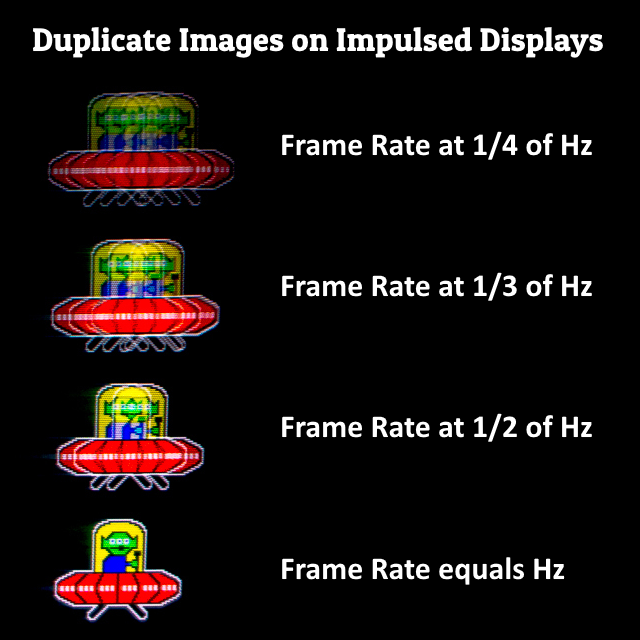
I was suggesting or at least pondering about not only doing LFC (low framerate compensation) , but also doing it on the high end with refresh/frame repeating perhaps even with hardware on the displays themselves. Basically, they are all "Low" frame rates by comparison to 1000fpsHz so could be compensated. A little frame insertion (even by one frame for 2x the framerate) maybe on the low end if you need it to get to ~ 200fps (of motion definition) in the first place, to buff up the motion definition aspect. Motion definition aspect of high fpsHz has diminishing returns after a point though. I'm more focused on (pun intended) the blur reduction of much higher Hz ranges .
https://i.imgur.com/KlIRG0B.png
.... At least as I understand it, the blur reduction is more about the raw refreshes/redraws in order to "wipe" our retinas with a refresh cycle rather than the difference or uniqueness of the individual frames (kind of like if BFI operated on the same unchanged unique frame position of a scene more than once to maintain a consistent "shutter speed", or a crt redrawing at a fixed rate independent of the game frame rate).
https://blurbusters.com/high-speed-vide ... at-960fps/
That is, taking ~125fps (at 4k, 10bit HDR, slight dsc perhaps over hdmi 2.1 if necessary) x 8, or 200fps x 5 to 250fps x 4 over dp 2.0, to achieve 1000fpsHz on a 1000Hz OLED.
I realize that LFC, in this scenario 200fps and less is considered "Low", is not interpolating or inserting frames but is instead repeating them or their refresh but I'd like to know if this would be theoretically viable as a way to take a healthy base frame rate motion articulation/definition wise and then increase motion clarity on the display end in order to bypass the bottleneck of ports and cables and "fatten up" the signal on the display end.
Additionally perhaps AI upscaling hardware on the display end as well once we get 8k screens in order to upscale 4k to 8k, again bypassing the port+cable bandwidth bottleneck of sending 10bit 8k 1000fps.
. .
4k 10bit 200fpsHz = ~ 59.72 Gbps.
4k 10bit 250fpsHz = 74.65 Gbps
. .
DisplayPort 1.3–1.4 = 25.92 Gbit/s
HDMI 2.1 = 41.92 Gbit/s
DisplayPort 2.0 = 77.37 Gbit/s
. . . . . . . . . . . . . . . . . .
3840 x 2160, 4k at 500fpsHz = 12 bit: 4,147,200,000 pixels/second = 174.18 Gbit/second, 10bit: 149.30 Gbps
3840 x 2160 4k at 1000fpsHz = 12bit: 8,294,400,000 pixels/second = 348.36 Gbps , 10bit: 298.60 Gbps Gbps
7680 x 4320 8k at 500fpsHz = 12 bit: 16,588,800,000 pixels/second = 696.73 Gbps , 10bit: 597.20 Gbps
7680 x 4320 8k at 1000fpsHz = 12bit: 1,393.46 Gbps, 10 bit: 1,194.39 Gbps
We could use DSC 2:1 rather than 3:1 and get some reductions but it again wouldn't be a pure native result anymore so lets put that aside for the moment.
. . . . . . . . . . . . . . . . . .
VR is also going to need some serious frame duplication beyond what it is doing in the longer future outlook whenever VR/MR/AR display resolution gets high enough per eye to actually get decent PPD. Some of the best VR headsets now are only around 30 to 32 ppd and that is only in the very center. They have to run two different screens too so once they get very high rez to say 60 - 80 ppd those combined resolution's bandwidth is going to be crazy.
. . . . . . . . .
=============================================================
The things in quotes are from blurbusters.com
1000Hz display: 1/1000Hz = MAXIMUM of 1ms error, 1 px which is negligible (just like 1px of sample and hold blur is on a crt). Average would be half of that ~ 0.5ms <----- ????LFC simply tries to predict a repeat-refresh to occur between two frames. And as you see in high speed video of LCD refreshing, www.blurbusters.com/scanout -- it takes 1/240sec to refresh all pixels (in a top-to-bottom fadesweep) = a monitor busy for 4.2 milliseconds refreshing a single 240Hz refresh cycle. This will remain constant a lower refresh rates on a VRR monitor, so even at 50 frames per second, the monitor still only needs 1/240sec to refresh.
LFC algorithms are very reliable with steady low frame rates, because it's easy to predict a repeat-refresh right in between. A repeat-refresh in an ideal situation is a no-operation (you see no visible effect on the screen because an image is being replaced by a duplicate image, so you can't tell LFC from non-LFC)
But LFC fails when frametimes vary a lot, so sometimes the repeat refresh starts, then the game finishes rendering a frame, and then suddenly the game is waiting for the monitor to finish repeat-refreshing (an old frame) before it can display the new frame. Thus, stutter. The good news is that this becomes less at higher Hz.
The LFC collision window is always max-Hz. (A frame-finish-rendering being forced to wait for a monitor-still-busy-repeat-refreshing). So the higher the VRR Hz, the smaller the LFC collision window is. On a 48Hz-240Hz VRR monitor, the LFC frame-vs-rerefresh collision window creates a maximum of 4.2ms (1/240sec) stutter in the worst-case scenario. The average LFC collision will be the halfpoint of that since the stutter error will be between [0...4.2ms]. Now if you got a lower maximum Hz such as 144Hz, your LFC collision window would be 6.9ms (1/144sec), so LFC stutters are worse on a 144Hz monitor than 240Hz monitor. So, if you're so worried about LFC stutter, make sure your max-Hz is higher to compensate.
Now if you buy that new 360 Hz monitor (future model, not sure of VRR range), and if it uses LFC algorithms (both NVIDIA and AMD use similar algorithms now), stutters from LFC algorithms on 360Hz will be at most, a 2.8ms stutter (2.8 pixel stutterjump at 1000 pixels/sec motion) at worst case, but a random number between [0...2.9ms] would be only 1.4ms stutter average (1.4 pixel stutterjump at 1000 pixesls/sec motion). At this point, without a strobe backlight, this begins to become hidden in low-framerate stutter, since 48fps at 1000 pixels/sec creates (1000/48) = 20.8333 pixels of motion blurring, or 20.8333 pixels of objectjump.
48Hz-240Hz VRR monitor, the LFC frame-vs-rerefresh collision window creates a maximum of 4.2ms (1/240sec) stutter in the worst-case scenario."
" The average LFC collision will be the halfpoint of that since the stutter error will be between [0...4.2ms]."
" Now if you got a lower maximum Hz such as 144Hz, your LFC collision window would be 6.9ms (1/144sec), so LFC stutters are worse on a 144Hz monitor than 240Hz monitor."
. . .
LFC becomes unnoticeable with wide VRR ranges like "48Hz-360Hz" instead of "48Hz-120Hz"So with a HUMONGOUS variable refresh rate range, e.g. 48...360, then the LFC stutters completely fall into the noisefloor of low-framerate stutter! Y'know (with proper drivers & proper LFC algorithm) even 1.4ms stutter error being completely lost in 20.8 pixel stutter at 48 frames per second. Big whooooop-deeee-do. The virtue of a massive VRR range works in the favour of LFC!
To play it safe, please stick to high-rated VRR. There are artifacts of cheap uncertified VRR (generic adaptive sync with no AMD or NVIDIA certifications) that can look worse than LFC artifacts.
- TL;DR:
- LFC doesn't add any stutter if you have consistent low framerate (like a perfect 30fps movie)
- LFC can worsen stutter for volatile low framerates (frametimes varying frequently across refreshtime of min-Hz).
- LFC stutter error is directly proportional to max-Hz [/B] - LFC stutter error (in milliseconds) averages out to equalling half the duration of a max-Hz (e.g. 2.1ms for 240Hz).
- Thusly, LFC becomes unnoticeable with wide VRR ranges like "48Hz-360Hz" instead of "48Hz-120Hz".\
- Thusly, if worried about LFC stutter.....Framepace your low framerates well to help LFC work better\.....And get the biggest VRR range you can afford\ - Premium VRR (G-SYNC certification and higher-end FreeSync) is worth it for other reasons than LFC too, but depends on goals
. . .
I would bet smarter LFC algorithms will "watch" the framerate range rather than instantaneous framerate, and simply go into permanent-LFC even at higher Hz, e.g. 31fps or 32fps becomes LFC on a GSYNC "30-144" monitor if it is seeing framerates becoming volatile across the LFC boundary (i.e. 28-35fps with a 31fps or 32fps average). Basically, smart LFC algorithms watch the framerate range, and if the framerate valley falls into LFC range, then the whole range becomes temporarily perma-LFC to become flawless LFC because you cannot have a partially-LFC framerate range without LFC collisions. Then when the framerate range finally stays above the LFC floor, then LFC can deactivate completely seamlessly. That's how smarter LFC algorithms can avoid stutter for minor framerate volatility that "fuzzes across" the LFC boundary.
. . .
I was suggesting or at least pondering about not only doing LFC (low framerate compensation) , but also doing it on the high end with refresh/frame repeating perhaps even with hardware on the displays themselves. Basically, they are all "Low" frame rates by comparison to 1000fpsHz so could be compensated. A little frame insertion (even by one frame for 2x the framerate) maybe on the low end if you need it to get to ~ 200fps (of motion definition) in the first place, to buff up the motion definition aspect. Motion definition aspect of high fpsHz has diminishing returns after a point though. I'm more focused on (pun intended) the blur reduction of much higher Hz ranges .
https://i.imgur.com/KlIRG0B.png
.... At least as I understand it, the blur reduction is more about the raw refreshes/redraws in order to "wipe" our retinas with a refresh cycle rather than the difference or uniqueness of the individual frames (kind of like if BFI operated on the same unchanged unique frame position of a scene more than once to maintain a consistent "shutter speed", or a crt redrawing at a fixed rate independent of the game frame rate).
https://blurbusters.com/high-speed-vide ... at-960fps/