Page 1 of 1

Need help with choosing between XG2431 and M27Q X

Posted: 04 Mar 2023, 15:55
by Merukurofu
I'm a bit stuck with choosing between XG2431 and M27Q X. Currently i'm using XL2546S and i want to move away from TN, but stay at the same level of competitive edge with response time and motion handling (DyAc has ruined my eyes, so now i can't imagine myself having monitor without BFI).
The prices for both in my region are pretty close, so that's not the point, but the question is, is 1440p worth in competitive games? (in my case it's mostly Quake, Apex Legends, Valorant and other random temporary BR's). I'm asking because i really suffer from this pixelated flickering of textures without anti-aliasing, but i also hate any type of anti-aliasing so if 1440p isn't crisp enough to avoid anti-aliasing forever, i'll stick with 1080p, and XG2431 is the only choice for me.
Re: Need help with choosing between XG2431 and M27Q X

Posted: 04 Mar 2023, 17:22
by Klemc
Antialiasing total removal is difficult, take the 1080p and use DSR/DLDSR to downsample your game, it will remove AA efficiently, 1440p+DSR is like 4k render for 2k display... not what competitive gameing can handle.

Re: Need help with choosing between XG2431 and M27Q X

Posted: 04 Mar 2023, 17:24
by Chief Blur Buster
Merukurofu wrote:
04 Mar 2023, 15:55
I'm asking because i really suffer from this pixelated flickering of textures without anti-aliasing, but i also hate any type of anti-aliasing so if 1440p isn't crisp enough to avoid anti-aliasing forever
1440p 27" is still pixelated enough to require you to keep AA turned on. Trying to do 1440p + AA can also lower your framerate (and thus, increase GPU component of input lag), so it's a kind of a pick-poison.

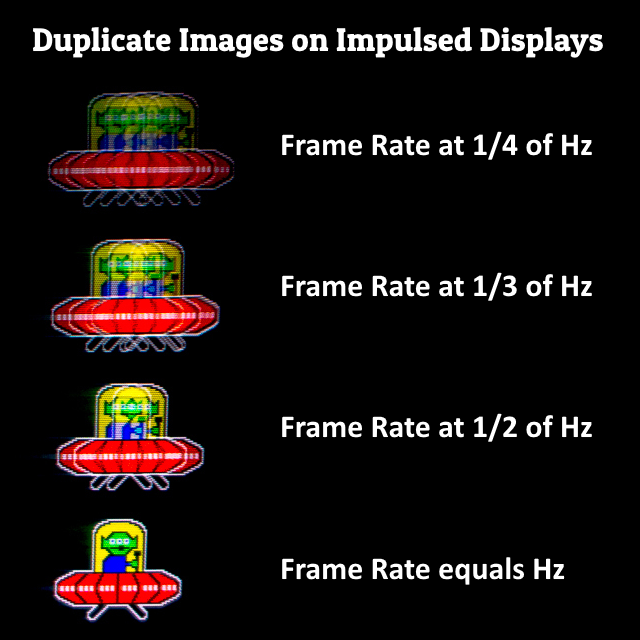
Lower frame rates makes it easier to achieve framerate=Hz with strobing, because strobing feels jittery with duplicate images when framerates are far below Hz. 1440p can push framerates pretty low in some games, which you might hate if you're dependent on strobing-based motion blur reduction now.

Re: Need help with choosing between XG2431 and M27Q X

Posted: 04 Mar 2023, 17:58
by Merukurofu
Klemc wrote:
04 Mar 2023, 17:22
Antialiasing total removal is difficult, take the 1080p and use DSR/DLDSR to downsample your game, it will remove AA efficiently, 1440p+DSR is like 4k render for 2k display... not what competitive gameing can handle.
Already tried this, but picture w/ that DSR/DLDSR look's kinda weird, i'm also tried tuning sharpness, but it's just weird.
Chief Blur Buster wrote:
04 Mar 2023, 17:24
Merukurofu wrote:
04 Mar 2023, 15:55
I'm asking because i really suffer from this pixelated flickering of textures without anti-aliasing, but i also hate any type of anti-aliasing so if 1440p isn't crisp enough to avoid anti-aliasing forever
1440p 27" is still pixelated enough to require you to keep AA turned on. Trying to do 1440p + AA can also lower your framerate (and thus, increase GPU component of input lag), so it's a kind of a pick-poison.

Lower frame rates makes it easier to achieve framerate=Hz with strobing, because strobing feels jittery with duplicate images when framerates are far below Hz. 1440p can push framerates pretty low in some games, which you might hate if you're dependent on strobing-based motion blur reduction now.
So that 1440p new competitive era, overhyped? Because i'm starting to see more and more hardcore FPS players move to 1440p and bless the day they did this, i'm confused because i've never seen what 1440p is, and after some influencers i respect talk about how crisp that resolution is, there is no way to not start think about this like solution to reduce pixelation. In conclusion, your advice is to stay with 1080p, right?

Re: Need help with choosing between XG2431 and M27Q X

Posted: 04 Mar 2023, 20:06
by Chief Blur Buster
Klemc wrote:
04 Mar 2023, 17:22
So that 1440p new competitive era, overhyped? Because i'm starting to see more and more hardcore FPS players move to 1440p and bless the day they did this, i'm confused because i've never seen what 1440p is, and after some influencers i respect talk about how crisp that resolution is, there is no way to not start think about this like solution to reduce pixelation. In conclusion, your advice is to stay with 1080p, right?
No...

There's a preference element.
Every person's eyes see differently.
Some gets nausea from stutter.
Others hate motion blur.
Others hate tearing.
Others prefer resolution over Hz
Others prefer Hz over resolution
Yet others may prefer VRR.
Other may not care about pixelation but worry more about lag/framerates.
<Place random preference here>
Etc.

You stated you have a preference of:
(A) Excellent motion blur reduction (DyAc strobing); and
(B) Avoiding pixelated lines;


Which automatically gives me a custom-tailored recommendation to you, that may not apply to other people.

It is well known that frame rates far below refresh rates really looks jittery/stuttery, which may bother you. So your 144fps 144Hz becoming 144fps 240Hz-360Hz may become a strobing downgrade for you until you reduce the refresh rate intentionally for the game that cannot keep up;

You might, for instance prefer 1440p but keep framerates low (e.g. 144fps 144Hz instead of 240fps 240Hz) so that you can use motion blur reductions more successfully with it. Also, I gave a recommendation without knowing what framerate ranges or games you play (one or more).

My recommendation may very well change with additional data. A resolution upgrade entails a risk of interfering with your preference (A) "Excellent motion blur reduction" so additional data is needed to mitigate potential risks -- framerates far below refresh rates can make strobing look like crap to many people, which is why 144fps 144Hz looks better than 144fps 240Hz strobed (duplicate-image effect).

Image

You could do some early-advance-testing. Higher resolutions can risk lowering frame rates sufficiently to make strobing look crappy.
To verify on your existing XL2546S you can pre-test 1440p at 1080p with GPU scaling -- and then see if DyAc still looks good with framerates you plan to use at 1440p in your preferred games.

If you test this, and if strobing still looks good to your eyes, then 1440p purchase is somewhat de-risked.

Re: Need help with choosing between XG2431 and M27Q X

Posted: 05 Mar 2023, 09:27
by Merukurofu
Chief Blur Buster wrote:
04 Mar 2023, 20:06
Klemc wrote:
04 Mar 2023, 17:22
So that 1440p new competitive era, overhyped? Because i'm starting to see more and more hardcore FPS players move to 1440p and bless the day they did this, i'm confused because i've never seen what 1440p is, and after some influencers i respect talk about how crisp that resolution is, there is no way to not start think about this like solution to reduce pixelation. In conclusion, your advice is to stay with 1080p, right?
No...

There's a preference element.
Every person's eyes see differently.
Some gets nausea from stutter.
Others hate motion blur.
Others hate tearing.
Others prefer resolution over Hz
Others prefer Hz over resolution
Yet others may prefer VRR.
Other may not care about pixelation but worry more about lag/framerates.
<Place random preference here>
Etc.

You stated you have a preference of:
(A) Excellent motion blur reduction (DyAc strobing); and
(B) Avoiding pixelated lines;


Which automatically gives me a custom-tailored recommendation to you, that may not apply to other people.

It is well known that frame rates far below refresh rates really looks jittery/stuttery, which may bother you. So your 144fps 144Hz becoming 144fps 240Hz-360Hz may become a strobing downgrade for you until you reduce the refresh rate intentionally for the game that cannot keep up;

You might, for instance prefer 1440p but keep framerates low (e.g. 144fps 144Hz instead of 240fps 240Hz) so that you can use motion blur reductions more successfully with it. Also, I gave a recommendation without knowing what framerate ranges or games you play (one or more).

My recommendation may very well change with additional data. A resolution upgrade entails a risk of interfering with your preference (A) "Excellent motion blur reduction" so additional data is needed to mitigate potential risks -- framerates far below refresh rates can make strobing look like crap to many people, which is why 144fps 144Hz looks better than 144fps 240Hz strobed (duplicate-image effect).

Image

You could do some early-advance-testing. Higher resolutions can risk lowering frame rates sufficiently to make strobing look crappy.
To verify on your existing XL2546S you can pre-test 1440p at 1080p with GPU scaling -- and then see if DyAc still looks good with framerates you plan to use at 1440p in your preferred games.

If you test this, and if strobing still looks good to your eyes, then 1440p purchase is somewhat de-risked.
After your reply and some research, i think you enlightened me to stay with 1080p panels and i found another interesting variant XG259CM as an alternative to XG2431, but seems like almost no one here has reviewed this, do you have any thoughts on this or better take XG2431 without any hesitation?

Re: Need help with choosing between XG2431 and M27Q X

Posted: 05 Mar 2023, 14:50
by Klemc
Today i buyed the monitor i searched after, it's :

1°) VA
2°) 27"
3°) 1440p

I was after 120hz but it's 240 !.. I think it's the only thing i'd accept to change, the other three factors are mandatory.

Think about what you want/need/like, and it will give you a choice selection.

1440p on PC is not like 4k for consoles,, i think you should keep 1080p in mind, verry bests monitors are in this resolution in your competitive gaming universe, nothing above.