Page 1 of 1
Graphs, how WDF affect on nvlddmkm and dxgkrnl
Posted: 29 Sep 2023, 15:32
by Slender
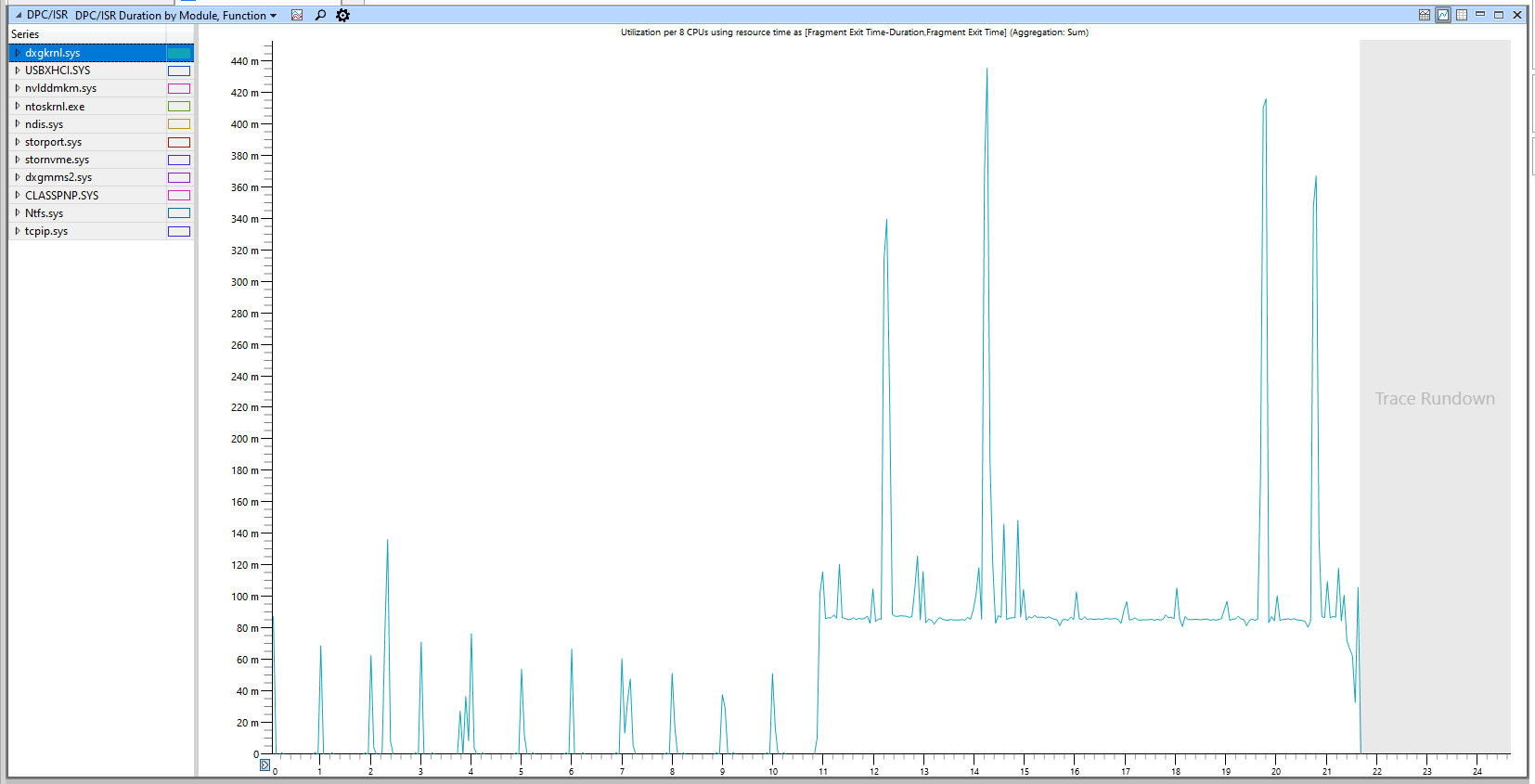
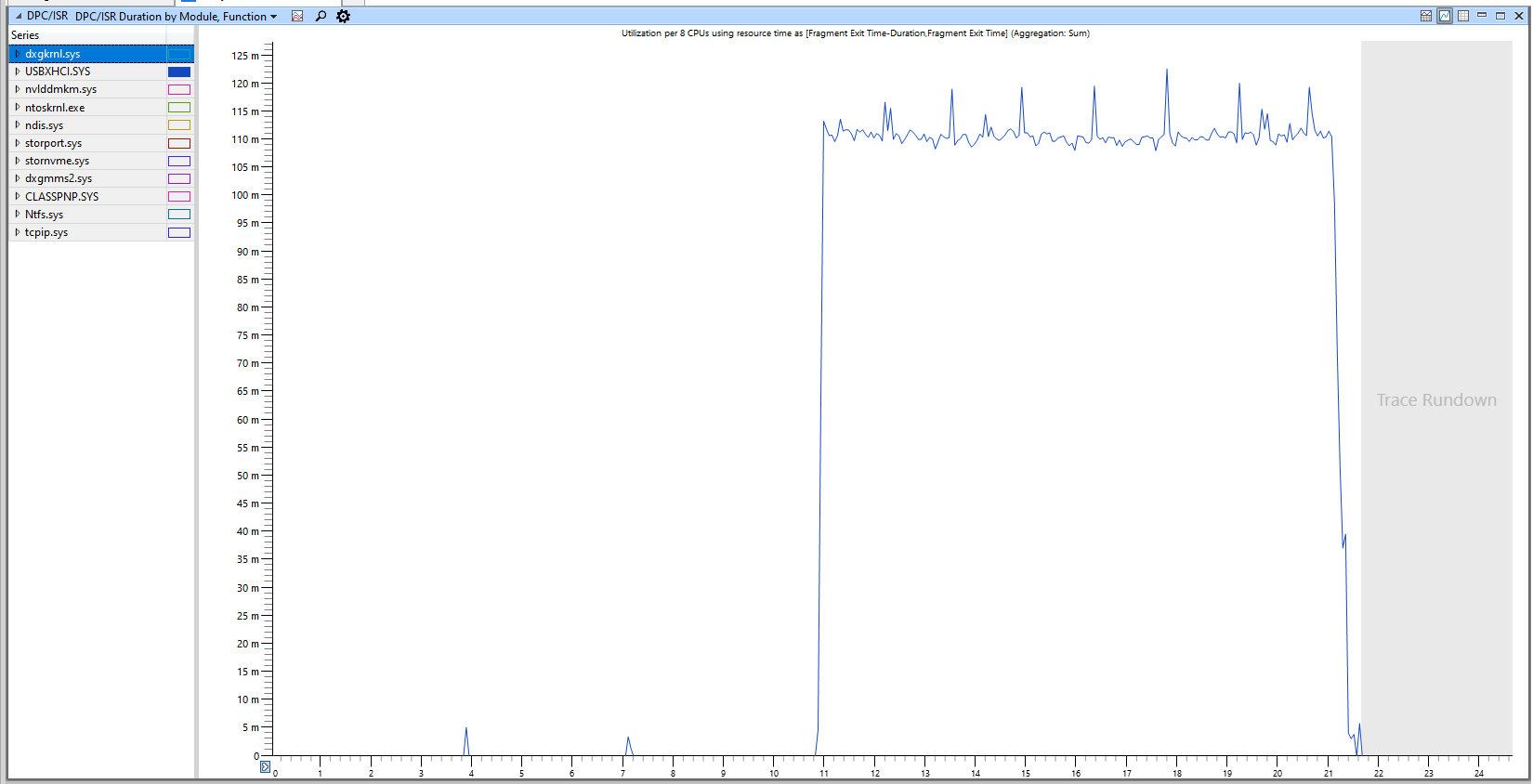
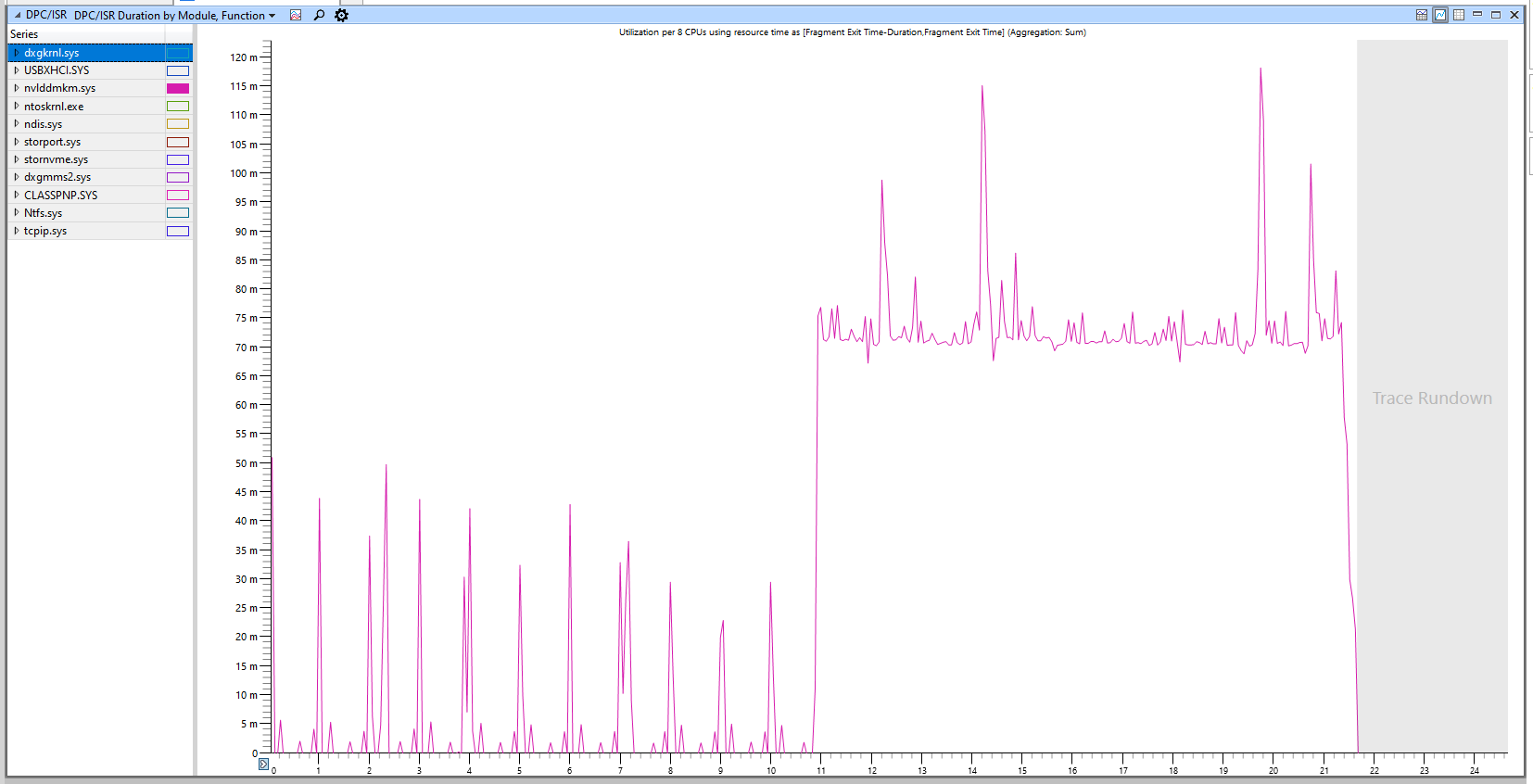
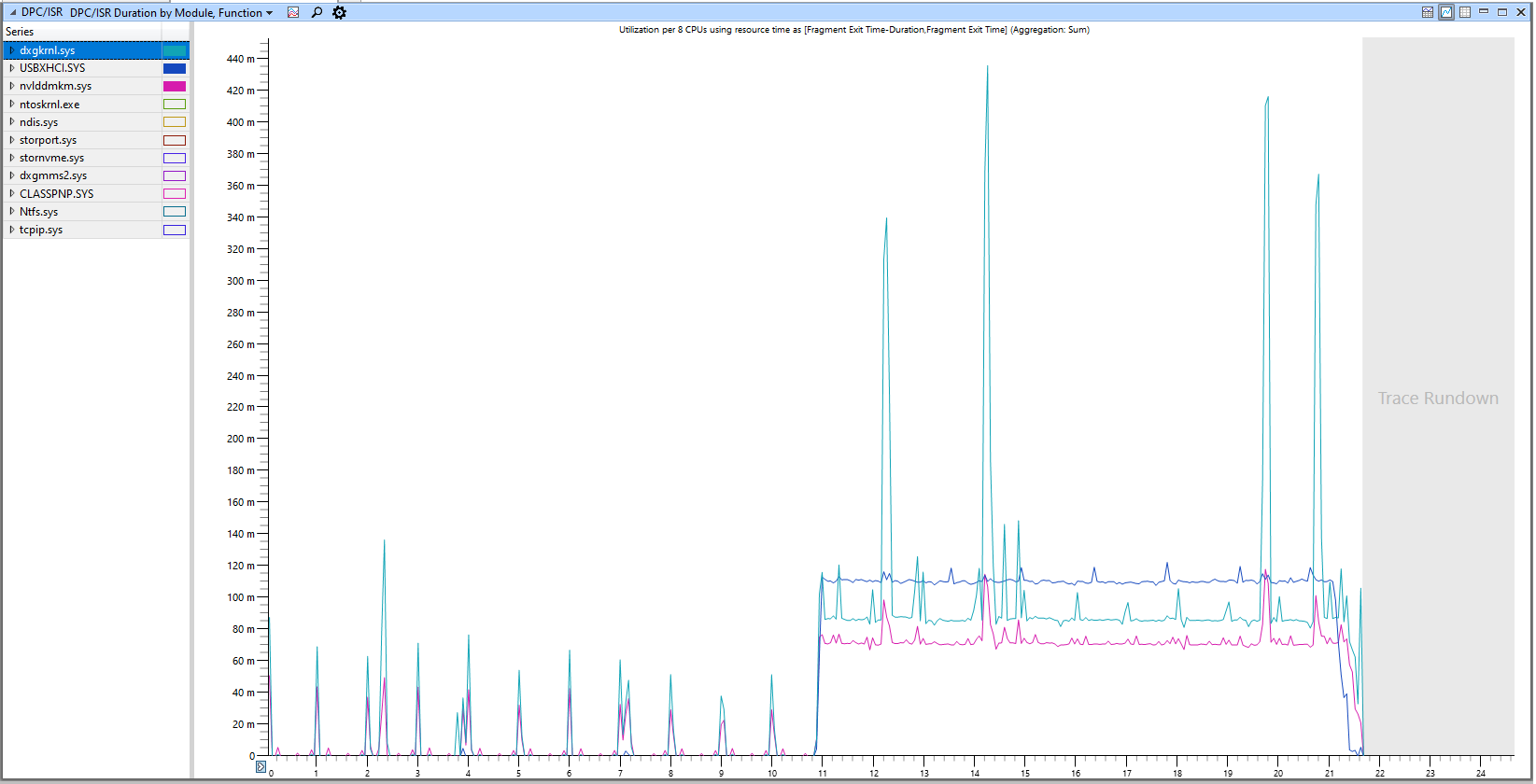
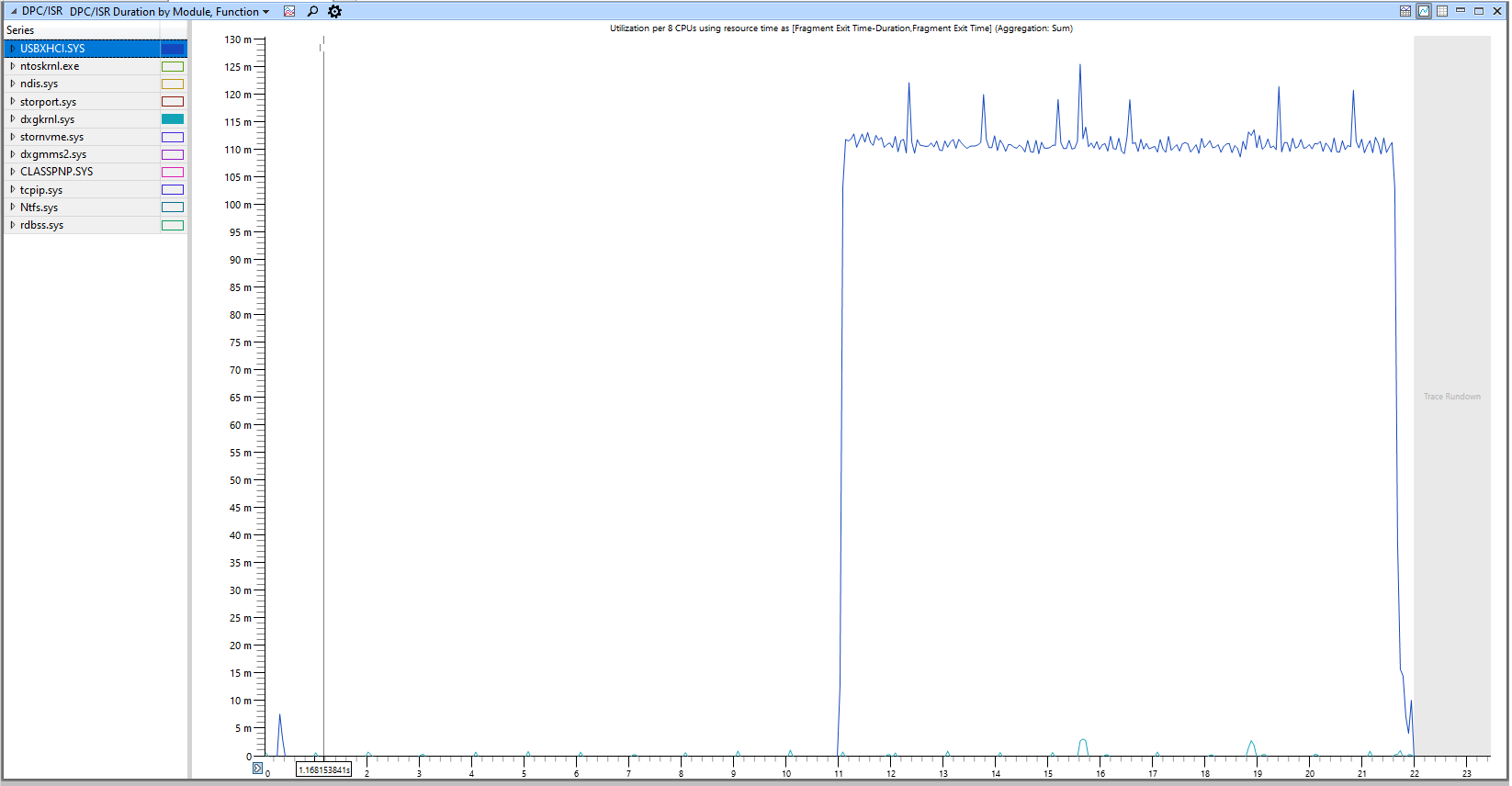
Testing was carried out on clean windows without running programs with a timer resolution of 1ms. The test time is 20s, 10 of which the system is idle, and then the mouse is moved for 10s. Soft: WPA. 2000hz mouse. Latest nvidia driver.
Сonclusion: as we can see, the mouse movement is proportional to the increase in the delay on the video drivers (I believe that this should not happen), but I think that this is typical behavior for a windows system, more tests are needed from other systems (radeon/amd) to be sure of the similarity behavior on different systems. As for the nvidia.sys driver, we can see how it has pronounced peaks even without moving the mouse, which may indicate an incorrect setting or a problem within the driver.
1) dxgkrnl.sys driver
- 1.PNG (61.97 KiB) Viewed 7000 times
2) WDF driver (usb z790)
- 2.PNG (48.72 KiB) Viewed 7000 times
3) nvlddmkm.sys driver
- 3.PNG (71.57 KiB) Viewed 7000 times
Re: Graphs, how WDF affect on nvlddmkm and dxgkrnl
Posted: 29 Sep 2023, 15:32
by Slender
4) Compare
- 4.PNG (81.02 KiB) Viewed 6999 times
5) Disable nvidia driver
- 5.PNG (52.81 KiB) Viewed 6999 times
Re: Graphs, how WDF affect on nvlddmkm and dxgkrnl
Posted: 29 Sep 2023, 16:25
by Slender
you can also check this behavior in latencymoon, when moving the mouse.
Re: Graphs, how WDF affect on nvlddmkm and dxgkrnl
Posted: 30 Sep 2023, 16:27
by R1sk
Nice research bro
1. I think that this is typical behavior for a windows system
2. As for the nvidia.sys driver, we can see how it has pronounced peaks even without moving the mouse, which may indicate an incorrect setting or a problem within the driver.
1. Of course; I believe Windows is not organized for Gaming or Low Latency.
2. There is two conclusion about Nvidia; they make worse Drivers from Day to Day or They make worse GPUs from Day to Day. Dont tell me they grow up..Shading Units Tensor Cores Cuda Cores Tflops..
I believe all of These are marketing tricks.
In my opinion 2080 ti better than 4090 ( It has lower latency, better old Drivers support)
Because like DDR4 vs DDR5 comparisons
Tuber guys or Paid revievers tell us
OMG DDR5 is nextgen best bro you should buy etc..
no bro DDR5 is Marketing trick for Sales. DDR4 is better than DDR5 or DDR4 = DDR5. It's all about Sales..
Re: Graphs, how WDF affect on nvlddmkm and dxgkrnl
Posted: 30 Sep 2023, 23:08
by timecard
Isn't this because every time the mouse updates it must interrupt the gpu (nvidia) to draw it on the screen, also consider trying software cursor vs hardware cursor.
Use this tool for realtime (windows APIs) OR optionally use registry below.
https://www.monitortests.com/forum/Thread-SoftCursor
Enable Mouse Trails then set this registry key (disables trails but allows software based cursor renderer) and restart or logoff/logon.
[HKEY_CURRENT_USER\Control Panel\Mouse]
"MouseTrails"="-1"
Re: Graphs, how WDF affect on nvlddmkm and dxgkrnl
Posted: 01 Oct 2023, 00:03
by andreeeeee-
timecard wrote: ↑30 Sep 2023, 23:08
Isn't this because every time the mouse updates it must interrupt the gpu (nvidia) to draw it on the screen, also consider trying software cursor vs hardware cursor.
Use this tool for realtime (windows APIs) OR optionally use registry below.
https://www.monitortests.com/forum/Thread-SoftCursor
Enable Mouse Trails then set this registry key (disables trails but allows software based cursor renderer) and restart or logoff/logon.
[HKEY_CURRENT_USER\Control Panel\Mouse]
"MouseTrails"="-1"
Interesting points.
TC, have you tried comparing "software cursor vs hardware cursor" and "MouseTrails enabled vs disabled" in FSE? Should it make any difference in FSE?
Re: Graphs, how WDF affect on nvlddmkm and dxgkrnl
Posted: 02 Oct 2023, 10:15
by timecard
andreeeeee- wrote: ↑01 Oct 2023, 00:03
TC, have you tried comparing "software cursor vs hardware cursor" and "MouseTrails enabled vs disabled" in FSE? Should it make any difference in FSE?
I'm just here to give another perspective.
