purplemelon1 wrote: ↑21 Mar 2025, 03:17
Hm. Thanks for the response. Apparently the response times are no different than the other 1440p 144hz displays. Meaning you should expect the coherence of 100fps. Except this is a 480hz display so what """ does that actually mean.
I have read the faq many times over. I do not really get it. I do not know how to convert that knowledge into say an rtings review. Like using the very above as an example. Would having a mprt (response time) of 10ms mean a gtg compliance of 20% because you need 2ms?
Does 2ms gtg automatically mean you have to add 2ms to 4ms mrpt because 480hz needs 2 seconds of display time? Giving you an equal amount of information visually as 240hz oled? Because the 480hz (or lower on lower monitors) would still be a real refresh rate. Even if smearing takes out pixel information that should be visible.
I don't know. I need more graphs maybe. I tried the testufo gtg example on a 2011 ccfl display i have and.... It really does not look that different than on an amoled phone. I don't think that is how it is suppose to work.
Would having a mprt (response time) of 10ms mean a gtg compliance of 20% because you need 2ms?
This is not how it works.
G2G response times and MPRT are not the same thing.
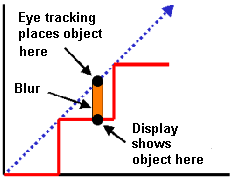
MPRT is a visual target, the actual time interval a target is visible for on the screen.
https://blurbusters.com/gtg-versus-mprt ... -response/
Refresh rate compliance is the percentage of all recorded values which are equal or under the display's scan-out.
Display scan-out (refresh rate) is still 240hz or 480hz, which will net you lower total persistence, regardless of response times.
You also substantially lower the total display latency by having a faster scan-out.
CRT's used to be <1ms persistence (MPRT), regardless of refresh rate, due to employing strobing (hiding the blur under flicker)
This is why most people in the past thought 60FPS was fine, since it was low persistence regardless of the content's frame rate.
Sample & hold (LCD & OLED) doesn't work that way, it requires you to push the refresh rate >1000Hz while also driving the frame rate to benefit reap motion clarity benefits (lower persistence / time on screen)
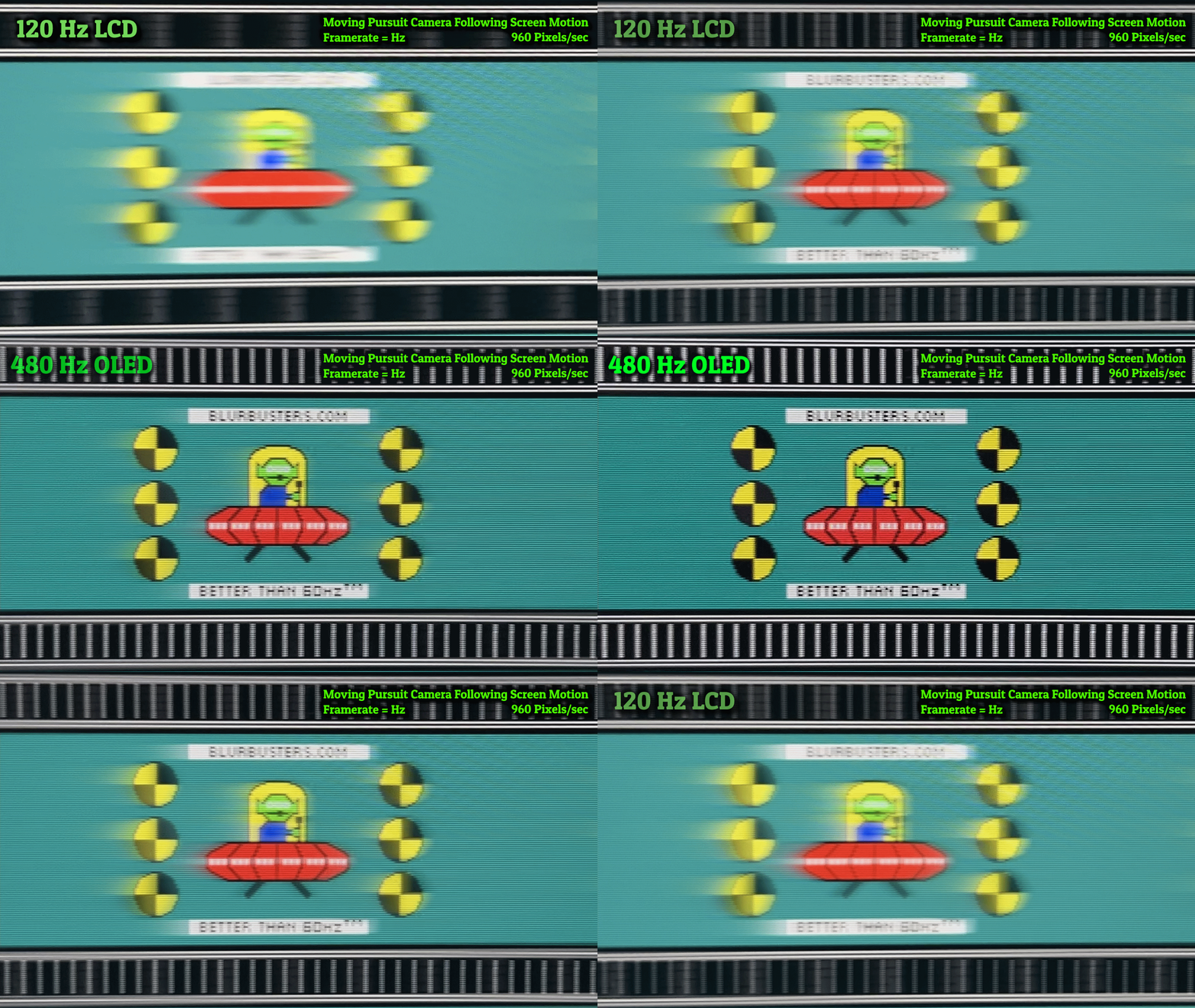
Source: @Discorz
 Source: Bilibili review
 Note: this is very likely at 960pps, which isn't fast enough for these high refresh rates.
This second image should show you how a pure MPRT limit (OLED) looks like, meaning G2G response times are below the display scan-out (refresh rate)
Notice how LCD's of equal or higher refresh rate than the OLED are blurrier? That is because of G2G response times adding the "smear" effect, but it's still mostly limited by the refresh rate.
To best evaluate RTINGS data, opt for the updated 2.0 testing methodology and take a look at raw response time graphs.
This should reveal you the true nature of each transition they record.
G2G response time heatmaps are also OK, but most reviewers don't make them as granular as possible.
This video should help you understand the data better.
I hope this answers some of your dilemma's.