Page 1 of 2
Why wireless mice in 250hz/500hz mode feel more predictable than 1k/2k/4k/8k
Posted: 11 Jul 2025, 07:10
by dermodemon
Hello fellow input laggers. Today i found out really strange mouse behavior.
I've never used mouse polling rate lower than 1k especially in wireless mode.
I was struggling using all of my wireless mice because all of them felt floaty and unpredictable. Except mchose g3 ultra(realtek chip).
BUT.
As soon as I connected the usb cable I immediately stopped having any kind of problems with the mouse(even in 1k/2k/4k/8k, yes mchose mice can use these polling rates with the cable)
I have like 10-12 different mouse models.
Today I decided to conduct a small experiment.
I played aim training map in cs2 in wireless mode with 1k polling rate for about 10 minutes and was really bad at tracking and flicking because it feels super floaty.
Than i lower my polling rate to 500hz and instantly feel the difference in mouse behavior. It feel more predictable and i start making pretty good flicks. Yes i felt a little bit of delay but mouse movement felt much more accurate.
Than i lower my polling rate to 250hz and mouse movement felt like i was playing 1k with a cable. I start flicking like crazy and it was really easy to track my enemies.
Is something wrong with my pc? Usb ports? Interference?
Or it is just obsessive–compulsive disorder

Pretty sure i am not THAT crazy
I just want to ask you guys to do same test if you have same feeling as me?
Cheers.
P.S. mchose g3 ultra still have no problems in wireless mode unlike other expensive superlights and other razer crap
SPECS:
Ryzen 5600x
3080 10GB
DDR4 3600mhz 16 timings
165hz msi monitor
Asrock b450m pro4-f mobo
Re: Why wireless mice in 250hz/500hz mode feel more predictable than 1k/2k/4k/8k
Posted: 11 Jul 2025, 10:39
by Slender
your mouse is not stable. When you move the mouse, you do not get a stable 1000hz, but at best 980-1020 (delta 40hz), this can happen either because of an unknown problem (interference?), or because your processor does not have enough time to process the wdf01000.sys driver, which is why a delayed access occurs.
This problem is eliminated if you configure your processor (example using stable clock instead of dynamic clock, c-state). You can clearly see this if you run mousetester. Also, when you use a low polling rate, you quickly gain enough speed to stably fix it at 125/250/500hz, rather than 1000+. In the latter case, increasing the dpi should help.
Otherwise, show your graph at 1000 and 500hz in mousetester.
Re: Why wireless mice in 250hz/500hz mode feel more predictable than 1k/2k/4k/8k
Posted: 11 Jul 2025, 11:13
by dermodemon
Slender wrote: ↑11 Jul 2025, 10:39
your mouse is not stable. When you move the mouse, you do not get a stable 1000hz, but at best 980-1020 (delta 40hz), this can happen either because of an unknown problem (interference?), or because your processor does not have enough time to process the wdf01000.sys driver, which is why a delayed access occurs.
This problem is eliminated if you configure your processor (example using stable clock instead of dynamic clock, c-state). You can clearly see this if you run mousetester. Also, when you use a low polling rate, you quickly gain enough speed to stably fix it at 125/250/500hz, rather than 1000+. In the latter case, increasing the dpi should help.
Otherwise, show your graph at 1000 and 500hz in mousetester.
250Hz
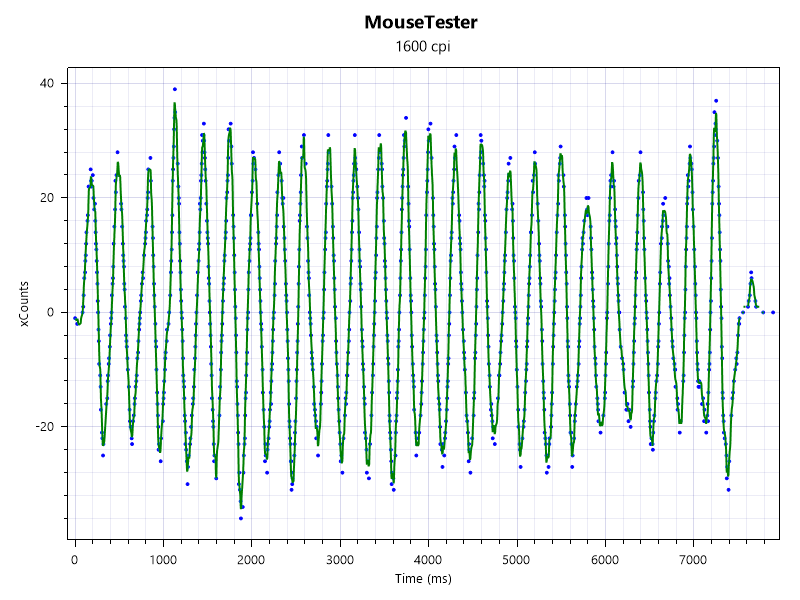
- 250_2.png (126.85 KiB) Viewed 9578 times
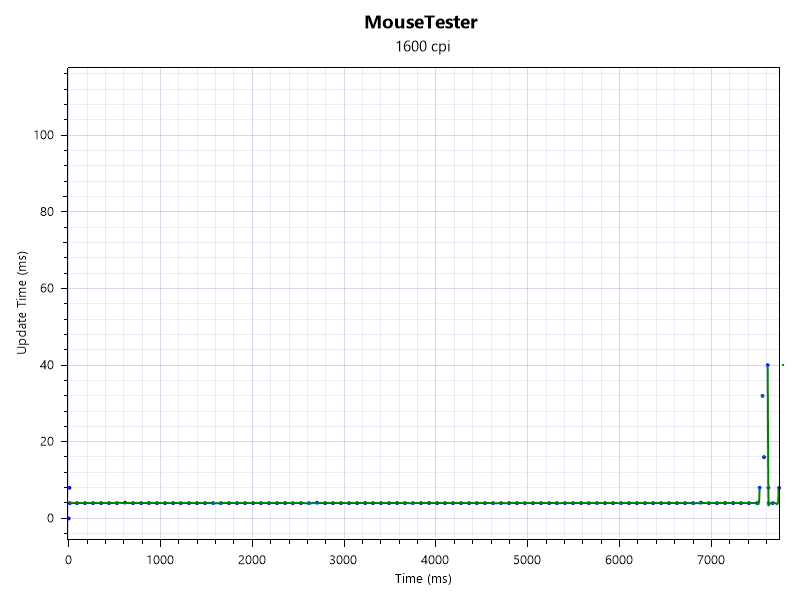
- 250_1.png (34.93 KiB) Viewed 9578 times
Re: Why wireless mice in 250hz/500hz mode feel more predictable than 1k/2k/4k/8k
Posted: 11 Jul 2025, 11:14
by dermodemon
Slender wrote: ↑11 Jul 2025, 10:39
your mouse is not stable. When you move the mouse, you do not get a stable 1000hz, but at best 980-1020 (delta 40hz), this can happen either because of an unknown problem (interference?), or because your processor does not have enough time to process the wdf01000.sys driver, which is why a delayed access occurs.
This problem is eliminated if you configure your processor (example using stable clock instead of dynamic clock, c-state). You can clearly see this if you run mousetester. Also, when you use a low polling rate, you quickly gain enough speed to stably fix it at 125/250/500hz, rather than 1000+. In the latter case, increasing the dpi should help.
Otherwise, show your graph at 1000 and 500hz in mousetester.
500Hz
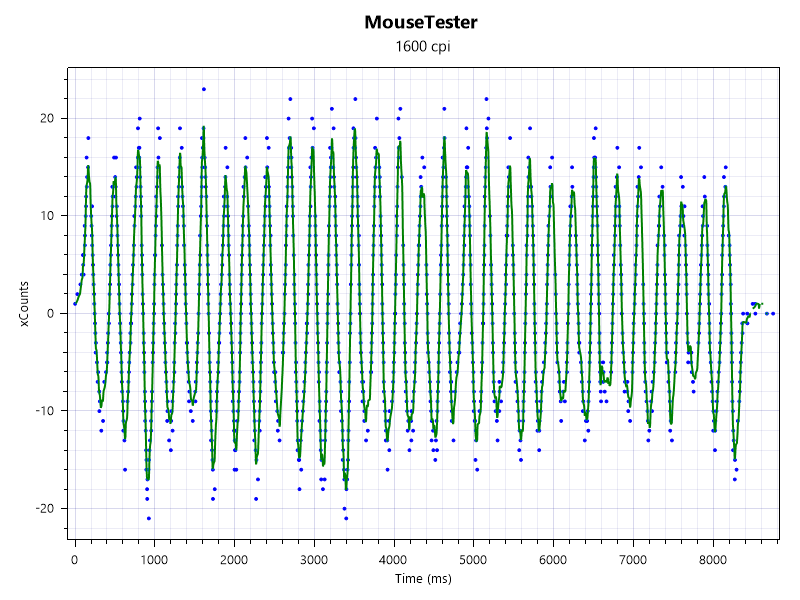
- 500_2.png (125.13 KiB) Viewed 9576 times
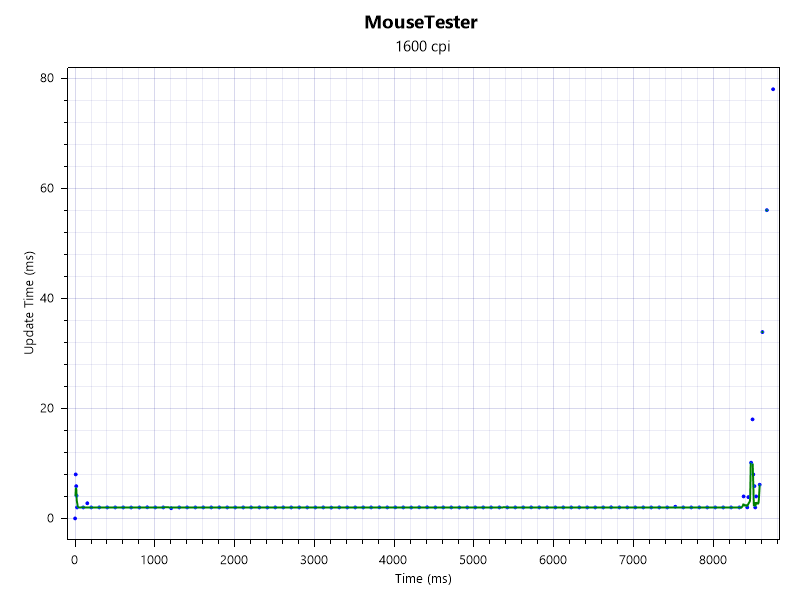
- 500_1.png (28.54 KiB) Viewed 9576 times
Re: Why wireless mice in 250hz/500hz mode feel more predictable than 1k/2k/4k/8k
Posted: 11 Jul 2025, 11:14
by dermodemon
Slender wrote: ↑11 Jul 2025, 10:39
your mouse is not stable. When you move the mouse, you do not get a stable 1000hz, but at best 980-1020 (delta 40hz), this can happen either because of an unknown problem (interference?), or because your processor does not have enough time to process the wdf01000.sys driver, which is why a delayed access occurs.
This problem is eliminated if you configure your processor (example using stable clock instead of dynamic clock, c-state). You can clearly see this if you run mousetester. Also, when you use a low polling rate, you quickly gain enough speed to stably fix it at 125/250/500hz, rather than 1000+. In the latter case, increasing the dpi should help.
Otherwise, show your graph at 1000 and 500hz in mousetester.
1000Hz
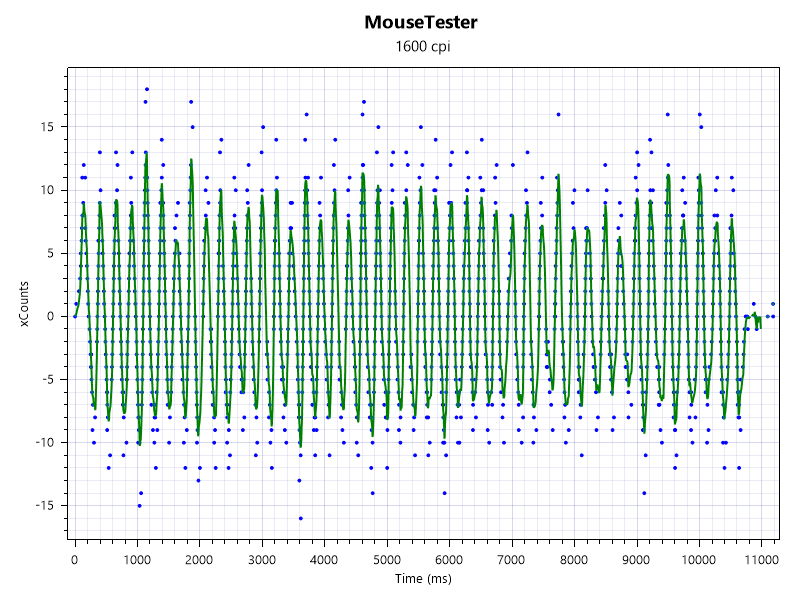
- 1000_2.png (135.11 KiB) Viewed 9575 times
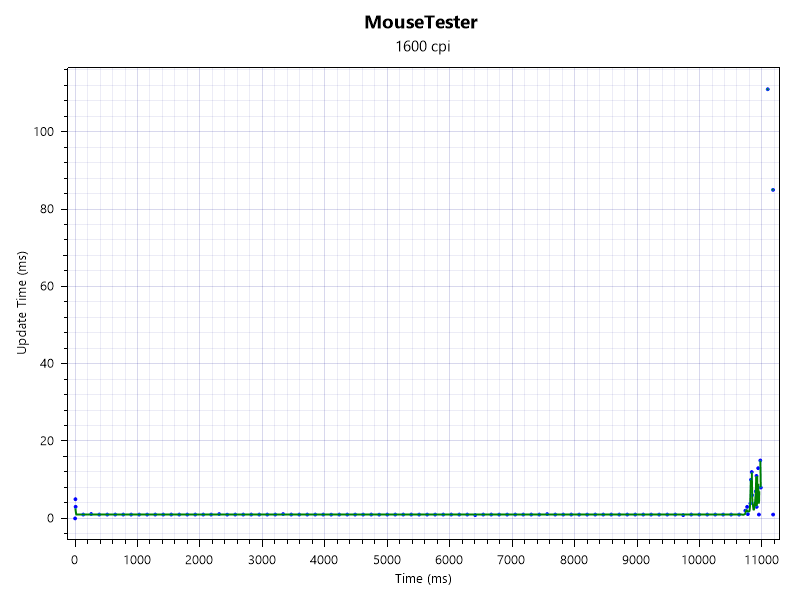
- 1000_1.png (53.91 KiB) Viewed 9575 times
Re: Why wireless mice in 250hz/500hz mode feel more predictable than 1k/2k/4k/8k
Posted: 11 Jul 2025, 11:14
by dermodemon
Slender wrote: ↑11 Jul 2025, 10:39
your mouse is not stable. When you move the mouse, you do not get a stable 1000hz, but at best 980-1020 (delta 40hz), this can happen either because of an unknown problem (interference?), or because your processor does not have enough time to process the wdf01000.sys driver, which is why a delayed access occurs.
This problem is eliminated if you configure your processor (example using stable clock instead of dynamic clock, c-state). You can clearly see this if you run mousetester. Also, when you use a low polling rate, you quickly gain enough speed to stably fix it at 125/250/500hz, rather than 1000+. In the latter case, increasing the dpi should help.
Otherwise, show your graph at 1000 and 500hz in mousetester.
2000Hz
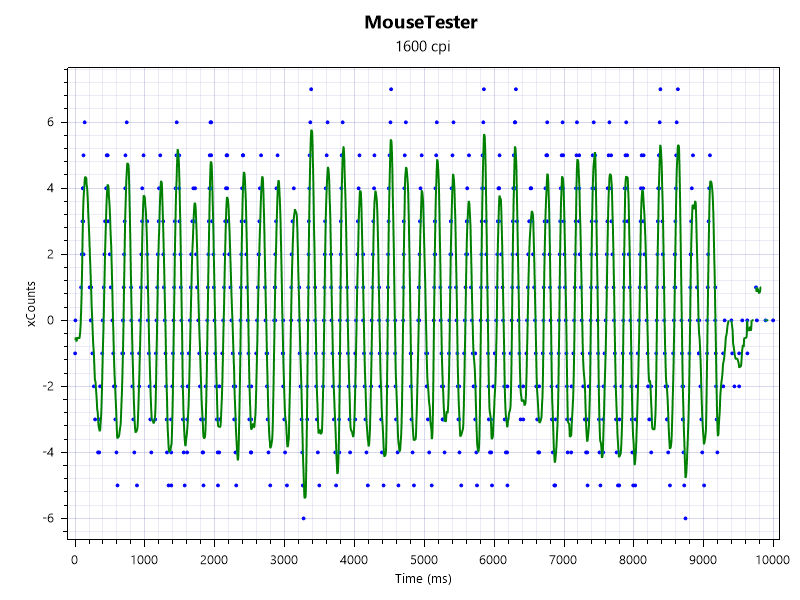
- 2000_2.png (112.05 KiB) Viewed 9574 times
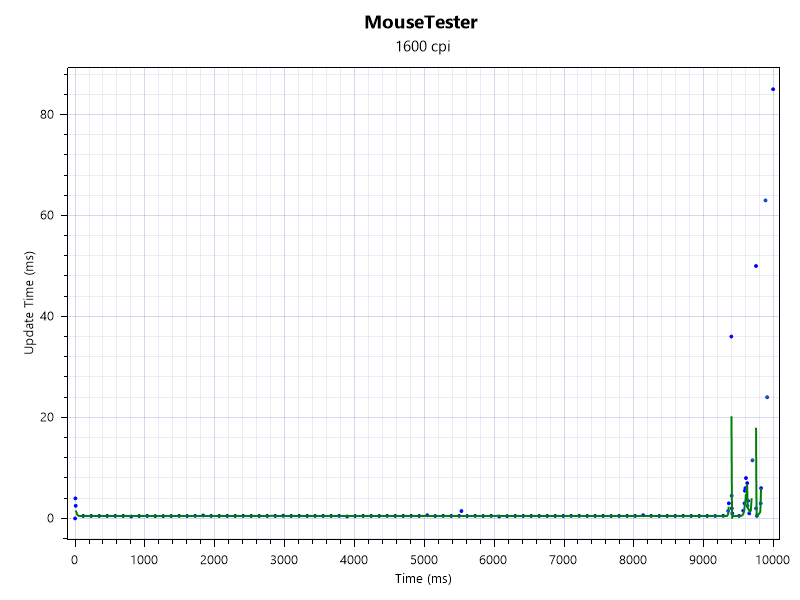
- 2000_1.png (31.55 KiB) Viewed 9574 times
Re: Why wireless mice in 250hz/500hz mode feel more predictable than 1k/2k/4k/8k
Posted: 11 Jul 2025, 11:15
by dermodemon
Slender wrote: ↑11 Jul 2025, 10:39
your mouse is not stable. When you move the mouse, you do not get a stable 1000hz, but at best 980-1020 (delta 40hz), this can happen either because of an unknown problem (interference?), or because your processor does not have enough time to process the wdf01000.sys driver, which is why a delayed access occurs.
This problem is eliminated if you configure your processor (example using stable clock instead of dynamic clock, c-state). You can clearly see this if you run mousetester. Also, when you use a low polling rate, you quickly gain enough speed to stably fix it at 125/250/500hz, rather than 1000+. In the latter case, increasing the dpi should help.
Otherwise, show your graph at 1000 and 500hz in mousetester.
4000Hz
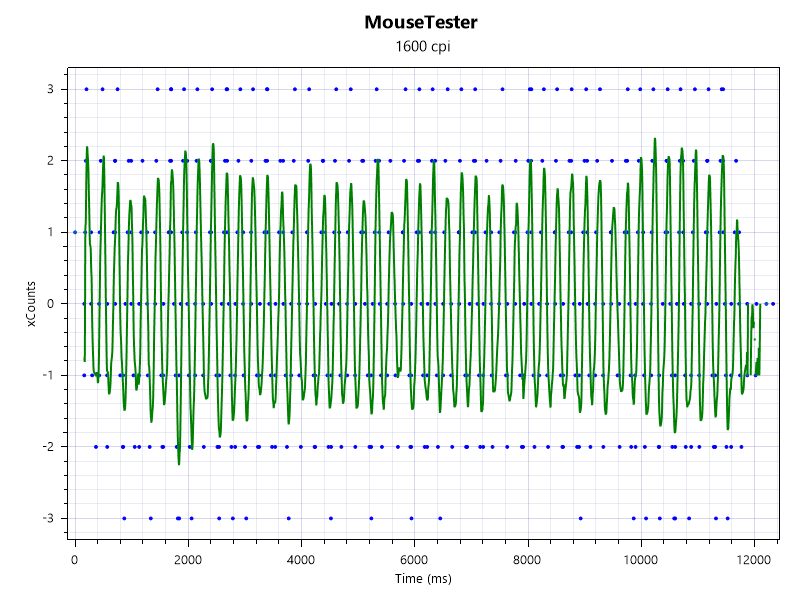
- 4000_2.png (96.6 KiB) Viewed 9573 times
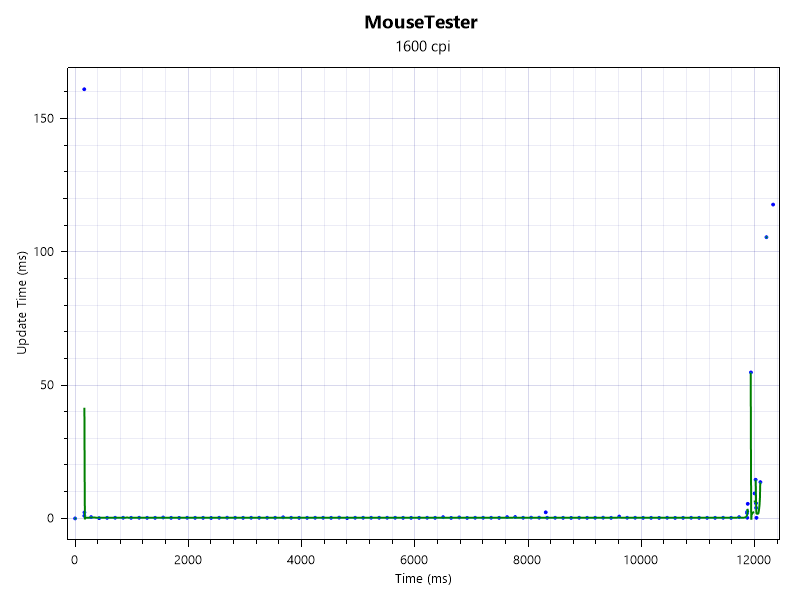
- 4000_1.png (36.01 KiB) Viewed 9573 times
Re: Why wireless mice in 250hz/500hz mode feel more predictable than 1k/2k/4k/8k
Posted: 11 Jul 2025, 11:25
by Slender
make it closer (1000-3000point cut) or send me the files
Re: Why wireless mice in 250hz/500hz mode feel more predictable than 1k/2k/4k/8k
Posted: 11 Jul 2025, 11:54
by dermodemon
Slender wrote: ↑11 Jul 2025, 11:25
make it closer (1000-3000point cut) or send me the files
https://imgur.com/a/w5DU2cC
Re: Why wireless mice in 250hz/500hz mode feel more predictable than 1k/2k/4k/8k
Posted: 11 Jul 2025, 17:56
by ablemor
I have the same problem it works better at 250Hz than at other frequencies. I think it's very likely interference; in my case, I'm sure it's some kind of interference.