I got the PG27QFW2A recently. Completely missed this post somehow.
There were many
indications this monitor potentially uses the latest "ultra fast" IPS panel like the one in PG27AQN or new Pulsar models (AUO M270DAN10.X), but it does not. It's a standard "fast IPS" (possibly BOE ME270QH7-MF1, BOE ME270QHM-NF6, or other variant), so native GtG is lacking compared to "ultra fast" panels.
This thing has THE worst variable overdrive implementation I have ever seen. It's so bad that it forces you to disable VRR completely which is a must-have feature for me. Can't even disable overdrive because OFF setting only disables it for about half the VRR range.
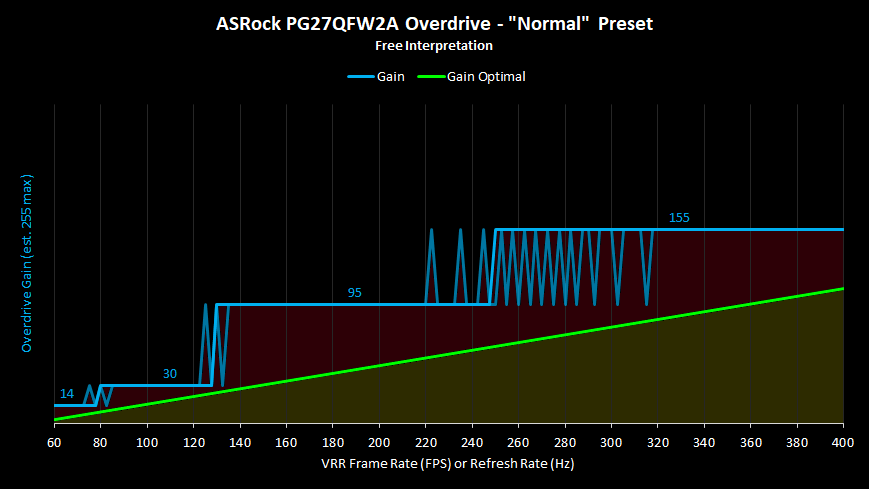
Basically, there are multiple (4) refresh rate or frame rate dependent overdrive zones programmed into the monitor. Each zone uses a specific OD gain. When the monitor detects specific frame rate it automatically adjusts the gain accordingly. On top of insufficient zone count, the gains of all 3 OD presets are badly cherrypicked. This creates the issue when application frame rate is near the end/beginning of a zone, the overdrive gains alternate erratically (during VRR), which in turn looks like ghosting flicker during motion.
Chart below demonstrates the issue nicely. The opaque blue line shows where internal overdrive gains actually change (VRR OFF). The transparent blue line shows the erraticness of the gains in VRR mode. Everything above “Optimal” green line (ideal variable overdrive) means noticeable overshoot (dark red area). And everything bellow the green line means overdrive boost is non-optimal (dark yellow area).
More charts:
https://ibb.co/album/4mCn2V?sort=name_asc
This is the 3rd monitor I've come across that has this problem (Gigabyte, Innocn, ASRock). I bet there are bunch more, and none of the reviewers test for it. This is a big problem.
ASRock probably didn't even test motion handling. I did contact them, explained it all in great detail, and pointed towards making a new firmware to fix it. However, when they said they were unable to replicate the issue and started suspecting my PC might be the problem, I lost hope.
Not to mention the MPRT mode. It uses fixed pulse width instead of fixed duty cycle (with fixed pulse height), so brightness across the range is inconsistent and very low. They also didn't even bother to tune the strobe phase. It's just left at default value internally, so the clearest screen section is always the top. I even suggested how to easily and cheaply fix it.
Few photos:
https://ibb.co/album/CKbDWV?sort=name_asc