5EYA wrote:1) 120/144hz is the refresh rate of these monitors, excluding the BFI\BLS technology. Is it correct? (All hdtv producer infact, add Hz number to indicate a plus BFI\BLS technology)
I presume:
BFI = Black Frame Insertion
BLS = BackLight Scanning
The good news is many new 120Hz monitors now include a strobe backlight, which now does the same thing as black frame insertion. These black-frame-insertion-via-backlight technologies are called LightBoost, ULMB, Turbo240, and BENQ Blur Reduction, as seen in
60Hz vs 120Hz vs LightBoost, and are now found in most new monitors in the
Official List Of 120Hz+ Monitors.
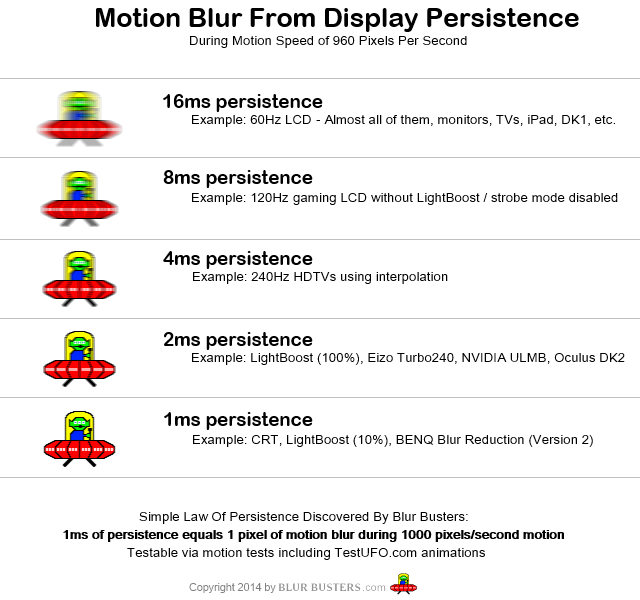
They do not market things the same way as HDTVs do, but strobe length is a useful criterion. Most gaming 120Hz+ monitors use a 2ms strobe flash length. A 2ms strobe length in a strobe backlight, is equivalent to a Motion Clarity Ratio of 500 (e.g. simulation of motion clarity of 500Hz sample-and-hold (flickerfree, full persistence). Some monitors such as newer ULMB monitors and the BENQ Blur Reduction, allow you to adjust strobe length to as low as 0.5ms (or less). A 0.5ms persistence equals a motion clarity ratio of 2000, as in equivalent of motion clarity of 2000Hz sample-and-hold (flickerfree, full persistence).
5EYA wrote:2) The 120/144hz value, is the number of times in a second that a display hardware updates its buffer. So ther's no new frame created. Is it correct?
Correct. However, these monitors also include BFI in the form of "strobe backlight" such as LightBoost, ULMB, Turbo240 and BENQ Blur Reduction. There's no interpolation, but there's the black frame insertion equivalent via backlight strobing.
LightBoost can go down to as low as 1.4ms persistence (1000/1.4 = motion clarity ratio 700)
BENQ Blur Reduction default is 2ms (1000/2 = motion clarity ratio of 500)
ULMB default is 2ms (1000/2 = motion clarity ratio 500)
ULMB minimum strobe length is 0.5ms (1000/0.5 = motion clarity ratio 2000)
BENQ Blur Reduction minimum strobe length is 0.5ms (1000/0.5 = motion clarity ratio 2000)
But they only work well when the true framerate is full frame rate (e.g. 120fps at 120Hz) as there's no frame interpolation being done.
5EYA wrote:(I know that in the led hdtv have a real refresh rate of 60hz, and 100/200hz are reached with frame interpolation that introduce soap opera effect,and some artefact)
So the 120\144hz frequancy of monitor pc is different betweeen the 100hz\200hz of the led hdtv ?
It feels the additional smoothness or soap opera effect, when I watch a 24p movie?
No, the monitors do not include frame interpolation, so you have to use external software such as SmoothVideo at
http://www.svp-team.com/ ... The combination of using this software, COMBINED with the built-in hardware strobe backlight, can give you the equivalent soap opera effect that you see in the motion-enhancing features of HDTVs -- if you like this kind of stuff.
5EYA wrote:3) BFI and BLS are available only on 120\140hz monitor.It's right?
Correct, via strobe backlight technologies.
5EYA wrote:So, Why IPS pc monitor can't reach the 120\144 hz?
Their pixel response time is too slow to be "clean".
Take a look at this page for a high speed video of the strobe backlight
http://www.blurbusters.com/zero-motion-blur/video/
5EYA wrote:There's a lot of hdtv led, with IPS panel that have been reached higher frequency then 60hz standard using bfi and bls techniques for many years already.
This is true, however, most HDTV's do not achieve the real-world gaming motion clarity that a good strobe-backlight LCD can nowadays achieve. Also, you can get 120Hz IPS displays via
Overclockable IPS 120Hz Monitors. However, their refresh pattern is too slow (see
high speed video of older LCD ...) as the refreshes bleed into each other, and kind of overlaps, so there's no clear refreshes to strobe a backlight through. You need a LCD with a real-world pixel response that's literally fast enough to complete between refreshes (e.g. the time period of a sync interval), so that a backlight can be strobed on fully refreshed frames, before the next refresh is displayed. IPS can have reductions in motion blur via strobing, but not as massively and not as low-latency as TN LCDs. Most gamers like to have low input lag, and TN LCDs tend to have far less lag too. And they are technologically much easier to strobe at the moment.
But hopefully this will change in the not-too-distant future, and hopefully backlight strobing will arrive in desktop IPS gaming monitors eventually.
5EYA wrote:I'd like to use bfi and bls when I watching 24 p movie, but if the 144hz will introduce smoothness and soap opera effect as like frame interpolation, will be useless for movie.
You can use BFI without interpolation. If you want to simulate the movie-theater/plasma effect, I recommend a display that can be adjustable to strobe at a lower frequency, such as 72Hz. The BENQ Blur Reduction monitor (Z-Series) are the only one that can strobe at any refresh rate in 1Hz increments from 60Hz through 144Hz, and 72Hz strobing looks more plasma-like / old-film-theater-like, if you prefer the old-fashioned strobing effect without frame interpolation. Sometimes the highest refresh rate doesn't enhance things if you prefer the old-fashioned movie film projector strobe effect, you need a lower refresh rate to emulate that more accurately. Most strobe backlight gaming monitors are limited to strobe at 100Hz or 120Hz, and precious few other refresh rates.
On the other hand, if you prefer the soap opera effect, you need to add interpolation, ala SmoothVideo, and at that point, higher refresh rate the better. 144Hz can work, but sometimes the color quality is poorer at higher refresh rates than at lower refresh rates.
5EYA wrote:is it true that when bfi and bls are active , there is reduction a of contrast and brightness?
In general yes. Especially for older LightBoost, but less of a problem for Turbo240 and BENQ Blur Reduction. Also, BFI in HDTV's often also dim the picture too.
If you're wanting to watch movies on a 120Hz+ desktop monitor instead of HDTV...
- You are aiming for a soap opera effect? If so, use
SmoothVideo playback software
- You are NOT for a soap opera effect? If so, don't use
SmoothVideo playback software
- You are aiming for elimination of 3:2 pullddown judder, for "24p-mode" playback? If so, you want to use 72Hz, 96Hz, 120Hz or 144Hz when playing back 24fps (whether
TN 120Hz+,
VA 120Hz+, or
IPS 120Hz+)
- You are aiming for maximum possible motion blur reduction in movies? If so, use
backlight strobing +
SmoothVideo
- You want brightest and best colors combined with BFI? If so, use
EIZO Turbo240
- You prefer best colors, without worrying about BFI? If so, try the
overclockable 1440p 120Hz monitors.
- You want lowest input lag? If so,
get a recent ASUS or BENQ 120Hz+ monitor
- You want to emulate the old fashioned movie theater strobe flicker effect? If so, choose a desktop monitor that includes backlight strobing (BFI) at a lower refresh rate that's a multiple of 24Hz. The only 72Hz-capable strobing candidate is BENQ Blur Reduction in the
BENQ Z-Series monitors.
Unfortunately there's no ideally perfect desktop monitor, just as there's no ideally perfect HDTV. Depending on your goals, it's possible to satisfy multiple needs with a carefully selected monitor.