New HBM AMD GPUs
Posted: 31 May 2015, 01:34
http://wccftech.com/amd-20nm-r9-390x-fe ... han-gddr5/
Guess that means a few less ms input lag with the new memory type?
Guess that means a few less ms input lag with the new memory type?
Who you gonna call? The Blur Busters! For Everything Better Than 60Hz™
https://forums.blurbusters.com/
lolSparky wrote:No, it would only be correlated to input latency by GPU render times.
There there's the 240Hz max over Freesync vs Gsync's max 144Hz - seems like a clear winner. I did come across: http://www.pcper.com/reviews/Displays/A ... -FreeSync- - not sure what all the overdrive/vrr talk is about in the comments?One clear difference between Nvidia G-Sync and AMD FreeSync is how they handle graphics cards that produce higher frame rates than a monitor can handle. G-Sync locks frame rates to the upper limit of the monitor while FreeSync (with in-game Vsync turned off) will allow the graphics card to produce a higher frame rate. This introduces tearing, but also means that input lag is at an absolute minimum, which is important for twitch gamers such as those who play FPS titles.
Not quite. 288fps on a 144hz display would imply v-sync off, which means your graphics card flips the new frame forward right in the middle of a refresh, causing a tear. If you're using v-sync, there would be a significant increase in latency when you become limited by the refresh rate, due to frames piling up in the render pipeline.Ghilbi wrote:I see. Essentially, more frames reduces the variable input latency. If my understanding is correct, comparing a 144Hz monitor at 144fps to 288FPS then the probability that you'll get a updated frame (0-3.47ms max instead of 0-6.94ms) during the next monitor refresh increases?
For minimizing input lag you have two good options: V-sync off at very high framerates(well above refresh rate), or VRR(g-sync or freesync) with your framerate capped in-game to just below your monitor's maximum refresh rate.I'm currently planning a low latency rig with a target 288FPS minimum, I prefer less input lag over visuals for the most part. Right now I'm still searching around for any articles or posts that can quantify a gain over an alternative.
g-sync works better right now, but freesync is fine if you always stay within the monitor's VRR window, and don't care too much about ghosting(there should be a factory firmware update for some of the freesync monitors to fix the ghosting issue, but I haven't seen an updated review of it) Freesync is much worse if you go below the VRR window, as it doesn't do window shifting to keep displaying frames on time. There is currently no freesync monitor with a 240hz refresh rate, nor any announcements on plans to produce one.For starters, Gsync or Freesync? http://www.displaylag.com/reduce-input- ... ive-guide/ - seems to suggest 1ms gains over Freesync, though the test method is 60Hz so it's within the margin for error. Then there's this quote (http://www.expertreviews.co.uk/accessor ... ptive-sync):There there's the 240Hz max over Freesync vs Gsync's max 144Hz - seems like a clear winner. I did come across: http://www.pcper.com/reviews/Displays/A ... -FreeSync- - not sure what all the overdrive/vrr talk is about in the comments?One clear difference between Nvidia G-Sync and AMD FreeSync is how they handle graphics cards that produce higher frame rates than a monitor can handle. G-Sync locks frame rates to the upper limit of the monitor while FreeSync (with in-game Vsync turned off) will allow the graphics card to produce a higher frame rate. This introduces tearing, but also means that input lag is at an absolute minimum, which is important for twitch gamers such as those who play FPS titles.
The bios tweaks that can matter are generally just the power saving stuff and overclocking, a lot of the stuff you'll see people talking about is placebo. For input latency, the location of your bottleneck matters far more than anything else. You want to stay CPU bottlenecked, as that allows all the downstream pipeline stages to finish working on a frame before receiving the next one. Check out the gedosato thread and flood's input lag testing thread for more info on that.Then there's picking a monitor; 144Hz, 1MS GtG, 1080p or greater is a good start but it's hard to find a pick when your scrutinizing every millisecond. http://www.displaylag.com/display-database/ - so far I've been going by these values divided by 2 (to offset the 60Hz testing method) and http://www.tftcentral.co.uk/reviews/acer_xb270hu.htm - Seems their method is slightly more accurate. Trying to keep the price around $500 or I'd grab that Acer model. http://www.overclock.net/t/1558635/vari ... -by-nixeus - holding out for reviews on this guy for now.
I've been looking into BIOS and software tweaks as well, https://forums.daybreakgames.com/ps2/in ... ive.69391/ - is this something applicable today? Then there's the almighty roach thread: http://www.overclock.net/t/1433882/gami ... ardware/10 - HPET disabled seems the most talked about tweak but I've read about varying results. Lastly, there's the older http://forums.steampowered.com/forums/s ... ?t=1315790 with a similar aim. No actual testing is cited (or remains buried in 150 pages).
AMD superiority confirmed (http://www.tftcentral.co.uk/articles/va ... efresh.htm):g-sync works better right now
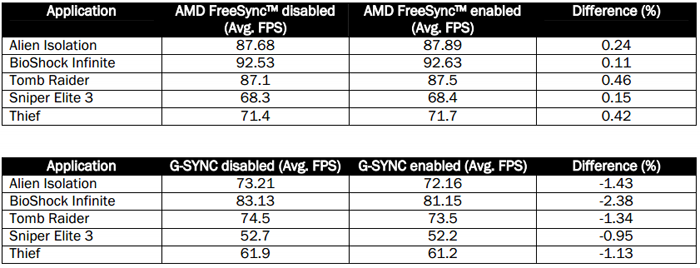
TN panel, overdrive - looking promising. Not sure if I'll go with 1 of the newsyncs to put savings into the gpu but having the option would be a plus.Update: We also have confirmation that the NX-VUE24 supports pixel overdrive
