[my post edited below to be improved]
Thanks for the update!
As the creator of TestUFO, and very familiar with motion blur observations dozens on many displays, I immediately notice the need for some minor tweaking in your animations:
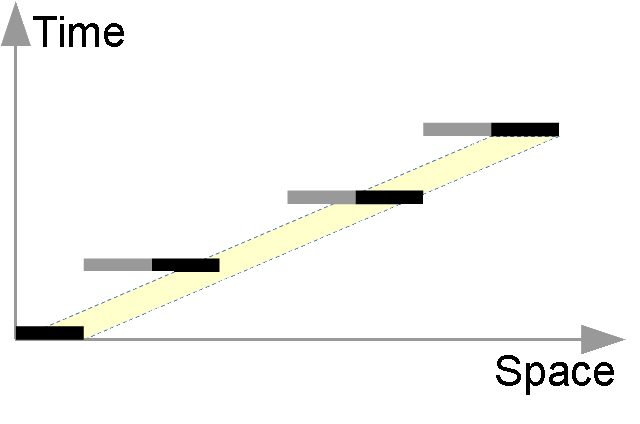
No eye tracking: We perceive 2 pixels with 1 pixels in between, and as the left pixel fades out, the next right on fades in. (strobing)

Sequence of fade-in is display tech dependant, but let's assume LCD here.
Under high speed camera, adjacent pixels fades in (GtG in one direction) while simultaneously other pixels fade out (GtG in other direction). This simultaneous effect is also seen in this
YouTube video (see ~0:30) modern LCDs, 2ms 60Hz, three refresh cycles would produce this effect:
~2-3ms of noticeable GtG movement (all pixels for a specific screen area, e.g. scanout region)
~14ms of mostly staticness (GtG ~99% complete, slowly moving to 100%)
~2-3ms of noticeable GtG movement (all pixels for a specific screen area, e.g. scanout region)
~14ms of mostly staticness (GtG ~99% complete, slowly moving to 100%)
~2-3ms of noticeable GtG movement (all pixels for a specific screen area, e.g. scanout region)
~14ms of mostly staticness (GtG ~99% complete, slowly moving to 100%)
So if you're modelling movement of single-pixel-width, the middle pixel should fade-in simultaneously while the first pixel fade-out.
If you were modelling more-than-one-pixel-wide objects (e.g. objects wider than the motion step between refreshes), then that should fill into that black gap (so pixel #2 and #4 would not be continuously black).
(Either way, whichever modelling you were intending to do, make sure this is clarified as such).
Eye-tracking: During fade in/out, blurring of the sides occurs at different times (judder, hold-type blur)

Yes, judder would cause variances. But judder/stutter (a matter of semantics) only occurs when you're not doing exact-step movement between frames, but your diagrams suggest you're modelling exact-step movement. Am I correct in this assumption? If so, then you're modelling perfectly smooth motion (stutterfree/judderfree).
In this case, hold-type blur remains constant assuming constant tracking speed (eye tracking, camera tracking), where eye saccades aren't injecting error factors.
Since we can't predict eye saccades, and we're modelling motion blur for situations of motionspeeds where eye saccades aren't a significant blurring factor (e.g. eye tracking moving objects moving only half a screenwidth per second -- aka 960 pixels/second at 1080p or 1920 pixels/second at 4K -- while viewing 1:1 screen ratio viewing distance common for computer monitors -- or high-FOV situations such as virtual reality goggles), we're not including blurring caused by eye saccades in these diagrams. Human observations is consistent with the lack of observed motion blur variances: When you view the moving UFO object at
http://www.testufo.com on an adjustable-persistence display (LightBoost 10->100%, or new firmware on XL2720Z with Blur Busters Strobe Utility), you notice that edge-blurring is constant.
Since strobe backlights mostly squarewave and thus creates blur visually virtually identical to simple-to-calculate linear blurring. In this case, the edge blurring is equal to the duty cycle percentage of the frame step (e.g. 20 pixel step at 25% duty cycle, dark 75% of the time, translates to 5 pixels of perceived motion blur). This is the persistence Law (1ms = 1 pixel of blur at 1000 pix/sec) that I have discovered is consistent on all modern strobe-backlight monitors. So at 60Hz = 1/60 = 16.66666666666... ~= 16.7, then full persistence is 16.7ms = 16.7 pixel of blur at 1000 pix/sec = 16.7 pixels of blur at 16.7 pixels/frame. So quarter persistence (25% duty cycle) is one quarter that, which is ~4.2ms of persistence = ~4.2 pixel of blurring. You scale that depending on motionspeed, so that means at 500 pixels/second, that's 2.1 pixels of blurring rather than 4.2 pixels of blurring. Of course, we're excluding spatial anti-aliasing for non-integer-step motion (e.g. 1000 pixels/sec at 60Hz would require moving objects to do exact pixel steps of 16.7 pixels, which requires anti-aliasing, so TestUFO uses 960 pixels/second as a speed that's closest to 1000 pixels/second to make motion blur math easy to double check and correlate with human-visual observations).
In your situation, this animation should be modified to have linear motion blur that's 1/5th the width of the pixel at both leading/trailing edge, and the linear motion blur is constant (no udulations in motion blur) during constant speed exact-pixel-step motion. (Of course, I'm assuming you're modelling exact-step 2 pixels per frame motion, with no antialiasing)
My ability to calculate the exact blur trail length (assuming squarewave persistence), allows me to produce motion blur optical illusions, like the below.
NOTE:
-- Use a stutter-free web browser such as
http://www.testufo.com/browser.html )
-- Works better if you click the above to zoom, and maximize window; for longer eye tracking region, to allow saccades to stabilize.
-- Assumes fast-transition displays. Fast LCD (1-2ms transition,15ms static) and OLED tend to resemble squarewave persistence, and produces intense checkerboarding compared to slower LCDs
-- Fast LCDs will often have more symmetric GtG (equal artifact at leading edge & trailing edge)
-- Slower LCDs will often have more distorted checkerboard illusions (especially for asymmetric GtG, more artifact at trailing edge)
-- Strobe backlights will horizontally reduce the width of the squares. 50% duty cycle = squares becomes 2:1 tall rectangles. 25% duty cycle (75% dark) = squares becomes 4:1 tall rectangles (1/4th width). Etc.
The checkerboard remains constant provided you keep eye-tracking it accurately. As you observe, the checkerboard motion blur does not udulate at all unless you inject eye-saccade errors. If you don't have significant eye-saccades during the motionspeed of this checkerboard, and the checkerboard illusion seems perfectly constant, then eye saccade motion blur error factors can thusly be considered insignificant for the purposes of this specific motionspeed being tested for your individual viewing situation (ability, display, viewing distance, etc) and thus don't need to be factored in the motion blur math. And since pixel steps remain exact, there's no udulations in motion blur.
The shape of the illumination curve (e.g. phosphor versus strobing) determines the shape of the motion blur -- phosphor creates more trailing motion blur than leading motion blur, while squarewave strobe backlight produces symmetric linear motion blur at leading/trailing edges. Strobe backlights aren't *perfectly* squarewave (they got ramp-up and ramp-down), but at the current strobe lengths being used, the factors have been observed to be insignificant from a human perceptual perspective (at least by me) and motion blur appears linear, much like a PhotoShop linear motion blur of an exact length equalling the step between two frames, then reduced by the duty cycle (e.g. 50% duty cycle = half linear motion blur trail length), which follows the "Law of Persistence".
Since GtG is the same for all 3 locations of pixels, and you're modelling exact-pixel-step motion which is technically zero-judder, then the hold-type blur (from the duty cycle -- 10% duty cycle at 2 pixels per frame motion = motion blurring exactly equal to 1/5th of pixel width (so pixel will be 7/5ths wider, accounting for leading edge and trailing edge), and motion blurring from 'perfect' tracking will always be constant for exact-step movement, since exact-step movement (e.g. 2 pixels per frame) produces zero judder, and thus, hold-type blur remains constant.
However, if you're modelling something differently than what I thought (exact pixel step motion) then this needs to be clarified, with the animations being updated to be consistent.
Edit: Full persistence, 4 pixels per frame (not in sync):

Is that moving in the opposite direction as the above animation? Shouldn't this specific one be moving in reverse?
If this is an eye tracking situation, then there should be no vertical boundaries between the pixels -- motion blur can be subpixel.
(Good ideas of the diagrams, just needs some tweaking!)