Maq wrote:Hey, do I have to put the setting "Area" on my XL2735 to 0 or 100 for the least amount of input lag? I'm kinda confused because in some threads people call it "Strobe Phase" or "Crosstalk". Looks like BenQ renamed it on the newer monitors. That's why I'm asking this!
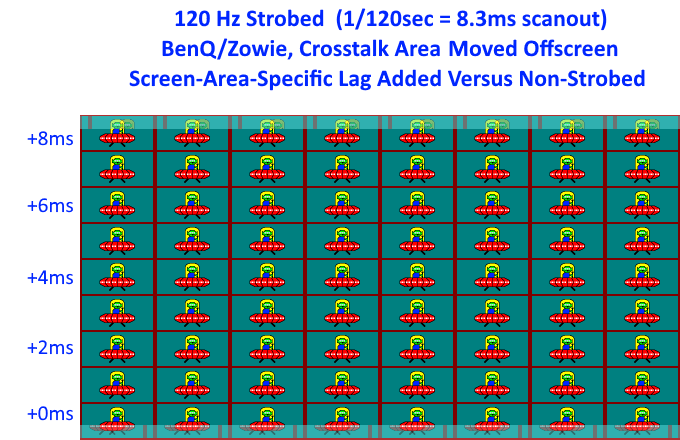
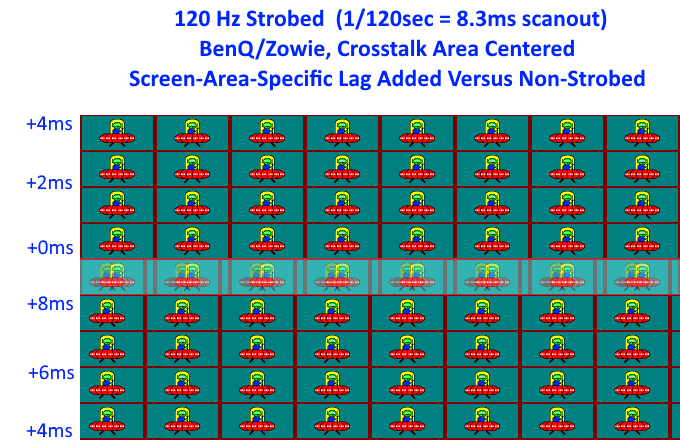
It's an input lag "gradient" in the vertical dimension. The top edge of the screen is not the same lag as the bottom edge of the screen.
The lag gradient changes for these 4 situations:
-- VSYNC ON non-strobed has lowest average lag for top edge (top lag < bottom lag)
-- VSYNC ON strobed has equal average lag for top and bottom edge (top lag == bottom lag, usually higher numbers)
-- VSYNC OFF non-strobed has equal average lag for top and bottom edge (top lag == bottom lag, usually lower numbers)
-- VSYNC OFF strobed has lowest average lag for bottom edge (top lag > bottom lag)
So, yes, latency gradient changes during these different modes.
The input lag gradient vertically shifts upwards/downwards -- the input lag gradient follows the band.
-- The input lag in the area immediately above the strobe crosstalk is always lowest
-- The input lag in the area immediately below the strobe crosstalk is always highest
On a relative screen surface basis (inches above/below), it's exactly the same lag. So anything "exactly 1 inch above the crosstalk band is always the same lag, no matter where I adjust the strobe crosstalk". The lag graident shifts upwards/downwards.
Mathematically, it's:
Lag delta above strobe crosstalk band is +0ms and increases linearly in the Y dimension above.
Lag delta below strobe crosstalk band is +(1 refresh cycle) and decreases linearly in the Y dimension below.
Once you're finished adjusting strobe crosstalk:
The specific screen area that's 1/4 screen height
above crosstalk band will be 1/4 refresh cycle lag
The specific screen area that's 1/4 screen height
below crosstalk band will be 3/4 refresh cycle lag
The specific screen area that's 1/2 screen height
above crosstalk band will be 1/2 refresh cycle lag
The specific screen area that's 1/2 screen height
below crosstalk band will be 1/2 refresh cycle lag
The specific screen area that's 3/4 screen height
above crosstalk band will be 3/4 refresh cycle lag
The specific screen area that's 3/4 screen height
below crosstalk band will be 1/4 refresh cycle lag
This assumes standard Vertical Total (default 1080p 120Hz or 144Hz). The Large Vertical Total tweaked mode will very slightly distort the latency gradient (since VT1350 means the screen is scanning out only 4/5ths of the time, and the screen is in VBI 1/5ths of the time).
TL;DR -- Quick Tips
Calibrating for lowest crosshairs lag
-- Adjust your strobe crosstalk band to just below the crosshairs.
Calibrating for lowest lag for a specific part of a screen
-- Adjust your strobe crosstalk band to just below that screen region is.
Calibrating for minimum strobe crosstalk; best motion clarity
-- Adjust your strobe crosstalk to be below bottom edge or above top edge.
Both situations are almost identical lag, though setting 0 and setting 100 is not always positioning the crosstalk band in exactly the same position -- but they're very close