RamenRider wrote:Yeah that's what I want to know as well.
I read the comments here:
"The problem with these new 240hz panels is the input lag. All reviews around the web shows the screen lags at 15ms to 16ms. Sure, when you are using 240hz you divide that for 4 (240/60), ending up with 4ms input latency, wich beats any offer on the market. Be it 60hz or 144hz.
The thing is, a good and fast 144hz monitor, like the famous LG 24GM79 (240€) or Asus MG248Q (300€), both rated at around 9.7ms input lag (dividing by 2,1), wich gives effective 4,6ms input lag. Now compare 4,6ms vs 4ms. Is that big advantage for 240hz considering you spent 500 bucks? And also taking into account that most games won´t get past 200fps (CS Go and OW can do it, most of the other games cant) thus increasing input lag even more. To me it isn´t worh it at all.
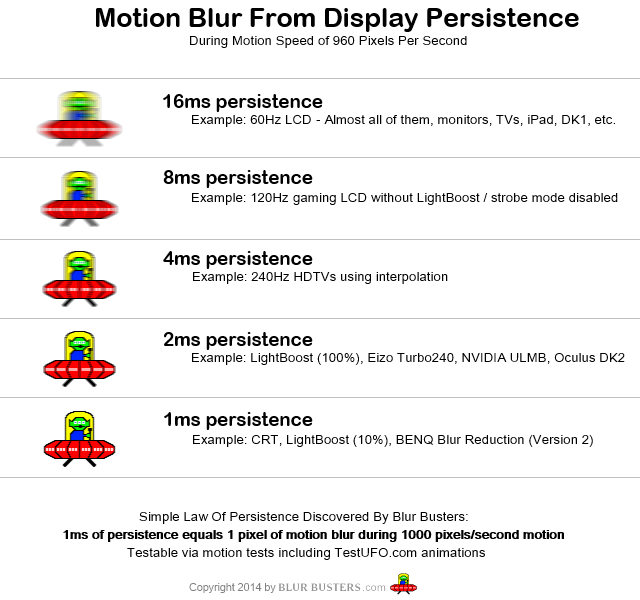
Adding to that, if you ever use that monitor with a console at 60hz, input lag will be too high aswell. The only real advantage 240hz gives right now is the motion clarity, wich is clearly improved over 144hz. But that doesn´t justify anything. I still prefer a lower input lag 144hz monitor, by far.
When 240hz tech matures and we get decent input lag screens (ranging from 9,5ms to 11ms like any good 144hz monitor), then we talk."
https://on-winning.com/240-hz-monitor-worth-difference/
Lag of a screen is a complex topic, please see
my older post here.
240Hz screens also diverges in scanout velocity between cable scanout speed and panel scanout speed, so there can be a lag-differential asymmetry for the top edge of the screen versus bottom edge of the screen. With a Leo Bodnar with a 60Hz (slowscanning) 1080i signal, the top and bottom edge usually as a ~16ms differential (refresh cycle transmission over cable, with panel refreshing top-to-bottom in sync with it) during VSYNC ON lag testers such as Leo Bodnar. However, doing a 60Hz 1080p on a 240Hz monitor show only a ~4ms differential. That's because the monitor has an internal scanconverter to buffer the slow scanning 60Hz (cable) and then output the scanout at the panel's native fixed scanout velocity (1/240sec top-to-bottom refresh). To speed up the scanout, it becomes necessary for the 240Hz monitor to partially buffer the refresh cycle before beginning the refresh-cycle scanout. This buffering behaviour occurs at low Hz, but the workaround might also theoretically be adding more lag at the top Hz on 240Hz. However, the fastest 240Hz monitors keep up pretty well -- e.g. the XL2546 is pretty low lag. Ideally there should be no buffering-like behaviour at the max Hz at least, since the cable Hz is the same as the panel's native scanout velocity. Other panels are variable scanout velocity, like most 144Hz 1080p panels. (the 1440p panels are a different story however -- they got internal scan-velocity conversion behavior; sigh).
While there's some issues with some buffering -- 240Hz monitors still vastly outperform during VSYNC
ON operation if you follow a few rules. For 60fps content, the lag savings of 240Hz versus 60Hz is a whopping ~12ms max, which can overcome some buffering-related lag differentials if it's only a tiny fraction of a refresh cycle. You can fix this via either using GSYNC (e.g. 60fps at 240Hz) or via Quick Frame Transport tricks (e.g. Vertical Total 4320 -- a blanking interval about 3x the size of visible vertical resolution) at 1080p, to speed up the refresh-cycle delivery, to make the panel scanout velocity in sync with the cable scanout velocity, keeping your 4ms top-vs-bottom edge, and getting a low-lag hacked "60Hz custom resolution" on a 240Hz monitor. (Though it's more complex than a 60fps cap at 240Hz).
SOOOO many tricks to raise/lower lag on 240Hz monitors because of the added complexity of asymmetric cable-vs-panel scanout velocities. You can't divide a lag number by 4 because of that factor, unfortunately -- some panels are fixed-scanout (needs internal buffering for scanout-velocity differentials) and some panels are variable-veolocity scanout.
Also, lag to GtG percentage is an issue in apples vs oranges measurements. RTINGS have numbers accurate for VSYNC OFF, while TomsHardware has numbers accurate for VSYNC ON. Humans can still see a pixel far less than GtG50% (when a pixel is already grey during the pixel transition from black to white), but lots of lag testers trigger early (e.g. GtG5%) or late (e.g. GtG100%). The lag difference of GtG5% and GtG100% can be well over 10 milliseconds, especially for some colors (e.g. some colors are laggier than others). So lag measurement science is quite imprecise.
In some metrics, the 240Hz monitors outperform, while in other metrics, the 240Hz monitors underperform. If you're looking for lower lag during VSYNC ON, all 240Hz monitors (when run at 240Hz scanout velocity). A 240Hz monitor may be lower lag in top-vs-bottom difference (which makes them superior for whole-refresh-cycle-at-once situations such as VSYNC ON or G-SYNC) but higher lag in absolute pixel-in-GPU-thru-pixel-on-screen due to a buffering stage (which unfortunately affects VSYNC OFF). So that means a 240Hz monitor may massively outperform in lag in G-SYNC but underperform in lag in VSYNC OFF when compared against a 144Hz monitor, because of different lag bottlenecks showing up.
Isn't monitor engineering fun, eh?
Disclaimer: I work with multiple monitor manufacturers