
So for the past 2 years now I have always used gsync on my xb271hu monitor and capped fps with rtss to 141 and that always gave me very smooth experience and a very enjoyable gaming experience. Problem is I always alternated between gsync on vsync off or both of them on. Recently my aim got really shit, I would be aiming at people and my shots just would not go. I said fuck it, uncapped my FPS turned off gsync turned off vsync in nvidia and wow man... All the sudden all my shots are landing I feel much faster for some reason and so now I'm confused as fuck... I was always under the impression that gsync on + vsync on + rtts cap does add input lag but not "noticeable" at all. I read that 101 article a few times actually but on the other hand I noticed non of the csgo,overwatch (maybe only 1 player), fortnite and league pros use gsync and I'm like wtf! I always chucked it on the fact that they just don't know about gsync and its glorious benefits and how smooth it makes games and helps with tearing and fps fluctuations but apparently that "small input lag" that gsync adds is actually noticeable for competitive players, at least for me it is. My game doesn't look as smooth as with gsync on and fps capped but it sure feels a lot more responsive and input lag feels really low so I am very happy with this. If someone can explain the technical side of this then please let me know.
Currently running fortnite with 240 fps cap, gsync off, vsync off AND THE GAME FEELS INSANELY FAST AND ALL MY SHOTS LANDING.
Hitting more shots with gsync off + nvidia vsync off?!!!
-
GFresha
- Posts: 149
- Joined: 01 Mar 2019, 17:28
-
theangryregulator
Re: Hitting more shots with gsync off + nvidia vsync off?!!!
I think it really comes down to however you perform best doesn't it? Whether it is placebo or not the results matter.
I'm not sure why people look at the pros for the technical aspect because their skill is a separate aspect from their setup. They're still perform at a different level even when the game engine is performing badly or their setup is less than the best.
I'm not sure why people look at the pros for the technical aspect because their skill is a separate aspect from their setup. They're still perform at a different level even when the game engine is performing badly or their setup is less than the best.
-
Chief Blur Buster

- Site Admin
- Posts: 12274
- Joined: 05 Dec 2013, 15:44
- Location: Toronto / Hamilton, Ontario, Canada
- Contact:
Re: Hitting more shots with gsync off + nvidia vsync off?!!!
Right tool for right job.
And I have two tips that the OP may have overlooked.
One Advantages of Frame Rates Above Refresh Rate is lower lag, when your framerate is able to exceed your refresh rate.
Apples versus oranges.
Compare 240fps GSYNC with 240fps VSYNC OFF
Compare 144fps GSYNC with 144fps VSYNC OFF
240fps@144Hz VSYNC OFF can get better K/D ratio than 141fps@144Hz GSYNC
Tip1: You're adding framerate lag if you're capping a 240fps-capable game to 144fps regardless of what sync technology you use. That's the bigger lag penalty you put on yourself, than the GSYNC lag penalty. Any "overkill framerate above Hz" will tend to beat GSYNC. So get a higher-Hz GSYNC and that's fixed. Capping is a useful trick but sometimes, we accidentally put a 65mph governor on a Ferrari. Capping should be used wisely, but it can also hurt ourselves too if the cap is too low relative to the GPU horsepower.
Tip2: Also, the Fortnite internal cap has less lag than the RTSS cap, so using RTSS to cap Fortnite may be the wrong way to cap Fortnite. The rule of thumb is to always cap using the in-game frame rate cap where possible (less lag), and only use RTSS to cap for games that don't have an in-game framerate cap.
Now, some people just grew up on VSYNC OFF for two decades since the Quake days and, are just used to it. There are many different latencies and the capping lag can be much bigger than the lag of GSYNC. Capping is simply the lesser-of-evil on VRR displays.
Uncapped + GSYNC + VSYNC OFF is also a legitimate situation when your framerate range have little venn diagram overlap with refresh rate range. That said, if you're not properly overlapping those venn diagrams into a proper superset (e.g. "My game runs at 150fps-230fps on a 30Hz-240Hz GSYNC monitor) then you're not properly zeroing-out the lag of a GSYNC monitor. That's just the way it is. But that's not the GSYNC's fault here, you can simply purchase a bigger VRR range to make sure it's easily handling the venn diagram of your frame rate range. To make most of those lag penalties go poof (on non-buggy monitors) and competitively enjoy GSYNC/FreeSync.
TL;DR: Get a 240Hz GSYNC monitor if you want good K/D ratio while keeping GSYNC enabled. And use the IN-GAME framerate cap for less lag. --> Get a monitor where your GSYNC range maximum is equal or above your game's framerate range. <--
Important! That can fix your K/D ratio while having cake & eating it too.
And I have two tips that the OP may have overlooked.
One Advantages of Frame Rates Above Refresh Rate is lower lag, when your framerate is able to exceed your refresh rate.
Apples versus oranges.
Compare 240fps GSYNC with 240fps VSYNC OFF
Compare 144fps GSYNC with 144fps VSYNC OFF
240fps@144Hz VSYNC OFF can get better K/D ratio than 141fps@144Hz GSYNC
Tip1: You're adding framerate lag if you're capping a 240fps-capable game to 144fps regardless of what sync technology you use. That's the bigger lag penalty you put on yourself, than the GSYNC lag penalty. Any "overkill framerate above Hz" will tend to beat GSYNC. So get a higher-Hz GSYNC and that's fixed. Capping is a useful trick but sometimes, we accidentally put a 65mph governor on a Ferrari. Capping should be used wisely, but it can also hurt ourselves too if the cap is too low relative to the GPU horsepower.
Tip2: Also, the Fortnite internal cap has less lag than the RTSS cap, so using RTSS to cap Fortnite may be the wrong way to cap Fortnite. The rule of thumb is to always cap using the in-game frame rate cap where possible (less lag), and only use RTSS to cap for games that don't have an in-game framerate cap.
Now, some people just grew up on VSYNC OFF for two decades since the Quake days and, are just used to it. There are many different latencies and the capping lag can be much bigger than the lag of GSYNC. Capping is simply the lesser-of-evil on VRR displays.
Uncapped + GSYNC + VSYNC OFF is also a legitimate situation when your framerate range have little venn diagram overlap with refresh rate range. That said, if you're not properly overlapping those venn diagrams into a proper superset (e.g. "My game runs at 150fps-230fps on a 30Hz-240Hz GSYNC monitor) then you're not properly zeroing-out the lag of a GSYNC monitor. That's just the way it is. But that's not the GSYNC's fault here, you can simply purchase a bigger VRR range to make sure it's easily handling the venn diagram of your frame rate range. To make most of those lag penalties go poof (on non-buggy monitors) and competitively enjoy GSYNC/FreeSync.
TL;DR: Get a 240Hz GSYNC monitor if you want good K/D ratio while keeping GSYNC enabled. And use the IN-GAME framerate cap for less lag. --> Get a monitor where your GSYNC range maximum is equal or above your game's framerate range. <--
Important! That can fix your K/D ratio while having cake & eating it too.
Head of Blur Busters - BlurBusters.com | TestUFO.com | Follow @BlurBusters on: BlueSky | Twitter | Facebook

Forum Rules wrote: 1. Rule #1: Be Nice. This is published forum rule #1. Even To Newbies & People You Disagree With!
2. Please report rule violations If you see a post that violates forum rules, then report the post.
3. ALWAYS respect indie testers here. See how indies are bootstrapping Blur Busters research!
-
jorimt

- Posts: 2641
- Joined: 04 Nov 2016, 10:44
- Location: USA
Re: Hitting more shots with gsync off + nvidia vsync off?!!!
While the input lag difference between the two methods is relatively minor at 144Hz (no more than 1-3ms difference in currently achievable scenarios, typically), both methods deliver frames differently, which is what you might be experiencing; you may simply like the overall feel of V-SYNC OFF + high, uncapped framerates more than G-SYNC + FPS cap, so use what you prefer.GFresha wrote:I said fuck it, uncapped my FPS turned off gsync turned off vsync in nvidia and wow man... All the sudden all my shots are landing I feel much faster for some reason and so now I'm confused as fuck... I was always under the impression that gsync on + vsync on + rtts cap does add input lag but not "noticeable" at all.
The technical side of G-SYNC + FPS limit vs. V-SYNC OFF + uncapped FPS was pretty much already answered in my article here:GFresha wrote:I read that 101 article a few times [...] If someone can explain the technical side of this then please let me know.
https://www.blurbusters.com/gsync/gsync ... ettings/9/
(jorimt: /jor-uhm-tee/)
Author: Blur Busters "G-SYNC 101" Series
Displays: ASUS PG27AQN, LG 48C4 OS: Windows 11 Pro Case: Fractal Design Torrent PSU: Seasonic PRIME TX-1000 MB: ASUS Z790 Hero CPU: Intel i9-13900k w/Noctua NH-U12A GPU: GIGABYTE RTX 4090 GAMING OC RAM: 32GB G.SKILL Trident Z5 DDR5 6400MHz CL32 SSDs: 2TB WD_BLACK SN850 (OS), 4TB WD_BLACK SN850X (Games) Keyboard: Wooting 60HE Mouse: Razer Viper Mini SE Sound: Creative Sound Blaster Katana V2 VR: Beyond 2, Quest 3, Reverb G2, Index Consoles: Dreamcast, PS2, PS3, PS5, Switch 2, Wii, Xbox, Analogue Pocket + Dock Scaler: RetroTINK 4k
Author: Blur Busters "G-SYNC 101" Series
Displays: ASUS PG27AQN, LG 48C4 OS: Windows 11 Pro Case: Fractal Design Torrent PSU: Seasonic PRIME TX-1000 MB: ASUS Z790 Hero CPU: Intel i9-13900k w/Noctua NH-U12A GPU: GIGABYTE RTX 4090 GAMING OC RAM: 32GB G.SKILL Trident Z5 DDR5 6400MHz CL32 SSDs: 2TB WD_BLACK SN850 (OS), 4TB WD_BLACK SN850X (Games) Keyboard: Wooting 60HE Mouse: Razer Viper Mini SE Sound: Creative Sound Blaster Katana V2 VR: Beyond 2, Quest 3, Reverb G2, Index Consoles: Dreamcast, PS2, PS3, PS5, Switch 2, Wii, Xbox, Analogue Pocket + Dock Scaler: RetroTINK 4k
-
Chief Blur Buster
- Site Admin
- Posts: 12274
- Joined: 05 Dec 2013, 15:44
- Location: Toronto / Hamilton, Ontario, Canada
- Contact:
Re: Hitting more shots with gsync off + nvidia vsync off?!!!
Yes, Jorim is correct. Some napkin math:
1/144sec = 6.9ms
1/240sec = 4.2ms
So almost 3ms worst-case.
However, a mouse flick speed of 8000 pixels second, 1ms = 8 pixel mis-aim. So a quick mouse flick may overshoot an average of 24 pixels at 3ms extra latency, if you're trained to the lagfeel of 3ms less lag, especially if you've been using VSYNC OFF for most of your lifetime. The muscle memory effect (lag training effect) is quite powerful if you've trained to a specific feel for many years. 100% agree. Single milliseconds matter at Blur Busters, no argument from me here.
But Wait...
I see more lag buildup here -- RTSS can sometimes add an extra frame of latency versus an in-game framerate cap!!!!
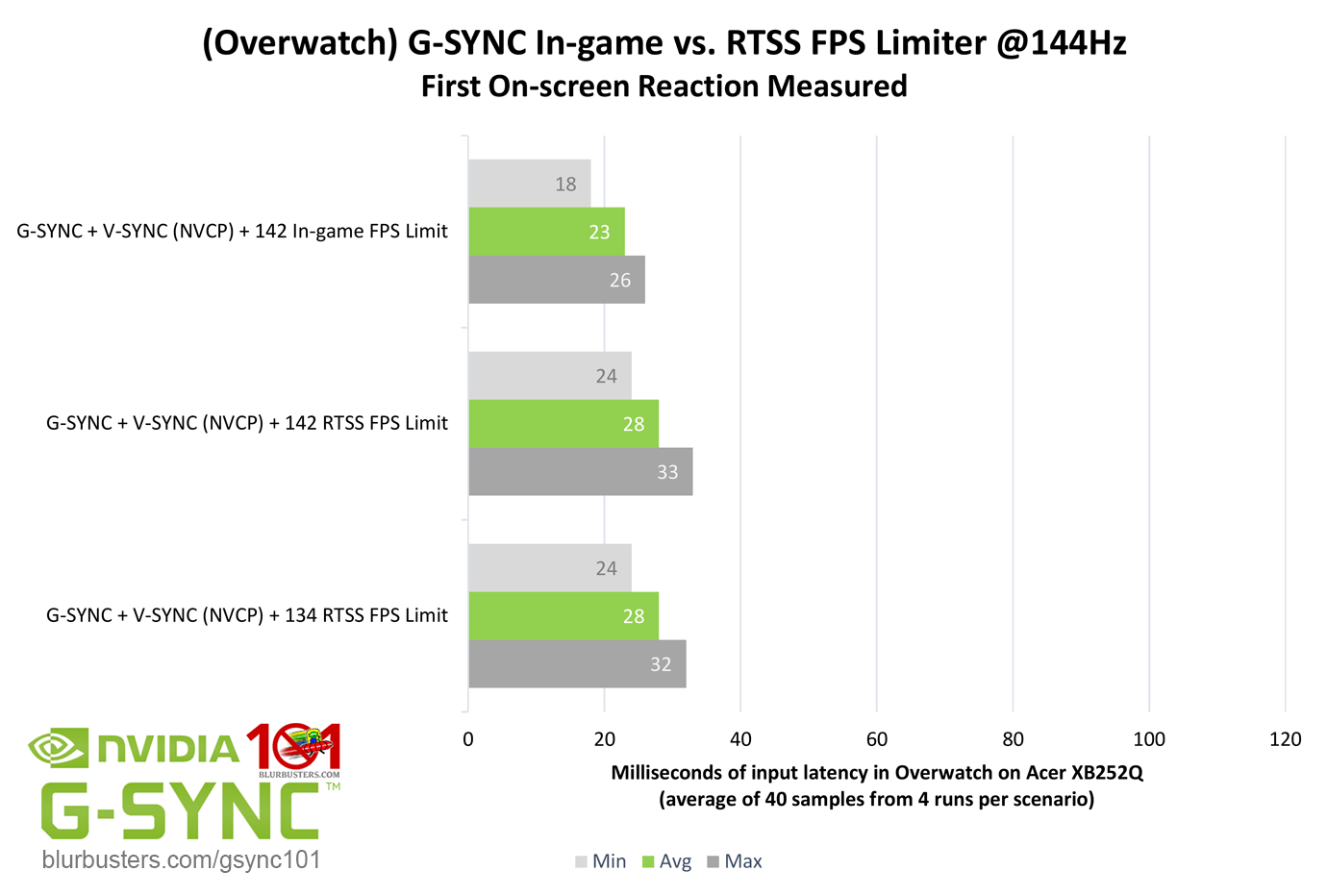
So if OP used RTSS instead of in-game Fortnite cap, he's just shot one extra refresh cycle of extra lag at themselves (1/144sec = 6.9ms) -- on top of that +1-3ms GSYNC lag penalty = 10ms lag penalty because OP didn't follow Tip1 & TIp2
Thusly, probably 10ms lag -- more than 70% of it not GSYNC fault!
See Jorim's Internal vs External Frame Rate Limiters in GSYNC 101.
We use RTSS as a "lesser of evil" frame rate cap versus letting GSYNC self-cap.
But RTSS can't beat a good internal frame rate cap.
The RTSS gospel sometimes forgets this little tidbit of Jorim's Part 11 of GSYNC 101.
Which is why it's always a good idea to read the entire GSYNC 101 if you're a professional player.
The point is.... The OP's major cause of lag is not GSYNC itself.
It's all a learning experience, we make mistakes, even Chief Blur Buster (me) does.
1/144sec = 6.9ms
1/240sec = 4.2ms
So almost 3ms worst-case.
However, a mouse flick speed of 8000 pixels second, 1ms = 8 pixel mis-aim. So a quick mouse flick may overshoot an average of 24 pixels at 3ms extra latency, if you're trained to the lagfeel of 3ms less lag, especially if you've been using VSYNC OFF for most of your lifetime. The muscle memory effect (lag training effect) is quite powerful if you've trained to a specific feel for many years. 100% agree. Single milliseconds matter at Blur Busters, no argument from me here.
But Wait...
I see more lag buildup here -- RTSS can sometimes add an extra frame of latency versus an in-game framerate cap!!!!
So if OP used RTSS instead of in-game Fortnite cap, he's just shot one extra refresh cycle of extra lag at themselves (1/144sec = 6.9ms) -- on top of that +1-3ms GSYNC lag penalty = 10ms lag penalty because OP didn't follow Tip1 & TIp2
Thusly, probably 10ms lag -- more than 70% of it not GSYNC fault!
See Jorim's Internal vs External Frame Rate Limiters in GSYNC 101.
We use RTSS as a "lesser of evil" frame rate cap versus letting GSYNC self-cap.
But RTSS can't beat a good internal frame rate cap.
The RTSS gospel sometimes forgets this little tidbit of Jorim's Part 11 of GSYNC 101.
Which is why it's always a good idea to read the entire GSYNC 101 if you're a professional player.
The point is.... The OP's major cause of lag is not GSYNC itself.
It's all a learning experience, we make mistakes, even Chief Blur Buster (me) does.
Head of Blur Busters - BlurBusters.com | TestUFO.com | Follow @BlurBusters on: BlueSky | Twitter | Facebook
Forum Rules wrote: 1. Rule #1: Be Nice. This is published forum rule #1. Even To Newbies & People You Disagree With!
2. Please report rule violations If you see a post that violates forum rules, then report the post.
3. ALWAYS respect indie testers here. See how indies are bootstrapping Blur Busters research!
-
GFresha
- Posts: 149
- Joined: 01 Mar 2019, 17:28
Re: Hitting more shots with gsync off + nvidia vsync off?!!!
Chief Blur and jorimt you guys are dimes man srsly. Appreciate the write ups and taking times out of your day to help some1 else out.
This is an awesome tip you have on RTTS that I overlooked when I made the switch from gsync on,vsync on + 141 FPS cap (RTTS) to gsync off, vsync off + 240 fps cap (RTTS)
Going to go ahead and turn off RTTS and do the 240 fps cap with Fortnite only. And will test for a week of performance
But if I turn on gsync once more should I turn on vsync in control panel and how do I cap to 141 in game? Fortnite only allows 144 So I am back to RTTS if I want to do 141 correct?
This is an awesome tip you have on RTTS that I overlooked when I made the switch from gsync on,vsync on + 141 FPS cap (RTTS) to gsync off, vsync off + 240 fps cap (RTTS)
Going to go ahead and turn off RTTS and do the 240 fps cap with Fortnite only. And will test for a week of performance
But if I turn on gsync once more should I turn on vsync in control panel and how do I cap to 141 in game? Fortnite only allows 144
So I am back to RTTS if I want to do 141 correct?-
theangryregulator
Re: Hitting more shots with gsync off + nvidia vsync off?!!!
open this file "C:\Users\YourWindowUsername\AppData\Local\FortniteGame\Saved\Config\WindowsClient\GameUserSettings.ini"GFresha wrote:Chief Blur and jorimt you guys are dimes man srsly. Appreciate the write ups and taking times out of your day to help some1 else out.
This is an awesome tip you have on RTTS that I overlooked when I made the switch from gsync on,vsync on + 141 FPS cap (RTTS) to gsync off, vsync off + 240 fps cap (RTTS)
Going to go ahead and turn off RTTS and do the 240 fps cap with Fortnite only. And will test for a week of performance
But if I turn on gsync once more should I turn on vsync in control panel and how do I cap to 141 in game? Fortnite only allows 144
And edit this line -
FrameRateLimit=144.000000
-
Chief Blur Buster
- Site Admin
- Posts: 12274
- Joined: 05 Dec 2013, 15:44
- Location: Toronto / Hamilton, Ontario, Canada
- Contact:
Re: Hitting more shots with gsync off + nvidia vsync off?!!!
Fixed that for you. That's what you need to do on a 144Hz GSYNC or 144Hz FreeSync monitor.theangryregulator wrote:open this file "C:\Users\YourWindowUsername\AppData\Local\FortniteGame\Saved\Config\WindowsClient\GameUserSettings.ini"
And edit this line -
FrameRateLimit=141.000000
Always. If you use a cap with GSYNC/FreeSync enabled, always cap a few frames per second below (unless you're using VRR+VSYNC OFF). That's because frame rate caps are never perfect. They always fluctuate a bit. If some frames are 1/143sec and others are 1/145sec, one of those two are beyond the VRR range. So you add a safety margin. That's why the big recommendation to cap a few frames per second below because of the tests in the past that showed lag savings from that. Hitting the VRR maximum can add more lag than the capping itself does.
And when you turn on an in-game cap, turn off RTSS frame rate capping too for that particular game.
Now, this will only solve 1 problem. Things improve but may not fully.
You still have the metaphorical problem of putting a 65mph speed governor on a Ferrari if your game wants to run at 300fps and you're throttling it to 141fps. If the difference is small, the capping lag penalty tends to be small/unnoticeable. But if the difference is big, the capping lag penalty is bigger and begins to affect K/D ratio. That will still hurt your K/D ratio if your GSYNC monitor isn't 240Hz capable to better fit the venn diagrams of framerate range inside your refreshrate range to make all your capping penalties disappear. Workarounds for that is (A) VSYNC OFF (until you upgrade), or (B) GSYNC+VSYNC OFF (cap can now be beyond Hz) or doing (B) Purchasing a 240Hz GSYNC/FreeSync (one that doesn't have lag bugs, at least.)
Head of Blur Busters - BlurBusters.com | TestUFO.com | Follow @BlurBusters on: BlueSky | Twitter | Facebook
Forum Rules wrote: 1. Rule #1: Be Nice. This is published forum rule #1. Even To Newbies & People You Disagree With!
2. Please report rule violations If you see a post that violates forum rules, then report the post.
3. ALWAYS respect indie testers here. See how indies are bootstrapping Blur Busters research!
-
GFresha
- Posts: 149
- Joined: 01 Mar 2019, 17:28
Re: Hitting more shots with gsync off + nvidia vsync off?!!!
I think for Fortnite I am keeping everything off and capping in game to 240 fps but for a game like Apex would you actually recommend gsync since the game fluctuate like crazy and I never get more than 140+ fps?
Also I am kinda confused on gsync on + vsync on vs gsync on + vsync off
Assuming a 141 cap is on for both
1) Does it cause more input lag for 1 method vs the other?
2) Ignoring input lag for a second and say I am playing a game like Witcher 3 with ultra settings, does one method look/feel smoother than the other? I found gsync on + vsync on + rtts 141 cap was butter smooth but again that had lots of input lag for a game like fortnite where my PC can push 240 FPS during most fights.
Also I am kinda confused on gsync on + vsync on vs gsync on + vsync off
Assuming a 141 cap is on for both
1) Does it cause more input lag for 1 method vs the other?
2) Ignoring input lag for a second and say I am playing a game like Witcher 3 with ultra settings, does one method look/feel smoother than the other? I found gsync on + vsync on + rtts 141 cap was butter smooth but again that had lots of input lag for a game like fortnite where my PC can push 240 FPS during most fights.
-
jorimt
- Posts: 2641
- Joined: 04 Nov 2016, 10:44
- Location: USA
Re: Hitting more shots with gsync off + nvidia vsync off?!!!
Technically? No: the first can't tear, while the second can, that's virtually the only difference. I answer this in more detail here (second FAQ entry):GFresha wrote:Also I am kinda confused on gsync on + vsync on vs gsync on + vsync off
Assuming a 141 cap is on for both
1) Does it cause more input lag for 1 method vs the other?
https://www.blurbusters.com/gsync/gsync ... ttings/15/
(jorimt: /jor-uhm-tee/)
Author: Blur Busters "G-SYNC 101" Series
Displays: ASUS PG27AQN, LG 48C4 OS: Windows 11 Pro Case: Fractal Design Torrent PSU: Seasonic PRIME TX-1000 MB: ASUS Z790 Hero CPU: Intel i9-13900k w/Noctua NH-U12A GPU: GIGABYTE RTX 4090 GAMING OC RAM: 32GB G.SKILL Trident Z5 DDR5 6400MHz CL32 SSDs: 2TB WD_BLACK SN850 (OS), 4TB WD_BLACK SN850X (Games) Keyboard: Wooting 60HE Mouse: Razer Viper Mini SE Sound: Creative Sound Blaster Katana V2 VR: Beyond 2, Quest 3, Reverb G2, Index Consoles: Dreamcast, PS2, PS3, PS5, Switch 2, Wii, Xbox, Analogue Pocket + Dock Scaler: RetroTINK 4k
Author: Blur Busters "G-SYNC 101" Series
Displays: ASUS PG27AQN, LG 48C4 OS: Windows 11 Pro Case: Fractal Design Torrent PSU: Seasonic PRIME TX-1000 MB: ASUS Z790 Hero CPU: Intel i9-13900k w/Noctua NH-U12A GPU: GIGABYTE RTX 4090 GAMING OC RAM: 32GB G.SKILL Trident Z5 DDR5 6400MHz CL32 SSDs: 2TB WD_BLACK SN850 (OS), 4TB WD_BLACK SN850X (Games) Keyboard: Wooting 60HE Mouse: Razer Viper Mini SE Sound: Creative Sound Blaster Katana V2 VR: Beyond 2, Quest 3, Reverb G2, Index Consoles: Dreamcast, PS2, PS3, PS5, Switch 2, Wii, Xbox, Analogue Pocket + Dock Scaler: RetroTINK 4k