Blur Busters has an article for this:
Advantages of Frame Rates Above Refresh Rates
As a result, 300fps CS:GO at 60Hz still has noticeable advantages. You still get progressively lower and lower lag with VSYNC OFF, the higher framerates you go, no matter how far above the refresh rate you go. VSYNC OFF frameslices are latency gradients that are subsets of scanout latency, so partitioning those smaller is beneficial.
First, here's VSYNC ON 60fps at 60Hz in a high speed video of refresh cycles, images alternating every refresh cycle. You'll see not all pixels refresh simultaneously, and realize that there's a scanout latency involved.

Doing 180fps at 60Hz will create average 3 tearlines per refresh cycle -- and average 3 frame slices per refresh cycle.
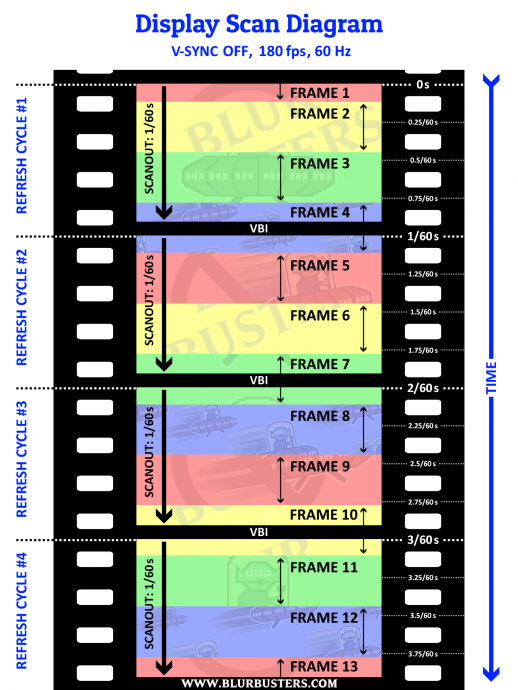
(This was graph-diagrammed from
high speed videos)
Now, 300fps at 60Hz creates average 5 tearlines per refresh cycle -- and average 5 frame slices per refresh cycle.
The latency gradient of a 1/5th screen height VSYNC OFF frameslice is only 1/5th of 1/60sec, which means you will get much more consistent VSYNC OFF latency throughout all pixels of the screen.
Check out
High Speed Video Of Scanout Latency to understand how a screen refreshes in high speed video, to understand the vertical latency gradient. VSYNC OFF essentially realtime splices frameslices into the scanout, so keeping vertical distance between tearlines smaller will create smaller latency non-uniformities.
In some situations you just simply hate tearing, and the only way to reduce scanout latency without getting tearing is simply raise the refresh rate -- 240Hz has only 1/4th the scanout latency of 60Hz if you want to chop your VSYNC ON latency. And GSYNC/FreeSync is even lower lag than VSYNC ON. Scanout latency of 4ms on a 240Hz monitor means amazing consistency.