fowteen wrote: ↑30 Mar 2020, 21:44
If you use gsync/freesync with vsync and the -3 fps cap in games, am I correct in thinking that this setup will give you no screen tearing and the same input lag during all framerates in the vrr unless the fps goes under the vrr into the lfc range where I heard that the input lag differs?
Here are two answers, the short answer and the long answer.
Short answer:
For scanout lag, yes lag is same at all frame rates within VRR range.
For overall lag, no. There's other lag factors at different frame rates.
Long answer:
The answer is not that simple -- it is neither yes nor no.
The latency chain is
complex.
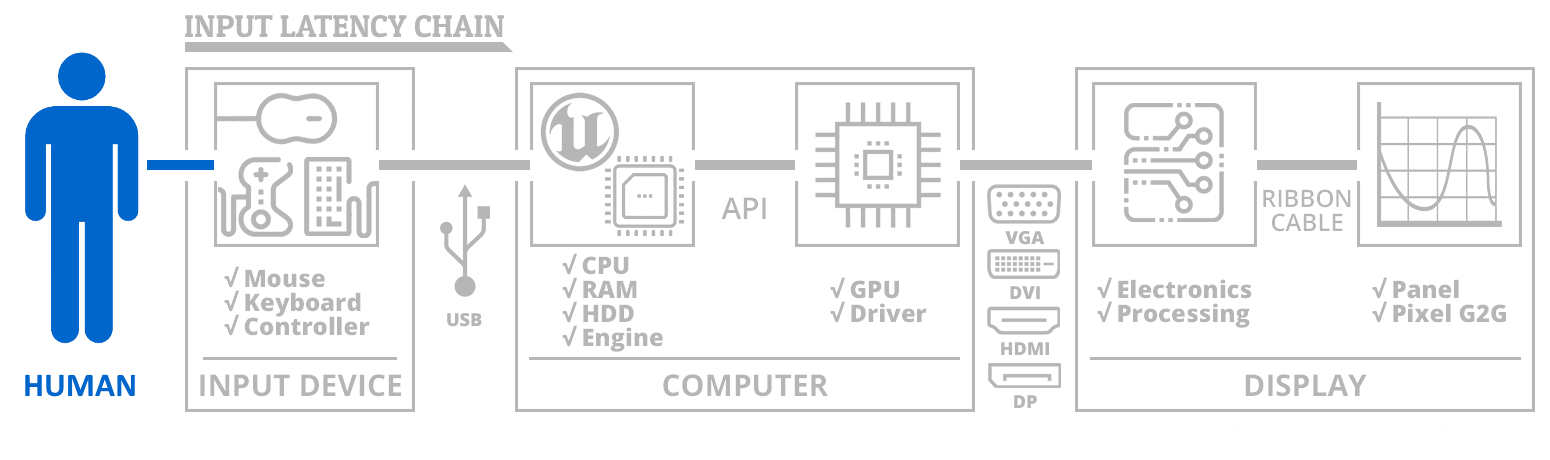
For example.... The game engine and the GPU. there's a framerate-induced latency that always happens with all monitors -- At 50 frame per second, a single-GPU subsystem has 1/50sec input latency just spent rendering the frame. The lower the frame rate, the more lag, no matter what. That's latency that occurs regardless of VSYNC ON, VSYNC OFF, G-SYNC, FreeSync, etc. So always keep the frame rate high if you don't want GPU lag. Upgrade your GPU to an RTX 2080 if you want the lowest GPU lag, for example!
HOWEVER, if you're asking about whatever latency contribution the monitor is injecting... the question becomes only
slightly simpler. I invite you to read all 14 pages of Jorim's
G-SYNC 101 on Blur Busters first. Over 5,000 different high speed video tests were used to generate almost 50 different graphs (within approximately a dozen slideshows).
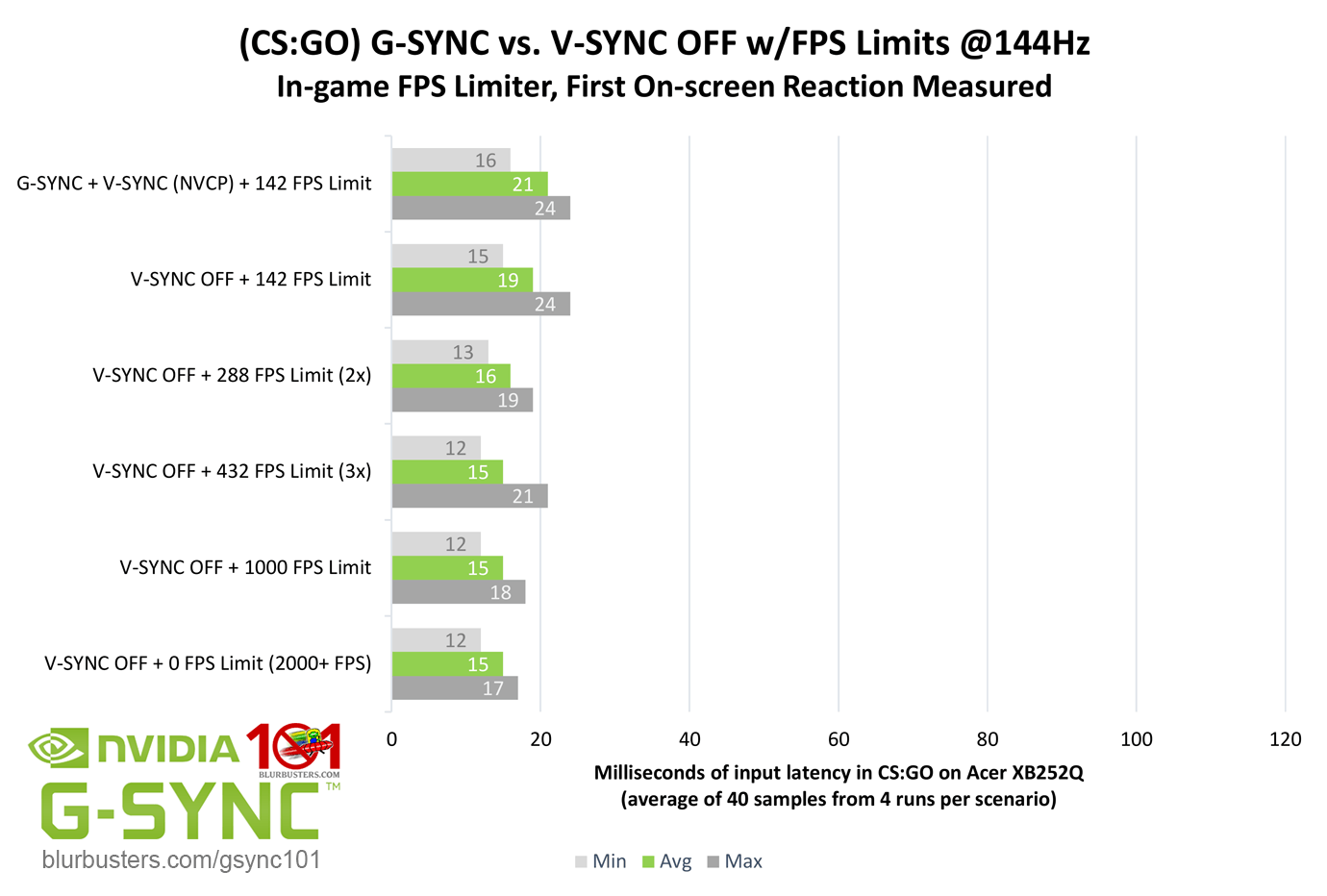
GSYNC/FreeSync has far less input lag than VSYNC ON. Much, much, much less. For a 240Hz monitor, for game framerates that stay within VRR range, lag can become almost identical to VSYNC OFF if you cap approximately 3fps below. (For more information why it's "3fps below", see the
Capping Differentials FAQ). The 3fps below cap is to prevent the G-SYNC monitor from automatically switching to a fallback sync technology when the frame rate tries to go above refresh rate. Which can create lag (if using VSYNC ON) or create tearing (if using VSYNC OFF).
For games capable of going far beyond VRR range (e.g. 500fps CS:GO, since a 500Hz monitor does not exist), it can sometimes be favourable to use VSYNC OFF instead of VRR.
That said, if you are playing games whose frame rates ranges almost always fall within VRR ranges (such as PUBG), then it can be quite favourable to use VRR. If you haven't bought a FreeSync monitor or G-SYNC monitor, it can be favourable to make sure you purchase the widest high-quality VRR range you can afford -- and the lowest lag VRR is always higher-Hz VRR monitors.
Now, if you narrow down your question a bit to focus ONLY on the display and its scanout (See
high speed videos of LCD refreshing; displays refresh one pixel row at a time from top to bottom) -- then yes, latency of all refresh rates is identical for all refresh rates within a VRR range (e.g. For 48Hz through 240Hz VRR -- all refresh cycles take exactly 1/240sec to sweep from top-to-bottom). So 1/240sec = 4.2ms = yes, scanout lag is the same.
That doesn't preclude that other parts of the lag chain will change (e.g. GPU lag increases at lower frame rates). The great news is that low frame rates (e.g. 50fps) on a 240Hz VRR monitor, is quite isolated one frame of lag (1/50sec) instead of the typical 3/50sec that most double-buffered VSYNC ON implementations often has (1 frame being rendered, 1 completed frame that's waiting for the next refresh cycle's VSYNC, and 1 front-buffer frame). That's literally like 20 milliseconds versus 60 milliseconds, for exactly the same 50fps frame rates. We're focussed on the GPU and sync-technology lag on that, even though 50fps has 20ms GPU lag (VRR) and ~60ms GPU lag (fixed-Hz VSYNC ON), and 100fps has 10ms GPU lag (VRR) and 30ms GPU lag (fixed-Hz VSYNC ON). VSYNC ON lag can vary quite a bit (max prerendered frames, NULL setting, etc) but unoptimized VSYNC ON always quite a bit worse than VRR.
So you see, even though GPU lag varies a lot, the scanout-lag is fixed (for all frame rates within VRR range). Two different parts of the lag chain.
(And that doesn't talk about yet other parts of the lag chain, though... Like network lag, game engine, controller lags, etc)