Page 1 of 2
Motion requirements for non-FPS gaming
Posted: 09 May 2020, 01:23
by RedCloudFuneral
I'm trying to figure out how much focus I should put on speed clarity for my new monitor vs other factors: The value of 240hz+ and deciding on panel type. I'm generally sold on the advantages of >144hz in regards to input latency but unsure on my needs regarding motion(I have owned a first-gen 240hz TN & an old 200hz VA, the later being so blurry as to cause me motion sickness. I currently own a new 165hz VA which is MUCH improved but I'm having trouble tracking faster enemy movement & noticing too much black smear. New fast TN/IPS monitors I have no experience with.)
I'm seeing that the main focus of fast monitors is competitive FPS gaming where I'm playing ARPGs/Isometric games. Speed for this genre is important due to constant movement, projectile dodging, & enemies dashing across the screen but I'm NOT dealing with flicking first-person cameras or the need for pixel-perfect aiming as are competitive FPS gamers. The complicating factor is that ARPGs tend to be dark games where each panel is at its worst. Getting mentally stuck here because the lack of discussion on fast monitors in genres other than FPS, so I'm looking for some opinions.
The other question I have: When someone states that a TN panel performs worse in color reproduction than IPS does this directly relate to SRGB % or a different factor? I'm seeing the new 27" 1440p 240hz TN panels with 122% SRGB & wondering if there's any scenario that could result in less pleasing colors than a 108% SRGB IPS. I'm speaking purely in regards to subjective vibrancy/pleasantness to the eye rather than performance for color critical work. From my experience the best colors I've seen were the 200hz VA I mentioned prior followed by the 240hz TN, my 4K IPS, & 165hz VA in that order. The 200hz panel was above 100% SRGB where the others all hover around 100%. Each was set by eye to what I felt looked best. This plays into my above considerations because I don't want to jump into a specific panel type for the improved colors when my own experience shows that its not that easy to call.
Re: Motion requirements for non-FPS gaming
Posted: 09 May 2020, 20:23
by Chief Blur Buster
RedCloudFuneral wrote: ↑09 May 2020, 01:23
I'm trying to figure out how much focus I should put on speed clarity for my new monitor vs other factors: The value of 240hz+ and deciding on panel type. I'm generally sold on the advantages of >144hz in regards to input latency but unsure on my needs regarding motion(I have owned a first-gen 240hz TN & an old 200hz VA, the later being so blurry as to cause me motion sickness. I currently own a new 165hz VA which is MUCH improved but I'm having trouble tracking faster enemy movement & noticing too much black smear. New fast TN/IPS monitors I have no experience with.)
I'm seeing that the main focus of fast monitors is competitive FPS gaming where I'm playing ARPGs/Isometric games. Speed for this genre is important due to constant movement, projectile dodging, & enemies dashing across the screen but I'm NOT dealing with flicking first-person cameras or the need for pixel-perfect aiming as are competitive FPS gamers. The complicating factor is that ARPGs tend to be dark games where each panel is at its worst. Getting mentally stuck here because the lack of discussion on fast monitors in genres other than FPS, so I'm looking for some opinions.
The other question I have: When someone states that a TN panel performs worse in color reproduction than IPS does this directly relate to SRGB % or a different factor? I'm seeing the new 27" 1440p 240hz TN panels with 122% SRGB & wondering if there's any scenario that could result in less pleasing colors than a 108% SRGB IPS. I'm speaking purely in regards to subjective vibrancy/pleasantness to the eye rather than performance for color critical work. From my experience the best colors I've seen were the 200hz VA I mentioned prior followed by the 240hz TN, my 4K IPS, & 165hz VA in that order. The 200hz panel was above 100% SRGB where the others all hover around 100%. Each was set by eye to what I felt looked best. This plays into my above considerations because I don't want to jump into a specific panel type for the improved colors when my own experience shows that its not that easy to call.
For display motion blur -- refer to this chart:
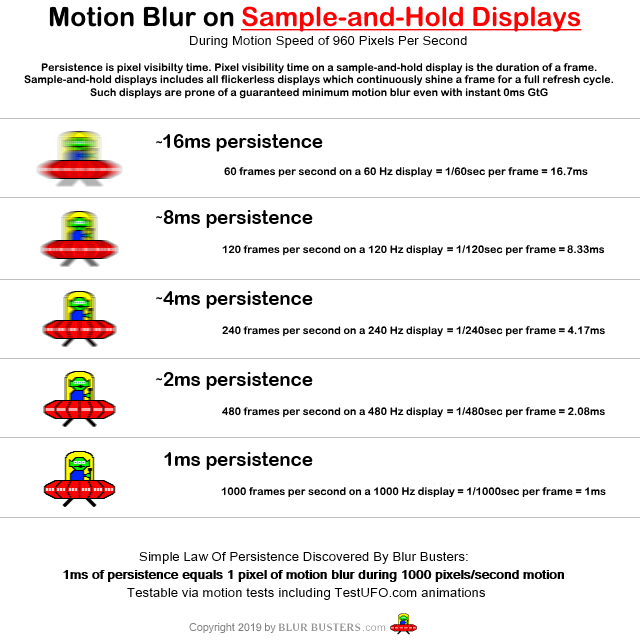
On a very good 240Hz monitor, browser scrolling is about 1/4th the motion blur of 60fps at 60Hz.
The problem is slow GtG will make things worse. 144Hz 1ms GtG is clearer than 165Hz 3ms GtG. Get your monitor panel's manufacturer VESA GtG 90% rating (make sure it's GtG, see
Pixel Response FAQ: GtG versus MPRT. You'll want to add GtG-time to the refresh-time to compute your approximate combined motion blurring+ghosting+smearing.
For example, 165Hz 3ms would be (1/165sec + 3ms) = 9ms = 9 pixels of motion blur for 1000 pixels/second.
Most TestUFO animations are 960 pixels per second which is intentionally selected to make it easy to estimate number of pixels of motion blurring (see
Making Of: Why Are TestUFO Display Motion Tests 960 Pixels Per Second?.)
If you want minimum motion blur, then:
-- You need high Hz or strobing
-- You need fast GtG
However, another alternative is the use of a motion blur reduction mode (strobe backlight), see
Motion Blur Reduction FAQ. They come in multiple brand names such as ULMB, LightBoost, ELMB, DyAc, VRB, PureXP. You will want to choose a brand that uses a brighter strobe backlight (less brightness loss), reduced strobe crosstalk, and perhaps lower latency.

If you're wanting clearer motion, then you definitely need a faster display. VA classically isn't good for motion handling, though the new 240Hz VA is even better. VA classically has very different GtG numbers for bright colors and dark colors, creating a smearing effect for dark colors. Though this is getting better on some panels.
Re: Motion requirements for non-FPS gaming
Posted: 09 May 2020, 23:35
by RLCSContender*
You're right, it's closer to 2.5ms. Forii is good at doing these motion tests.
Re: Motion requirements for non-FPS gaming
Posted: 10 May 2020, 04:26
by RedCloudFuneral
Thanks for the advice, I've been digging into the forum since I originally posted and am picking up on a lot of info.
My purpose with the new monitor is to use it in combination with gaming to help train my eyes/brain to correctly track images and use both eyes together. I've had surgery to correct most of my eyesight related issues but am focusing on an Amblyopia which redeveloped post-recovery. I'm going to be avoiding strobing features for the time being as there is a chance the brain may perceive strobe crosstalk as double vision(the trigger for a lazy eye to switch off.) I'm more concerned about this as owned 2 strobed displays around the time my vision relapsed, I left the strobe on 24/7 as I subjectively preferred the effect even in desktop use. I have no way to link cause & effect so I'm erring on the side of caution.
Am I increasing my requirement for fast GtG response by not using strobing to 'cover up' slower transitions or are all improvements strictly additive? Asking because I could beat the motion sickness on my old VA when I turned on strobing and could keep a stable FPS.
It's common in ARPG games to have bright colors on darker backgrounds leading to more smearing on VA than you'd see in other genres. It appears in my looking at reviews that TN tends toward being content agnostic & IPS falls between VA & TN regarding dark level smear. Am I understanding this correctly? The gulf between the two technologies(IPS/TN) is wider in this usage case?
In the video RLCScontender posted I can see what appears to be mild overshoot(halo) in the top UFO which seems to support this statement(it's really subtle though.)
Re: Motion requirements for non-FPS gaming
Posted: 10 May 2020, 09:14
by xxxtinct
Chief Blur Buster wrote: ↑09 May 2020, 20:23
If you're wanting clearer motion, then you definitely need a faster display. VA classically isn't good for motion handling, though the new 240Hz VA is even better. VA classically has very different GtG numbers for bright colors and dark colors, creating a smearing effect for dark colors. Though this is getting better on some panels.
This is a bit of a hypothetical that goes slightly off-topic, but why do we see so many gaming monitors being released with VA panels, then? Obviously VA is in 3rd place behind IPS and TN for motion clarity, yet MSI, AOC and others release tons of "gaming monitors", that are curved VA panels.. I myself fell for the hype on the 165hz MAG272QR, and the motion blur led me to this site before I found the 251rx as a replacement.
Re: Motion requirements for non-FPS gaming
Posted: 10 May 2020, 09:51
by 1000WATT
RedCloudFuneral wrote: ↑10 May 2020, 04:26
I've had surgery to correct most of my eyesight related issues but am focusing on an Amblyopia which redeveloped post-recovery.
Which one? There are several types in the classification. What was corrected by the operation?
Re: Motion requirements for non-FPS gaming
Posted: 10 May 2020, 11:59
by Chief Blur Buster
xxxtinct wrote: ↑10 May 2020, 09:14
This is a bit of a hypothetical that goes slightly off-topic, but why do we see so many gaming monitors being released with VA panels, then? Obviously VA is in 3rd place behind IPS and TN for motion clarity, yet MSI, AOC and others release tons of "gaming monitors", that are curved VA panels.. I myself fell for the hype on the 165hz MAG272QR, and the motion blur led me to this site before I found the 251rx as a replacement.
As much as VA is slow for dark colors, the VA venn diagram still overlaps somewhat.
Literally, there are over 60,000 different GtG numbers on the same panel (because of the number of GtG color combos -- the numbers reported are averages, GtG90%, or best-case GtG, as seen in
Pixel Response FAQ. The fastest VA colors can be faster than the slowest TN and IPS colors. But the GtG heatmap is bad.
There's a venn diagram overlapping point where a 240Hz VA panel is (on-average) superior to a generic 60Hz IPS panel with merely average overdrive, and sufficiently fast enough that the dark-ghosting isn't too bad.
As IPS has massively improved in response time (in those new 240Hz IPS panels), the GtG ghosting is definitely massively less than past IPS panels. The same thing is happening to VA too, although the dark-ghosting is still noticeable even on 240Hz VA.
VA colors are often very contrasty and saturated, so they have their appeal, and as much esports sometimes talk trash about VA, they have their plasce.
VA panels have better blacks which is great for space scenes and such (though motion in darks have to be de-prioritized)
If you're not earning money playing competitive in esports, the attributes of VA may still be worthwhile if you're more annoyed by lack of contrast ratio on IPS or TN, than about motion handing quirks. And a 240Hz VA is still delightfully better than a 60Hz VA in motion handling.
Re: Motion requirements for non-FPS gaming
Posted: 10 May 2020, 13:18
by xxxtinct
Chief Blur Buster wrote: ↑10 May 2020, 11:59
xxxtinct wrote: ↑10 May 2020, 09:14
This is a bit of a hypothetical that goes slightly off-topic, but why do we see so many gaming monitors being released with VA panels, then? Obviously VA is in 3rd place behind IPS and TN for motion clarity, yet MSI, AOC and others release tons of "gaming monitors", that are curved VA panels.. I myself fell for the hype on the 165hz MAG272QR, and the motion blur led me to this site before I found the 251rx as a replacement.
As much as VA is slow for dark colors, the VA venn diagram still overlaps somewhat.
Literally, there are over 60,000 different GtG numbers on the same panel (because of the number of GtG color combos -- the numbers reported are averages, GtG90%, or best-case GtG, as seen in
Pixel Response FAQ. The fastest VA colors can be faster than the slowest TN and IPS colors. But the GtG heatmap is bad.
There's a venn diagram overlapping point where a 240Hz VA panel is (on-average) superior to a generic 60Hz IPS panel with merely average overdrive, and sufficiently fast enough that the dark-ghosting isn't too bad.
As IPS has massively improved in response time (in those new 240Hz IPS panels), the GtG ghosting is definitely massively less than past IPS panels. The same thing is happening to VA too, although the dark-ghosting is still noticeable even on 240Hz VA.
VA colors are often very contrasty and saturated, so they have their appeal, and as much esports sometimes talk trash about VA, they have their plasce.
VA panels have better blacks which is great for space scenes and such (though motion in darks have to be de-prioritized)
If you're not earning money playing competitive in esports, the attributes of VA may still be worthwhile if you're more annoyed by lack of contrast ratio on IPS or TN, than about motion handing quirks. And a 240Hz VA is still delightfully better than a 60Hz VA in motion handling.
I did enjoy the colors on my VA while I had it for about a week, I guess I underplayed the real margin of victory VA's have in that contrast department. I wish I had taken a testufo video on the 272QR for others to see, because it was absolutely horrible. I guess my problem with the VA's is more on the marketing side, since there's so many being claimed as specifically for gaming.
Re: Motion requirements for non-FPS gaming
Posted: 10 May 2020, 15:12
by RedCloudFuneral
xxxtinct wrote: ↑10 May 2020, 09:14
This is a bit of a hypothetical that goes slightly off-topic, but why do we see so many gaming monitors being released with VA panels, then? Obviously VA is in 3rd place behind IPS and TN for motion clarity, yet MSI, AOC and others release tons of "gaming monitors", that are curved VA panels.. I myself fell for the hype on the 165hz MAG272QR, and the motion blur led me to this site before I found the 251rx as a replacement.
To defend the 165hz VA I have now I purchased it before I rekindled an interest in ARPGs. I'm perfectly happy with this monitor for racing games, slower-paced RPGs, strategy games, etc. The reduced input latency with the higher framerates is noticeable even where you don't need quick motion/G2G as is reduced tearing moving across maps. Contrast is great. It was also CHEAP. To add to that some games are designed to avoid darker areas for competitive play(avoiding VA's major downfall with black smear.) VA making up most of the Ultrawide monitor some will choose them for the wider FoV in games like PUBG and find the response times adequate. Simple answer, there are scenarios where you can take advantage of the higher framerate or other VA exclusive features(32:10 for example) without worrying about the rest.. I just grew out of them.
@1000Watt It's complicated to discuss my eyesight but I'll try. I was born crossed-eyed, one eye was far-sighted, and the other near-sighted. I had muscle surgery at a young age which cosmetically corrected the crossing but the eyes still pull inward. The surgery I had in 2017 was PRK to correct the prescription. I'm now 20/20 L, 20/25 R which has eliminated the major imbalance. I struggle to see depth and track movement because my brain prefers only to use one eye at a time and they need to be trained to track together(which I'm working on with a doctor.) I've also created a new problem for myself in how close I sat to the screen for years and struggle to focus on distant objects despite the lens correction. On top of that my right eye is borderline lazy as with my prescription corrected my brain no longer switches between eyes depending on where I'm looking preferring just to use the dominant eye for all distances.
What I'm doing now is digging into all the games I've been avoiding for years due to disorientation following movement on the screen(AKA I sucked at them and rage quit) as it seems to be a good challenge for the eyes & I'm at the stage where I just need to retrain the eye muscles/brain to work properly. I'm feeling like I just entered the wild-west of monitor turf here because there's not much established science connecting my vision issues to display technology, I'm mostly just stumbling blind trying to make sense of what monitor to purchase through what makes sense intuitively.
Re: Motion requirements for non-FPS gaming
Posted: 10 May 2020, 16:36
by 1000WATT
Please note that I use Google translator.
I think I understand you. The main reason your brain chose to divide its eyes into the master and the follower was due to the double image, which ultimately developed dysbinocular amblyopia.
usually in such cases, stimulate the method of "occlusion of the leading eye." And they do exercises: drawing with bright colors, puzzles, designers or computer games. The process of restoring sharpness in the slave eye takes months. And after the focus in two eyes is normalized, the brain very quickly rebuilds itself. And begins to use both.
I would like to hear what method your doctor recommends.
Since just computer games will not fix it. You cannot be constantly focused on your eyes while you play. You will definitely be distracted and as soon as this happens your brain will immediately return to the leading eye. You won’t notice this because you are passionate about the game. And the process of correcting the focus of the driven eye will stop.