Lesson:
1. Not all pixels refresh at the same time
#1 important lesson!
To understand how a display refreshes, please see these high speed videos:
High speed videos of scanout
TestUFO Test That Flashes 4 Pictures In Rapid Flicker Fashion (for high speed cameras)
For a test
www.testufo.com/scanout (Try it now if you're not epileptic!). it will display 4 images in a rapid sequence at full frame rate. Now point a Samsung Galaxy camera at ultra-slo-mo 960 frames per second at that test. The resulting high speed video (ultra-slow-motion) looks like this on a common TN LCD:
>>> Play This Video First <<<
(There's more videos at
High speed videos of scanout including fast/slow LCDs and OLEDs)
Play the above video now, before reading the below post
It will help you understand better (really).
You'll realize displays refreshes 1 pixel at a time, like a calendar, left-to-right, top-to-bottom. Just like a calendar that that is 1920 days wide (per week) and 1080 weeks tall. Imagine refreshing one pixel at a time, super-fast -- dislay panels have to be a superhero (like superman) in refreshing pixels really fast.
Imagine trying to record a 2D picture over a 1D medium (wire). It has to be serialized one pixel at a time. That's why it's done this way, because it's not possible to transmit a whole picture instantaneously all at the same time, it has to transmit one pixel at a time through the cable wire -- literally. (Advanced detail, it might compress a whole row, or packetize, but it's still a defacto one continuous serial sequence of binary numbers like 10101010's). This is the art of the raster scanning mechanism, true from 1930s analog television broadcasts, all the way to 2020s DisplayPort cables.
The matter of fact, is that cables deliver 1 pixel row at a time top-to-bottom, and most displays often refresh 1 pixel row a time, top-to-bottom. Some displays (DLP, Plasma) may have to convert to different refreshing patterns, but the simplest refresh pattern is the raster-based top-to-bottom refresh.
Now, if you map it out to a graph, the graph looks like this:
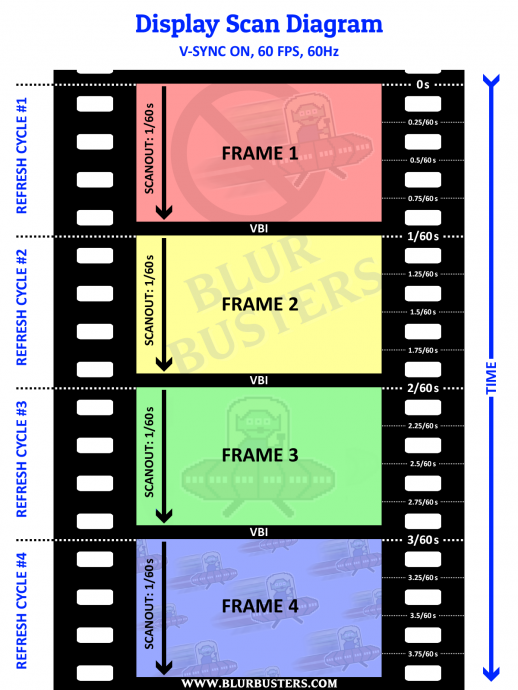
The VBI (vertical blanking interval) is the tiny pause after a refresh cycle finishes "sweeping", but before next refresh cycle begins. Be noted, that the sweep is the
instantaneous beginning of the LCD GtG, and not the GtG momentum that trails behind.
The VBI can be tiny (short pauses between scanout sweeps in video), or can be huge (long pauses between scanout sweeps in video)
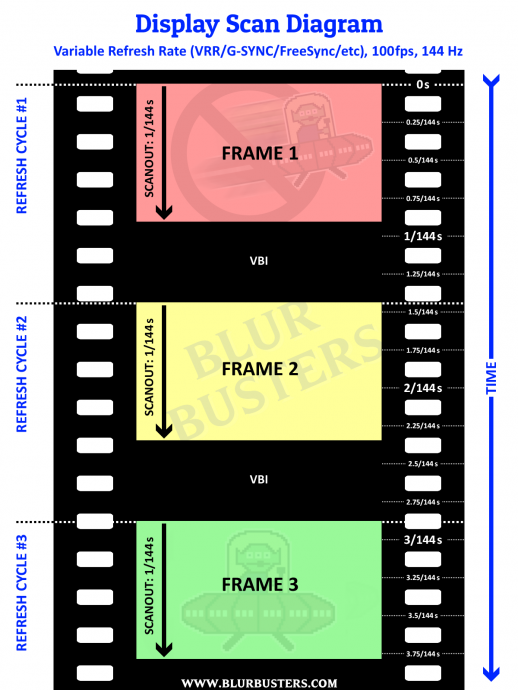
Now, if you use VSYNC OFF, frame presentation no longer waits for VSYNC, and can "splice in realtime" into scanout.
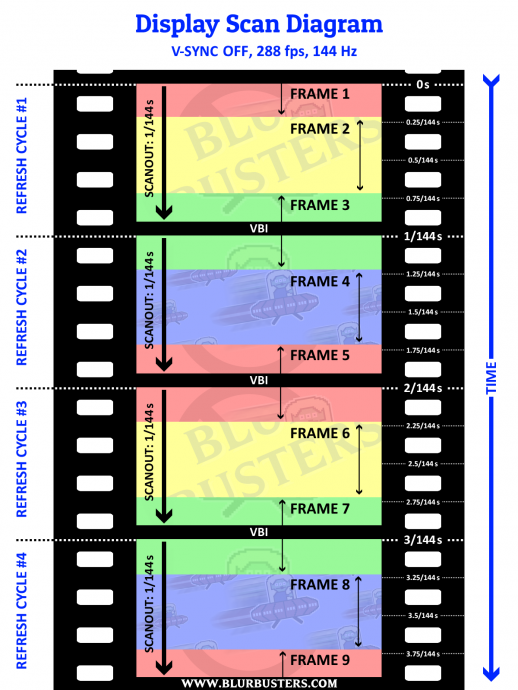
VSYNC OFF can also be metaphorically be thought as real-time streaming of frameslices into the middle of display scanout.
Stationary tearlines occur when frame rates are similar to Hz, so the next tearline occurs at approximately the same tearline location:
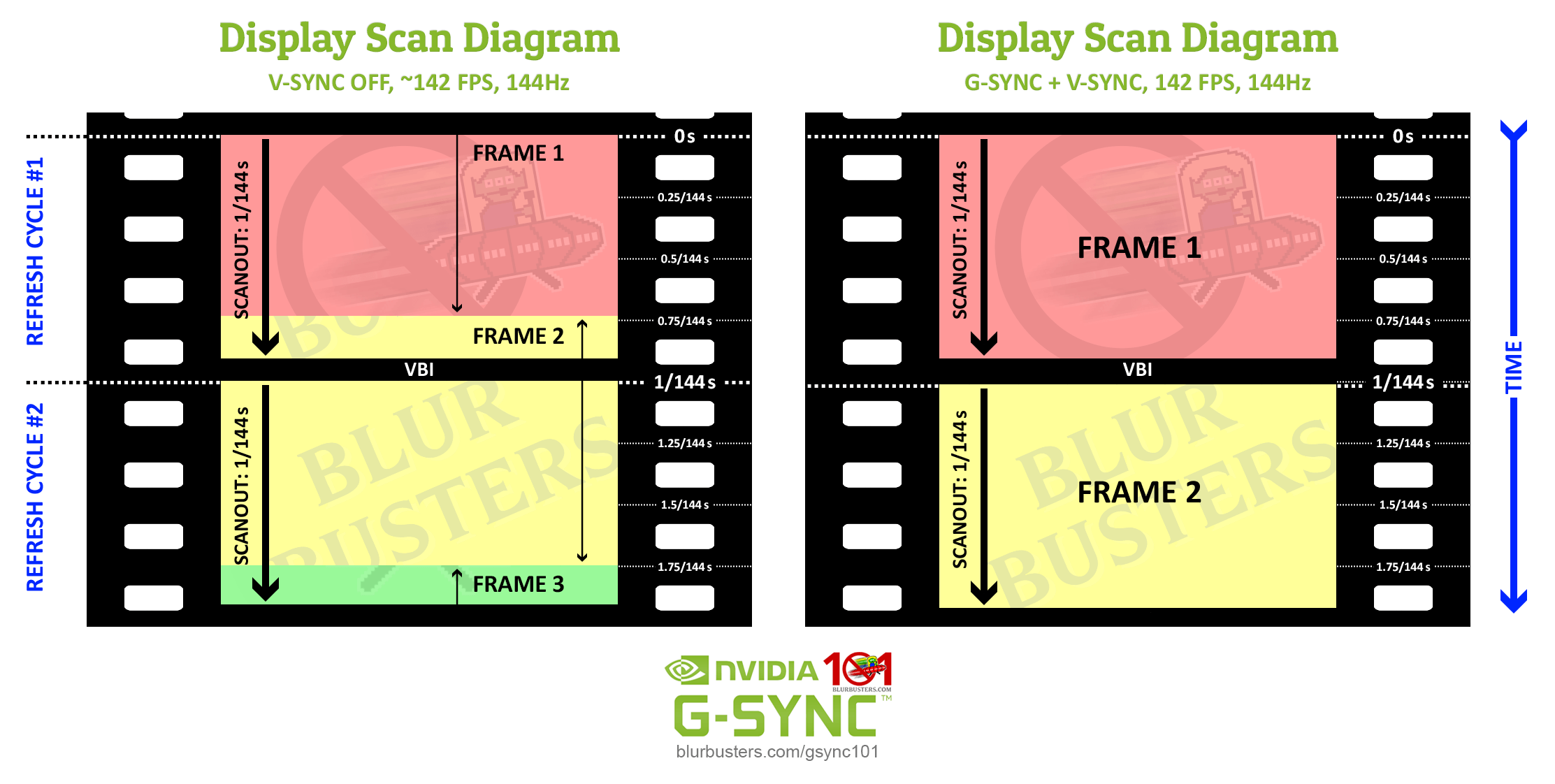
Also, if you increase VSYNC OFF frame rate, it can become huge numbers of tiny frame slices:
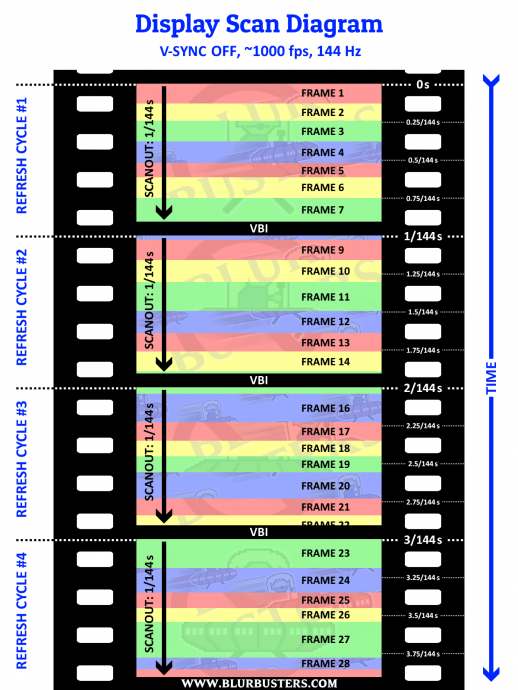
Now study this again:
1. Not all pixels refresh at the same time
This is the most important lesson! You should be
watching the video before looking at the pictures in this post.
Lessons Learned
1. Not all pixels refresh at the same time
2. Screens refresh from top-to-bottom in one sweep
3. Blanking interval (VBI) is the pause between sweeps
4. "VSYNC" comes from "Vertical Sync" which is a portion of VBI ("Vertical Blanking Interval").
5. "VSYNC ON" means wait for VBI before switching frames (don't interrupt the scanout with new frame)
6. "VSYNC OFF" means don't wait for VBI before switching frames (interrupt the scanout, tear in a new frame)
Do you understand better?