G-Sync Problems 2x ASUS 165Hz Monitors
Posted: 15 Jun 2020, 08:48
Hello!
I have this problem for a while now and I just can't find a solution to it...
My Setup is 2x ASUS RoG Swift PB278QR w/ 165Hz, 8700k 5GHz, 32GB 3200MHz RAM, RTX 2080 Ti for main monitor and rtx 2060 for second monitor and streaming.
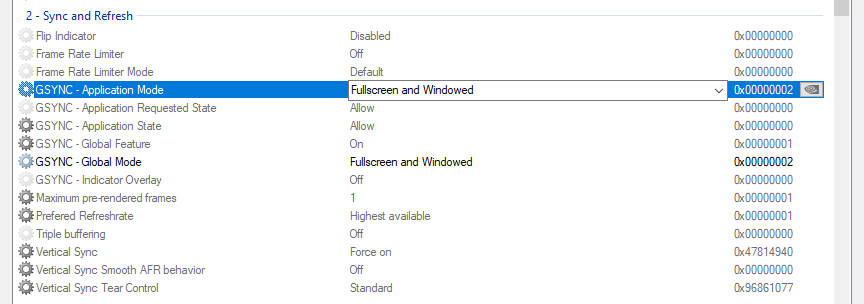
I capped my FPS at 155 with RTSS and have Gsync enabled for Fullscreen and Window Mode. Also V-Sync is on in NVCP so I think that I have the best/correct settings here. I reinstalled Windows 10 (1909 Version) , disabled Game Mode and Xbox Bar and always have my Nvidia driver up to date (clean uninstall with DDU in safe mode).
Sadly I often get FPS drops and micro stutters when I play on borderless window (what I want to do, so I can switch faster out of the game) and I just don't know why...
I mean I tried everything. Even bought a second Gsync Monitor which is the exact same like my main monitor because every Forum said "you need to have same Refresh Rate". But still I often get such a weird stutter and lag. It's even worse when I watch something on my second monitor or when there is any movement on it.
Do you have any idea how I can finally fix it? One thing that maybe could couse trouble is the fact that I have 2 Gsync monitors and both are hooked to a RTX card (Main monitor to 2080 Ti and 2nd to 2060)? Maybe thats causing the stutter and I should connect my second monitor to my iGPU instead of the RTX 2060 so gsync does not try to sync both monitors?
Also I would like to know your opinion about NULL. Should I turn it on/off/Ultra? Or keep the FPS Limit at 155 with RTSS?
Thanks for your help ( :
Regards
Michael
I have this problem for a while now and I just can't find a solution to it...
My Setup is 2x ASUS RoG Swift PB278QR w/ 165Hz, 8700k 5GHz, 32GB 3200MHz RAM, RTX 2080 Ti for main monitor and rtx 2060 for second monitor and streaming.
I capped my FPS at 155 with RTSS and have Gsync enabled for Fullscreen and Window Mode. Also V-Sync is on in NVCP so I think that I have the best/correct settings here. I reinstalled Windows 10 (1909 Version) , disabled Game Mode and Xbox Bar and always have my Nvidia driver up to date (clean uninstall with DDU in safe mode).
Sadly I often get FPS drops and micro stutters when I play on borderless window (what I want to do, so I can switch faster out of the game) and I just don't know why...
I mean I tried everything. Even bought a second Gsync Monitor which is the exact same like my main monitor because every Forum said "you need to have same Refresh Rate". But still I often get such a weird stutter and lag. It's even worse when I watch something on my second monitor or when there is any movement on it.
Do you have any idea how I can finally fix it? One thing that maybe could couse trouble is the fact that I have 2 Gsync monitors and both are hooked to a RTX card (Main monitor to 2080 Ti and 2nd to 2060)? Maybe thats causing the stutter and I should connect my second monitor to my iGPU instead of the RTX 2060 so gsync does not try to sync both monitors?
Also I would like to know your opinion about NULL. Should I turn it on/off/Ultra? Or keep the FPS Limit at 155 with RTSS?
Thanks for your help ( :
Regards
Michael