jorimt wrote: ↑29 Jun 2020, 16:57
I've done some casual tests of the "High" BFI setting, which, from my readings, is a little above 100 nits at max TV brightness (though not sure if I need to set my reading mode to something different for BFI in the measurement software), and it is extremely clear (but obviously relatively dark/flickery) on the crosstalk test. Short of that, not 100% sure what else to look for (or what UFO settings are optimal for 4k 120Hz), as the subject of strobing isn't my specialty.
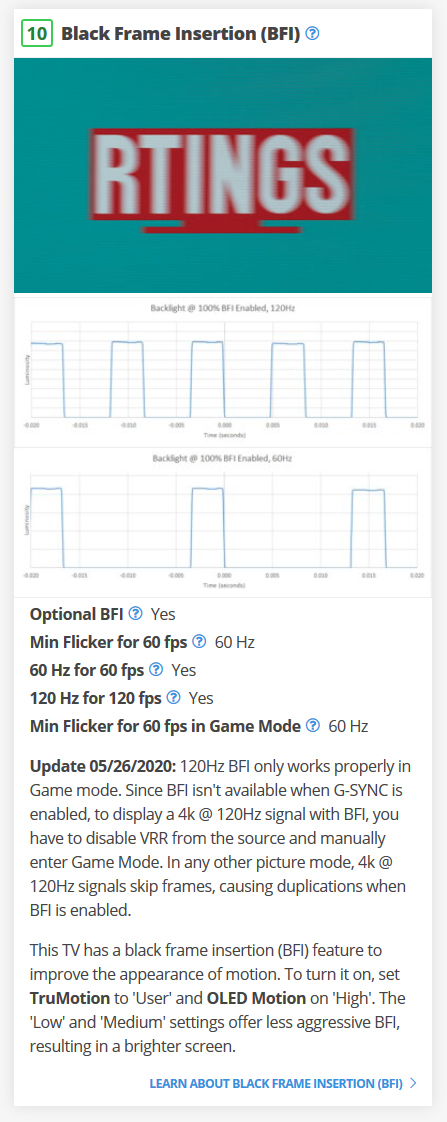
Your OLED appears to be using BFI in 1/240sec granularity increments.
Motion blur of 60Hz BFI and 120Hz BFI probably is similar at this current granularity.
120Hz + 50%:50% BFI = similar amount of motion blur to 240fps at 240Hz
If you see approximately 1/4th the motion blur of 4K 60fps non-BFI, then 4K 120Hz BFI is working correctly.
You do, however, need to maintain framerate=Hz, in order to maintain this effect, because strobing amplifies visibility of microstutters. 120fps 120Hz VSYNC ON should look absolutely beautiful, but anything 119fps or lower, 4K 60fps BFI looks better.
You will see the obvious blur-increase effect in TestUFO when you adjust OLED Motion setting during BFI.
Mathematically, it's very simple motionblur-wise, from Blur Busters Law mathematics (1ms = 1 pixels per 1000 pixels/sec).
For games that can run perma-60fps
- 60Hz BFI with OLED Motion High = 25%:75% ON:OFF = 4.2ms MPRT(100%) = 4 pixels of motionblur per 960 pixels/sec = similar to 240fps@240Hz nonstrobed LCD
- 60Hz BFI with OLED Motion Medium = 50%:50% ON:OFF = 8.3ms MPRT(100%) = 8 pixels of motionblur per 960 pixels/sec = similar to 120fps@120Hz nonstrobed LCD
- 60Hz BFI with OLED Motion Low = 75%:25% ON:OFF = 12.5ms MPRT(100%) = 12 pixels of motionblur per 960 pixels/sec = similar to 80fps@80Hz nonstrobed LCD
For games that can run perma-120fps
- 120Hz BFI with 50%:50% ON:OFF = 4.2ms MPRT(100%) = 4 pixels of motionblur per 960 pixels/sec = similar to 240fps@240Hz nonstrobed LCD
OLED BFI is so reliably predictable in TestUFO behaviours, that I don't even need to look at the display to tell you these motion-blur predictions; as it's quite mathematically simple; persistence-based motion blur is controlled by pixel visibility time per frame. You will see very interesting line thickening/thinning effects with
TestUFO Eye Tracking Chess Board Illusion for 60Hz BFI as you cycle through "OLED Motion" settings, with blurwidths corresponding to 1/4th refresh, 1/2 refresh, and 3/4 refresh. (Try it, that optical illusion is fun and motion blur educational during adjustable-MPRT situations -- watching those chessboard squares becomes thinner rectangles!)
The con of shorter pulse widths is darker image, a pick-your-poison effect between brightness versus motion clarity. However, 120Hz BFI 4.2ms will probably be brighter than 60Hz BFI 4.2ms, due to twice as many flashes.
For the smoothest BFI in real-world games, sync your framerate=Hz using your favourite low-lag VSYNC technology (VSYNC ON + NULL, or Low-Lag VSYNC HOWTO, or RTSS Scanline Sync), switch to the lowest-common-denominator refresh rate for your particular game, and run.
Most competitive players seem to be stuck at ~400dpi or ~800dpi for gaming mice, but recommendations become different for motion blur reduced displays. Configure mouse is 1600dpi or 3200dpi, and adjust in-game sensitivity lower, to avoid strobe-amplified mouse microstuttering. I personally now use 3200dpi to avoid the mouse becoming a stutter weak link for VRR and strobing (especially during mouse slowturns/slowpans).
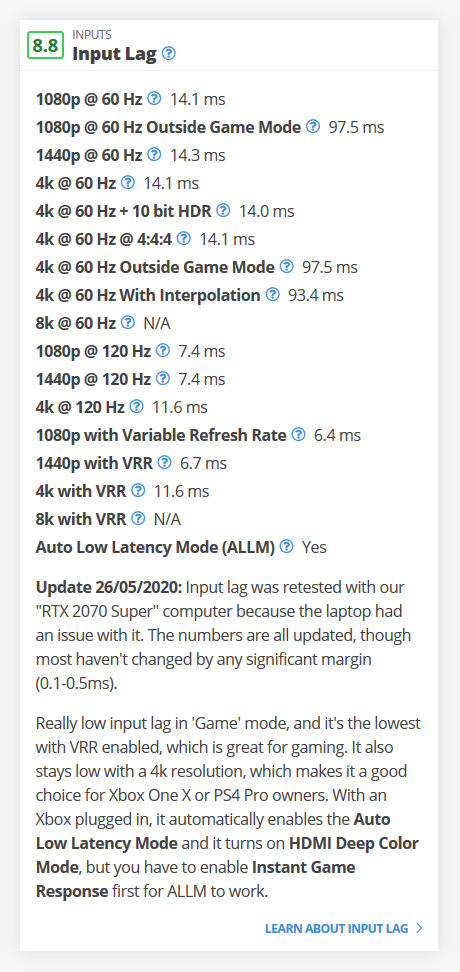
If you want to keep at 120Hz, 4K 120fps is a bit demanding for a 1080Ti in real world games. So reduce your game's resolution and detail until your game runs perma-120fps, and then do it. Motion-quality-priority strobing without double-image effects needs framerate=Hz.
It will not be as low-motion-blur as ULMB or CRT (due to the minimum 4.2ms pulse width) but it would have zero strobe crosstalk being an OLED, and should look absolutely beautiful if you can maintain framerate-refreshrate lock.
Strobe at framerate=Hz can be even better looking than VRR.
BUT, strobe at framerate-mismatch-Hz is worse looking than VRR.
For those who need low-lag strobing, you can use VSYNC OFF and max Hz, and tolerate the stutters. But if you're motion-quality-priority BFI, you definitely need to control your microstutters (fix the mouse, fix the framerate=Hz).
 worthless monitors, even when they are laughable advertised as a kind of "fw900 without the bulk and weight" in my opinion).
 ) but let me ask you, if you want, if not, no problem, i dont want to be too stubborn wth you, but i would really apreciate as well if you can test bfi high mode at 80hz at least, just to be sure user is not restricted to only 60 or 120 bfi hz,
  (y)
(y) 

 , this is the reason why i'm interested to know if 100Hz 80Hz BFI can also work, to have flexibility to adapt screen frequency to exact or minimun FPS content, trying allways assure BFI without random sttuters.