The Z-Series will produce the best clarity, as Z-Series can go down to as low as 0.5ms persistence, while LightBoost 10% is about 1.4ms persistence. However, keep in mind that there is always a persistence-versus-brightness tradeoff on all strobe backlights, since shorter flashes lead to less average brightness. Also, I've measured the Z-Series strobing to have approximately 1-2ms less lag than LightBoost strobing.
Z-Series: 0.5ms persistence
LightBoost: 1.4ms persistence
So you have almost 3x sharper motion. However, you are already reaching points of diminishing returns because LightBoost 10% vs 100% is so subtle (to most people). So you may not notice a difference except during ultrafast ultrasmooth refresh-synchronized motion (e.g. 'perfect smooth' VSYNC ON panning at 3000 pixels/second). 1.0ms persistence appears to be the general sweet spot, with about 2.5ms+ if you need extra brightness. However, some of us do like the 0.5ms mode when gaming in a dark room.
Improved motion clarity can improve reaction times, but darker images can decrease reaction times, so you want to adjust persistence to a sweet spot where you perform the best in the tradeoff.
hex wrote:color quality with lighboost really doesnt concern me as any of them will be an improvement over what im currently using. what does concern me is this
strobe crosstalk "problem". does this happen on all monitors when using lighboost (or equivalent) or just with these new BenQ?
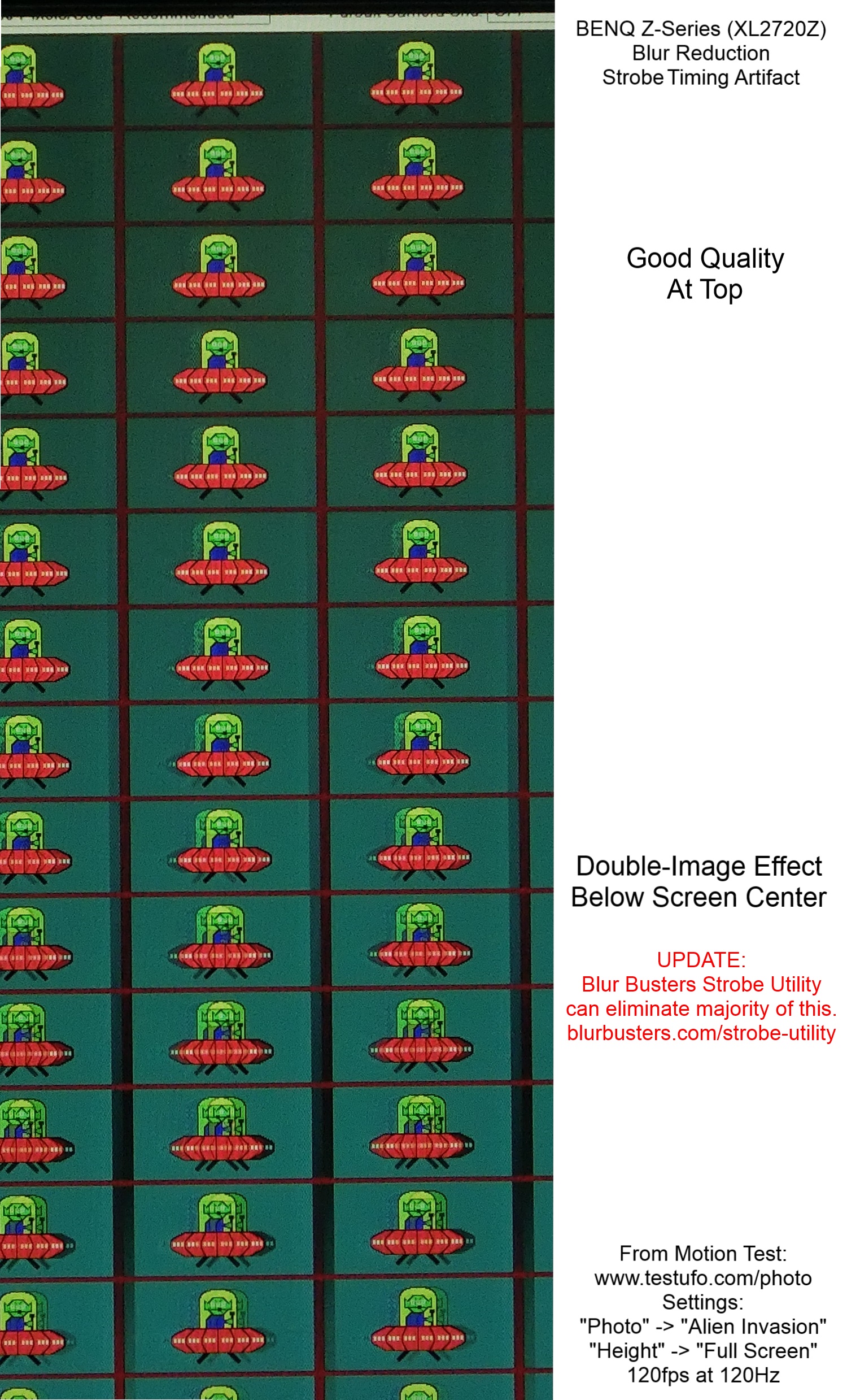
Strobe crosstalk is present on all strobe backlights to varying extents. However, it is usually very faint except at the top/bottom edges. LightBoost, Turbo240 and ULMB all have varying amounts of strobe crosstalk which is simply the leftover incomplete GtG transitions leaking between strobes.
What was different with the Z-Series is that by default, the strobe crosstalk artifact is more visible than usual, and it requires calibration with Blur Buster Strobe Utility, to reduce strobe crosstalk to levels roughly competitive with LightBoost. You can see the before versus after images at
http://www.blurbusters.com/strobe-utility . Also, 24" 1ms monitors will generally have slightly less strobe crosstalk than 27" monitors and older 24" 2ms monitors. Also, Z-Series will strobe at any refresh rate on all graphics cards, which gives you more options. If you were super picky about crosstalk, you can also reduce the contrast setting, but that can make the picture darker/duller.
Most of the time, you will not notice strobe crosstalk in real-world gaming, on a well-adjusted monitor (whether it's LightBoost or BENQ Z-Series).
hex wrote:is it possible to achieve motion clarity across the entire display like in following image?
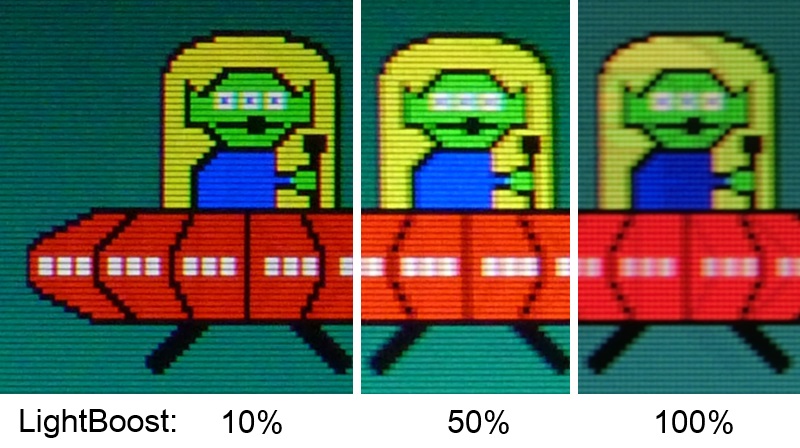
That photo is taken of moving UFOs moving across the center of the screen. If you look closely, you will see some very faint strobe crosstalk in the LightBoost=100% image. Doing the same moving UFOs at the top edge or bottom edge of the screen, shows strobe crosstalk artifacts. (e.g. running TestUFO Alien Invasion via
http://www.testufo.com/photo at Height -> Full Screen, on the LightBoost monitors, show similiar artifacts too at the top/bottom edges)
This is caused by different parts of the screen being refreshed at different times (top to bottom scanout) so some of the GtG transitions are more complete and some of the GtG transitions are less complete. Which creates the strobe crosstalk artifact. The large Vertical Total tweaks gives more time for GtG transitions to complete (via the use of large blanking intervals) before the strobe backlight flashes.
Hope this answers your questions!