kaemon wrote:I currently don´t know a lot about G-Sync. But will things like LightBoost, ULMB, Turbo240, BENQ Blur Reduction work at the same time as G-Sync? I have heard that all of them reduce motion blur significantly. Is there any other reason to buy a G-Sync monitor except to prevent tearing? Tearing doesn't bother me too much and i am looking for something more to make it worth the wait.
As a rule of thumb (based on what I wrote in
GSYNC Preview #2, ULMB Chapter)
G-SYNC: Eliminates stutters, tearing and reduces lag,
but not motion blur.
Strobing: Eliminates motion blur,
but not stutters or tearing.
Motion blur eliminating strobe backlights (LightBoost or ULMB) always looks best when strobe rate matches frame rate. Such strobe backlights tend to run at high refresh rates only, in order to avoid flicker (to avoid eyestrain-inducing 60Hz style CRT flicker).
We found that G-SYNC looked nicer at the low frame rates experienced in both Battlefield 4 and Crysis 3, while ULMB looked very nice during Counter Strike: GO. We did not yet do extensive tests on input lag, but preliminary checks shows that ULMB adds only approximately 4ms (center/average) input lag compared to VSYNC OFF or good frame-capped G-SYNC. If you do, however, use ULMB, and you prefer not to fully lock the frame rate to refresh rate, then using a close frame rate works well (e.g. fps_max 118) as a latency compromise, if you prefer the motion clarity of ULMB.
G-SYNC: Enhances motion quality of lower & stuttery frame rates.
Strobing: Enhances motion quality of higher & consistent frame rates.
kaemon wrote:I have always had a problem with my monitor when i play stepmania at a very high speed. Very fast moving objects/arrows leave a small duplicate/trail behind them, which makes it harder for me to distinguish objects/arrows from eachother. That is the main reason why i want to change my monitor. I am still having problems trying to read a small fast moving text at 120hz. Even though i manage to do it irl.
Motion blur-reducing strobe backlights eliminate even more motion blur during eye-tracking situations, including reading small fast-scrolling text (similiar to
TestUFO Scrolling Text Test and the
TestUFO Panning Map Readability Test). With strobe backlights, you can easily read text scrolling at 1000 pixels/second and even 2000 pixels/second -- just like you can on a CRT.
60Hz - baseline
120Hz - 50% less motion blur
strobing - 80 to 98% less motion blur.
This translates to any game motion that you track your eyes on, such as fast panning/turning/strafing/scrolling. This would tend to also include rythm games (Dance Dance Revolution, Guitar Hero, etc) where arrows are fast-scrolling from the bottom.
One very small side-effect (of all strobe technologies) that you may want to be aware of is strobe crosstalk which will create very faint razor-sharp afterimages chasing behind your razor-sharp motion. This is from LCD leftover technical limits -- incomplete GtGs leaking between refresh cycles -- but in the real world this is generally not distracting on the current 1ms TN monitors, since the afterimages are only about 1% as strong and visually lost in high-detail motion. So, in many cases the strobe crosstalk is below human-noticeable levels during the screen center for most game material. This is often far less distracting than standard high-persistence LCD ghosting.
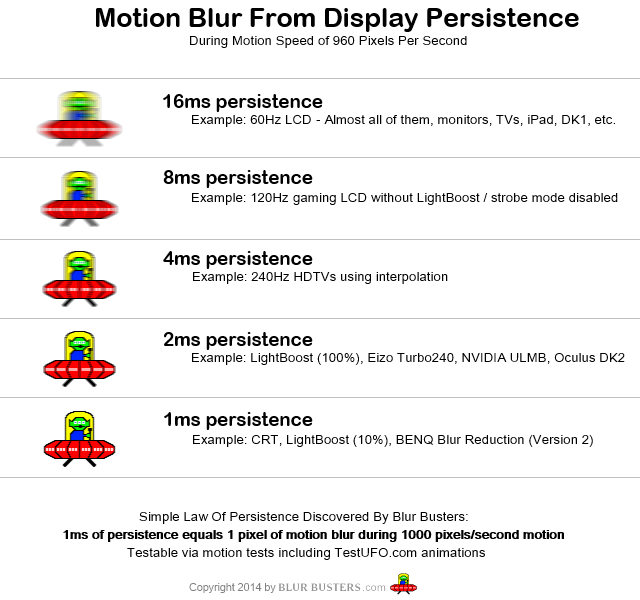
(From
PHOTOS: 60Hz vs 120Hz vs LightBoost)
kaemon wrote:I have read and heard that monitors with strobed backlighting fix these issues. Will G-Sync still be worth the wait and further improve my experiance?
Yes, strobe backlights at framerate matching refreshrate solve the problem, by successfully producing the CRT fast-motion effect on computer monitors.
You will still have double-image effects at 30fps@60Hz or 60fps@120Hz, so you will want to make sure your framerate matches refreshrate matches stroberate. Can Stepmania run at 120 frames per second? Or at framerates within the supported strobe rates of the various strobe technologies?
Supported strobe rates
LightBoost: 100Hz and 120Hz
ULMB: 85Hz, 100Hz and 120Hz
Turbo240: 105Hz through 122Hz in 1Hz increments (via Custom Resolution)
BENQ Blur Reduction V2: 60Hz through 144Hz in 1Hz increments (via Custom Resolution)
If you want maximum flexibility of low persistence for the zero motion blur (arcade CRT zero motion blur, perfect sharp fast motion effect), you want to make sure you run a strobe backlight technology that supports stroberates that overlaps your games' framerates. If all your games can run at 120fps, then any of the four strobe technologies will work to eliminate motion artifacts.
