kogorta wrote: ↑07 Nov 2021, 15:57
So, it means for casual gaming at 60fps 240Hz (compared to 144Hz) shows no improvements in motion blur.
With adaptive sync yes (if we assume response times are same/similar on both monitors).
kogorta wrote: ↑07 Nov 2021, 15:57
If I am not a competitive FPS player, any advantages to buy 240Hz over 144Hz?
Not really. Except on desktop, web browsing and stuff higher refresh rates provide better, smoother experience.
For players that are not competitive I usually recommend 144Hz monitors with fast IPS.
kogorta wrote: ↑07 Nov 2021, 15:57
Also, I am confusing about Response Time and Motion Blur, does lower response time means lower motion blur? Example:
Monitor 1, 60Hz Response Time 10ms.
Monitor 2, 60Hz Response Time 15ms.
Monitor 1 shows less motion blur?
Yes, lower response times are better, higher refresh rate are better.
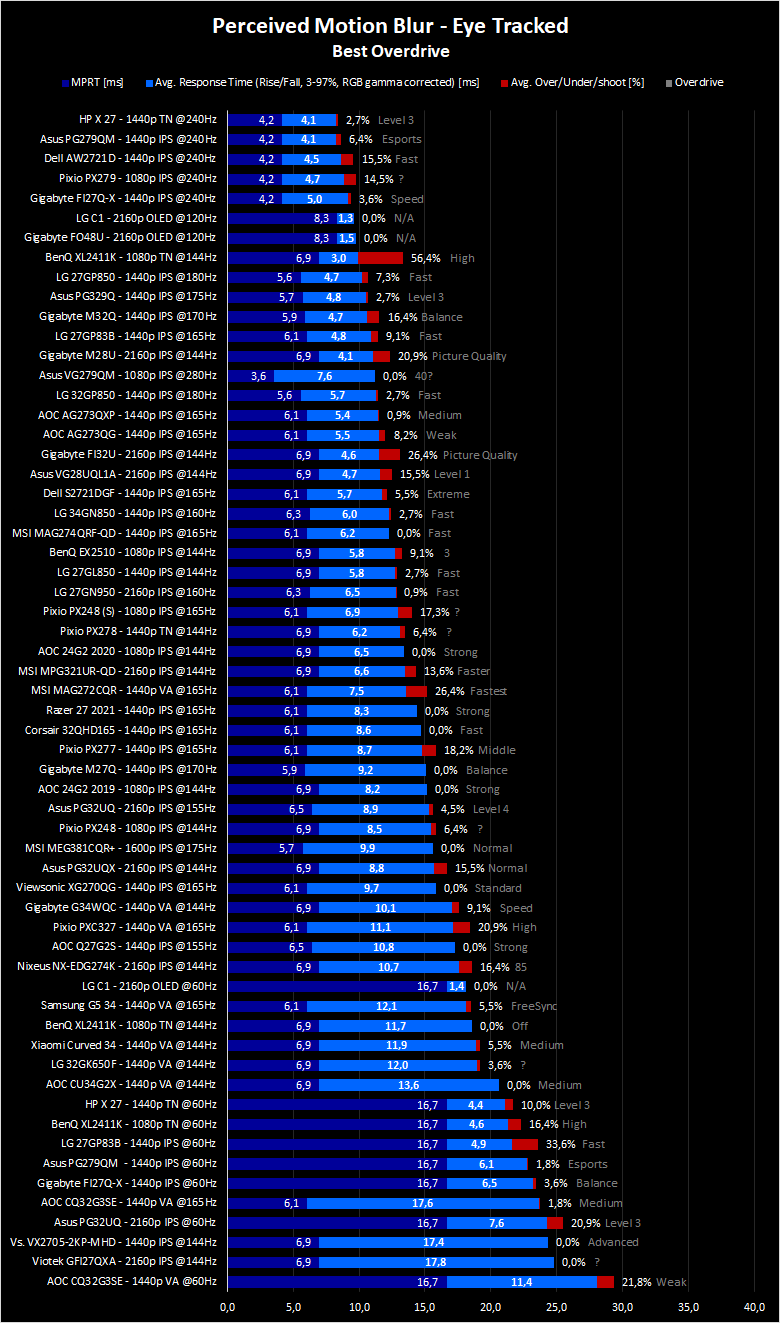
Understanding response times can be a bit confusing for new people. I partially blame reviewers for not providing enough digestible information for users to educate them. Where it becomes confusing is when their bar charts show 240Hz monitors slower than 144Hz by including only response times. What you want to be aware of is response times are mixed together with refresh rate (on classic sample-and-hold displays). When you track an moving object on screen what you end up seeing is MPRT + Response Time .
Now don't worry this is a simple example of one pixel wide line moving across the screen (left to right). This is what your eye would see - check
here. Top row is showing ideal MPRT blur (Motion Picture Response Time) which is refresh rate based, and second row shows MPRT + additional Response Time blur (panel's transitioning speed capability).
1. 60Hz, 2. 144Hz, 3. 240Hz.






As refresh rate increases line width narrows, meaning blur decreases but response time blur stays the same. This additional blur can partially be removed by applying Overdrive. Too much overdrive can result in distracting coronas aka overshoot. But this is for another discussion.
What reviewers give you is something like
this, but what they should give you is
this.
kogorta wrote: ↑07 Nov 2021, 15:57
And one more question, does same monitor shows 60fps at 144Hz same image compared to 60fps at 60Hz. This question is about adaptive sync, if async is enabled (if I correctly understand) it shows 60fps at 60Hz, if disabled 60fps at 144Hz, of course async removes tearing, but what about motion blur what option gives less blur?
Again, with adaptive sync yes. What adaptive sync does is synchronizes display refresh rate with your in-game framerate (Hz=FPS). Only within range of usually 48-144Hz. 60fps 144Hz has around the same amount of blur as 60fps 60Hz but it stutters more. Best motion experience is max fps, max Hz and Hz=fps. If u can't push 144fps u won't really benefit from high refresh rate display (unless you like better desktop experience).
Edit:
lol now I see jorimt repplied.