usually knowledgeable, but struggling to understand
Posted: 13 Feb 2022, 20:27
i just got a QN90A tv + RTX 3080. i've spent the last few days reading about vsync, gsync, adaptive sync, fast sync, VRR. i believe i have a limited understanding, but not quite confident to say i know what i'm talking about. i believe i have been reading outdated information, or just plan wrong information. please correct / educate me.
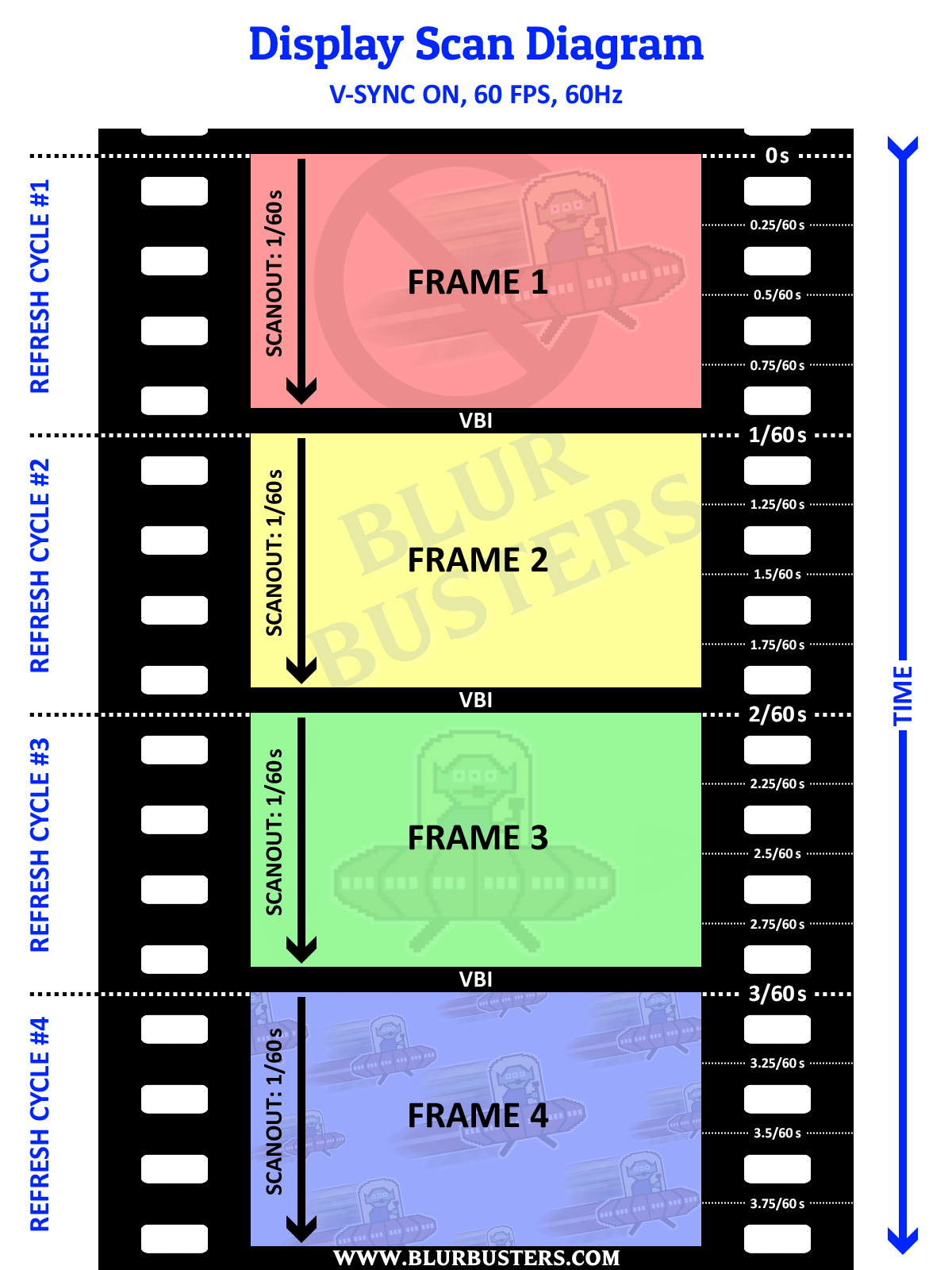
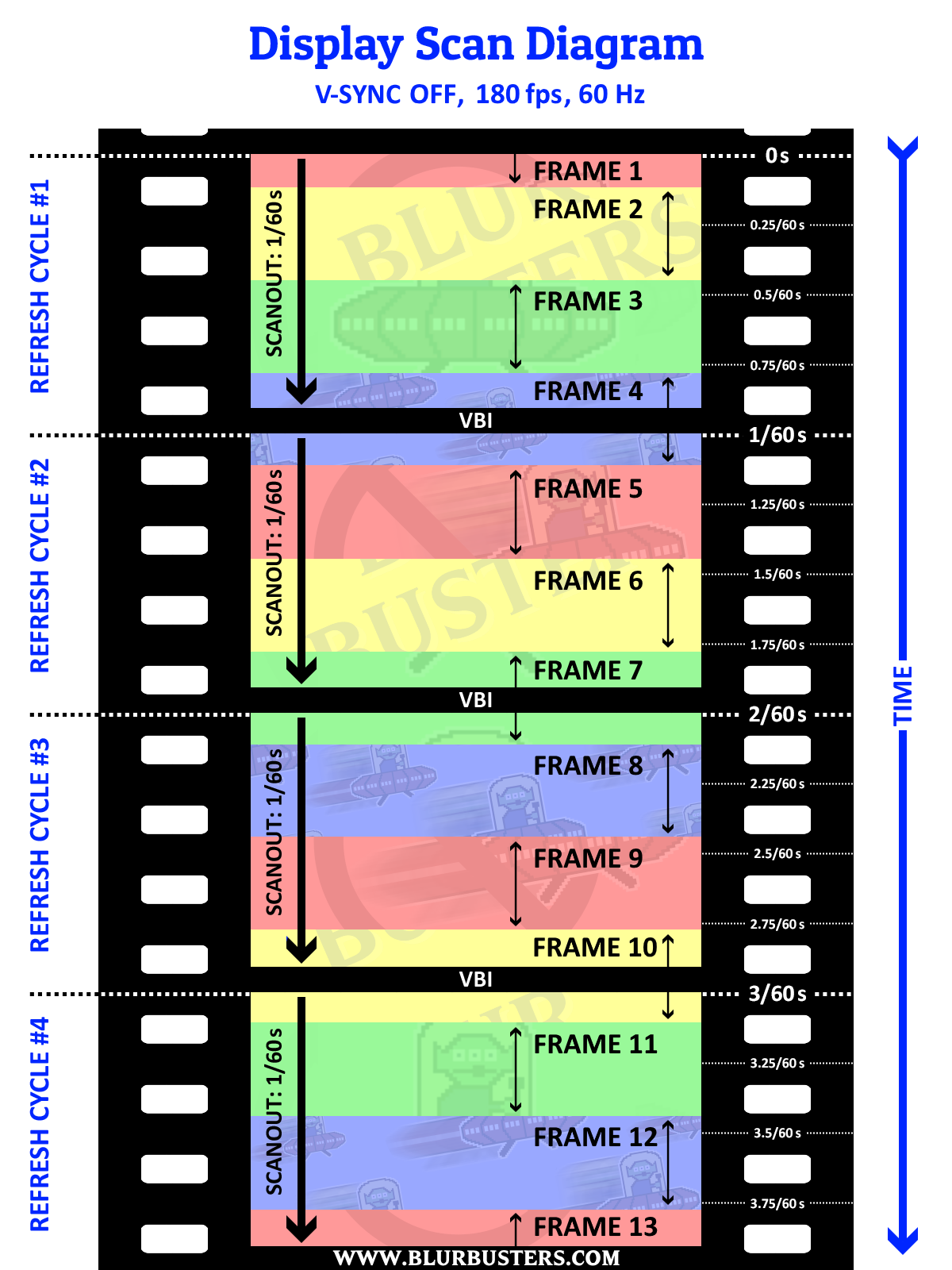
vsync - limits FPS to refresh rate. adds input lag. if vsync limits FPS to refresh rate, how is this different from manually setting the "max frame rate" to your refresh rate? i tried this, and i got tearing. my understanding must be lacking. i also heard when vsync is on you are actually capping your FPS to half your refresh rate. i turned on vsync, my FPS was not half my refresh rate, so i'm not inclined to believe this, but this has come up enough times that makes me wonder if there is truth to this.
fast sync - drops frames in excess of your frame rate. very low input lag. makes your GPU run at 100%. only useful when you produce more FPS than your refresh rate. i tested this with a game that produced more FPS than my refresh rate. i still got tearing. but when i capped my FPS with fast sync, no tearing. confused again. i thought the use case for fast sync was when you have too many frames, which i did in the first test. when i use the FPS limiter, i did not have too many frames, which seems to go against the use case for fast sync, producing more FPS than your refresh rate.
adaptive sync - this is the opposite of vsync. instead of limiting the FPS to match the refresh rate, it limits/adjusts the refresh rate to match the FPS on demand.
gsync - same concept as adaptive sync. uses nvidia proprietary hardware. because it's hardware controlled vs software controlled there are tighter tolerances / higher standards / better performance. this is often seen as the end game / holy grail that solves both problems of tearing and input lag. a few things that confuse me about gsync, i thought this replaces vsync. but i've read several threads now that say it does not replace vsync, you use gsync and vsync together. i've also read other threads that say you use both plus a FPS limiter set a few FPS below your max refresh rate. even with the tech that is considered the best, there is still uncertainty on how to use it.
VRR - same concept as adaptive sync. but can't figure out why this exists. my best guess is this is basically marketing the same thing different ways, or this is geared towards consoles. nvidia has gsync, amd has freesync, consoles have VRR. they all have the same goal, but accomplish it differently or are aimed towards different platforms. one thing i can't figure out about VRR, my tv supports VRR, but not gsync. however, whether i'm in game mode, or PC mode, i do not see a way to turn VRR on in my TV or nvidia control panel. my TV always says VRR off. to make it even more confusing, with my tv game mode on, i can turn gsync on in nvidia control panel, even though it's not supported.
sorry for the long post. i know this has been discussed millions of times. i'm not just posting without doing any reading or making no effort to understand for myself. i've been reading almost the whole week. either i'm stupid or this is confusing or i'm reading bad information or missing important pieces of information cause i am really struggling to figure out the differences between these technologies and when it's appropriate to use one over the other or one in conjunction with another. hopefully you guys can straighten me out cause i just want to play my games the right way.
vsync - limits FPS to refresh rate. adds input lag. if vsync limits FPS to refresh rate, how is this different from manually setting the "max frame rate" to your refresh rate? i tried this, and i got tearing. my understanding must be lacking. i also heard when vsync is on you are actually capping your FPS to half your refresh rate. i turned on vsync, my FPS was not half my refresh rate, so i'm not inclined to believe this, but this has come up enough times that makes me wonder if there is truth to this.
fast sync - drops frames in excess of your frame rate. very low input lag. makes your GPU run at 100%. only useful when you produce more FPS than your refresh rate. i tested this with a game that produced more FPS than my refresh rate. i still got tearing. but when i capped my FPS with fast sync, no tearing. confused again. i thought the use case for fast sync was when you have too many frames, which i did in the first test. when i use the FPS limiter, i did not have too many frames, which seems to go against the use case for fast sync, producing more FPS than your refresh rate.
adaptive sync - this is the opposite of vsync. instead of limiting the FPS to match the refresh rate, it limits/adjusts the refresh rate to match the FPS on demand.
gsync - same concept as adaptive sync. uses nvidia proprietary hardware. because it's hardware controlled vs software controlled there are tighter tolerances / higher standards / better performance. this is often seen as the end game / holy grail that solves both problems of tearing and input lag. a few things that confuse me about gsync, i thought this replaces vsync. but i've read several threads now that say it does not replace vsync, you use gsync and vsync together. i've also read other threads that say you use both plus a FPS limiter set a few FPS below your max refresh rate. even with the tech that is considered the best, there is still uncertainty on how to use it.
VRR - same concept as adaptive sync. but can't figure out why this exists. my best guess is this is basically marketing the same thing different ways, or this is geared towards consoles. nvidia has gsync, amd has freesync, consoles have VRR. they all have the same goal, but accomplish it differently or are aimed towards different platforms. one thing i can't figure out about VRR, my tv supports VRR, but not gsync. however, whether i'm in game mode, or PC mode, i do not see a way to turn VRR on in my TV or nvidia control panel. my TV always says VRR off. to make it even more confusing, with my tv game mode on, i can turn gsync on in nvidia control panel, even though it's not supported.
sorry for the long post. i know this has been discussed millions of times. i'm not just posting without doing any reading or making no effort to understand for myself. i've been reading almost the whole week. either i'm stupid or this is confusing or i'm reading bad information or missing important pieces of information cause i am really struggling to figure out the differences between these technologies and when it's appropriate to use one over the other or one in conjunction with another. hopefully you guys can straighten me out cause i just want to play my games the right way.