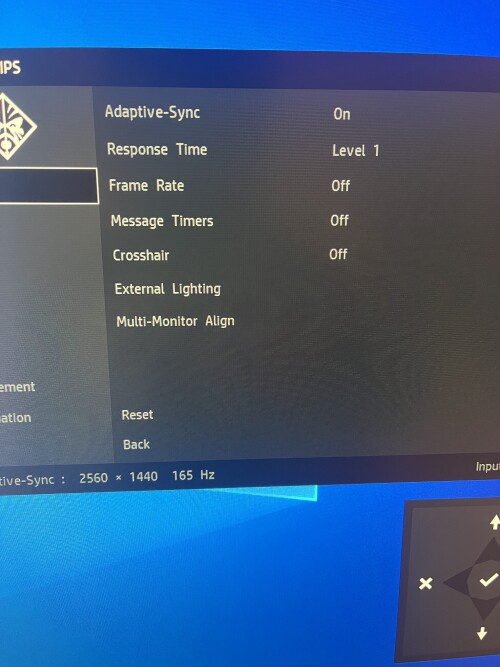
Bubu wrote: ↑15 Mar 2022, 17:42
Hey, i have HP Omen 27i, and there is an option called ''Adaptive Sync'', i do know if i disabled it, Freesync/G-Sync would not work either.
But its confused name, if i play game without Freesync/G-sync, does it make any difference when enable/disable it
I felt like there is a tiny difference but it could be placebo effect, i have no clue since i havent find anything from Google researches?
I mainly play fighting games locked at 60 fps (no direct G-Sync/Freesync support)
Assuming you can work around other FreeSync issues (e.g. adjust overdrive), enabling FreeSync at 60fps can smooth frame jitter and reduce lag, for some games:
(A) Smoother 60fps
(B) Reduced latency at 60fps
Each 60fps refresh cycle is refreshed faster in 1/240sec at 240Hz, or 1/144sec at 144Hz. Refresh cycles on VRR always refresh at max-Hz, and VRR ensures framerate=Hz since the monitor now syncs to the framerate of the game. So framedrops are gone, 60fps->59fps->60fps is completely invisible stutter-free, since even a 0.1ms lateness in a frame causes the refresh cycle to be simply delayed (0.1ms) rather than missed to next refresh cycle (16.7ms), which means 99% of the framedrop stutter visibility was just erased (0.1ms vs 16.7ms). So you don't have those 60-60-60-59-60-60-60 situations, assuming the game is good at framepacing adequately accurately enough without things like texturestreaming/disk-based stutter. See
www.testufo.com/vrr for an animation of the benefits of VRR smoothing out framedrop-style stutters as well as Hz-vs-framerate mismatch stutters.
So, yes, VRR is an excellent method of low-lag VSYNC ON look-and-feel. FreeSync and G-SYNC is far less lag than VSYNC ON, even if the esports athletes sometimes prefer VSYNC OFF for ultra high frame rate CS:GO.
For your 60fps situations, FreeSync/G-SYNC reduces lag for arcade fight8ing games quite a bit -- as long as it's not a defective VRR implementation.
In these situations:
1. VRR = ON in the monitor menus (e.g. FreeSync setting)
2. VRR = ON in the driver settings (e.g. NVCP G-SYNC setting)
3. Let your game self-frameratecap (e.g. 60fps capped game). If cap is adjustable, set about 3fps below max Hz.
4. VSYNC OFF in game settings
5. VSYNC ON in drivers (NVCP settings. It's used only as a fallback sync technology if framerate tries to exceed Hz)
(For other readers -- you hear the rumors of VRR latency -- but that's mainly the biggest concern when relative to VSYNC OFF at framerates above Hz. But if you're playing VSYNC ON games like fighting games, VRR is vastly superior and lower lag than VSYNC ON. And for those buying a new monitor and want to use VRR competitively -- make sure the VRR range is bigger than your planned framerate range. If you esports in fighting games, make sure 60fps is in the VRR range. If you esports in CS:GO, makes sure you have 360Hz so your VRR range is wider than CS:GO's framerate range without needing to cap. So your ideal VRR range depends on the games you play. The esports kids "who don't know how to eliminate GSYNC lag" are the ones using only 240Hz or less with 300fps+ CS:GO, there's the problem. Making VRR shine in esports properly requires your framerate range to be perpetually inside your VRR range.)
This usually produces the best, smoothest VRR experience.