Pochly wrote: ↑23 Jul 2024, 21:16
I've been on and off trying to purchase a new monitor for a bit over a year now. So far, I have had bad luck with my choices it seems.
Monitors I'm currently using that don't cause issues:
Monitors that I have tried so far:
I'm not sure how much it translates, but I use an LG OLED48C1PUB TV every day and have no issues with that.
The most recent monitors I have tried were the two QD-OLEDs: AW3423DWF and the AW2725DF. I didn't buy two to test; I actually purchased the AW3423DWF first because the AW2725DF wasn't on sale at the time. Then I noticed the AW2725DF went on sale after, and I still wanted a 27" monitor, so I bought that later. I ended up using the AW3423DWF for a couple of days, but I did notice my eye strain starting on the second day. Once the AW2725DF arrived, I tried using that for five days, but I'm still experiencing eye strain which can hurt a fair bit. It's not as severe as it was when I first got it, but it's still quite noticeable. I feel like the IPS monitors I listed above caused more strain, but it was a while ago when I bought and tried them.
I have tested the last two OLEDs at every refresh rate listed in the NVIDIA control panel, all the way down to 60Hz. My current main monitor (Lenovo Legion Y27gq-20) runs at 165Hz.
It doesn't seem to matter whether I'm just reading a static webpage or playing a game; the eye strain comes on regardless.
Other things I have tried:
- Changing the output dynamic range and color depth
- Changing the brightness/contrast
- Changing color values in the monitor settings
It's interesting to me that you've also tried a (presumably) nano-ips panel such as on the Lenovo, yet you don't have a issue as with the Asus, LG & Dell (same backlight type employed)
The OLED part is perplexing to me however. You could also have issues with QD-OLED monitors in particular (some people have reported this), due to subpixel layout itself, rendering or the sharp spectrum peaks.
SPD of QD-OLED vs WOLED

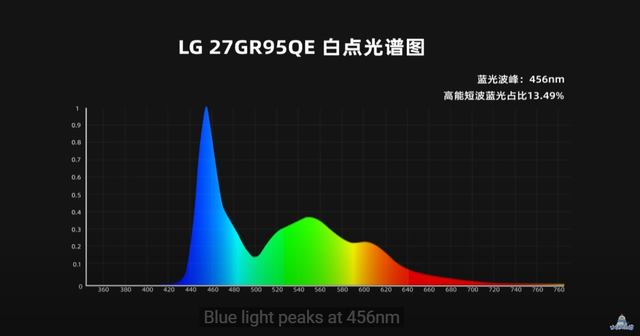
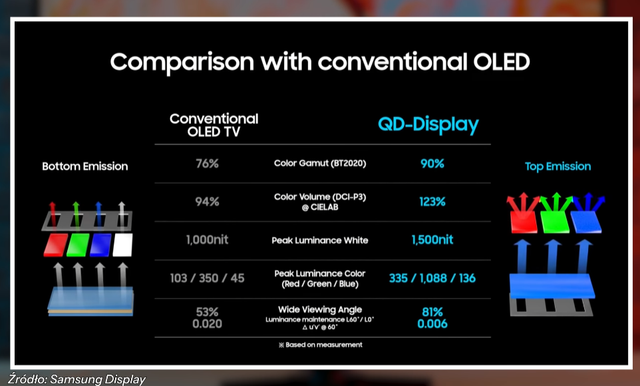
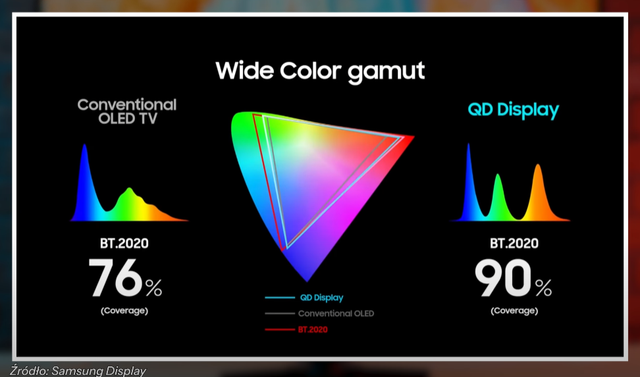
The only common denominator I can think of otherwise is dithering technique employed.
The near black reproduction on QD-OLED is way better than WOLED monitors (patented dithering technique)
More info (check bottom of page):
http://www.lagom.nl/lcd-test/black.php
I know for a fact that the S2522HG (LM245WF9-SSA3, same as XG259CM) uses a
static dithering technique, thus the green tint which is apparent in subpixel shots.
(Source:
parkggoki's review of the S2522HG)
For example, this is how S2522HG vs AW2521HF (6bit+HiFRC vs true 8-bit) looks like


I want to say it could be the dithering technique that's causing your issue, but this is such a rabbit hole that we've got barely any info on.
Could you find out the panel your Lenovo employs?
I assume the usual "Turn off -> Hold menu button while powering on the monitor" trick should reveal the service menu.
You could also take a look at QDEF panels, such as the 274URF-QD, 274QRF-QD, XL2586X, XB273U GX etc. but I worry that you might have the same troubles as with the QD-OLED's (same tech used)
WOLED monitors could also be a potential idea to try, such as the LG 27GR95QE-B,
XG27AQDMG & others
Info on backlight's used in monitors:
https://pcmonitors.info/articles/the-ev ... acklights/