
I'm discussing this topic already in the SVP forums, but I think maybe here is more appropriate for more pro and technical answers/solutions?
I don't know why, but there are always some (micro)stuttering and skipped/dropped/delayed frames when I use SVP with RIFE, even when the CPU usage is always below 20% and GPU never reaches 100% (I'm using scaling to QHD 1440p and black bars).
If I disable SVP there are no dropped frames.
Tried several RIFE models but it happens with all of them.
Machine is X570 AORUS ULTRA Mobo - Ryzen 9 5950x - 32GB Gskill DDR4 3600 - Nvidia RTX 4080 FE - NexiGo Aurora Pro HDMI 2.1 projector (and secondary Aorus FV43U DisplayPort)
Windows 11 23H2 and 24H2 (Recent installation with no problems running intensive CPU (Render) and GPU (CUDA apps, demanding games) tasks)
Things I tried:
1 Killing all possible processes in Task Manager that may interfere.
2 All possible combinations of RIFE settings in SVP Manager.
3 Different players (PotPlayer, MPC-BE, MPV-SMPlayer)
4 Different decoders (Built-in, LAV, MPC) with different Software and Hardware Acceleration decoders (DXVA, D3D9, D3D11/DXVA2, D3D11cb, D3D12cb, OpenGL, Vulkan, NVDEC)
5 Different Video Renderers in each player (MPC-VR, EVR, EVR Custom Present, PotPlayers Built-in D3D9 and D3D11 renderers)
6 All possible combination of settings for each Video Renderer (Flip/Discard, Video Processor On/Off, Vsync, D3D9-11, Exclusive Fullscreen, Adjust Frame Presentation Time, Surface formats, Resizers ...)
7 Disabling all OC for CPU, RAM (even XMP) and GPU.
8 Different refresh rates (59.94Hz and 60Hz)
9 Limiting the framerate with RTSS with all possible options (Async, Front Edge, Back Edge, Nvidia Reflex, Passive) on the whole range from 59.93 to 60.2.
10 Vsync On/Off in Nvidia CP.
11 Windows 'Graphics Options' HAGS and Flip Model On/Off.
12 Using a NVME disk for the source test files.
13 Many different Nvidia drivers versions
14 Uninstalling and reinstalling Chipset drivers
15 Power Management 'Power Saving' or 'High Performance'and many other Nvidia CP and Profile settings
16 Changing CPU affinities and Priorities for the Video Players in Task Manager.
17 Disabling SMT in BIOS
18 Disabling secondary display
...and the dropped frames keep showing up. Not only in the Statistics, I can see the stutters in the playback, which is driving me crazy.
They are not constant, but some always show up every minute, and it's very distracting.
How to get perfect smooth video playback using SVP with RIFE?
-
Milincho
- Posts: 31
- Joined: 28 Oct 2022, 10:45
 How to get perfect smooth video playback using SVP with RIFE?
Last edited by Milincho on 22 Oct 2024, 05:15, edited 4 times in total.
-
Milincho
- Posts: 31
- Joined: 28 Oct 2022, 10:45
Re: How to get perfect smooth video playback using SVP with RIFE?
I've been doing more tests, with these settings:

and using 'Decrease to FHD/1080p' the GPU usage is around 30% and there are no frame drops:

but using 'Decrease to QHD/1440p', with a GPU usage of less than 60%, it starts dropping frames after less than 2000 frames played:

How does this make sense? with nowhere near maxing the gpu % usage...
and using 'Decrease to FHD/1080p' the GPU usage is around 30% and there are no frame drops:
but using 'Decrease to QHD/1440p', with a GPU usage of less than 60%, it starts dropping frames after less than 2000 frames played:
How does this make sense? with nowhere near maxing the gpu % usage...
-
Milincho
- Posts: 31
- Joined: 28 Oct 2022, 10:45
Re: How to get perfect smooth video playback using SVP with RIFE?
And even more tests.
Tried with a different model, 4.22 lite v2:

and a 1080p source ( https://drive.google.com/file/d/1DJc1U9 ... sp=sharing )
Using 'Decrease to FHD/1080p' there are no skipped frames:

but using 'Decrease to QHD/1440p' there are skipped frames, even when the source is 1080p and there is no real scaling...

and even when the GPU usage is the same in both cases.

I tried a ton of different things again: all possible options in MPCVR, different cpu/gpu video decoders, different splitters, different audio decoders and renderers, different priorities, disabling all OC, Flip model or not, no HAGS, ... and no matter what this always happens, even with a 1080p source and less than 50% GPU usage. :/
Tried with a different model, 4.22 lite v2:
and a 1080p source ( https://drive.google.com/file/d/1DJc1U9 ... sp=sharing )
Using 'Decrease to FHD/1080p' there are no skipped frames:
but using 'Decrease to QHD/1440p' there are skipped frames, even when the source is 1080p and there is no real scaling...
and even when the GPU usage is the same in both cases.
I tried a ton of different things again: all possible options in MPCVR, different cpu/gpu video decoders, different splitters, different audio decoders and renderers, different priorities, disabling all OC, Flip model or not, no HAGS, ... and no matter what this always happens, even with a 1080p source and less than 50% GPU usage. :/
-
Milincho
- Posts: 31
- Joined: 28 Oct 2022, 10:45
Re: How to get perfect smooth video playback using SVP with RIFE?
My main video player is PotPlayer, but same happens in MPV (SMPlayer), with this source (65MB): https://drive.google.com/open?id=1SWNDE ... p=drive_fs
using these settings --hr-seek-framedrop=no --framedrop=no --video-sync=display-tempo
with 'Decrease to FHD/1080p':
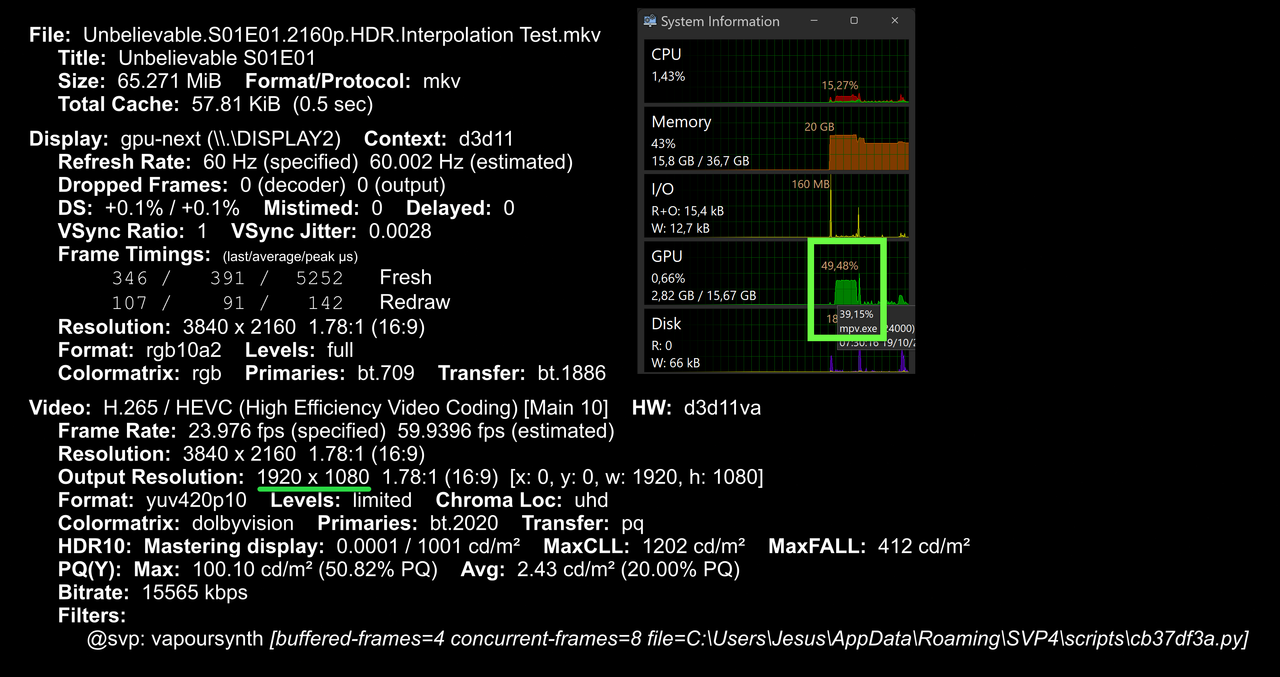
no stutters, hitches or Delayed frames.
and then with 'Decrease to QHD/1440p':
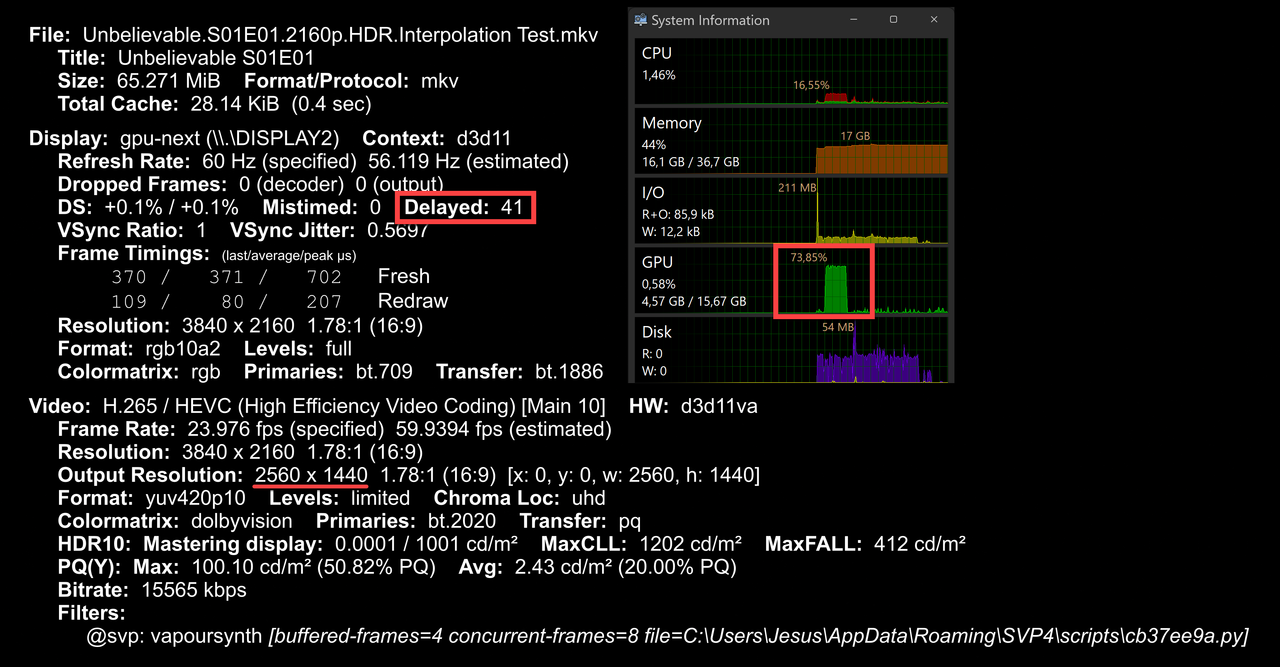
Lots of very noticeable stutters and Delayed frames (41 in 28 seconds), with less than 75% GPU usage.
I see MPV doesn't count skipped or dropped frames like PotPlayer does, for me it always says 'Dropped Frames: 0 (decoder) 0 (output)' even with very visible hitching/stutters like with that test video, that's why I added --video-sync=display-tempo. Tried all the other --video-sync= options but none of them made the video playback smoother.
Same happens with HW decoding off or any of the other options, any output driver and 'Direct Rendering' On/Off, 'Double buffering' On/Off and 'Video Slices' On/Off.
Thoughts?
Can you play this file ( https://drive.google.com/open?id=1SWNDE ... p=drive_fs ) at 60fps perfectly fine with no Dropped/Skipped/Delayed frames and no visible hitches/stutters?
using these settings --hr-seek-framedrop=no --framedrop=no --video-sync=display-tempo
with 'Decrease to FHD/1080p':
no stutters, hitches or Delayed frames.
and then with 'Decrease to QHD/1440p':
Lots of very noticeable stutters and Delayed frames (41 in 28 seconds), with less than 75% GPU usage.
I see MPV doesn't count skipped or dropped frames like PotPlayer does, for me it always says 'Dropped Frames: 0 (decoder) 0 (output)' even with very visible hitching/stutters like with that test video, that's why I added --video-sync=display-tempo. Tried all the other --video-sync= options but none of them made the video playback smoother.
Same happens with HW decoding off or any of the other options, any output driver and 'Direct Rendering' On/Off, 'Double buffering' On/Off and 'Video Slices' On/Off.
Thoughts?
Can you play this file ( https://drive.google.com/open?id=1SWNDE ... p=drive_fs ) at 60fps perfectly fine with no Dropped/Skipped/Delayed frames and no visible hitches/stutters?
-
Milincho
- Posts: 31
- Joined: 28 Oct 2022, 10:45
Re: How to get perfect smooth video playback using SVP with RIFE?
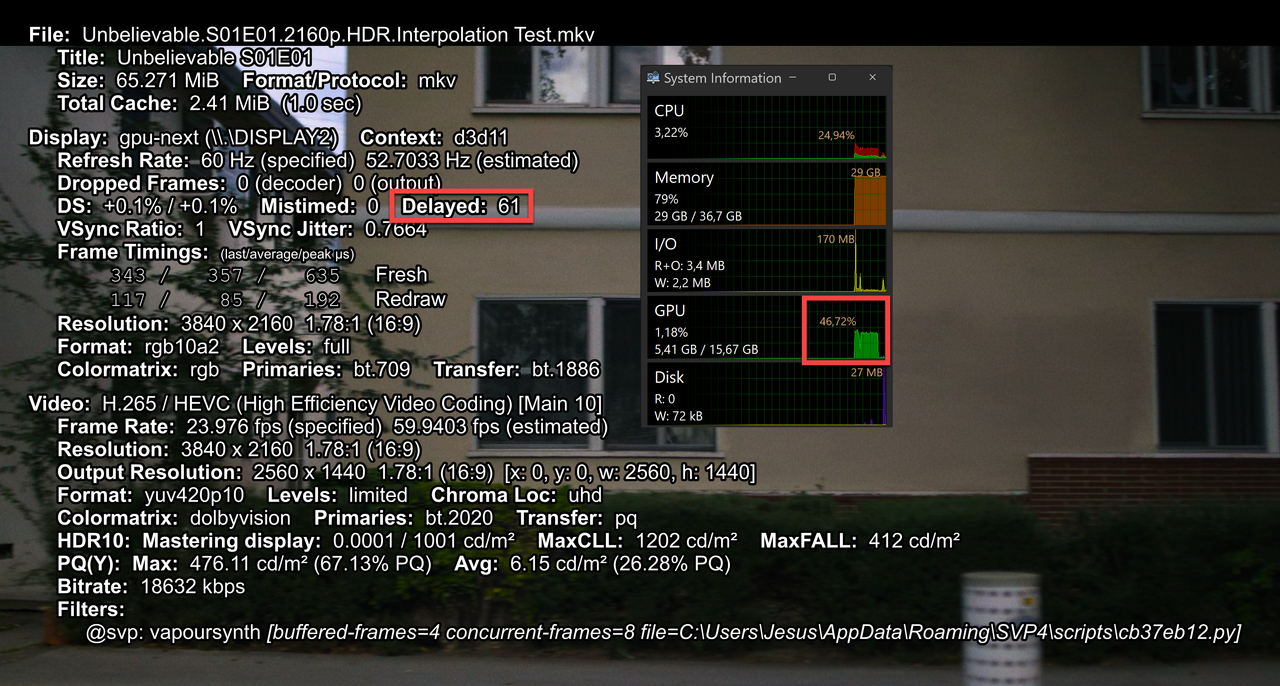
Same happens with lower models like 4.0 or 4.6 with a GPU usage well below 50%...
-
Milincho
- Posts: 31
- Joined: 28 Oct 2022, 10:45
Re: How to get perfect smooth video playback using SVP with RIFE?
Did more tests and although not perfect, PotPlayer runs smoother for me than MPV (SMPlayer) with either EVR Custom Present and these settings:

or MPCVR with these settings:

Besides the 30 seconds long dolly from Unbelievable 2160p DV HDR I posted before, the other best testing video file I have is a 30 seconds panning intro from Top Boy 1080p SDR (8MB)
Using those files on 'Repeat' is easy to catch any stuttering and Dropped/Skipped/Delayed frames by eye (sometimes they're not reported in stats/info).
It seems to me that maybe this problem is related to a bad handling of multithreading, because the lower number of threads I use in the video decoder (either LAV or MPC) and SVP seem to show better results, with less stutters or Dropped/Skipped/Delayed frames. But for 2160p content is impossible to go single threading, the lowest I can go is 2 or 3.
I'm doing more tests creating custom display modes with custom refresh rates in CRU , but so far no luck, still stuttering showing up.
Will keep testing and reporting any findings. Hope I'm not the only one interested in fixing this...
or MPCVR with these settings:
Besides the 30 seconds long dolly from Unbelievable 2160p DV HDR I posted before, the other best testing video file I have is a 30 seconds panning intro from Top Boy 1080p SDR (8MB)
Using those files on 'Repeat' is easy to catch any stuttering and Dropped/Skipped/Delayed frames by eye (sometimes they're not reported in stats/info).
It seems to me that maybe this problem is related to a bad handling of multithreading, because the lower number of threads I use in the video decoder (either LAV or MPC) and SVP seem to show better results, with less stutters or Dropped/Skipped/Delayed frames. But for 2160p content is impossible to go single threading, the lowest I can go is 2 or 3.
I'm doing more tests creating custom display modes with custom refresh rates in CRU , but so far no luck, still stuttering showing up.
Will keep testing and reporting any findings. Hope I'm not the only one interested in fixing this...
-
Milincho
- Posts: 31
- Joined: 28 Oct 2022, 10:45
Re: How to get perfect smooth video playback using SVP with RIFE?
So, best detection so far is using RTSS. Here the framegraph limits are min 16.5 and max 17ms, so any minor stutter can be clearly seen.
But even frame limiting a bit under the refresh rate and with a perfectly flat framegraph... there are still visible microstutters.

The more suspicious thing I found is that no matter the settings, just one cpu core always ends up with a near max usage:

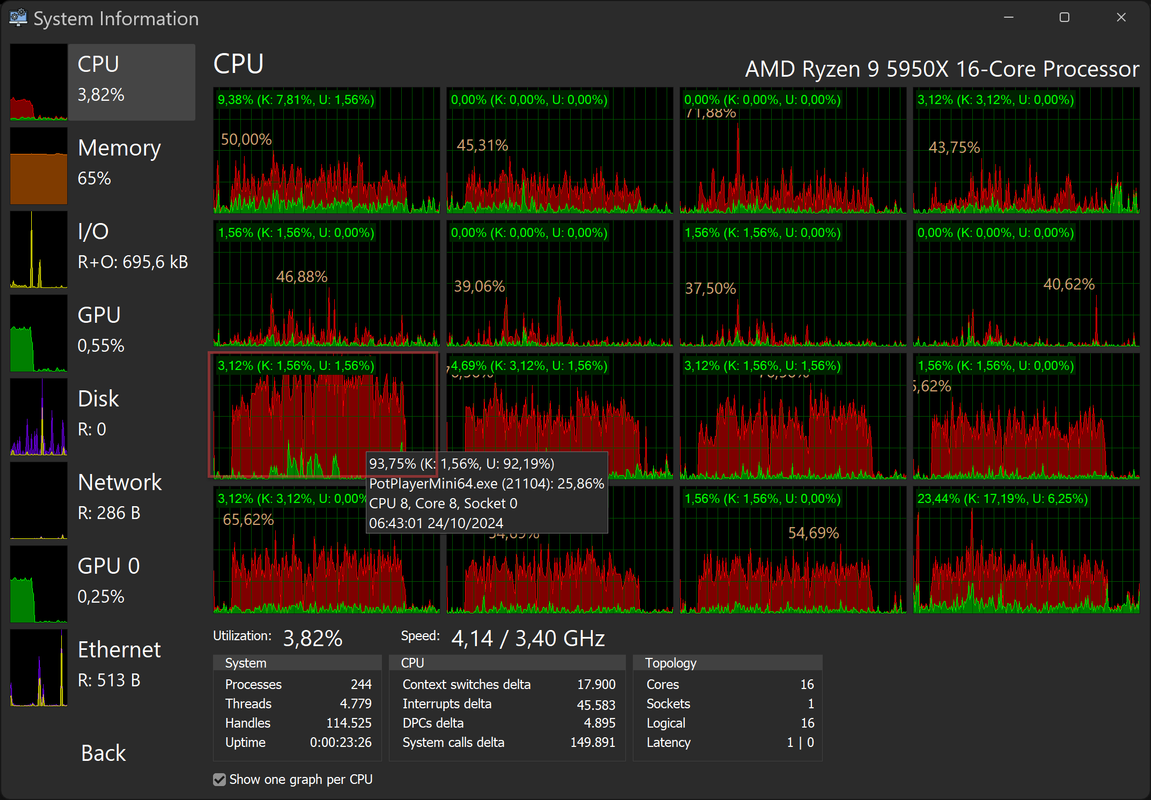
It's always just 1 core, not the same one each time, and happens with both SMT off or on.


Same happens with MPV/SMplayer and MPC-BE, with any video decoder and any video renderer...

But even frame limiting a bit under the refresh rate and with a perfectly flat framegraph... there are still visible microstutters.
The more suspicious thing I found is that no matter the settings, just one cpu core always ends up with a near max usage:
It's always just 1 core, not the same one each time, and happens with both SMT off or on.
Same happens with MPV/SMplayer and MPC-BE, with any video decoder and any video renderer...
Any thoughts/suggestions?Chief Blur Buster wrote:
-
Milincho
- Posts: 31
- Joined: 28 Oct 2022, 10:45
Re: How to get perfect smooth video playback using SVP with RIFE?
Ok, I found out the thing that was maxing out one core is RTSS frame limiting when using async active:

Using passive or Front Sync, Back Sync or Nvidia Reflex does not max one core... but has a lot of stuttering.
So, the only thing that fixes the stuttering ends up maxing one cpu core... and causing also stuttering.

This is so utterly frustrating...
The main thing still being... can anybody play this file ( 30 seconds long dolly from Unbelievable 2160p DV HDR ) at 60fps perfectly fine with no Dropped/Skipped/Delayed frames and no visible hitches/stutters?
Using passive or Front Sync, Back Sync or Nvidia Reflex does not max one core... but has a lot of stuttering.
So, the only thing that fixes the stuttering ends up maxing one cpu core... and causing also stuttering.
This is so utterly frustrating...
The main thing still being... can anybody play this file ( 30 seconds long dolly from Unbelievable 2160p DV HDR ) at 60fps perfectly fine with no Dropped/Skipped/Delayed frames and no visible hitches/stutters?
-
5fa5g
- Posts: 1
- Joined: 30 Jun 2024, 09:18
Re: How to get perfect smooth video playback using SVP with RIFE?
Did you ever sort this out? I'm curious if anyone has this working without stuttering...
-
Milincho
- Posts: 31
- Joined: 28 Oct 2022, 10:45
Re: How to get perfect smooth video playback using SVP with RIFE?
Yes, I was able to fix the weird stuttering using a secondary GPU just for video output. Something seems to be wrong with Nvidia GPUs in this regard, no matter the drivers version, etc.
Other people fixed it using their integrated gpu, as my CPU doesn't have one I had to buy a cheap AMD card.
Other people fixed it using their integrated gpu, as my CPU doesn't have one I had to buy a cheap AMD card.