
Yes you have, which is caused by EXTERNAL factors...how many freaking software fixes will you try before you will finally accept this? Try your computer at other house which is at leats 3+ km away and you will see, and stop trying to find a magical software fix because the problem is interference of some kind, magnetic field interference, electricity interference, radiofrequency interference, or a mixture of everything.
No FPS gaming possible
Forum rules
IMPORTANT:
This subforum is for advanced users only. This separate area is for niche or unexpected lag issues such as electromagnetic interference (EMI, EMF, electrical, radiofrequency, etc). Interference of all kinds (wired, wireless, external, internal, environment, bad component) can cause error-correction (ECC) latencies like a bad modem connection, except internally in a circuit. ECC = retransmits = lag. Troubleshooting may require university degree. Your lag issue is likely not EMI.
🠚 You Must Read This First Before Submit Post or Submit Reply
IMPORTANT:
This subforum is for advanced users only. This separate area is for niche or unexpected lag issues such as electromagnetic interference (EMI, EMF, electrical, radiofrequency, etc). Interference of all kinds (wired, wireless, external, internal, environment, bad component) can cause error-correction (ECC) latencies like a bad modem connection, except internally in a circuit. ECC = retransmits = lag. Troubleshooting may require university degree. Your lag issue is likely not EMI.
🠚 You Must Read This First Before Submit Post or Submit Reply
-
MK92
- Posts: 187
- Joined: 06 Oct 2025, 15:11
Re: No FPS gaming possible
-
LaggyTyp
- Posts: 219
- Joined: 07 Apr 2024, 16:16
Re: No FPS gaming possible
The only thing I can really imagine is that I have so many FEC errors on the connection that it's causing these problems.
I'm getting 180-230 FEC errors per second during downloads.
I'm getting 180-230 FEC errors per second during downloads.
-
MK92
- Posts: 187
- Joined: 06 Oct 2025, 15:11
Re: No FPS gaming possible
I think the problem might actually be your extremely low SNR ranges, I have between 39 and 41 dB on all channels (I also have coax, not fiber).
This is caused by a bad coax cables.
This is caused by a bad coax cables.
-
LaggyTyp
- Posts: 219
- Joined: 07 Apr 2024, 16:16
Re: No FPS gaming possible
I also have 39-41dB on my DOCSIS line. That's normal.
DOCSIS cable (coax cable)
https://asset.conrad.com/media10/isa/16 ... .jpg?x=514
VDSL cable
https://m.media-amazon.com/images/I/41b ... SL500_.jpg
https://www.vdsl-tarifvergleich.de/bild ... n-f-n.webp
https://eacademy.mitegro.com/wp-content ... g-vdsl.jpg
The cable goes from the DSLAM (FTTC) to the neighboring house and then to my house. This cable seems to have a problem.
FTTC = Fiber optic to DSLAM
The remaining ~150 meters are copper cables
DOCSIS cable (coax cable)
https://asset.conrad.com/media10/isa/16 ... .jpg?x=514

VDSL cable
https://m.media-amazon.com/images/I/41b ... SL500_.jpg

https://www.vdsl-tarifvergleich.de/bild ... n-f-n.webp
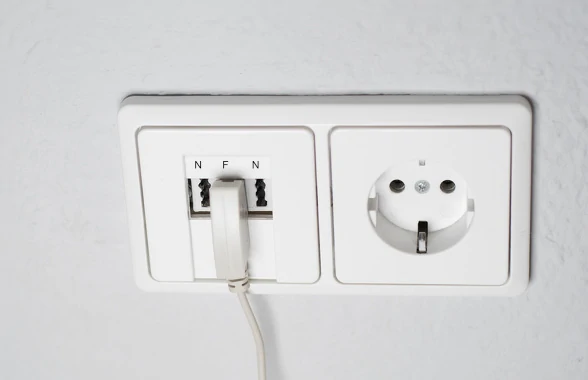
https://eacademy.mitegro.com/wp-content ... g-vdsl.jpg

The cable goes from the DSLAM (FTTC) to the neighboring house and then to my house. This cable seems to have a problem.
FTTC = Fiber optic to DSLAM
The remaining ~150 meters are copper cables
-
LaggyTyp
- Posts: 219
- Joined: 07 Apr 2024, 16:16
Re: No FPS gaming possible
I was just about to play a round of BF6, but it felt terrible. After a few minutes, the game crashed (C2D).
Event log: The hardware real-time clock failed to set due to an error in the evaluation of the ACPI time and alarm device method. Status: 0xC0000001.
Event log: The hardware real-time clock failed to set due to an error in the evaluation of the ACPI time and alarm device method. Status: 0xC0000001.
-
astroasis
- Posts: 102
- Joined: 25 Jul 2025, 18:11
Re: No FPS gaming possible
There is no point trying to play with this issue bro, just sitting idle on twitch and youtube i can tell the video isnt as smooth as its meant to be. Im trying one last thing (balanced isolation transformer as was recommended here), if not im going to try move places again
-
themagic

- Posts: 463
- Joined: 02 Jul 2024, 08:22
Re: No FPS gaming possible
There always a Point and we Humans make and create this Logic...astroasis wrote: ↑04 Jan 2026, 13:43There is no point trying to play with this issue bro, just sitting idle on twitch and youtube i can tell the video isnt as smooth as its meant to be. Im trying one last thing (balanced isolation transformer as was recommended here), if not im going to try move places again
Atleast try to proof that this Issue is real...cause many Millions others still believe in SKILL and in pure Human reaction timings and that everything very Normal...normal...and acting like nothing much wrong

Guys what happen to us 2018 or 2019 ? What changed ? Maybe we should start search here for our Issues which we have Today and about our Online Gaming experience...
I know Today that many Guys had already long before such similar "SKILL" Issues but for some reason I blieve that since 2018 it become much more. Just feelings and included myself who start to Suffer same about this "Problem"...I know no one likes talk about feelings here and only want hear and see some hard Facts and some Numbers.
Last edited by themagic on 06 Jan 2026, 09:43, edited 5 times in total.
-
LaggyTyp
- Posts: 219
- Joined: 07 Apr 2024, 16:16
Re: No FPS gaming possible
I'm getting an FTTH connection, but I'm afraid it won't change anything.
O2 VDSL (240/40)
8-9ms ping
Every second shot is not counted
O2 VDSL (240/40)
8-9ms ping
Every second shot is not counted
-
LaggyTyp
- Posts: 219
- Joined: 07 Apr 2024, 16:16
Re: No FPS gaming possible
Oh, and one more thing: I've noticed something.
My friends are playing BF6 and their "BW Out" feed shows 150-170 kbps. Mine is often only 60-80 kbps. We're in the same lobby. My upload speed is 50% lower than theirs.
My friends are playing BF6 and their "BW Out" feed shows 150-170 kbps. Mine is often only 60-80 kbps. We're in the same lobby. My upload speed is 50% lower than theirs.
-
astroasis
- Posts: 102
- Joined: 25 Jul 2025, 18:11
Re: No FPS gaming possible
Who knows bro, my mental health did start declining around 2018 when this started. Perhaps we make this realitythemagic wrote: ↑06 Jan 2026, 09:32There always a Point and we Humans make and create this Logic...astroasis wrote: ↑04 Jan 2026, 13:43There is no point trying to play with this issue bro, just sitting idle on twitch and youtube i can tell the video isnt as smooth as its meant to be. Im trying one last thing (balanced isolation transformer as was recommended here), if not im going to try move places again
Atleast try to proof that this Issue is real...cause many Millions others still believe in SKILL and in pure Human reaction timings and that everything very Normal...normal...and acting like nothing much wrong
Guys what happen to us 2018 or 2019 ? What changed ? Maybe we should start search here for our Issues which we have Today and about our Online Gaming experience...
I know Today that many Guys had already long before such similar "SKILL" Issues but for some reason I blieve that since 2018 it become much more. Just feelings and included myself who start to Suffer same about this "Problem"...I know no one likes talk about feelings here and only want hear and see some hard Facts and some Numbers.