NVIDIA G-Sync Pulsar monitor - Asus ROG Strix XG27AQNGV
-
MSIfanboy
- Posts: 137
- Joined: 15 Apr 2022, 13:51
Re: NVIDIA G-Sync Pulsar monitor - Asus ROG Strix XG27AQNGV
Cs2 backlight strobing on all my monitors looks awful, must be the 1% lows
-
Morphy
- Posts: 5
- Joined: 10 Jan 2026, 12:00
Re: NVIDIA G-Sync Pulsar monitor - Asus ROG Strix XG27AQNGV
I'm having an issue with Pulsar: Pulsar has stopped working altogether, it only engages very briefly for a view seconds after adjusting the pulsar low fps setting. This is on the AOC version and I'm using smoothfrog to observe it. Anyone have any ideas as to what might be causing it? Thanks
-
liquidshadowfox
- Posts: 249
- Joined: 05 Nov 2020, 14:03
Re: NVIDIA G-Sync Pulsar monitor - Asus ROG Strix XG27AQNGV
Have you checked the monitor OSD listing consistent fps? if the fps is too erratic it will disengage pulsar and make things look blurry, double imaging is currently a bug in current firmware from 120 fps - 180ish fps but below 120 it should be fairly clearMorphy wrote: ↑24 Mar 2026, 13:24I'm having an issue with Pulsar: Pulsar has stopped working altogether, it only engages very briefly for a view seconds after adjusting the pulsar low fps setting. This is on the AOC version and I'm using smoothfrog to observe it. Anyone have any ideas as to what might be causing it? Thanks
- Discorz
- VIP Member
- Posts: 1139
- Joined: 06 Sep 2019, 02:39
- Location: Europe, Croatia
- Contact:
Re: NVIDIA G-Sync Pulsar monitor - Asus ROG Strix XG27AQNGV
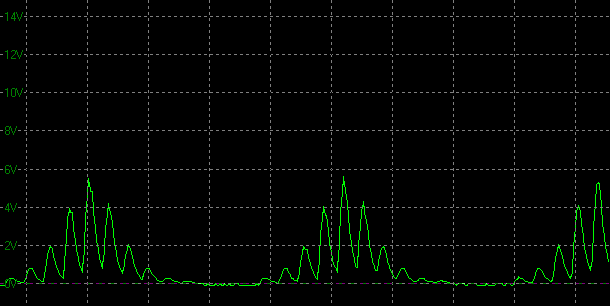
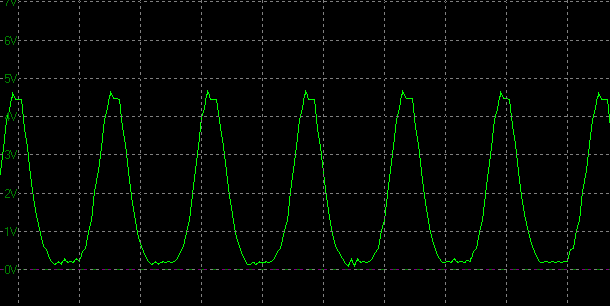
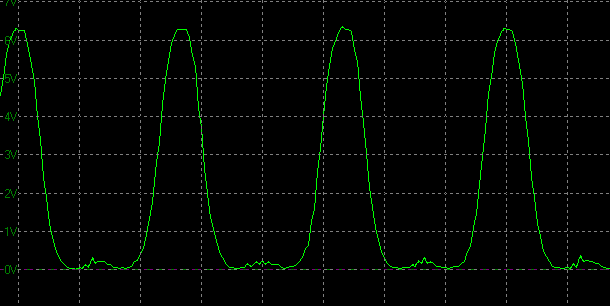
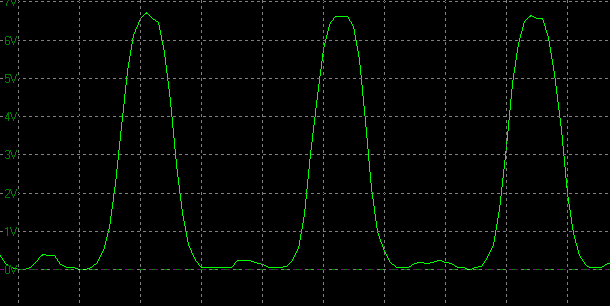
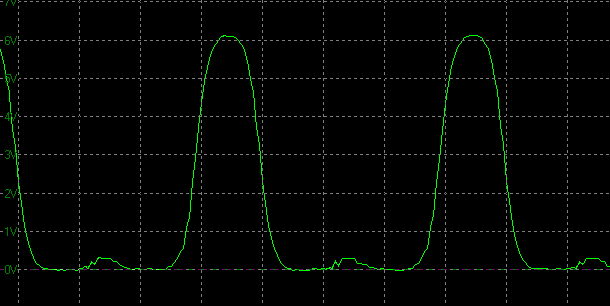

We got some more oscillographs from TFTCentral article/review!
I measured all the pulse widths mid-height. They're mostly the same as Monitors Unboxed. But I should note that the measured widths don't necessarily correspond to perceived average MPRT. I haven't seen anyone confirm they do. Not sure if the graphs need to be gamma corrected for this method to work. However, all the ufos of Pulsar at 360 fps I saw online do correspond more to ~40% rather than 25% (~2 vs 1.25 pixels of blur at 1800 pps, assuming camera tracking is accurate).
Pulsar @360 Hz:
- 360 fps = ~1.1 ms
- 250 fps = ~1.3 ms
- 200 fps = ~1.5 ms
- 150 fps = ~1.9 ms
- 127 fps = ~2.3 ms
- 100 fps = ~2.6 ms
Graph X-axis scale = 2.5 ms
Pulsar @360 Hz at various settled frame rates:
360 fps
250 fps
200 fps
150 fps
127 fps
100 fps
I measured all the pulse widths mid-height. They're mostly the same as Monitors Unboxed. But I should note that the measured widths don't necessarily correspond to perceived average MPRT. I haven't seen anyone confirm they do. Not sure if the graphs need to be gamma corrected for this method to work. However, all the ufos of Pulsar at 360 fps I saw online do correspond more to ~40% rather than 25% (~2 vs 1.25 pixels of blur at 1800 pps, assuming camera tracking is accurate).
Pulsar @360 Hz:
- 360 fps = ~1.1 ms
- 250 fps = ~1.3 ms
- 200 fps = ~1.5 ms
- 150 fps = ~1.9 ms
- 127 fps = ~2.3 ms
- 100 fps = ~2.6 ms
Graph X-axis scale = 2.5 ms
Pulsar @360 Hz at various settled frame rates:
360 fps
250 fps
200 fps
150 fps
127 fps
100 fps- Discorz
- VIP Member
- Posts: 1139
- Joined: 06 Sep 2019, 02:39
- Location: Europe, Croatia
- Contact:
Re: NVIDIA G-Sync Pulsar monitor - Asus ROG Strix XG27AQNGV
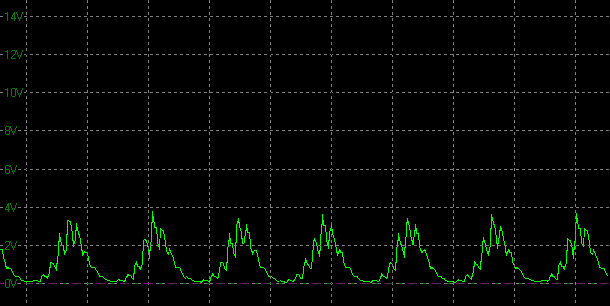
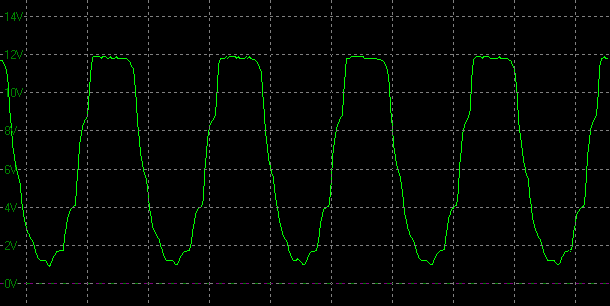
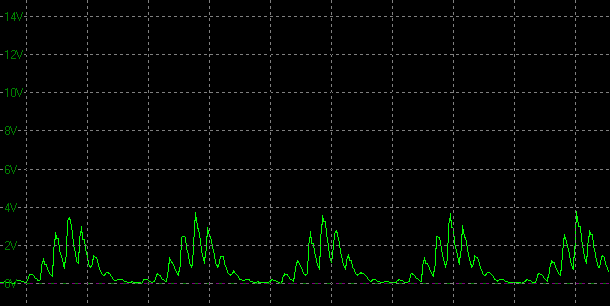
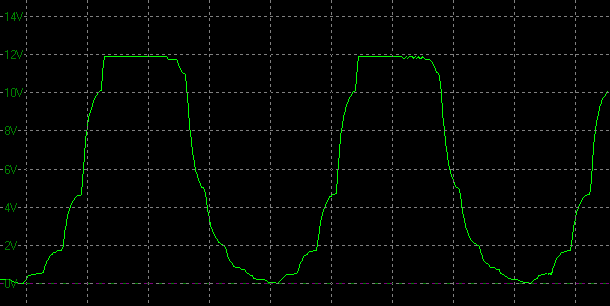
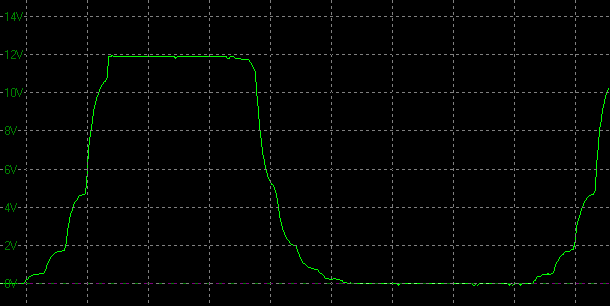
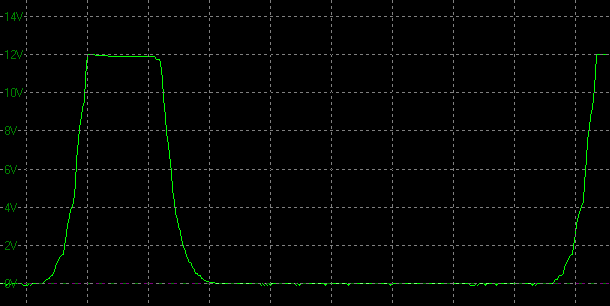
We also got new ULMB 2 graphs (thank you Simon for providing these).
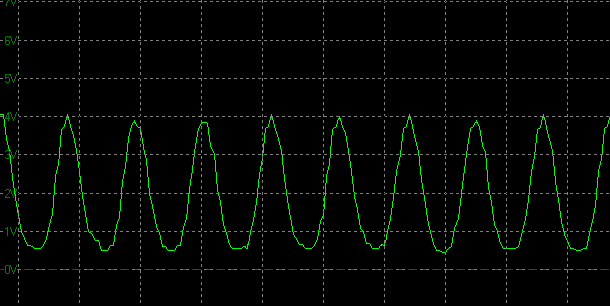
The same note from comment above regarding mid-height measurements applies here. Also keep in mind that graphs are not the most accurate due to smoothing effect. Standard square pulses that normally look like this, look like this. I'm guessing they actually look closer to this (DyAc 2 Premium @540Hz).
Observations:
- When I plot the measurements into one of my MPRT charts, the 360-120Hz range scales somewhat linearly in terms of MPRT target, but the 60 Hz mode goes off-track with lower duty cycles.
- ULMB MPRT target at PW 50 is very similar to Pulsar MPRT target.
- ULMB pulsing is more stepped, while Pulsar has a smooth sinusoidal wave.
- Some multi-strobing might be spotable at lower duty cycles for 360-120 Hz range. 60 Hz doesn't show signs of this.
- PW differences at higher refresh rates are rather minor, but become larger at lower ones. PW 100 vs 10 at 360 Hz is ~0.5 ms difference, at 240 Hz ~1 ms, at 120 Hz ~2 ms, at 60 Hz ~4 ms.
ULMB 2 @360 Hz fps:
- PW 100 = ~1.5, 1.4 ms
- PW 50 = ~1.0, 1.1, 1.2 ms
- PW 10 = ~1.0 ms
ULMB 2 @240 Hz fps:
- PW 100 = ~2.1 ms
- PW 50 = ~1.5, 1.6 ms
- PW 10 = ~1.1 ms
ULMB 2 @120 Hz fps:
- PW 100 = ~3.7 ms
- PW 50 = ~2.4 ms
- PW 10 = ~1.6 ms
ULMB 2 @60 Hz fps:
- PW 100 = ~5.9, 4.7 ms
- PW 50 = ~2.4, 3.1 ms
- PW 10 = ~0.8, 0.7 ms
Graph X-axis scale = 2 ms
ULMB 2 @360 Hz fps
PW 100
PW 50
PW 10
ULMB 2 @240 Hz fps
PW 100
PW 50
PW 10
ULMB 2 @120 Hz fps
PW 100
PW 50
PW 10
ULMB 2 @60 Hz fps
PW 100
PW 50
PW 10
The same note from comment above regarding mid-height measurements applies here. Also keep in mind that graphs are not the most accurate due to smoothing effect. Standard square pulses that normally look like this, look like this. I'm guessing they actually look closer to this (DyAc 2 Premium @540Hz).
Observations:
- When I plot the measurements into one of my MPRT charts, the 360-120Hz range scales somewhat linearly in terms of MPRT target, but the 60 Hz mode goes off-track with lower duty cycles.
- ULMB MPRT target at PW 50 is very similar to Pulsar MPRT target.
- ULMB pulsing is more stepped, while Pulsar has a smooth sinusoidal wave.
- Some multi-strobing might be spotable at lower duty cycles for 360-120 Hz range. 60 Hz doesn't show signs of this.
- PW differences at higher refresh rates are rather minor, but become larger at lower ones. PW 100 vs 10 at 360 Hz is ~0.5 ms difference, at 240 Hz ~1 ms, at 120 Hz ~2 ms, at 60 Hz ~4 ms.
ULMB 2 @360 Hz fps:
- PW 100 = ~1.5, 1.4 ms
- PW 50 = ~1.0, 1.1, 1.2 ms
- PW 10 = ~1.0 ms
ULMB 2 @240 Hz fps:
- PW 100 = ~2.1 ms
- PW 50 = ~1.5, 1.6 ms
- PW 10 = ~1.1 ms
ULMB 2 @120 Hz fps:
- PW 100 = ~3.7 ms
- PW 50 = ~2.4 ms
- PW 10 = ~1.6 ms
ULMB 2 @60 Hz fps:
- PW 100 = ~5.9, 4.7 ms
- PW 50 = ~2.4, 3.1 ms
- PW 10 = ~0.8, 0.7 ms
Graph X-axis scale = 2 ms
ULMB 2 @360 Hz fps
PW 100
PW 50
PW 10ULMB 2 @240 Hz fps
PW 100
PW 50
PW 10ULMB 2 @120 Hz fps
PW 100
PW 50
PW 10ULMB 2 @60 Hz fps
PW 100
PW 50
PW 10-
brownvim
- Posts: 197
- Joined: 22 Jun 2020, 04:15
Re: NVIDIA G-Sync Pulsar monitor - Asus ROG Strix XG27AQNGV
Discorz wrote: ↑24 Mar 2026, 15:18ULMB 2 @360 Hz fps:
- PW 100 = ~1.5, 1.4 ms
- PW 50 = ~1.0, 1.1, 1.2 ms
- PW 10 = ~1.0 ms
ULMB 2 @240 Hz fps:
- PW 100 = ~2.1 ms
- PW 50 = ~1.5, 1.6 ms
- PW 10 = ~1.1 ms
ULMB 2 @120 Hz fps:
- PW 100 = ~3.7 ms
- PW 50 = ~2.4 ms
- PW 10 = ~1.6 ms
ULMB 2 @60 Hz fps:
- PW 100 = ~5.9, 4.7 ms
- PW 50 = ~2.4, 3.1 ms
- PW 10 = ~0.8, 0.7 ms
Why does it seem like adjusting the PW on ULMB 2 at 360, 240 and 120 Hz only slightly improves clarity, if it even does, hard to tell.
Compared to the 60hz mode where the clarity difference is very noticeable going down the range?
5800X3D, RTX 5080 FE, OLED AW3423DW + Acer Pulsar XB273U F5
- kyube
- Posts: 896
- Joined: 29 Jan 2018, 12:03
Re: NVIDIA G-Sync Pulsar monitor - Asus ROG Strix XG27AQNGV
Ask Nvidia, it's a artificial limitation.
Also, based on those graphs, I'm pretty certain that 60Hz is global scan instead of rolling scan.
Comparing ULMB2 PW=10 — 60Hz & 120,240,360Hz are distinctly different.
Last edited by kyube on 24 Mar 2026, 17:14, edited 1 time in total.
evaluating xhci controller performance | audio latency discussion thread | "Why is LatencyMon not desirable to objectively measure DPC/ISR driver performance" | AM4 / AM5 system tuning considerations | latency-oriented HW considerations | “xhci hand-off” setting considerations | #1 tip for electricity-related topics | ESPORTS: Latency Perception, Temporal Ventriloquism & Horizon of Simultaneity | good lcd backlight strobing implementation list | display vs gpu scaling
-
brownvim
- Posts: 197
- Joined: 22 Jun 2020, 04:15
Re: NVIDIA G-Sync Pulsar monitor - Asus ROG Strix XG27AQNGV
I guess its because PW adjustment 100 to 10 does the following:
360 Hz: only ~0.5 ms improvement
240 Hz: only ~1 ms improvement
120 Hz: only ~2 ms improvement
60 Hz: ~4–5 ms improvement (huge jump)
Could a 4-5 ms range be added to the higher Hz?
360 Hz: only ~0.5 ms improvement
240 Hz: only ~1 ms improvement
120 Hz: only ~2 ms improvement
60 Hz: ~4–5 ms improvement (huge jump)
Could a 4-5 ms range be added to the higher Hz?
5800X3D, RTX 5080 FE, OLED AW3423DW + Acer Pulsar XB273U F5
- kyube
- Posts: 896
- Joined: 29 Jan 2018, 12:03
Re: NVIDIA G-Sync Pulsar monitor - Asus ROG Strix XG27AQNGV
Fun fact:
The MSI 274QPF X30MV (300Hz MiniLED VA QD; rolling scan) has a better fixed refresh rate better backlight strobing implementation @ 300–240Hz than ULMB2 @ 360–240Hz on the 4 Pulsar models
Memes write themselves...
The MSI 274QPF X30MV (300Hz MiniLED VA QD; rolling scan) has a better fixed refresh rate better backlight strobing implementation @ 300–240Hz than ULMB2 @ 360–240Hz on the 4 Pulsar models
Memes write themselves...
evaluating xhci controller performance | audio latency discussion thread | "Why is LatencyMon not desirable to objectively measure DPC/ISR driver performance" | AM4 / AM5 system tuning considerations | latency-oriented HW considerations | “xhci hand-off” setting considerations | #1 tip for electricity-related topics | ESPORTS: Latency Perception, Temporal Ventriloquism & Horizon of Simultaneity | good lcd backlight strobing implementation list | display vs gpu scaling
-
Morphy
- Posts: 5
- Joined: 10 Jan 2026, 12:00
Re: NVIDIA G-Sync Pulsar monitor - Asus ROG Strix XG27AQNGV
Thanks, turned out the issue occurred when I was playing around with resolutions, the monitor needs to be turned off and on again when you change it for pulsar to work.liquidshadowfox wrote: ↑24 Mar 2026, 15:04Have you checked the monitor OSD listing consistent fps? if the fps is too erratic it will disengage pulsar and make things look blurry, double imaging is currently a bug in current firmware from 120 fps - 180ish fps but below 120 it should be fairly clearMorphy wrote: ↑24 Mar 2026, 13:24I'm having an issue with Pulsar: Pulsar has stopped working altogether, it only engages very briefly for a view seconds after adjusting the pulsar low fps setting. This is on the AOC version and I'm using smoothfrog to observe it. Anyone have any ideas as to what might be causing it? Thanks
I'm now using 2304x1440/16:10. As someone coming from a 24inch to a 27inch it feels very imposing. Not only are pulsar monitors thick, AOC seems to be the thickest. I have a desk mount arm but the vesa attachment they give you increases the distance from monitor to wall even further. I was looking at the Acer version where you can directly mount it and it is thinner so I'm considering sending this back. I would avoid AOC if anyone has similar concerns.