NVIDIA G-Sync Pulsar monitor - Asus ROG Strix XG27AQNGV

Ask about motion blur reduction in gaming monitors. Includes ULMB (Ultra Low Motion Blur), NVIDIA LightBoost, ASUS ELMB, BenQ/Zowie DyAc, ToastyX, black frame insertion (BFI), and now framerate-based motion blur reduction (framegen / LSS / etc).
Post Reply
mawi
Posts: 77
Joined: 03 Jan 2026, 08:10
Location: Palatine, Germany

Re: NVIDIA G-Sync Pulsar monitor - Asus ROG Strix XG27AQNGV

Post by mawi » 24 Mar 2026, 09:07

shapaco wrote:
24 Mar 2026, 08:06
However, because motion clarity depends on short pulse widths, these frequent 1% low drops mean the backlight stays on longer more often, resulting in a loss of motion blur reduction.
I am not sure I f 1% low drops really cause motion blur. But you clearly see a lot of micro stuttering which destroys this "wow" feeling pulsar can give you. I am testing this always at the same spot in CS2 where I strafe sideways while trying to read the small letters on the restaurant menue on Inferno :lol:
These letters remain clear and smooth even down to 120 Hz if 1% lows are fine.

Using Vsync + Reflex then makes them drop. On my hardware the average remains fine (about 300) but lows drop down to 100 instead of 220-260.
Then the menu letters are stuttering. I think they are still clear... its not the typical sample&hold blurriness. But still hard to read. It just doesnt look well.
7800X3D, RTX 5070 Ti, XG27AQNGV Pulsar

MSIfanboy
Posts: 177
Joined: 15 Apr 2022, 13:51

Re: NVIDIA G-Sync Pulsar monitor - Asus ROG Strix XG27AQNGV

Post by MSIfanboy » 24 Mar 2026, 13:22

Cs2 backlight strobing on all my monitors looks awful, must be the 1% lows

Morphy
Posts: 6
Joined: 10 Jan 2026, 12:00

Re: NVIDIA G-Sync Pulsar monitor - Asus ROG Strix XG27AQNGV

Post by Morphy » 24 Mar 2026, 13:24

I'm having an issue with Pulsar: Pulsar has stopped working altogether, it only engages very briefly for a view seconds after adjusting the pulsar low fps setting. This is on the AOC version and I'm using smoothfrog to observe it. Anyone have any ideas as to what might be causing it? Thanks

liquidshadowfox
Posts: 271
Joined: 05 Nov 2020, 14:03

Re: NVIDIA G-Sync Pulsar monitor - Asus ROG Strix XG27AQNGV

Post by liquidshadowfox » 24 Mar 2026, 15:04

Morphy wrote:
24 Mar 2026, 13:24
I'm having an issue with Pulsar: Pulsar has stopped working altogether, it only engages very briefly for a view seconds after adjusting the pulsar low fps setting. This is on the AOC version and I'm using smoothfrog to observe it. Anyone have any ideas as to what might be causing it? Thanks
Have you checked the monitor OSD listing consistent fps? if the fps is too erratic it will disengage pulsar and make things look blurry, double imaging is currently a bug in current firmware from 120 fps - 180ish fps but below 120 it should be fairly clear

User avatar
Discorz
VIP Member
Posts: 1151
Joined: 06 Sep 2019, 02:39
Location: Europe, Croatia
Contact:

Re: NVIDIA G-Sync Pulsar monitor - Asus ROG Strix XG27AQNGV

Post by Discorz » 24 Mar 2026, 15:15

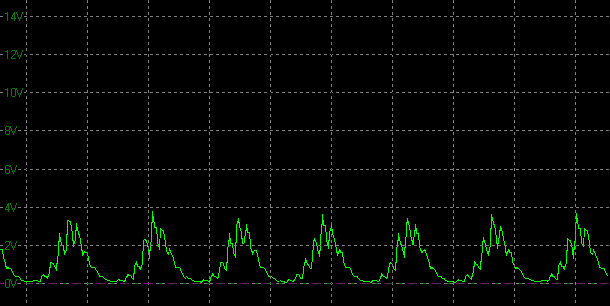
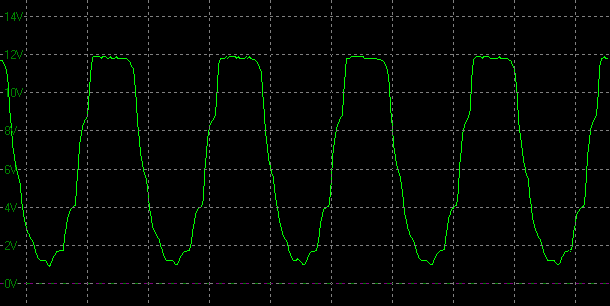
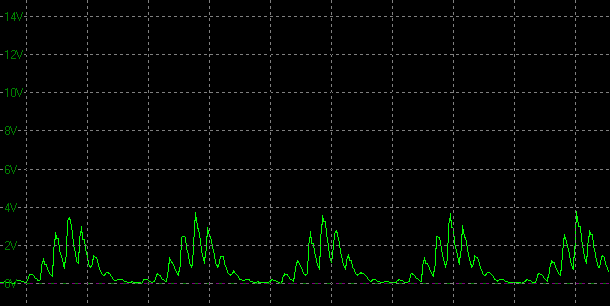
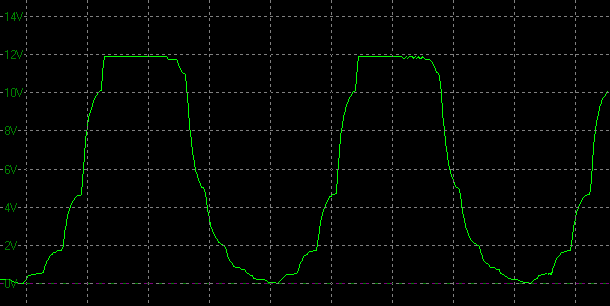
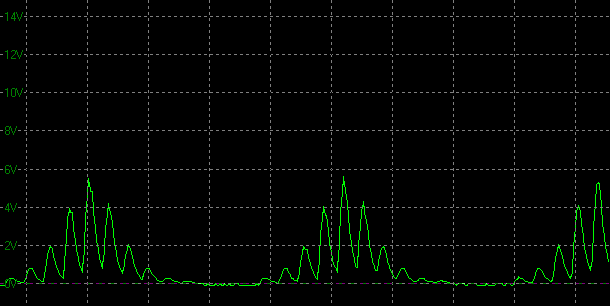
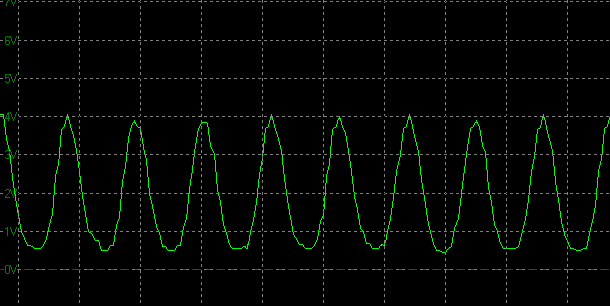

We got some more oscillographs from TFTCentral article/review!

I measured all the pulse widths mid-height. They're mostly the same as Monitors Unboxed. But I should note that the measured widths don't necessarily correspond to perceived average MPRT. I haven't seen anyone confirm they do. Not sure if the graphs need to be gamma corrected for this method to work. However, all the ufos of Pulsar at 360 fps I saw online do correspond more to ~40% rather than 25% (~2 vs 1.25 pixels of blur at 1800 pps, assuming camera tracking is accurate).

Pulsar @360 Hz:
- 360 fps = ~1.1 ms
- 250 fps = ~1.3 ms
- 200 fps = ~1.5 ms
- 150 fps = ~1.9 ms
- 127 fps = ~2.3 ms
- 100 fps = ~2.6 ms


Graph X-axis scale = 2.5 ms

Pulsar @360 Hz at various settled frame rates:
Image 360 fps
Image 250 fps
Image 200 fps
Image 150 fps
Image 127 fps
Image 100 fps

User avatar
Discorz
VIP Member
Posts: 1151
Joined: 06 Sep 2019, 02:39
Location: Europe, Croatia
Contact:

Re: NVIDIA G-Sync Pulsar monitor - Asus ROG Strix XG27AQNGV

Post by Discorz » 24 Mar 2026, 15:18

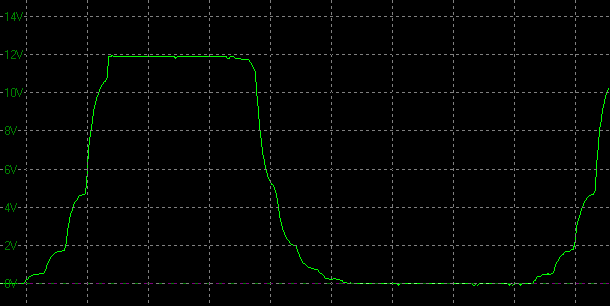
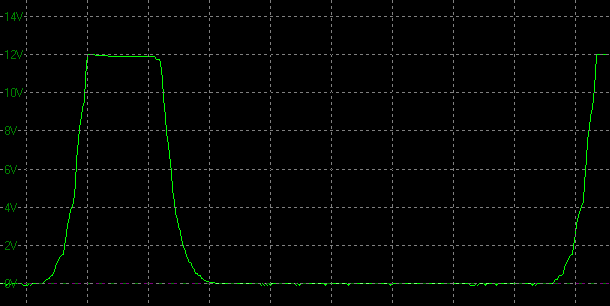
We also got new ULMB 2 graphs (thank you Simon for providing these).

The same note from comment above regarding mid-height measurements applies here. Also keep in mind that graphs are not the most accurate due to smoothing effect. Standard square pulses that normally look like this, look like this. I'm guessing they actually look closer to this (DyAc 2 Premium @540Hz).

Observations:
- When I plot the measurements into one of my MPRT charts, the 360-120Hz range scales somewhat linearly in terms of MPRT target, but the 60 Hz mode goes off-track with lower duty cycles.
- ULMB MPRT target at PW 50 is very similar to Pulsar MPRT target.
- ULMB pulsing is more stepped, while Pulsar has a smooth sinusoidal wave.
- Some multi-strobing might be spotable at lower duty cycles for 360-120 Hz range. 60 Hz doesn't show signs of this.
- PW differences at higher refresh rates are rather minor, but become larger at lower ones. PW 100 vs 10 at 360 Hz is ~0.5 ms difference, at 240 Hz ~1 ms, at 120 Hz ~2 ms, at 60 Hz ~4 ms.

ULMB 2 @360 Hz fps:
- PW 100 = ~1.5, 1.4 ms
- PW 50 = ~1.0, 1.1, 1.2 ms
- PW 10 = ~1.0 ms

ULMB 2 @240 Hz fps:
- PW 100 = ~2.1 ms
- PW 50 = ~1.5, 1.6 ms
- PW 10 = ~1.1 ms

ULMB 2 @120 Hz fps:
- PW 100 = ~3.7 ms
- PW 50 = ~2.4 ms
- PW 10 = ~1.6 ms

ULMB 2 @60 Hz fps:
- PW 100 = ~5.9, 4.7 ms
- PW 50 = ~2.4, 3.1 ms
- PW 10 = ~0.8, 0.7 ms


Graph X-axis scale = 2 ms

ULMB 2 @360 Hz fps
Image PW 100
Image PW 50
Image PW 10

ULMB 2 @240 Hz fps
Image PW 100
Image PW 50
Image PW 10

ULMB 2 @120 Hz fps
Image PW 100
Image PW 50
Image PW 10

ULMB 2 @60 Hz fps
Image PW 100
Image PW 50
Image PW 10

brownvim
Posts: 228
Joined: 22 Jun 2020, 04:15

Re: NVIDIA G-Sync Pulsar monitor - Asus ROG Strix XG27AQNGV

Post by brownvim » 24 Mar 2026, 16:34

Discorz wrote:
24 Mar 2026, 15:18
ULMB 2 @360 Hz fps:
- PW 100 = ~1.5, 1.4 ms
- PW 50 = ~1.0, 1.1, 1.2 ms
- PW 10 = ~1.0 ms

ULMB 2 @240 Hz fps:
- PW 100 = ~2.1 ms
- PW 50 = ~1.5, 1.6 ms
- PW 10 = ~1.1 ms

ULMB 2 @120 Hz fps:
- PW 100 = ~3.7 ms
- PW 50 = ~2.4 ms
- PW 10 = ~1.6 ms

ULMB 2 @60 Hz fps:
- PW 100 = ~5.9, 4.7 ms
- PW 50 = ~2.4, 3.1 ms
- PW 10 = ~0.8, 0.7 ms

Why does it seem like adjusting the PW on ULMB 2 at 360, 240 and 120 Hz only slightly improves clarity, if it even does, hard to tell.

Compared to the 60hz mode where the clarity difference is very noticeable going down the range?
5800X3D, RTX 5080 FE, OLED AW3423DW + Acer Pulsar XB273U F5

User avatar
kyube
Posts: 966
Joined: 29 Jan 2018, 12:03

Re: NVIDIA G-Sync Pulsar monitor - Asus ROG Strix XG27AQNGV

Post by kyube » 24 Mar 2026, 16:40

brownvim wrote:
24 Mar 2026, 16:34
Why does it seem like adjusting the PW on ULMB 2 at 360, 240 and 120 Hz only slightly improves clarity, if it even does, hard to tell.
Compared to the 60hz mode where the clarity difference is very noticeable going down the range?
Ask Nvidia, it's a artificial limitation. :)
Also, based on those graphs, I'm pretty certain that 60Hz is global scan instead of rolling scan.
Comparing ULMB2 PW=10 — 60Hz & 120,240,360Hz are distinctly different.
Last edited by kyube on 24 Mar 2026, 17:14, edited 1 time in total.

brownvim
Posts: 228
Joined: 22 Jun 2020, 04:15

Re: NVIDIA G-Sync Pulsar monitor - Asus ROG Strix XG27AQNGV

Post by brownvim » 24 Mar 2026, 16:46

I guess its because PW adjustment 100 to 10 does the following:

360 Hz: only ~0.5 ms improvement
240 Hz: only ~1 ms improvement
120 Hz: only ~2 ms improvement
60 Hz: ~4–5 ms improvement (huge jump)

Could a 4-5 ms range be added to the higher Hz?
5800X3D, RTX 5080 FE, OLED AW3423DW + Acer Pulsar XB273U F5


Post Reply