NVIDIA G-Sync Pulsar monitor - Asus ROG Strix XG27AQNGV

Ask about motion blur reduction in gaming monitors. Includes ULMB (Ultra Low Motion Blur), NVIDIA LightBoost, ASUS ELMB, BenQ/Zowie DyAc, ToastyX, black frame insertion (BFI), and now framerate-based motion blur reduction (framegen / LSS / etc).
Angel Soler
Posts: 97
Joined: 14 Apr 2020, 17:49

Re: NVIDIA G-Sync Pulsar monitor - Asus ROG Strix XG27AQNGV

Post by Angel Soler » 03 Jul 2026, 00:51

I’m really loving everything I’m seeing here 😊
This is a great update 👌
The only thing left for me now is an update to ULMB 2 at 60 Hz and a fix for the input lag.
Once that happens, I’ll buy the monitor again without hesitation. 😊🥰💪

pablo v2
Posts: 4
Joined: 25 Apr 2021, 08:19

Re: NVIDIA G-Sync Pulsar monitor - Asus ROG Strix XG27AQNGV

Post by pablo v2 » 03 Jul 2026, 01:18

t2na wrote:
02 Jul 2026, 16:02
Great to see the reduced input lag at 240hz as well, I mainly keep my Pulsar monitor at 360hz but cap all my games to 240fps as I've found the clarity from 240-360 isn't a huge increase - but the GPU utilisation and temperatures saved are much more noticeable to me.
I'd be curious to know whether the “reduced input lag for 240 Hz Pulsar” change applies only when the monitor is explicitly set to 240 Hz mode, or whether it also applies when a 360 Hz Pulsar monitor is left in 360 Hz mode but running at around 240 FPS under VRR.

MSIfanboy
Posts: 172
Joined: 15 Apr 2022, 13:51

Re: NVIDIA G-Sync Pulsar monitor - Asus ROG Strix XG27AQNGV

Post by MSIfanboy » 03 Jul 2026, 01:57

ManuelG_NVIDIA wrote:
02 Jul 2026, 13:35
rexbinary wrote:
01 Jul 2026, 22:10
I am sad to report that 1.1.8 does not solve the no pulsar after display sleep issue. At least not for me. I still have to run the monitor in 240Hz desktop to work around the issue. This is on 4080 SUPER.
Could you provide additional details on how you are reproducing this issue?
  • When the issue occurs, does only the display enter sleep mode, or does the entire PC also go to sleep?
  • Are any additional monitors connected to your RTX 4080?
  • Have you changed any NVIDIA Control Panel or NVIDIA App settings from their default values that could affect display behavior (for example, custom color settings, power management, or other display-related settings)?
  • Do you power off the monitor when not in use, or do you leave it in sleep mode?
  • Approximately how long does the display need to remain in sleep mode before the issue can be reproduced after waking it?
  • Are you currently using the latest NVIDIA driver (610.62)?
  • Are there any other steps or conditions that consistently help reproduce the issue?

Who is responsible for the software of these monitors? No vivid pixel, sharpening, dynamic crosshair, no option to save or load a profile, really bare bones even compared to cheaper Asus monitors, even the 25 inch mode is 24.9 inches, it's basically copy paste osd from my old pg27aqn, with 60hz ulmb2 and pulsar in the menu, would be cool to have a dedicated 24.5 inch, 24.135 inch, 24, hell even 26.5 like all the current oleds (same as there Asus and other current esports displays) instead of using sre and cru as a work around with a custom non scaled resolution

Off the top of my head this monitor is 26.9206 or something inches diagonally

User avatar
edgintheledge
Posts: 39
Joined: 03 Feb 2026, 02:11

Re: NVIDIA G-Sync Pulsar monitor - Asus ROG Strix XG27AQNGV

Post by edgintheledge » 03 Jul 2026, 05:35

I took a stab at a 1920px/sec 120hz crosstalk test as well. (30fps video @ 1/30sec as usual)

Do note that the slightly dark vertical band near the center is due to the phone's rolling shutter
(shot vertically so shutter sweeps horizontally across the screen and presumably caused the vertical band). I tried to capture as much detail, but you'd really need a camera on a rail capturing photos rather than video that compresses tiny details alot more, but this should give an idea of how much I was nitpicking every last detail when it's basically a nonissue in real use.
Attachments
1.png
1.png (5.87 MiB) Viewed 603 times

brownvim
Posts: 227
Joined: 22 Jun 2020, 04:15

Re: NVIDIA G-Sync Pulsar monitor - Asus ROG Strix XG27AQNGV

Post by brownvim » 03 Jul 2026, 06:04

edgintheledge wrote:
03 Jul 2026, 05:35
I took a stab at a 1920px/sec 120hz crosstalk test as well. (30fps video @ 1/30sec as usual)

Do note that the slightly dark vertical band near the center is due to the phone's rolling shutter
(shot vertically so shutter sweeps horizontally across the screen and presumably caused the vertical band). I tried to capture as much detail, but you'd really need a camera on a rail capturing photos rather than video that compresses tiny details alot more, but this should give an idea of how much I was nitpicking every last detail when it's basically a nonissue in real use.
Yeah in game its hard to spot even when looking for it, non issue.

It's a joy to play games at this clarity.
5800X3D, RTX 5080 FE, OLED AW3423DW + Acer Pulsar XB273U F5

brownvim
Posts: 227
Joined: 22 Jun 2020, 04:15

Re: NVIDIA G-Sync Pulsar monitor - Asus ROG Strix XG27AQNGV

Post by brownvim » 03 Jul 2026, 06:53

kyube wrote:
02 Jul 2026, 12:35
Could you test the same PW's in intermediary speeds up till 3840px/s?
Displayninja done a good review with great pursuit shots here: https://www.displayninja.com/msi-mpg-272qrf-x36-review/
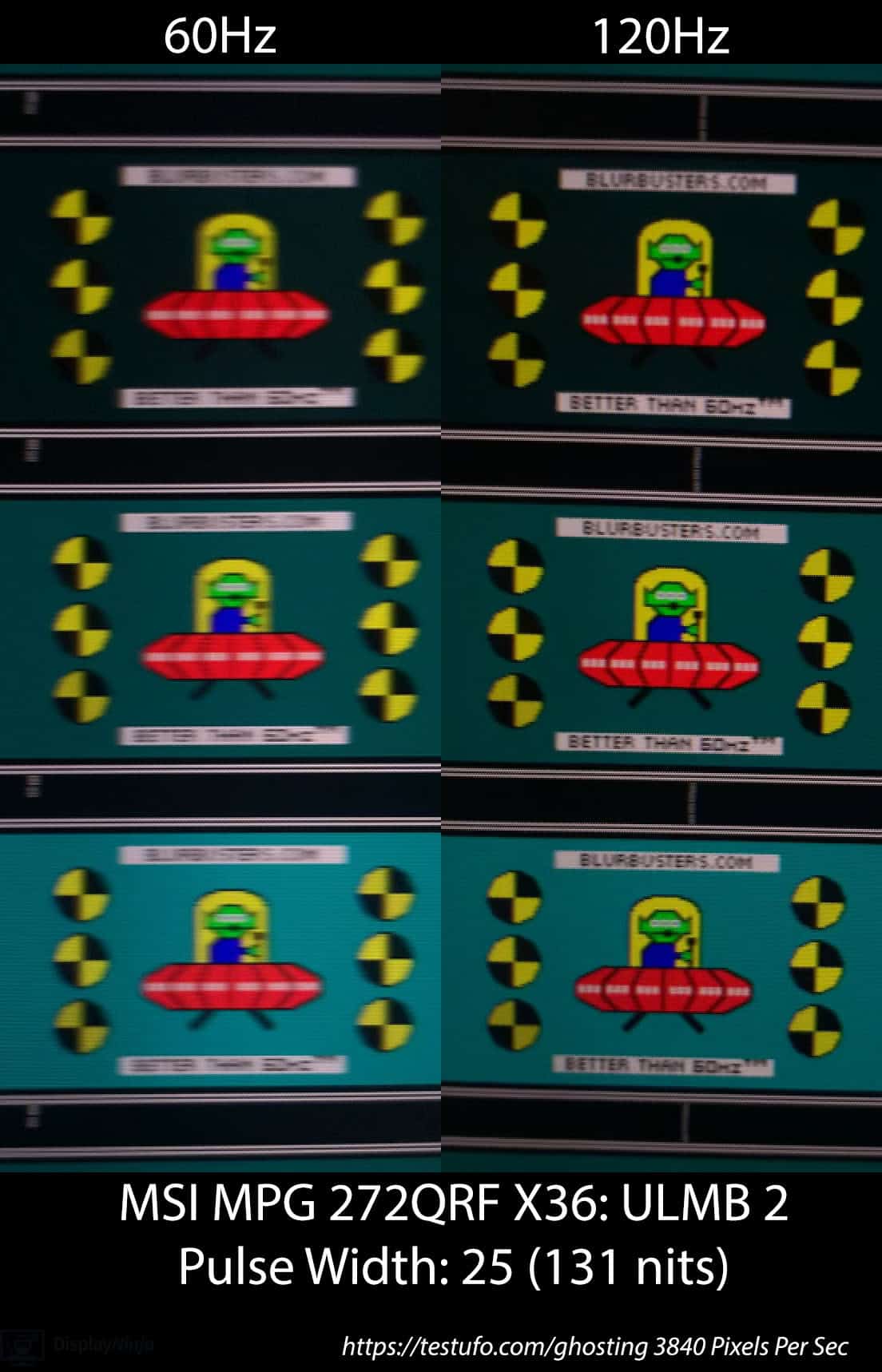
A pursuit shot here at 3840 px/s for 60hz and 120hz:
Image
https://www.displayninja.com/wp-content ... 40-PPS.jpg

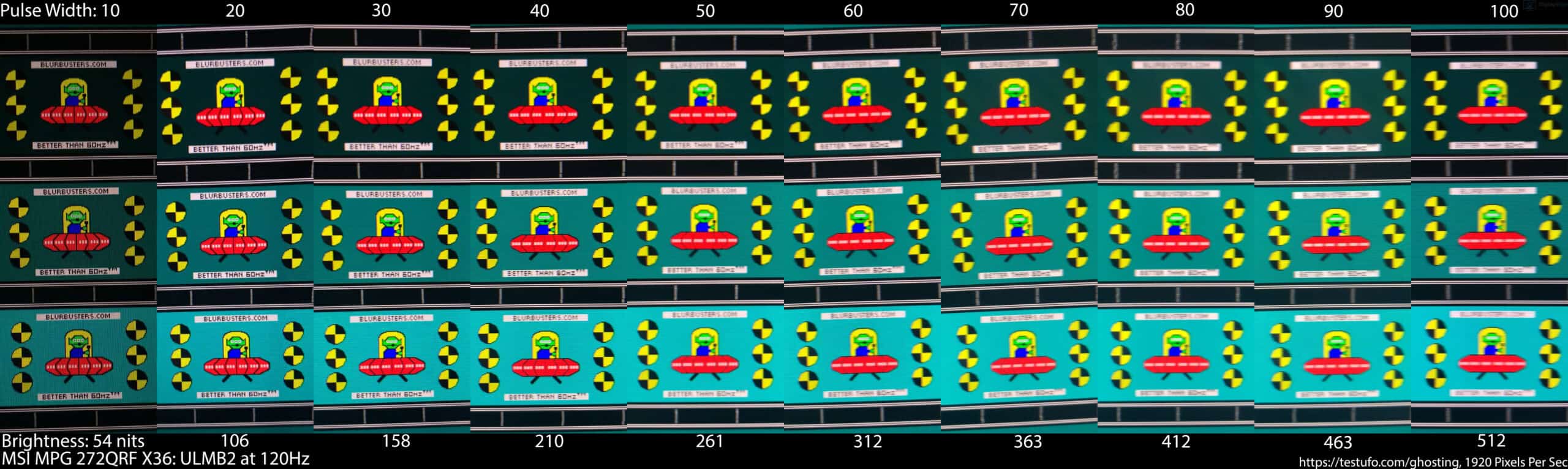
120hz at full pulse width range at 1920 px/s:
Image
https://www.displayninja.com/wp-content ... scaled.jpg
Last edited by brownvim on 03 Jul 2026, 07:04, edited 5 times in total.
5800X3D, RTX 5080 FE, OLED AW3423DW + Acer Pulsar XB273U F5

User avatar
Discorz
VIP Member
Posts: 1142
Joined: 06 Sep 2019, 02:39
Location: Europe, Croatia
Contact:

Re: NVIDIA G-Sync Pulsar monitor - Asus ROG Strix XG27AQNGV

Post by Discorz » 03 Jul 2026, 06:54

edgintheledge wrote:
02 Jul 2026, 06:05
They called it "global flash" in the patchnotes so I just repeated it, but that mightve lead to confusion... sorry! It is the same behavior as the 60hz mode. I think they just call it global flash because at the lowest PW it basically is for both 60 and 120
Calling it global flash just because the backlight rolls extra fast is indeed confusing. Why mix the two terms?
brownvim wrote:
02 Jul 2026, 11:38
This help? 1920 pixels per second, PW100, 120hz.

https://youtu.be/WcBL8boY_mQ
edgintheledge wrote:
03 Jul 2026, 05:35
I took a stab at a 1920px/sec 120hz crosstalk test as well. (30fps video @ 1/30sec as usual)

download/file.php?id=7144
That will do. Brownvim used PW 100, what did u use?

It looks very clean! They did excelent job! It reminds me of XG2431 with QFT at very low pulse widths.
kyube wrote:
02 Jul 2026, 08:42
Definitely <5% PW in that mode, which makes it the first desirable ULMB2 experience on this display.
Could you do a TestUFO pursuit photograph at 1920px/s & 3840px/s on PW=20?
If 120Hz method is identical to 60Hz, u can use the previously mentioned formula to calculate MPRT:
viewtopic.php?p=124508#p124508
CRT-like clarity should be at PW ~24 (~0.5 ms).

User avatar
edgintheledge
Posts: 39
Joined: 03 Feb 2026, 02:11

Re: NVIDIA G-Sync Pulsar monitor - Asus ROG Strix XG27AQNGV

Post by edgintheledge » 03 Jul 2026, 07:32

Discorz wrote:
03 Jul 2026, 06:54
That will do. Brownvim used PW 100, what did u use?
I used PW10

User avatar
kyube
Posts: 931
Joined: 29 Jan 2018, 12:03

Re: NVIDIA G-Sync Pulsar monitor - Asus ROG Strix XG27AQNGV

Post by kyube » 03 Jul 2026, 08:55

brownvim wrote:
03 Jul 2026, 06:53
Displayninja done a good review with great pursuit shots here: https://www.displayninja.com/msi-mpg-272qrf-x36-review/

--snip--
Absurdly good implementation.
Finally, this is what I was waiting for since the annoucement of this monitor.
This is one of the best 120 Hz backlight strobing experiences ever released.
The only other competitors, which are QD or YAG-based (I discount KSF/PFS completely due to red image artifacts, such as the PG27AQN), have either had:
• Very noticable crosstalk due to slow G2G RT's of LCD,
• A bad pulse on / brightness curve due to insufficient voltage boosting (24-27" QHD ULMB1) and vendors always opting for a "brightness-first" approach
• Inferior total image quality due to LCD subtype choice (Zowie 24" FHD TN's)
This implementation eradicates all 3 concerns at once.

The 1440p/4K space lacked good implementations for years now. This even exceeds models in the FHD native image resolution category category.
The Viewsonic XG2431 is rendered completely irrelevant by this ULMB2 mode in terms of brightness & effective motion clarity capabilities.
A shame that they won't allow the end-user to use custom refresh rates (e.g.: 72,96,125,144, 250 & others) and allow ULMB2 to be used on 240 & 360 Hz.
Lack of HDMI 2.1 FRL6 is a bummer, but this eye-tracked motion clarity is definitely praiseworthy.

It looks ~2px of blur to me (maybe even between 1-1,5px of blur), which would imply a ≤6,25% pulse width on the setting that DisplayNinja tested.
This would make sense, as the voltage boosting is ~1800-2000cd/m2 and DisplayNinja measured ~130cd/m2 using the PW=25 setting.
It seems that PW<25 is the CRT-like eye-tracked motion clarity region for ULMB2 on these models.

Bravo Nvidia!
ps: I somewhat think they'd never release this mode if I wasn't bickering about it on here =p

brownvim
Posts: 227
Joined: 22 Jun 2020, 04:15

Re: NVIDIA G-Sync Pulsar monitor - Asus ROG Strix XG27AQNGV

Post by brownvim » 03 Jul 2026, 09:34

Displayninja measured the latency of the 240hz mode on firmware 1.1.6 and 1.1.8 in his review and its been reduced by 2ms.

https://www.displayninja.com/msi-mpg-272qrf-x36-review/
5800X3D, RTX 5080 FE, OLED AW3423DW + Acer Pulsar XB273U F5

Post Reply

