
1/2, 1/4 & 1/6 the values Discorz' has mentioned.
NVIDIA G-Sync Pulsar monitor - Asus ROG Strix XG27AQNGV
-
kyube

- Posts: 1015
- Joined: 29 Jan 2018, 12:03
Re: NVIDIA G-Sync Pulsar monitor - Asus ROG Strix XG27AQNGV
evaluating xhci controller performance | audio latency discussion thread | "Why is LatencyMon not desirable to objectively measure DPC/ISR driver performance" | AM4 / AM5 system tuning considerations | latency-oriented HW considerations | “xhci hand-off” setting considerations | #1 tip for electricity-related topics | ESPORTS: Latency Perception, Temporal Ventriloquism & Horizon of Simultaneity | good lcd backlight strobing implementation list | display vs gpu scaling
-
Discorz

- VIP Member
- Posts: 1157
- Joined: 06 Sep 2019, 02:39
- Location: Europe, Croatia
- Contact:
Re: NVIDIA G-Sync Pulsar monitor - Asus ROG Strix XG27AQNGV
If u're asking about the MPRT target, It would be mostly identical to last gen ULMB - 0.25% duty cycle per increment (per 1 setting number), which allowed much sharper primary image during eye-tracking.
This was the formula if anyone wants to calculate the exact targets. It can be used for the new 60Hz mode too. And here is the ufo reference.
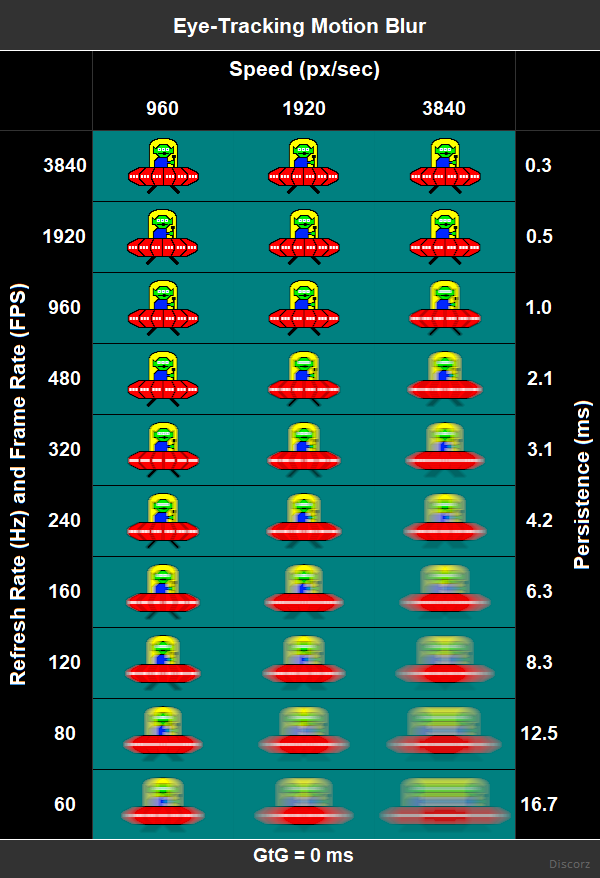
- MPRT = Frame Time × (0.25%×Pulse Width Setting) → e.g. (1/120) × (0.0025×33) = 0.7 ms
GtG needs to be significantly faster and massive refresh headroom is needed for the pixels GtG to be hidden. To put it in perspective, we would need 6x faster GtG with 6x more Hz for 360Hz to behave the same or look as clean as 60Hz mode (assuming it's using max Hz QFT for the pixels, if not numbers are different).
Perhaps 120Hz still has room for improvement, with some crosstalk at the top and bottom mind you. Who knows, maybe audience finds it acceptable, but also maybe they've already gone through this and concluded it's not worth it. As Hz goes up, improvements lessen very quickly. Below is what XG2431 can do with "inferior" global-flash at 10% (PW 40) with slightly slower response times and slightly less refresh headroom. More about XG2431 in my 10-page review. www.blurbusters.com/xg2431-discorz
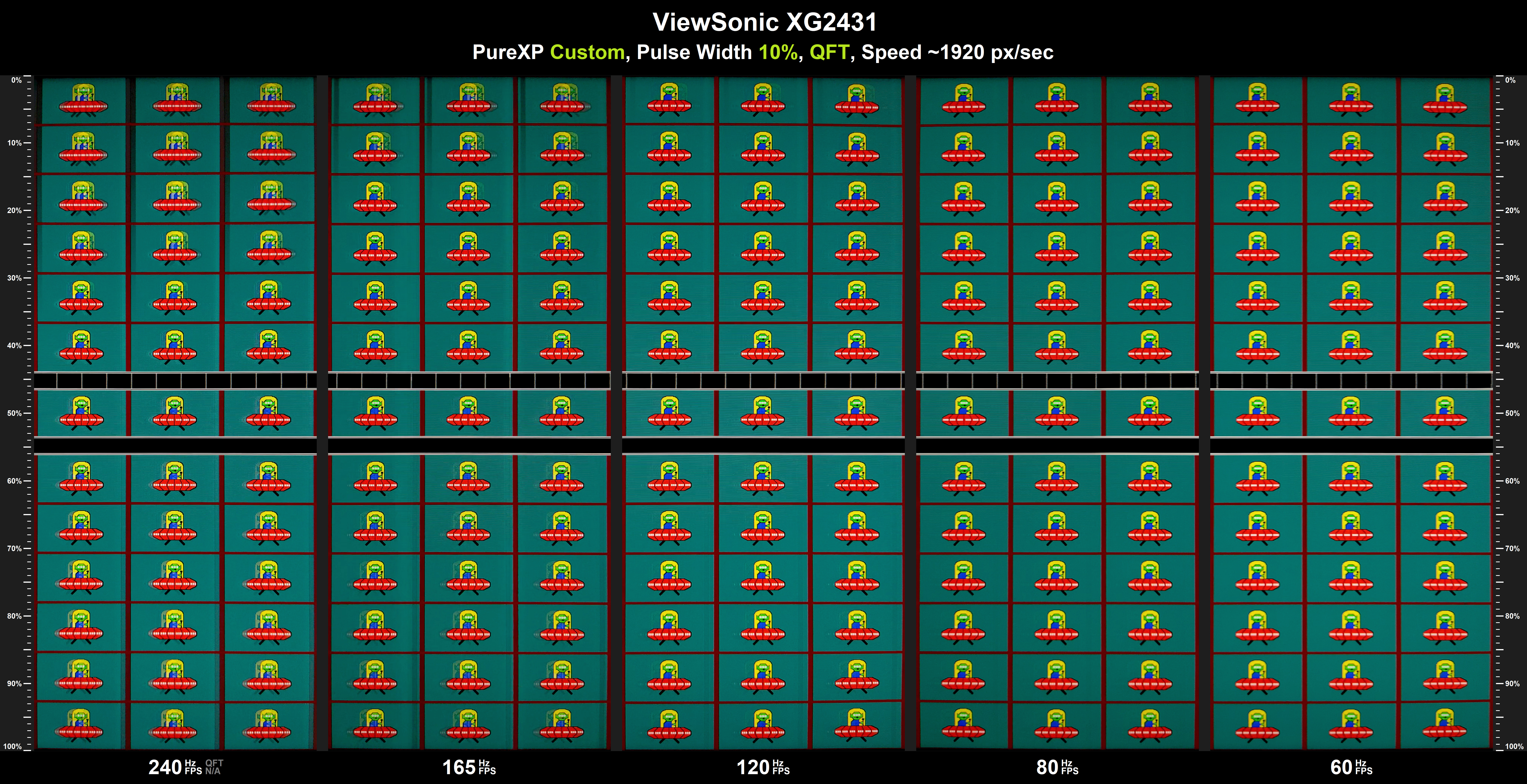
Anyway... I think they should focus on improving Pulsar primarily.
Your slow-mo footage and post about skewing helped confirm the theory I posted few days before that. Unless u posted even earlier and I missed it. If so can u link?edgintheledge wrote: ↑27 Apr 2026, 07:34Idk if any of my posts were part of the theory crafting but it's nice to know I was on the right track with what we know so far. I was trying to describe this behavior on this post...
-
brownvim
- Posts: 228
- Joined: 22 Jun 2020, 04:15
Re: NVIDIA G-Sync Pulsar monitor - Asus ROG Strix XG27AQNGV
Nice reference graphic, thank you!
It does look like there’s still some room to improve the 120 Hz ULMB2 mode. Let’s hope they address it.
The XG2431 still looks really good at 120 Hz and below — that’s about the most crosstalk I could tolerate personally.
If they ever gave us proper tools to tune it ourselves, I reckon we could get it into a really good state haha.
It does look like there’s still some room to improve the 120 Hz ULMB2 mode. Let’s hope they address it.
The XG2431 still looks really good at 120 Hz and below — that’s about the most crosstalk I could tolerate personally.
Yeah, that would be great. In what areas would you most like to see them improve the Pulsar? Would you want them to allow lower brightness for even better clarity, or focus on something else?
If they ever gave us proper tools to tune it ourselves, I reckon we could get it into a really good state haha.
5800X3D, RTX 5080 FE, OLED AW3423DW + Acer Pulsar XB273U F5
-
BLooDS_inc
- Posts: 59
- Joined: 12 Apr 2026, 15:02
Re: NVIDIA G-Sync Pulsar monitor - Asus ROG Strix XG27AQNGV
I think they need to properly set gsync pulsar for work in fullscreen borderless mode, in PUBG, pulsar now working only in fullscreen, even when u set fullscreen and windowed mode in nvcp panel for PUBG exclusively, when u set fullscreen borderless in-game, pulsar stop working
-
brownvim
- Posts: 228
- Joined: 22 Jun 2020, 04:15
Re: NVIDIA G-Sync Pulsar monitor - Asus ROG Strix XG27AQNGV
I had to roll back the Nvidia drivers, the latest ones break borderless for me.BLooDS_inc wrote: ↑27 Apr 2026, 14:40I think they need to properly set gsync pulsar for work in fullscreen borderless mode, in PUBG, pulsar now working only in fullscreen, even when u set fullscreen and windowed mode in nvcp panel for PUBG exclusively, when u set fullscreen borderless in-game, pulsar stop working
5800X3D, RTX 5080 FE, OLED AW3423DW + Acer Pulsar XB273U F5
-
liquidshadowfox
- Posts: 283
- Joined: 05 Nov 2020, 14:03
Re: NVIDIA G-Sync Pulsar monitor - Asus ROG Strix XG27AQNGV
I think what people aren't very happy about is the fact that rolling scan pulse doesn't actually make ULMB 2 at 120, 144, 240 and 360 hz look as sharp as global pulse on the pg27aqn which uses the last gen panel. If this new panel they are using is actually a direct successor with better g2g than the previous one, than implementing ULMB 2 global pulse SHOULD be an option for this monitor given that it also supports dynamic overdrive and variable independent overdrive. Even if there's crosstalk, there was already very minimal crosstalk on the pg27aqn where almost 1/2 the entire screen was clear so if this panel is any better, I'd assume the crosstalk would be even less and would be more sharp given it's not using red phosphor backlight. I know the 240 hz on the pg27aqn had even LESS crosstalk than 360 hz mode so I'd argue they should implement global strobe ULMB 2 at LEAST for 120 hz and 240 hz mode given how good it was on the pg27aqn (I could take another look at this tonight to compare but I remember it felt like there was literally no crosstalk at 240 hz).Discorz wrote: ↑27 Apr 2026, 13:13If u're asking about the MPRT target, It would be mostly identical to last gen ULMB - 0.25% duty cycle per increment (per 1 setting number), which allowed much sharper primary image during eye-tracking.
This was the formula if anyone wants to calculate the exact targets. It can be used for the new 60Hz mode too. And here is the ufo reference.
But strobing is not just about MPRT. At high refresh rates u don't want the backlight scan boost because that would bring back some of the inconsistent vertical crosstalk that we used to have. It would look closer to ULMB 1 crosstalk, which kills the point of rolling edge-lights.
- MPRT = Frame Time × (0.25%×Pulse Width Setting) → e.g. (1/120) × (0.0025×33) = 0.7 ms
GtG needs to be significantly faster and massive refresh headroom is needed for the pixels GtG to be hidden. To put it in perspective, we would need 6x faster GtG with 6x more Hz for 360Hz to behave the same or look as clean as 60Hz mode (assuming it's using max Hz QFT for the pixels, if not numbers are different).
Perhaps 120Hz still has room for improvement, with some crosstalk at the top and bottom mind you. Who knows, maybe audience finds it acceptable, but also maybe they've already gone through this and concluded it's not worth it. As Hz goes up, improvements lessen very quickly. Below is what XG2431 can do with "inferior" global-flash at 10% (PW 40) with slightly slower response times and slightly less refresh headroom. More about XG2431 in my 10-page review. www.blurbusters.com/xg2431-discorz
Anyway... I think they should focus on improving Pulsar primarily.
Your slow-mo footage and post about skewing helped confirm the theory I posted few days before that. Unless u posted even earlier and I missed it. If so can u link?edgintheledge wrote: ↑27 Apr 2026, 07:34Idk if any of my posts were part of the theory crafting but it's nice to know I was on the right track with what we know so far. I was trying to describe this behavior on this post...
-
brownvim
- Posts: 228
- Joined: 22 Jun 2020, 04:15
Re: NVIDIA G-Sync Pulsar monitor - Asus ROG Strix XG27AQNGV
The 1.1.6 firmware update is currently available for AOC AGON PRO AG276QSG2 and MSI MPG 272QRF X36 models.BLooDS_inc wrote: ↑20 Apr 2026, 06:56How about a pulse width setting on the MSI version of pulsar monitor? Now it's just unusable cause u can't change the pulse width of 60hz ulmb mode and standard mode cause massive flickering, why only MSI 272qrf x36 is still have the worst firmware version between 4 monitors?
https://gsync-update.nvidia.com/
1.1.6:
Improved G-SYNC Pulsar operation for 100 – 180 FPS range.
Fixed monitor white-point value in EDID to D65 white-point value.
Fixed input auto-switch issue.
Fixed cable detection issue affecting input switching when using a DP80 cable.
Fixed occasional frame skip issue when second input is active.
https://nvidia.custhelp.com/app/answers ... 1.4-update
See if a pulse width setting got added? Doesn't seem like it from the above list.
Last edited by brownvim on 28 Apr 2026, 05:53, edited 1 time in total.
5800X3D, RTX 5080 FE, OLED AW3423DW + Acer Pulsar XB273U F5
-
kyube
- Posts: 1015
- Joined: 29 Jan 2018, 12:03
Re: NVIDIA G-Sync Pulsar monitor - Asus ROG Strix XG27AQNGV
Source: https://gsync-update.nvidia.com/Nvidia wrote:
1.1.4: This firmware update includes G-SYNC Pulsar optimizations, eliminates sharp double images when operating under 90 FPS, fixes the in-monitor FPS indicator when below 90 FPS, and adds a fixed 60Hz strobing mode for games locked to 60 Hz.
1.1.6: This firmware update improves G-SYNC Pulsar operation for 100 - 180 FPS range.
Note: The 1.1.6 firmware update is currently available for AOC AGON PRO AG276QSG2 and MSI MPG 272QRF X36 models. Support for Acer Predator XB273U F5 and ASUS ROG STRIX Pulsar XG27AQNGV monitors will be added soon.
Sadly, still no update to >120Hz ULMB2.
I hate this type of software development, where a product isn't fully featured out of the box and receives post-release firmware updates instead...
Pure greed.
evaluating xhci controller performance | audio latency discussion thread | "Why is LatencyMon not desirable to objectively measure DPC/ISR driver performance" | AM4 / AM5 system tuning considerations | latency-oriented HW considerations | “xhci hand-off” setting considerations | #1 tip for electricity-related topics | ESPORTS: Latency Perception, Temporal Ventriloquism & Horizon of Simultaneity | good lcd backlight strobing implementation list | display vs gpu scaling
-
brownvim
- Posts: 228
- Joined: 22 Jun 2020, 04:15
Re: NVIDIA G-Sync Pulsar monitor - Asus ROG Strix XG27AQNGV
Nvidia guy here mentioned they were investigating this and only confirmed the Pulsar ghosting fix in the next firwmare update which is 1.1.6.
5800X3D, RTX 5080 FE, OLED AW3423DW + Acer Pulsar XB273U F5
-
kyube
- Posts: 1015
- Joined: 29 Jan 2018, 12:03
Re: NVIDIA G-Sync Pulsar monitor - Asus ROG Strix XG27AQNGV
viewtopic.php?p=124270#p124271
I don't have my hopes up... considering something as grand as this managed to slip past their Q&A team...
This product was being worked on for 2 years, at a minimum...
evaluating xhci controller performance | audio latency discussion thread | "Why is LatencyMon not desirable to objectively measure DPC/ISR driver performance" | AM4 / AM5 system tuning considerations | latency-oriented HW considerations | “xhci hand-off” setting considerations | #1 tip for electricity-related topics | ESPORTS: Latency Perception, Temporal Ventriloquism & Horizon of Simultaneity | good lcd backlight strobing implementation list | display vs gpu scaling