About poll rate: 2000 Hz works with more games than 4000 Hz. 1000-vs-2000 is more noticeable than 2000-vs-8000 (I can still see improvements to mouse cursor behavior).
One big problem with 400 and 800 is legacy game engines and legacy mouse mathematics, like the older CS:GO engine, especially at many settings.
Modern great mouse sensors do a great job of 1600dpi in newer engines (e.g. Valorant, Overwatch). 1600dpi at quarter sensitivity relative to 400dpi, while adjusting Windows mouse sensitivity (bad for old games, harmless for new games) to keep pointer speeds the same as before -- allows you to slowtrack sniper much more accurately, while keeping your fast flicks unaffected. If you pay attention to adjustments at places like https://mouse-sensitivity.com/ and carefully configure settings, it's possible to get great 1600dpi in the older Source1 engines (and older), but I wouldn't chance it, 800 seemed the comfortable maximum with CS:GO when I was playing it, even while Fortnite felt quite perfectly fine at 1600dpi+. Newer engines are wayyyyy more universally accurate at higher DPI at whatever odd sensitivity settings you use.
If you slow track (sniper, slowpans, target tracking, aiming at airplanes, etc) in NEWER engines -- then you should know that you can do better nowadays. 400dpi = your 0.25 inch slowtracks runs at only 100 frames per second (one-quarter of 400dpi is 100, and that's only 100 positions). You're sabotaging slowtrack framerate with 400dpi, but whatever floats your boat -- for proper championship money in older game engines. As you are hitting 360Hz, the framerate sabotage of 400dpi starts to become noticeable unless you're a super-low-game-sensitivity user (e.g. moving your whole arm over a whole foot to flick turn), then you'll always never be moving 0.25 inch at a time while camping as a sniper slowtracking a target. Then 400 can be fine. Regardless, 400 increasingly sabotages mouseturn/mousepan framerate below refreshrate, and the main purpose of 400 is simply to keep latency low, muscle memory familiarity, and compatibility with (less and less oft used) older game engines with less precise mouse mathematics.
If you watch the professional esports teams -- they didn't ever go above 800 in CS:GO. But once you looked at other games, some of the teams were using 2000+ in games like Fortnite!
Mousepad quality is also a biggie. Some people are trying out those new nano textured glass mousepads to improve high-DPI function (3200dpi). Not all like it, but it's quite an interesting option for high-DPI users and wrist-flickers. But make sure you're windexing it now and then! And definitely keep your mouse feet clean.
When I talked to a Razer employee after I got the 8KHz sample, he confirmed the low-precision mouse mathematics in some older engines was observed.
Also, for me, 2KHz is usually the sweet spot. 4000 still starts to bog the CPU, and some engines hate even 1000. When it got first released -- the super buggy Cyberpunk 2077 even originally ran best at 500 Hz for me (mouse microstutters at 1000 Hz!!) but the engine was fixed and now it performs okay at default settings. At least on my machine. But it doesn't benefit as much, as say, a competitive FPS shooter. Use profile switching to blacklist high pollrates in engines that go wonky with it. Stick to 1000 for older engines, but go nuts with 2000-4000 for newer engines that has an efficient mouseloop. Just know that the computer is the limiting factor. When I got my first 1000Hz mouse in 2006 (more than 15 years ago), many games couldn't even keep up, and the same problem is happening now with 8000 Hz. It's beautiful when it works (very very noticeable when spinning mouse pointer in circles on Windows desktop), but in a game, the frequency bogs down the mouse loop bad.
This was the old advice (which still partially applies today)
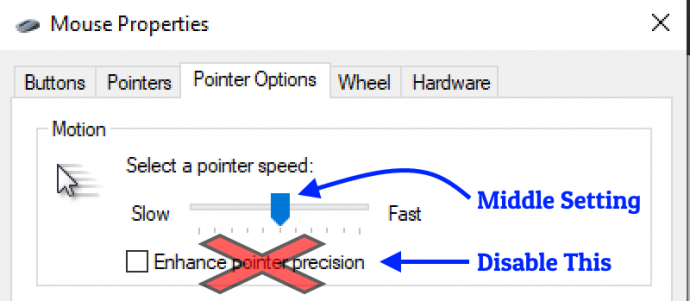
While you need to turn OFF Enhanced pointer precision, it's now safe to deviate away from Middle Setting *IF* you have stopped playing legacy games. This can help slow down your cursor in menus during 1600dpi+ operation, WHILE keeping your flick turns feeling exactly the same 400-vs-1600dpi (at compensated in-game sensitivity settings). At least in newer engines.
It used to be the case you HAD to avoid adjusting the Windows mouse sensitivity settings away from the dead-center setting. Say, you play World of Warcraft, it's got problems when you deviate from the middle!! But modern games ignore it completely EXCEPT for mouse pointering around (inventories in RTS games, game-join menus in FPS, flipping through menu screens in any game, etc), which makes it perfect in a bunch of newer games. If you stopped playing legacy games, it's now safe to adjust that setting to slow down your mouse pointer during 1600-3200dpi operation. The main problem is you have to familiarize with the exact notch that divide your mouse pointer speed by 2 or 4, if you double or quadruple your DPI. Otherwise, your mouse pointer will stay wonky.
Just remember to turn off "Enhance Mouse Pointer Precision"! (very very BAD -- pointer moves different speeds at 1000Hz vs 2000Hz vs 4000Hz). Even at the same DPI!
Once properly setting'd out 1600-3200 with compensated Pointer Speed and with compensated In-Game Sensitivity...
...you've got a "normal" slow mouse pointer (just like 400dpi days)
...and your fast flickturns feel unchanged (just like 400dpi days) as long as it's a good sensor, high resolution clean mouse pad, clean mouse feet.
But you gain a hidden new superpower from the high DPI operation: Your slowtracks become so much smoother and higher frame rate (no longer sabotaged by low DPI). The grainy slowtracks stops happening. However, YMMV depending on game. Some love the graininess because it's like "notched" movements, so if you need the notchfeel effect of a low-DPI slowtrack, then keep using low DPI. However, not all gamers are trained on that part, and the improved framerate of slowtracks wins out instead.
And with some of the esports leagues moving to 1440p recently (and possibly 4K in the future, longterm), more pixels = the dpi limitations show like a sore thumb during showtracks.
Syncing muscle memory between games is the HARD part -- when you've got a mix of old engines and new engines -- so sites like mouse-sensitivity.com helps with that sort of thing. Sometimes it's much easier to give up the obvious new-engine benefit of 1600+, and just stick to 400/800. But a lot of the new crowd now only plays Fortnite or Valorant or other bunch of newer FPS games -- and so, it's easier to start again with a 1600dpi+ 2000Hz clean sheet and reliably sync muscle memories better.
Currently, I'm a 3200dpi 2000Hz (wannabe-4000 if game engine actually kept up) casual gaming user simply because it's a fairly universal setting of convenience that I can easily sync now with most newer games (I don't play CS:GO anymore, and haven't yet tried CS2) and a wrist-flicker not an arm-sweeper. But I'm encountering more and more people who've settled on >800dpi sweet spots even for arm-sweeping.
Unfortunately SOME older games still feel better with 800. It just makes me stop playing them, ha. I really enjoy my >240 frames per second slowtracks (<1 inch/sec). No dpi-derived framerate sabotage for me, buddy. I want to _enjoy_ my Hertz _visually_ and 800 is garbage on 480 Hz OLEDs!
The Settings-configuring skillz of figuring out how to properly use 1600-3200 DPI is really hurt by legacy engines, so I understand if you need to focus your esports championship earnings at what works best for you. I only play casually for fun. But as games evolve, fewer players play legacy engines (including the forced CS:GO -> CS2 jump which is MUCH more 1600dpi friendly), and 1000Hz displays arrive -- be prepared to compete against gamers who have gained new superpowers like this one. We 400dpi dinosaurs can fail against the new kids that have learned to properly 1600dpi in new engines that does 1600dpi flawlessly. Just let that future sink ...er, sync?... in.