240Hz IPS worse in games compare to my previous 144Hz TN monitor?

Everything about displays and monitors. 120Hz, 144Hz, 240Hz, 4K, 1440p, input lag, display shopping, monitor purchase decisions, compare, versus, debate, and more. Questions? Just ask!
forii
Posts: 218
Joined: 29 Jan 2020, 18:23

Re: 240Hz IPS worse in games compare to my previous 144Hz TN monitor?

Post by forii » 16 Apr 2020, 05:38

To everyone reading this - I found the problem.

When I was playing on 144Hz TN with anti-aliasing (AA) + 140 fps cap, I didn't have the problem with big gpu usage, it was never above 90%.

But when I switched to 240Hz IPS which Im talking about, then I unlocked my fps to have more than 200 fps+ but I realised that my gpu is much often near 97-98% usage, I could lower it by only capping fps to 140.

But that is not the final point... One guy on the stream told me that Anti-aliasing which I was using in the game (highest one - Filmic TX2 - in CoD MW 2019) is causing the most work for the gpu. its a killer for 240Hz Monitors. Even if I had all other settings turned off or lowest possible - the AA was causing most problem

I get used to highest AA because I don't like jaggy edges and moving pixels everywhere on the map, thats why it was hard to me to get rid of that

But I realised when we want as much FPS as possible we need to get rid of the any form of AA, because its either AA with max 140 fps (to don't have often 97% gpu usage) or just turn off AA and have less gpu usage + have easy more than 140 fps+ which is neccessary for 240hz monitors

Also I heard that AA cause slower rendering screen. And with turned off AA i actually could react faster and see enemy fly faster from behind the wall


Now I can play on my 240Hz with capped fps at 200 (thats my AVG fps) + never have more than 92~% gpu usage - because on capped fps at 200 with AA i had always often 97% gpu usage anyway, even at 170 locked it was the same, only at 140 fps at 240hz with AA I had less than 90% gpu usage... but who would use 140 fps just to have AA...!?

So AA was the problem.

I went further and also checked my 144hz TN monitor, it has 2x higher response time (!!yes!!) and 2,5x higher input lag compare to the Asus VG259QM 240hz TN which Im using right now.

So guys...

All pro's can use unlocked fps and dont have the input lag problem but actually they can do that only because they do not play with AA and all settings are low... and they gpu usage is not more than 95%

I thought im same like them because I also had the low settings as possible but only except the AA, which I didn't know gave me almost 30+ more fps and lower my gpu usage. 8-)

User avatar
Chief Blur Buster
Site Admin
Posts: 12102
Joined: 05 Dec 2013, 15:44
Location: Toronto / Hamilton, Ontario, Canada
Contact:

Re: 240Hz IPS worse in games compare to my previous 144Hz TN monitor?

Post by Chief Blur Buster » 17 Apr 2020, 11:38

forii wrote:
16 Apr 2020, 05:38
To everyone reading this - I found the problem.
Yes, it is possible that the higher frame rate requirements of a 240 Hz monitor created an unexpected bottleneck for you -- and create some latency that way.

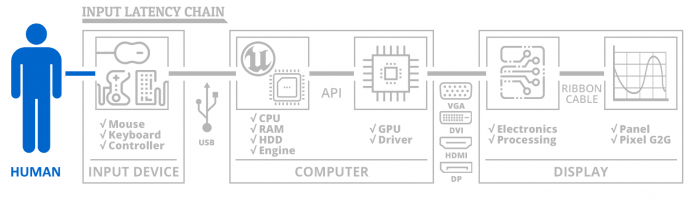
The known lagfeel-increase behaviours at near-100% GPU is sometimes a catch-22 when you've got a higher Hz monitor that requires your GPU to work harder...

Not all games exhibit lagfeel changes at near 100% CPU and/or GPU, but for some games it creates processing starvation behaviors -- e.g. when CPU+GPU are too busy on graphics, the mouse input read programming can lagbehind because there's no spare processor cycles to process input -- and thus lag increases. There are other reasons but, indeed, certain games have lagfeel problems at near-100% utilization because it's a lag chain.

Image

Metaphorically, if 100% of processing is focussed only parts of the lag chain, there's little processing time left over for a different part of the lag chain -- like rush hour traffic down a road clogging things up elsewhere in the lag chain.

It could happen anywhere in the lag chain. 100% spent in graphics. Or 100% spent on trying to process too many mouse inputs inefficiently. Etc. When the first 1000Hz mice came out and were used on slower systems, inefficient mouse drivers or applications clogged down the rest of the system (For a few apps, it is still occasionally a problem: Like dragging Microsoft Office 365 windows with a 1000Hz mouse -- it lags behind at least with the 2019 edition of Microsoft Office!).

Unexpected inefficiencies can occur when something unexpectedly happens to increase lag during higher performance situations. It is possible to run into situations where 240Hz monitors are laggier only because of that situation -- and requires adjustments such as frame rate capping or disabling detail to allow the 240 Hz to feel less laggy than your 144 Hz.

Fortunately, it is only minor tweaking -- CS:GO is more immune to this with AA off. Glad it works for you!

Shall I put a [FIXED] tag to the topic line if it's currently fixed for you?
Head of Blur Busters - BlurBusters.com | TestUFO.com | Follow @BlurBusters on: BlueSky | Twitter | Facebook

Image
Forum Rules wrote:  1. Rule #1: Be Nice. This is published forum rule #1. Even To Newbies & People You Disagree With!
  2. Please report rule violations If you see a post that violates forum rules, then report the post.
  3. ALWAYS respect indie testers here. See how indies are bootstrapping Blur Busters research!

forii
Posts: 218
Joined: 29 Jan 2020, 18:23

Re: 240Hz IPS worse in games compare to my previous 144Hz TN monitor?

Post by forii » 18 Apr 2020, 08:07

Yea i think its fixed.

Post Reply