GtG measurements are pretty tough to nail down to a single trusted numberRLCScontender wrote: ↑21 Apr 2020, 04:49Heres'a n example. They had the viewsonic elite xg270qg at 5.2ms response time and the lg 27gl850-b at 4.17ms response time. Yet almost EVERY review company (TFT, Prad.de, Snowman, etc) easily had the viewsonic faster than the LG. Another example is the LG 32gk850-f, tft had it at 8ms response time while hardware unboxed had the same panel at 4.3ms respones time. TWo different revieweres, with vastly DIFFERENT g2g averages
Also different parts of the curve can be faster than others.
1. GtG curve SHAPE differences on GtG graphs.
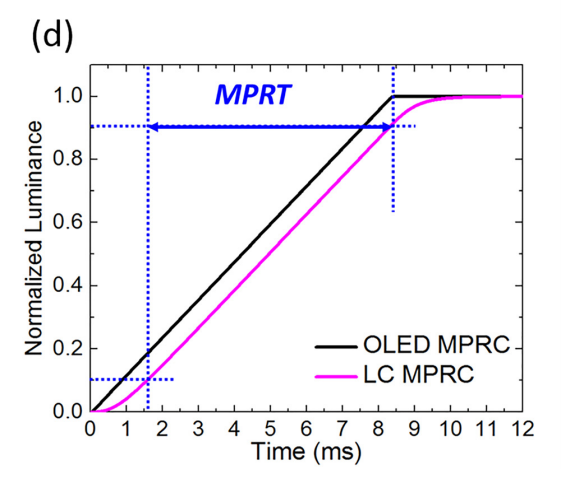
Start of might be faster than competitor, but end of curve might be slower than competitor. While only one of the two might be more visible in-game for specific games. Even dark games can make parts of a GtG curve more important, while brighter games make different parts of a GtG curve more important. The famous VA slowness in darks is a famous example but also affects TN and IPS to lesser extents.
2. Colors measured. Different colors have different GtG.
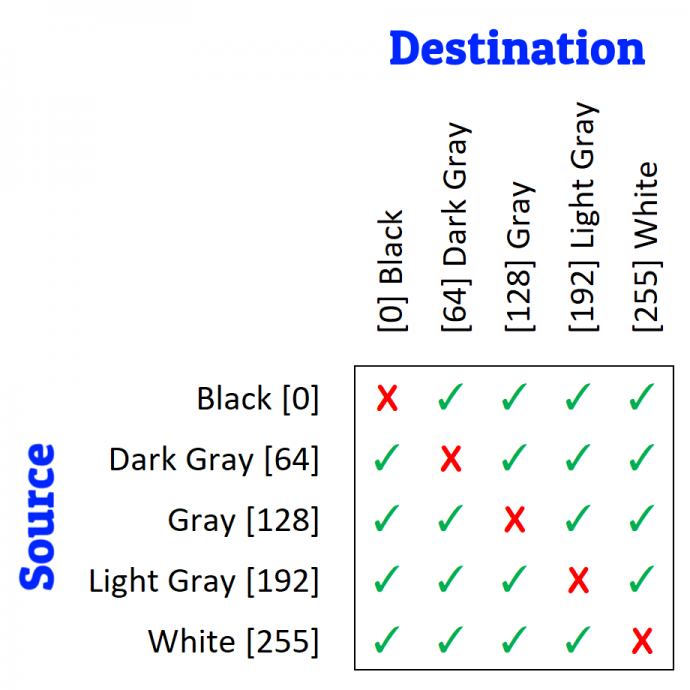
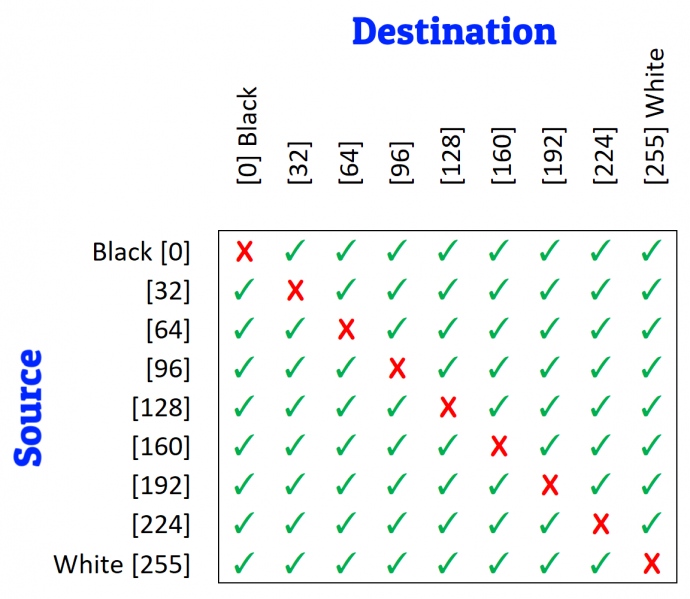
For an 8-bit panel, there are over 60,000 different GtG color values -- 256x256 color combination minus the no-change colors (256), for 8-bit = 65536-256 = 65280 different GtG numbers! But most reviewers only test a 5x5 grid, which is too small to get accurate averages on VA panels.
3. Temperature differences. Even 1 degrees colder can create 1ms slower on some VA panels on some colors.
Ever used a frozen LCD in a freezing car in middle-winter? GtG measured in seconds. But even 1 degree differences is important.
4. Warm-up differences. Receive a monitor by FedEx in winter versus summer. GtG tests will be different.
You need 24hr warm-up to room temp, followed by at least 30-60 minutes of full power-on time in a temperature-controlled room (20C).
5. Panel lottery factor, You know those black nonuniformities that can't be explained-away as backlight bleed etc?
That, too, can affect GtG by fractions of milliseconds
6. Sensor location factor. You know the cold corner of the LCD and the hot corner of the LCD where the power supply is?
That, too, can affect GtG speeds, just by position of your GtG measuring sensor
7. Aging differences.
Yup, yup. I've seen different numbers after 400 hours of breaking-in.
So... See, it's a bigger rabbit hole than you thought, eh?

TL;DR Review Quality GtG Lab Analysis Preparation
- If freshly received by Amazon, wait 24 hours till monitor equalizes to the temperature of your home.
- Get 2 accurate lab thermometers and place them 2 meters aparts on left/right side of monitors.
Two is preferred as a verifier of each other, and to verify lack of room hotspots - Make sure no computer nearby (Keep hot computers far away from monitor -- preferably moved to UNDER the desk or next to desk side, and diagonally away from monitor to prevent hot rising air from computer). Prevents temperature interference from hot GPUs etc.
- Thermostat your room until 20C reads on both thermometers sitting a meter away from both sides of monitor
There are also different temperature standards, but I use 20C as a standardized room temperature
Make sure your computer desk is far away from your heat vents, e.g. no baseboard heater or air conditioner near monitor - Power up the monitor for an hour or so minimum
- Measure consistent position (i.e. screen dead centre) Never, never, never, never, never randomize sensor position.
- Measure a grid, the biggest you can. For VA panels, even 5x5 grid vs 9x9 grid makes big diff because of small size of GtG slowness hotspot in the dim area of the color gamut.
- Disclose your GtG measurement standard. For example, use VESA GtG cutoff points 10% and 90% accurately. Make sure your oscilloscope is sensitive enough not to be noisy at GtG10%. Many cheap oscilloscopes are, and will massively change your GtG number.
- Average the numbers for GtG averages.
- You can color-code it as a GtG heatmap (like TFTCentral and ApertureGrille, etc)
See? Monitor manufacturers aren't necessarily "lying". They just are following imperfect standards of GtG measurements which are sometimes inconsistent with each other. GtG is hard to measure accurately at these accuracy levels.
TL;DR: Do a full disclosure of the limitations of your GtG measurements. Anything less than an attempt at perfection will guarantee even-more-different results.