
TL:DR : Cant cap FPS at monitors refresh rate, lines start appearing down the middle and mouse movements start becoming laggy or unreadable
So I've had this problem for over a year now, and almost all of my friends think I'm crazy but I know that it happens. I play a lot of Fortnite and I have an 165hz monitor sometimes ill cap my FPS at 165 and it'll be normal for a few seconds until these random lines start appearing on my screen affecting my mouse movement. I cant really use g-sync because of the competitive playstyle that I indulge in, but when I cap my fps at 180 or 200 and my fps drops down to that 165hz range my mouse movements start acting weird and it almost feels like everything is slowing down. I've had this problem for almost 2 years and still have yet to find a solution or something that could turn down the effect. Ive seen multiple people cap there fps at their monitors refresh rate and I think I'm going crazy
SPECS :
Ryzen 7 3700x
EVGA 1660 TI OC
32GB 3000hz Corsair RGB Vengeance
B450 Aorus Pro
1 TB
1 SSD
Can Never Cap My FPS at My Monitors Set Refresh rate
-
Chief Blur Buster

- Site Admin
- Posts: 12144
- Joined: 05 Dec 2013, 15:44
- Location: Toronto / Hamilton, Ontario, Canada
- Contact:
Re: Can Never Cap My FPS at My Monitors Set Refresh rate
If you are using VSYNC OFF, that is called a tearing artifact; see section 3 of Are There Advantages to Frame Rates Higher Than the Refresh Rate? -- more framerates means tearlines often have smaller offsets
Tearing artifacts can become a beat frequency effect between frame rate versus refresh rate (two frequencies beat-frequencying against each other)
162fps at 165Hz = one tearline rolling downwards 3 cycles per second
163fps at 165Hz = one tearline rolling downwards 2 cycles per second
164fps at 165Hz = one tearline rolling downwards 1 cycles per second
165fps at 165Hz = one tearline stationary (or slowly jittering/rolling)
166fps at 165Hz = one tearline rolling upwards 1 cycles per second
167fps at 165Hz = one tearline rolling upwards 2 cycles per second
168fps at 165Hz = one tearline rolling upwards 3 cycles per second
If you hate this, always make sure your framerate is far below Hz, or far beyond Hz. Upgrade your Hz if you want tearing to be much less visible. 240Hz and 360Hz really helps tearing even if your framerates are only 170fps.
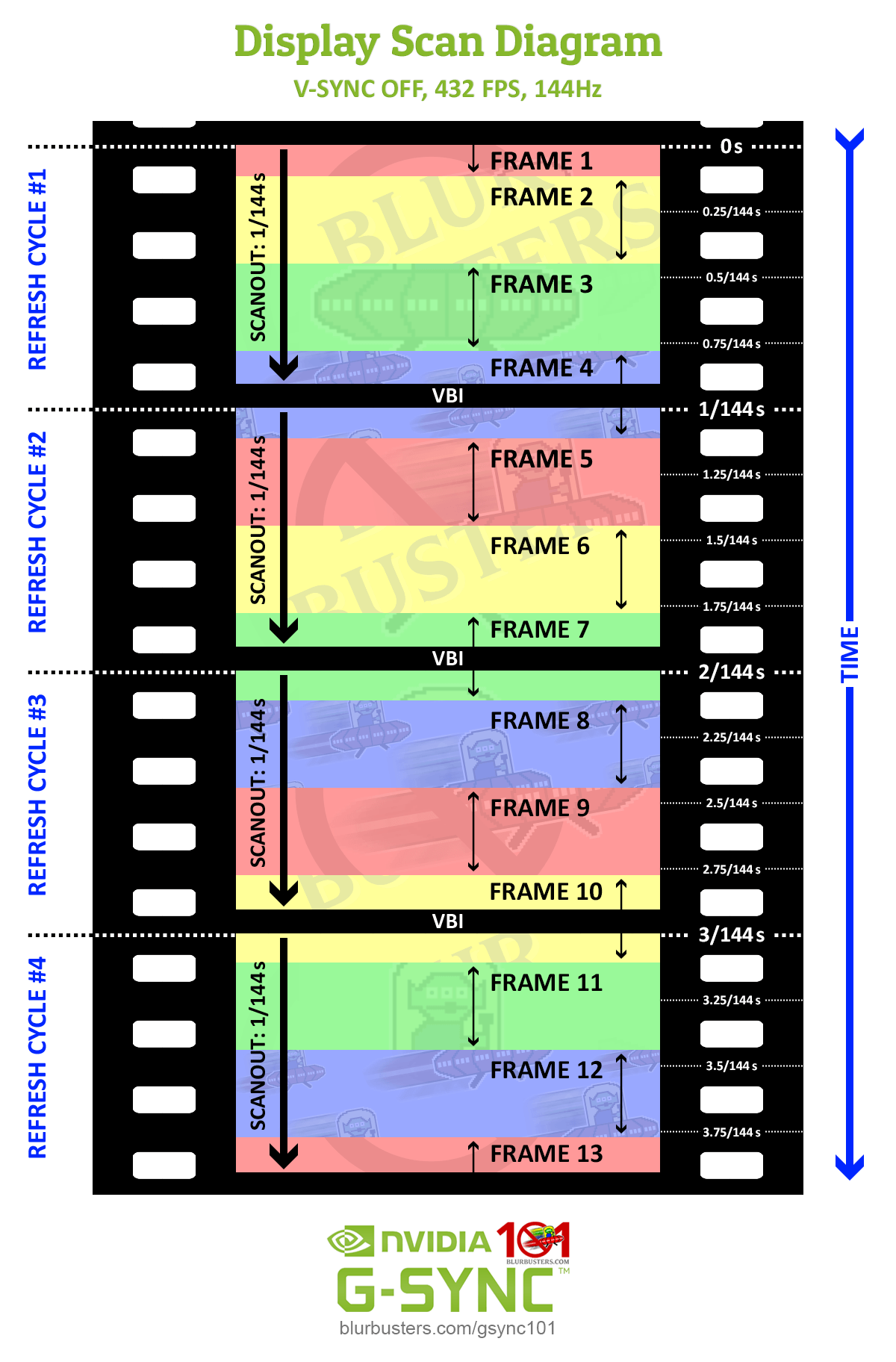
You also get a weird latency sawtoothing effect as the framerate slowsly slews against refresh rate, since frame slices are subdivided latency gradients between tearlines, as seen in this scan diagram. The button-to-photons latency is an increasing latency gradient from just below a previous tearline to right just above the next tearline.
And when tearlines are slowly moving;
-- The latency of a pixel slowly increases and then suddenly decreases (sawtooth) during frame rates very slightly below Hz
-- The latency of a pixel slowly decreaes and then suddenly increases (sawtooth) during frame rates very slightly above Hz
Some esports champions are thrown off by this latency weirdness of VSYNC OFF framerates too close to Hz because of this slow-latency-sawtoothing effect.
The solution is to randomize the tearlines more; to create a more averaged latency effect; such as framerates far below Hz, or framerates far beyond Hz. In your case, I recommend a refresh rate upgrade.
If you want to keep using VSYNC OFF:
- Get your framerates a bit further away from Hz, or use RTSS Scanline Sync for VSYNC OFF running at perfect framerate=Hz
- Upgrade your Hz to 240Hz or higher to have double advantages:
.....Smaller latency slew effects (1/240sec latency variance amplitude rather than 1/165sec latency variance amplitude)
.....Less visible tearing
.....Less frequent incidences of framerates matching Hz to create the amplified microstuttering/tearing/latencyslew effects.
If you want lowest-lag zero-tearing Framerate=Hz
-- Use tearingless VSYNC OFF such as RTSS Scanline Sync to get framerate=Hz without the latencyslew effects or tearing-lines visibility.
-- Or if your priority is to trade a bit of absolute lag for more consistent latency, there are multiple routes, you may wish to try a more esports-friendly capped VRR at a much higher. You get a smidge higher lag, but your lag is guaranteed much more fixed-amount, which is easier to train for. Sometimes some esports people prefer that -- but if you hate VRR lag, upgrade to a monitor whose VRR range is much wider than your framerate range. The new 360Hz monitors can display VRR refresh cycles in their entirety in a mere 2.78ms, no matter what your framerate (effective refresh rate) is, which produces a more lagfree esports-quality VRR. A 355fps cap is almost superfluous, as most games don't even exceed 355fps anyway, and the VRR latency penalty of a 360Hz VRR is only 1/6th the latency of 60Hz VRR.
Head of Blur Busters - BlurBusters.com | TestUFO.com | Follow @BlurBusters on: BlueSky | Twitter | Facebook

Forum Rules wrote: 1. Rule #1: Be Nice. This is published forum rule #1. Even To Newbies & People You Disagree With!
2. Please report rule violations If you see a post that violates forum rules, then report the post.
3. ALWAYS respect indie testers here. See how indies are bootstrapping Blur Busters research!
Re: Can Never Cap My FPS at My Monitors Set Refresh rate
ok thank you, this actually makes so much sense to me now, making sense to why pros can cap their fps at 240, also im not entirely amazing with PC's but I know about CRU. Would setting my monitor to LCD reduced help any type of responsiveness in anyway, pixel or monitor response time?