Everything about displays and monitors. 120Hz, 144Hz, 240Hz, 4K, 1440p, input lag, display shopping, monitor purchase decisions, compare, versus, debate, and more. Questions? Just ask!
-
Binder87
- Posts: 13
- Joined: 07 Aug 2020, 10:09
Post
by Binder87 » 06 Jun 2021, 14:27
Hi all. Just purchased the xl2546k (i play csgo mostly) and i noticed something which happened in the previous 240hz panel i had (the msi 251rx)- when i go in game and set the resolution to 1024x768, which is what i use , it most def looks like it (it looks like shit basically

) but on the display menu it says its @1920x1080@240hz. It doesn't matter whether i put the scaling on display or gpu (i have to say gpu scaling looked better than display). On the msi i used cru to creat a custom res (1024x768@240) and chose "no scaling" and indeed the correct res showed on the display menu. I have 2 questions.
1. Why it isn't possible to do the same without cru
2.it may sound dumb, but is cru totally safe for the monitor? Idk why, but i kinda became paranoid and afraid to damage my new monitor using it. I used lcd native timings btw.
Thanks!
-
Binder87
- Posts: 13
- Joined: 07 Aug 2020, 10:09
Post
by Binder87 » 06 Jun 2021, 14:58
First, thank you for the reply. I did the same with my previous monitor using lcd native timings, still had the option to choose scaling on nvcp, i just chose no scaling and it worked (also showed the correct res in osd). The timings you posted, are they valid also for the 2546k? Should i just use lcd native?
-
chumacher
- Posts: 30
- Joined: 10 Dec 2019, 22:23
Post
by chumacher » 06 Jun 2021, 15:02
If you read my posts you have the answer there. read carefully. download my profile and open it with CRU (no need to apply, just see the timings that i've used) they are the ones that you can find from the extension block(CEA-861). if your true monitor scaled resolution is grainy at first just change resolution to something else and back and change the aspect ratio from the monitors menu. (using the buttons @ right corner of your monitor)
-
Binder87
- Posts: 13
- Joined: 07 Aug 2020, 10:09
Post
by Binder87 » 06 Jun 2021, 15:15
Ok, just downloaded and opened it, my question is (and sorry if i missed it, or just plain dumb), you said those timings are for the 2546, can i use those exact timings for my 2546k?
-
chumacher
- Posts: 30
- Joined: 10 Dec 2019, 22:23
Post
by chumacher » 06 Jun 2021, 15:29
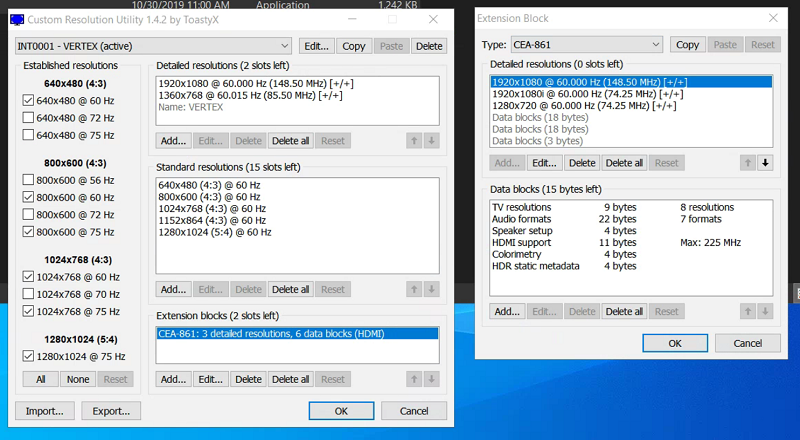
I'm not 100% sure but if you have the extension block open in CRU ( link for example picture, not mine)
https://i.postimg.cc/LXHRn6kv/z03.png
there should be 1280x1024 or some other 5:4 or 4:3 resolution. and copy those timings and adjust the vertical sync width according to your aspect ratio. for 4:3 it's 4 (very easy to remember)
for 4:3 modes: vsync=4
for 16:9 modes: vsync=5
for 16:10 modes: vsync=6
for 5:4 or 15:9 modes: vsync=7
for custom aspect ratio: vsync=10
-
chumacher
- Posts: 30
- Joined: 10 Dec 2019, 22:23
Post
by chumacher » 07 Jun 2021, 01:38
that should do it! for some weird cases you need to remove lots of the resolutions from the extension block. (some weird thing causes games to use the timings from wrong resolutions. really hard to explain since English is not my native language.
you can check if your true monitor scaled resolution is working from 'advanced display settings' (from desktop with mouse2 to 'display settings' and there you can find advanced display settings (active signal resolution need to be same as desktop resolution)
-
Binder87
- Posts: 13
- Joined: 07 Aug 2020, 10:09
Post
by Binder87 » 07 Jun 2021, 04:44
Ok. Ill try that later today. Just to make sure, i put it in detailed resolutions right?
Also btw, why in your .bin file v sync width is set to 7 instead of 4?