
60fps on 144Hz or 240Hz, what option gives less blur?
I choose between asus vg279q (144Hz) and asus vg279qm (240Hz).
I will use freesync and lock fps at 60 with RTSS.
Reviews from rtings , if i understand correctly, shows that 240Hz monitor gives better results. If it is true, does it belongs to all highest Hz monitors?
60fps on 144Hz or 240Hz
-
Discorz

- VIP Member
- Posts: 1157
- Joined: 06 Sep 2019, 02:39
- Location: Europe, Croatia
- Contact:
Re: 60fps on 144Hz or 240Hz
With adaptive sync enabled both look the same.
With adatpive sync disabled tho higher refresh displays have less distracting screen tearing due to faster scanout. This kinda means as refresh rate increases async becomes less benefitial.
There is no need to use rtss limiter, especially with async because there is some additional latency with it. Just use in-game limiters and you're good. If your game doesn't have any built in limiters then using rtss would be one of the options.
-
kogorta
- Posts: 5
- Joined: 06 Nov 2021, 16:48
Re: 60fps on 144Hz or 240Hz
Thanks for answer!
So, it means for casual gaming at 60fps 240Hz (compared to 144Hz) shows no improvements in motion blur.
If I am not a competitive FPS player, any advantages to buy 240Hz over 144Hz?
Also, I am confusing about Response Time and Motion Blur, does lower response time means lower motion blur? Example:
Monitor 1, 60Hz Response Time 10ms.
Monitor 2, 60Hz Response Time 15ms.
Monitor 1 shows less motion blur?
And one more question, does same monitor shows 60fps at 144Hz same image compared to 60fps at 60Hz. This question is about adaptive sync, if async is enabled (if I correctly understand) it shows 60fps at 60Hz, if disabled 60fps at 144Hz, of course async removes tearing, but what about motion blur what option gives less blur?
-
jorimt

- Posts: 2641
- Joined: 04 Nov 2016, 10:44
- Location: USA
Re: 60fps on 144Hz or 240Hz
There are two forms of motion blur on an LCD display, 1) pixel response time, otherwise known as GtG (gray-to-gray), and 2) image persistence, which is measured as MPRT (motion picture response time), both of which can occur at the same time.
Some LCD monitors can have better native GtG than others, depending on the model and the panel type. GtG also includes overdrive tuning, the effectiveness of which can vary between models and panel types as well.
Native GtG and overdrive presets affect how much or little motion blur artifacts there are during horizontal and vertical panning. These usually manifest as smearing, ghosting, etc, whereas MPRT is entirely dependent on the sustained refresh/framerate ratio, and causes the appearance of a doubled image.
I.E. you could have virtually 0ms GtG (similar to OLED), and still have motion blur due to image persistence from finite refresh/framerate ratios, and visa-versa.
So with that said, with 60 FPS 240Hz vs 60 FPS 144Hz running VRR or no sync, while the former does not have an image persistence benefit (both are 60 frames per second), it does have a latency reduction benefit due to the fact that frames are scanning in faster at the same framerate (4.2ms per vs. 6.9ms per).
Add that, plus a 240Hz monitor that may have a lower GtG and better overdrive tuning, and you can have marginally lower pixel response times (vs certain and/or older 144Hz monitor models) and decreased latency. Again, image persistence will remain the same at the same framerate, so whatever frame doubling you are seeing during fast pans at 60 FPS will still occur. Only a higher framerate paired with a higher refresh rate will reduce that (and/or strobing/BFI, if you aren't already implementing that).
(jorimt: /jor-uhm-tee/)
Author: Blur Busters "G-SYNC 101" Series
Displays: ASUS PG27AQN, LG 48C4 OS: Windows 11 Pro Case: Fractal Design Torrent PSU: Seasonic PRIME TX-1000 MB: ASUS Z790 Hero CPU: Intel i9-13900k w/Noctua NH-U12A GPU: GIGABYTE RTX 4090 GAMING OC RAM: 32GB G.SKILL Trident Z5 DDR5 6400MHz CL32 SSDs: 2TB WD_BLACK SN850 (OS), 4TB WD_BLACK SN850X (Games) Keyboard: Wooting 60HE Mouse: Razer Viper Mini SE Sound: Creative Sound Blaster Katana V2 VR: Beyond 2, Quest 3, Reverb G2, Index Consoles: Dreamcast, PS2, PS3, PS5, Switch 2, Wii, Xbox, Analogue Pocket + Dock Scaler: RetroTINK 4k
Author: Blur Busters "G-SYNC 101" Series
Displays: ASUS PG27AQN, LG 48C4 OS: Windows 11 Pro Case: Fractal Design Torrent PSU: Seasonic PRIME TX-1000 MB: ASUS Z790 Hero CPU: Intel i9-13900k w/Noctua NH-U12A GPU: GIGABYTE RTX 4090 GAMING OC RAM: 32GB G.SKILL Trident Z5 DDR5 6400MHz CL32 SSDs: 2TB WD_BLACK SN850 (OS), 4TB WD_BLACK SN850X (Games) Keyboard: Wooting 60HE Mouse: Razer Viper Mini SE Sound: Creative Sound Blaster Katana V2 VR: Beyond 2, Quest 3, Reverb G2, Index Consoles: Dreamcast, PS2, PS3, PS5, Switch 2, Wii, Xbox, Analogue Pocket + Dock Scaler: RetroTINK 4k
-
Discorz
- VIP Member
- Posts: 1157
- Joined: 06 Sep 2019, 02:39
- Location: Europe, Croatia
- Contact:
Re: 60fps on 144Hz or 240Hz
With adaptive sync yes (if we assume response times are same/similar on both monitors).
Not really. Except on desktop, web browsing and stuff higher refresh rates provide better, smoother experience.
For players that are not competitive I usually recommend 144Hz monitors with fast IPS.
Yes, lower response times are better, higher refresh rate are better.
Understanding response times can be a bit confusing for new people. I partially blame reviewers for not providing enough digestible information for users to educate them. Where it becomes confusing is when their bar charts show 240Hz monitors slower than 144Hz by including only response times. What you want to be aware of is response times are mixed together with refresh rate (on classic sample-and-hold displays). When you track an moving object on screen what you end up seeing is MPRT + Response Time .
Now don't worry this is a simple example of one pixel wide line moving across the screen (left to right). This is what your eye would see - check here. Top row is showing ideal MPRT blur (Motion Picture Response Time) which is refresh rate based, and second row shows MPRT + additional Response Time blur (panel's transitioning speed capability).
1. 60Hz, 2. 144Hz, 3. 240Hz.






As refresh rate increases line width narrows, meaning blur decreases but response time blur stays the same. This additional blur can partially be removed by applying Overdrive. Too much overdrive can result in distracting coronas aka overshoot. But this is for another discussion.
What reviewers give you is something like this, but what they should give you is this.

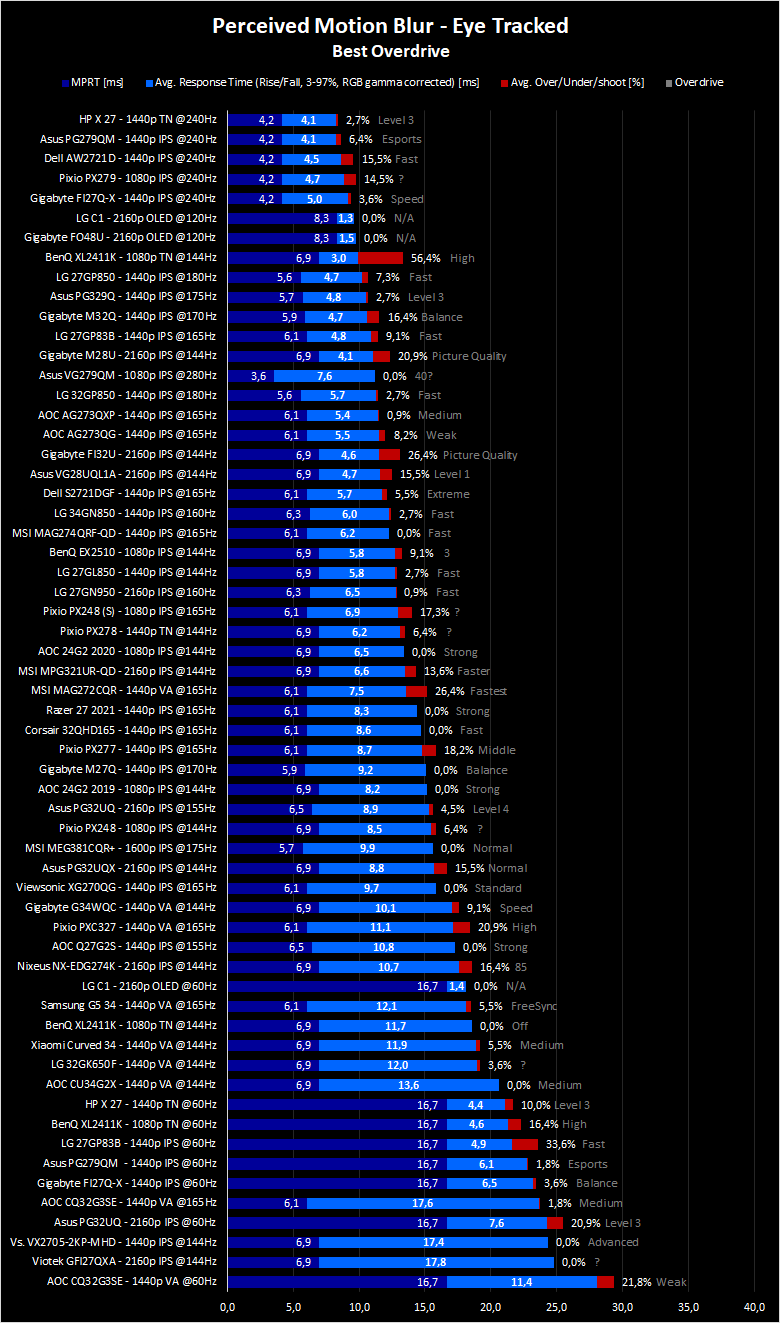
Again, with adaptive sync yes. What adaptive sync does is synchronizes display refresh rate with your in-game framerate (Hz=FPS). Only within range of usually 48-144Hz. 60fps 144Hz has around the same amount of blur as 60fps 60Hz but it stutters more. Best motion experience is max fps, max Hz and Hz=fps. If u can't push 144fps u won't really benefit from high refresh rate display (unless you like better desktop experience).kogorta wrote: ↑07 Nov 2021, 15:57And one more question, does same monitor shows 60fps at 144Hz same image compared to 60fps at 60Hz. This question is about adaptive sync, if async is enabled (if I correctly understand) it shows 60fps at 60Hz, if disabled 60fps at 144Hz, of course async removes tearing, but what about motion blur what option gives less blur?
Edit:
lol now I see jorimt repplied.
-
jorimt
- Posts: 2641
- Joined: 04 Nov 2016, 10:44
- Location: USA
Re: 60fps on 144Hz or 240Hz
If you're running standard V-SYNC, I'd agree, but if you're running VRR or no sync, there's still benefits to a higher refresh rate display due to the increased scanout speed, even for 60 FPS, assuming the higher refresh rate display has as good or better GtG/overdrive performance than the lower refresh rate display and as low or lower processing latency, of course (some don't).
Everyone needs to remember that finite refresh rate (and by extension, finite framerate) is a technological limitation of the manufacturing capabilities of our time.
Otherwise, there's no reason we should be limited by refresh rate at all. The higher the better, regardless of achievable framerate, especially on sample-and-hold display types (again assuming the pixel response time of the given panel can keep up, which, granted, isn't and won't always be the case with first-gen 240Hz, 360Hz, 480Hz, and so on).
No worries; it's not like our replies cancel each other out.
(jorimt: /jor-uhm-tee/)
Author: Blur Busters "G-SYNC 101" Series
Displays: ASUS PG27AQN, LG 48C4 OS: Windows 11 Pro Case: Fractal Design Torrent PSU: Seasonic PRIME TX-1000 MB: ASUS Z790 Hero CPU: Intel i9-13900k w/Noctua NH-U12A GPU: GIGABYTE RTX 4090 GAMING OC RAM: 32GB G.SKILL Trident Z5 DDR5 6400MHz CL32 SSDs: 2TB WD_BLACK SN850 (OS), 4TB WD_BLACK SN850X (Games) Keyboard: Wooting 60HE Mouse: Razer Viper Mini SE Sound: Creative Sound Blaster Katana V2 VR: Beyond 2, Quest 3, Reverb G2, Index Consoles: Dreamcast, PS2, PS3, PS5, Switch 2, Wii, Xbox, Analogue Pocket + Dock Scaler: RetroTINK 4k
Author: Blur Busters "G-SYNC 101" Series
Displays: ASUS PG27AQN, LG 48C4 OS: Windows 11 Pro Case: Fractal Design Torrent PSU: Seasonic PRIME TX-1000 MB: ASUS Z790 Hero CPU: Intel i9-13900k w/Noctua NH-U12A GPU: GIGABYTE RTX 4090 GAMING OC RAM: 32GB G.SKILL Trident Z5 DDR5 6400MHz CL32 SSDs: 2TB WD_BLACK SN850 (OS), 4TB WD_BLACK SN850X (Games) Keyboard: Wooting 60HE Mouse: Razer Viper Mini SE Sound: Creative Sound Blaster Katana V2 VR: Beyond 2, Quest 3, Reverb G2, Index Consoles: Dreamcast, PS2, PS3, PS5, Switch 2, Wii, Xbox, Analogue Pocket + Dock Scaler: RetroTINK 4k
-
kogorta
- Posts: 5
- Joined: 06 Nov 2021, 16:48
Re: 60fps on 144Hz or 240Hz
Thank you for answers!
Well, everything is more complicated than I thought.
Seems only solution is test myself what monitor suits better for me.
And last question, now I have old monitor Samsung 24b350h TN panel 60Hz, playing 60fps at 60Hz everything is OK, clear image without blur. I bought AOC 24g2 (from reviews it is not a bad monitor), I tested it with VRR on and cap 60fps, and monitor gives pretty much motion blur, i tested different Overdrive settings, and yes with highest settings is less blur but it gives overshoot(if correctly understand what is overshoot, white corona around moving objects), 144fps at 144hz everything is OK. It was a disappointment for me, that newer monitor shows blur but older monitor not. So, my question is, why it is so? If i correctly understand it is not related with monitors Hz, but with IPS vs TN panels. If i want same image results as older monitors, i need search new monitors with TN panels?
-
jorimt
- Posts: 2641
- Joined: 04 Nov 2016, 10:44
- Location: USA
Re: 60fps on 144Hz or 240Hz
There are several reasons...kogorta wrote: ↑08 Nov 2021, 09:25And last question, now I have old monitor Samsung 24b350h TN panel 60Hz, playing 60fps at 60Hz everything is OK, clear image without blur. I bought AOC 24g2 (from reviews it is not a bad monitor), I tested it with VRR on and cap 60fps, and monitor gives pretty much motion blur, i tested different Overdrive settings, and yes with highest settings is less blur but it gives overshoot(if correctly understand what is overshoot, white corona around moving objects), 144fps at 144hz everything is OK. It was a disappointment for me, that newer monitor shows blur but older monitor not. So, my question is, why it is so?
1. AOC is not known for the best overdrive tuning.
2. That AOC model is FreeSync. 99% of FreeSync monitors do not have variable overdrive during VRR operation, only G-SYNC monitors with modules do. This results in worse overdrive performance at the same framerate over fixed refresh rate operation, due to the fact that the monitor has to use the same overdrive preset that it uses for it's max refresh rate across all variable refresh rates during VRR operation, which can be too much or too little for, say, 60 FPS at 240Hz.
3. Some monitors, regardless of VRR or variable overdrive can have worse overdrive performance than older models. It depends entirely on the panel type, brand, model, and tuning choices of the given manufacturer.
As for IPS vs. TN, that used to be an issue, but the most modern IPS panels can now typically go toe-to-toe with equivalent TN models where overdrive performance is concerned.
Basically, if you want the best overdrive performance on a 240Hz VRR display during VRR operation, you'll need to spring for the latest IPS-type models with G-SYNC modules, and those simply cost more (there's a lot less of them to chose from too).
(jorimt: /jor-uhm-tee/)
Author: Blur Busters "G-SYNC 101" Series
Displays: ASUS PG27AQN, LG 48C4 OS: Windows 11 Pro Case: Fractal Design Torrent PSU: Seasonic PRIME TX-1000 MB: ASUS Z790 Hero CPU: Intel i9-13900k w/Noctua NH-U12A GPU: GIGABYTE RTX 4090 GAMING OC RAM: 32GB G.SKILL Trident Z5 DDR5 6400MHz CL32 SSDs: 2TB WD_BLACK SN850 (OS), 4TB WD_BLACK SN850X (Games) Keyboard: Wooting 60HE Mouse: Razer Viper Mini SE Sound: Creative Sound Blaster Katana V2 VR: Beyond 2, Quest 3, Reverb G2, Index Consoles: Dreamcast, PS2, PS3, PS5, Switch 2, Wii, Xbox, Analogue Pocket + Dock Scaler: RetroTINK 4k
Author: Blur Busters "G-SYNC 101" Series
Displays: ASUS PG27AQN, LG 48C4 OS: Windows 11 Pro Case: Fractal Design Torrent PSU: Seasonic PRIME TX-1000 MB: ASUS Z790 Hero CPU: Intel i9-13900k w/Noctua NH-U12A GPU: GIGABYTE RTX 4090 GAMING OC RAM: 32GB G.SKILL Trident Z5 DDR5 6400MHz CL32 SSDs: 2TB WD_BLACK SN850 (OS), 4TB WD_BLACK SN850X (Games) Keyboard: Wooting 60HE Mouse: Razer Viper Mini SE Sound: Creative Sound Blaster Katana V2 VR: Beyond 2, Quest 3, Reverb G2, Index Consoles: Dreamcast, PS2, PS3, PS5, Switch 2, Wii, Xbox, Analogue Pocket + Dock Scaler: RetroTINK 4k
-
Discorz
- VIP Member
- Posts: 1157
- Joined: 06 Sep 2019, 02:39
- Location: Europe, Croatia
- Contact:
Re: 60fps on 144Hz or 240Hz
Yes, this is what I would of said too until week ago when I tested again all the possible combinations and it all felt kinda same latency wise. Don't know whats up with that. Makes me want to get into measuring with proper equipment to see what is really going on.
I want to add up that lower refresh rate or frame rate can sometimes look less blurry than higher, but not as smooth... that is in fixed gaze at crosshair play style: viewtopic.php?p=73581#p73581
So Kogorta try and experiment with this. I know its a bit weird advice but reduce overdrive and framerate. Maybe your 24G2 ends up being good for you.
-
Chief Blur Buster

- Site Admin
- Posts: 12295
- Joined: 05 Dec 2013, 15:44
- Location: Toronto / Hamilton, Ontario, Canada
- Contact:
Re: 60fps on 144Hz or 240Hz
Great pursuit camera photograph of MPRT-only blurring versus MPRT+GtG blurring!
When GtG=0, both top/bottom should look idential. The closer the GtG is to 0, the more identical the top/bottom halves of www.testufo.com/gtg-vs-mprt looks like during eye-tracked situations (or pursuit camera situation).
I should add a pursuit camera sync track to the GtG versus MPRT test, because I think this is a fantastic pursuit camera opportunity.
The worse the GtG tuning, the more color combos will show top/bottom differences in the GtG vs MPRT blur. Surgically testing the colors in the red zones of a GtG heatmap (like RTINGS or HardwareUnboxed) shows a hell of a lot of smearing in this pursuit camera photo.
Tips: To amplify *trailing* ghost, background should be destination color, line should be source color, set R,G,B to same value for each. Or focus on a primary color if preferred (set one or two to zero, set the remainder of primary colors to the GtG heatmap value). The GtG speed of each subpixel is usually idential on LCDs, but sometimes vary on other technologies such as slower OLEDs or phosphor-pixel LCDs (e.g. QD-LED with fluorescent filters).
Head of Blur Busters - BlurBusters.com | TestUFO.com | Follow @BlurBusters on: BlueSky | Twitter | Facebook

Forum Rules wrote: 1. Rule #1: Be Nice. This is published forum rule #1. Even To Newbies & People You Disagree With!
2. Please report rule violations If you see a post that violates forum rules, then report the post.
3. ALWAYS respect indie testers here. See how indies are bootstrapping Blur Busters research!