Is There Still a Future for 240Hz+ IPS panels in 2026?

Everything about displays and monitors. 120Hz, 144Hz, 240Hz, 4K, 1440p, input lag, display shopping, monitor purchase decisions, compare, versus, debate, and more. Questions? Just ask!
Anonymous703819

Re: Is There Still a Future for 240Hz+ IPS panels in 2026?

Post by Anonymous703819 » 17 Feb 2026, 05:32

kyube wrote:
16 Feb 2026, 08:06
Yes, I don't like light flicker of any kind.
Ideally, the end-user should have the ability to choose between impulsed or sample&hold operation.
Ideally, the impulsed mode would allow the user to adjust the pulse width to his liking and choose the refresh rate to his liking (always <1ms strobe 'ON' period)
I haven't tried OLEDs due to the lack of RGB stripe options. Maybe next year, I'll do it.
But you say you use the MBR (strobing) of your AOC, so I don't really understand.
For the eyes, whether it's PWM/light flicker or something else related to flickering, the reactions are perceived the same (in my opinion): nausea/headache/eye strain/neck tension etc.

Yes, we should always have the choice.

kyube wrote:
16 Feb 2026, 08:06
The biggest problem I see with this approach is that you might achieve worse clarity when setting your XL2566X+ to 300Hz and enabling DyAc than your current XL2546X.
Follow-up below
Because for strobing to work perfectly, FPS = Hertz, right?

I already know that, but it can't be that bad, I don't know. Besides, I'm not basing my purchase exclusively on Apex Legends. As I said, my desires are like an unstable wave; at some point, 1080p will bore me, I'll want to get rid of my whole "esports" setup and go back to something more chill, sharper, more comfortable. I always love upgrading my setup. And between 2020 and 2023, that's all I did, which made me waste quite a bit of time and money, by the way.

That's also why my initial post mentioned "IPS", even though I don't like this technology basically because most of the ones I've owned either had catastrophic motion blur (because my first screens were CRT/TN), or the colors or backlighting used were so harsh they burned my retinas.
kyube wrote:
16 Feb 2026, 08:06
There's no necessity to apply 2 frame rate limiters. Rely on in-game fps_max only.
So, actually, I've already tried multiple scenarios. Believe it or not, placebo effect or not, better or worse in paper, I prefer my setup as I mentioned earlier. It doesn't prevent me from reaching the rank I want on my games, and it doesn't ruin my enjoyment of the game. I tried your method with Reflex (fixed refresh rate scenario) with NvLimiterV3/without RivaTuner, and the mouse seems to respond slightly more instantly, though it's extremely slight. But I have a feeling (or maybe it's just a placebo effect) that without Riva Tuner, the game is very slightly jitterier. With Riva Tuner, it's like there's a 1% V-Sync and i'm ok with it.
Especially since I like having the FPS displayed at the top (and rarely CPU Temp etc), I know that 99% or even 100% of games already use FPS counters but I'm used to it, I've been playing like that for years.

Anyway, it's subjective, but I'm happy with my setup.
kyube wrote:
16 Feb 2026, 08:06
I was under the impression that you primarily play OW2.
Then, I wouldn't buy the AG246FK6 (even though that it's much more worth than the XL2566X+, which is abhorrently expensive for what it offers)
I would instead buy the XL2566K (DyAc+) for the ability to adjust pulse width to your liking. Though, you might dislike it's strobing from a eye comfort perspective, as it's global scan VS rolling scan of DyAc2.
I don't know which of the DyAc2 models (XL2540X+, XL2566X+, XL2586X+) would be a good choice for your use-case, as you'd have to use ≤300Hz for Apex.
My attraction to Overwatch is like a poisoned love; I hate the game, but I always end up going back to it or reinstalling it. It's quite strange.
So I wouldn't call it my main game, but since the recent update (goodbye Overwatch 2, hello Overwatch again), I'm starting to take an interest in it again.
I already had the XL2566K and i'm never going back on it, i had 3 of them with different batches years ago and EVERY one of them had coil whine, i'm not the most sensitive person to coil whine but on this particular screen, it was so annoying.

I didn't know they'd fundamentally changed the way Zowie strobes work! At least, I didn't know it was on Zowie and that it would change things for eye comfort, lol, interesting.

As for the best Zowie for me, i think the XL2586X+ would be the best, i mean, i can run this one without strobing on Apex Legends and still have awesome response time etc, but the price is an absolute NOPE obviously.
XL2540X+ does not make any sense to me and XL2566X+ is kinda interesting, price is "ok.." and 400hz is to me the sweet spot.
But i think i will test a QD-OLED/the AOC 1440p 24inch 300hz you listed and if they don't suit me, I would get an XL2566X+ and then get an OLED RGB Stripe at the end of 2026/2027.
kyube wrote:
16 Feb 2026, 08:06
Now this is a rabbit hole to go down through :)
Thing is, you can't know the exact pulse behavior unless some reviewer has used a oscilloscope + light diode graph to show you the exact behavior.
A great example of someone who used to do this was a5hun (ApertureGrille), as seen here
Generally, most displays have a fixed pulse width setting (DyAc2 included), where you have to use the highest refresh rate setting to achieve the best possible clarity (lowest strobe 'on' period)
For example (I believe DyAc2 is akin to this):
30% PW (x0,3 multiplier) on different refresh rates
120Hz (8,3333 ms) → 2,4999 ms (effective refresh rate: 400Hz)
240Hz (4,16667 ms) → 1,25 ms (effective refresh rate: 800Hz)
280Hz (3,57143 ms) → 1,071429 ms (effective refresh rate: 933,333 Hz)
300Hz (3,3333 ms) → 0,9999 ms (effective refresh rate: ~1000 Hz)

DyAc2 'Premium' & 'High' target different fixed pulse width settings and from what I've seen, each of the DyAc2 models has a different implementation of it.
Generally, from my PoV, you'd want <30% PW (as you're limited by your frame rate) to achieve the best possible clarity.
15% PW @ 300Hz would get you to 2000Hz (~0,4999 ms) effective refresh rate, which would be optimal for your use-case. :D
This is only achievable on models which have an adjustable PW, such as the XL2566K (thanks to the Blurbusters Utility)
I doubt you're able to optimise other models that well for your use-case.
Really good informations, thanks.
It's like Refresh Rate Compliance, that's a rabbit hole too, i really want to know more about that btw, like, when/how do we consider that a screen has a poor refresh compliance to the point of being bad/not considering the purchase and saying: damn, won't we benefit from the advertised hertz rate? (that's a really important question, because I think I'm obsessing over this abnormally.
It's subjective but when I see the majority of LCDs on Monitor Unboxed having below 50% or even 80% refresh rate compliance, that means it's bad, right?

Furthermore, please, if the chief reads this, I hope that one day the software will support the new Zowie, like the XL2546X; it's so disappointing that they aren't supported.:cry:
kyube wrote:
16 Feb 2026, 08:06
All Current OLED (phone, desktop, TV) implementations have the slight light flicker related to the internal capacitance, yes.
I've seen a similar behavior occur on certain VA LCDs in darker gray transitions as well.
Noted. even though on my "old" OLED TV LG A1, I don't "feel it".
kyube wrote:
16 Feb 2026, 08:06
I'm using a Q24G2A with MBR=20 right now (when gaming; disabled when not gaming) due to the use of a YAG phosphor WLED backlight.
I use a combination of DisplaySpecifications & scouting Bilibili.
Wait, I don't understand. You say you don't like strobing if the MPRT isn't near perfect/perfect, which isn't the case with this AOC, right?
I don't get it. I had this monitor, and I didn't find it amazing (subjective), especially since I'm used to at least 240Hz, but 1440p on a 24-inch screen was fine.
Bilibili ? interesting lol.
kyube wrote:
16 Feb 2026, 08:06
This was a theoretical "what-if" scenario.
In the case they ever fix it's behavior (which won't occur on any of the upcoming RGB OLEDs)
My hope is shattered lmao.
kyube wrote:
16 Feb 2026, 08:06
Slight disambiguition:
BFI is exclusive to OLED (you insert a black frame)
Backlight strobing is exclusive to LCDs (you turn/pulse the backlight, which OLEDs don't have, on & off rapidly)
Are you sure?
I mean, for years I've heard people talk about BFI (black frame insertion) to refer to strobing, because yes, strobing adds a black image, we all know that.
But okay, fine.
Actually, I see what you mean, isn't that a bit of an overuse of puns? xD
kyube wrote:
16 Feb 2026, 08:06
Yes, all TN's <400Hz TN's are the standard WLED (YAG phosphor) backlight. To be specific, a narrow color gamut (SDR-only) display
Can you give me a quick reminder of the pros/cons of YAG/KSF/QD-Backlight for this area?
I'm afraid of getting confused.
Also, the XL2566X+ is still a YAG?
kyube wrote:
16 Feb 2026, 08:06
Insufficient pixel density for general desk depths of the vast majority of users.
So, you dont' like 1080p at all?
I understand. If I could, I would go for 4K.
kyube wrote:
16 Feb 2026, 08:06
Red fringing due to KSF/PFS, fixed refresh rate settings (inability to adjust it to any one you want to your liking) & HDMI 2.0 blocks it from being good.
Wait, the PG27AQN has red fringing?!
Damn, I'm such an idiot lol. It's true that I thought I saw that several years ago, I forgot.
Furthermore, regarding the G-Sync Pulsar and PG27AQN, if you don't use their strobing feature, is there no reason to buy them? Or are they still better/very good at motion blur compared to others IPS/TN without strobing ofc.
kyube wrote:
16 Feb 2026, 08:06
Not that necessary IMO, as it's all about finding the correct model/panel for the specific subtype of LCD or specific OLED & specific use-case
Come on, not even to please me? :lol:

Even if it was subjective, I still would have liked to. It's just that you seem to add way more detail than some others, which could have helped me understand. Maybe there would have been pros/cons I didn't know about.

Too bad, haha.

Very interesting discussion, thank you. I have two off-topic questions (nothing personal):

1. Do you work for the site? You're extremely passionate, active, and knowledgeable in several areas, which really is surprising.
2. What games do you usually play with your AOC?

You don't have to answer, just curious.

User avatar
kyube
Posts: 931
Joined: 29 Jan 2018, 12:03

Re: Is There Still a Future for 240Hz+ IPS panels in 2026?

Post by kyube » 17 Feb 2026, 10:09

Sirius wrote:
17 Feb 2026, 05:32
But you say you use the MBR (strobing) of your AOC, so I don't really understand.
For the eyes, whether it's PWM/light flicker or something else related to flickering, the reactions are perceived the same (in my opinion): nausea/headache/eye strain/neck tension etc.
Yes, we should always have the choice.
Because 165Hz strobing isnt as 'aggressive' as the abhorrent permanent vaseline effect when you do fast flicks on frame rate locked titles such as Apex :)
'Neck tension' sounds like a case of weak neck muscles, consider incorporating neck extensions & flexions.

Sirius wrote:
17 Feb 2026, 05:32
Because for strobing to work perfectly, FPS = Hertz, right?
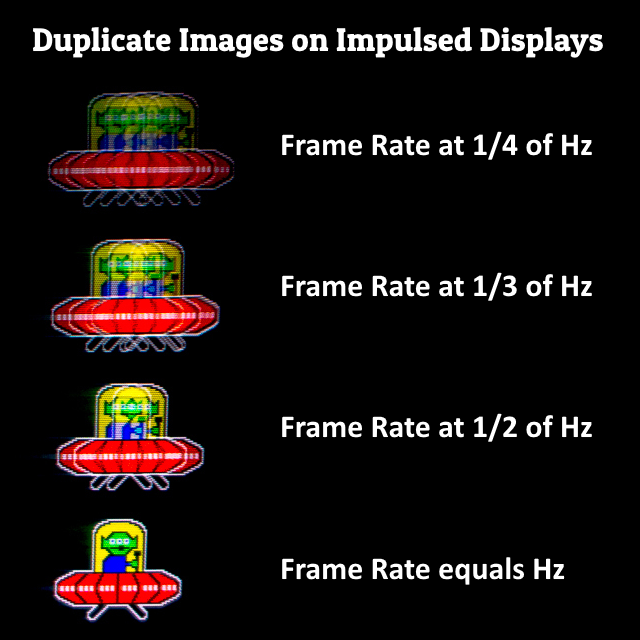
Frame Rate ≥ Refresh rate is ideal
Frame Rate ≤ Refresh rate leads to this effect below (this occurs on any impulse display, where there's no synchronization between the 2 frequencies occurring; FPS is a frequency)
Image
Sirius wrote:
17 Feb 2026, 05:32
I already had the XL2566K and i'm never going back on it, i had 3 of them with different batches years ago and EVERY one of them had coil whine, i'm not the most sensitive person to coil whine but on this particular screen, it was so annoying.
I didn't know they'd fundamentally changed the way Zowie strobes work!
At least, I didn't know it was on Zowie and that it would change things for eye comfort, lol, interesting.
A shame... I haven't read of anyone else having coil whine issues on his XL2566K.
Yes, see here
It's still one of the best displays for Apex due to the aforementioned benefits.
Sirius wrote:
17 Feb 2026, 05:32
As for the best Zowie for me, i think the XL2586X+ would be the best
i mean, i can run this one without strobing on Apex Legends and still have awesome response time etc, but the price is an absolute NOPE obviously.
XL2540X+ does not make any sense to me and XL2566X+ is kinda interesting, price is "ok.." and 400hz is to me the sweet spot.
But i think i will test a QD-OLED/the AOC 1440p 24inch 300hz you listed and if they don't suit me, I would get an XL2566X+ and then get an OLED RGB Stripe at the end of 2026/2027.
RGB stripe OLED won't happen this year. I doubt it'll even happen till Q2 2027...
I don't think the 86X+ is the 'best' in the slightest. Too many compromises for the asking price.
The XL2540X+ actually does make sense, since it's G2G RTs are better than your current monitor. Should lead to a slightly better backlight strobing experience.
It's likely using the same panel as the 66X+, just downclocked.
Be mindful that the AOc Q25G4SR successor (a 24" QHD +360Hz panel) is coming out to EU by the end of Q1 2026.
It will likely feature MBR+, which is akin to your DyAc2 (rolling scan strobing)
Might be better to camp on your Zowie till then...
I would personally skip your QD-OLED endeavours due to 360Hz still being too blurry compared to a BS'd display.
Sirius wrote:
17 Feb 2026, 05:32
Really good informations, thanks.
It's like Refresh Rate Compliance, that's a rabbit hole too, i really want to know more about that btw, like, when/how do we consider that a screen has a poor refresh compliance to the point of being bad/not considering the purchase and saying: damn, won't we benefit from the advertised hertz rate? (that's a really important question, because I think I'm obsessing over this abnormally.)
It's subjective but when I see the majority of LCDs on Monitor Unboxed having below 50% or even 80% refresh rate compliance, that means it's bad, right?
It's far from something such as refresh rate compliance.
Backlight strobing implementation is purely dependant on the mercy of the vendor.
Refresh rate compliance actually has limitations within material science & electrical engineering, which (seemingly) prevents most LCDs from being close to OLEDs.
It's all about whether the specific gray2gray combinations you have in a game are favorable or not to your display.
The short answer is — skip LCD and go OLED if you care about sample&hold only :D
There's only a select handful of LCDs which can compete with OLED.
Sirius wrote:
17 Feb 2026, 05:32
Furthermore, please, if the chief reads this, I hope that one day the software will support the new Zowie, like the XL2546X; it's so disappointing that they aren't supported.:cry
The adoption rate of a monitor for the Blurbusters Utility entirely depends on whether BenQ/Zowie opens up the specific DDC/CI commands for Chief.
Namely, the ability to adjust pulse width, pulse phase etc.
You can test whether this is possible with your monitor and report back in the appropriate thread
Here & here
Here's another snippet
Sirius wrote:
17 Feb 2026, 05:32
Noted. even though on my "old" OLED TV LG A1, I don't "feel it".
That's why it's difficult to claim absolutes with eye strain :D

Sirius wrote:
17 Feb 2026, 05:32
Wait, I don't understand. You say you don't like strobing if the MPRT isn't near perfect/perfect, which isn't the case with this AOC, right?
I don't get it. I had this monitor, and I didn't find it amazing (subjective), especially since I'm used to at least 240Hz, but 1440p on a 24-inch screen was fine.
Bilibili ? interesting lol.
Compromises have been made for the sake of pixel density :D
In hindsight, I probably would've gone for a old 24" QHD +120Hz G-SYNC module model instead.
Would get far better strobing than AOC's lackluster implementation.
Sirius wrote:
17 Feb 2026, 05:32
Can you give me a quick reminder of the pros/cons of YAG/KSF/QD-Backlight for this area?
I'm afraid of getting confused.
Also, the XL2566X+ is still a YAG?
It's simply about whether you'll see red fringing during backlight strobing use and for HDR capabilities.
A general 'rule' of thumb — skip KSF/PFS displays entirely and either go old YAG phosphor (66K, 66X+,..) or QD (majority of MiniLEDs, 86X,...)
Sirius wrote:
17 Feb 2026, 05:32
So, you dont' like 1080p at all?
I understand. If I could, I would go for 4K.
Not the image resolution itself. The pixel density / display resolution.
24" QHD is a much more pleasant experience.
Sirius wrote:
17 Feb 2026, 05:32
Wait, the PG27AQN has red fringing?!
Damn, I'm such an idiot lol. It's true that I thought I saw that several years ago, I forgot.
Furthermore, regarding the G-Sync Pulsar and PG27AQN, if you don't use their strobing feature, is there no reason to buy them? Or are they still better/very good at motion blur compared to others IPS/TN without strobing ofc.
I don't see a reason to buy a LCD if one is concerned about sample & hold only, when RGB OLED is around the corner.
To me, the Pulsar models are not worth their asking price in the slightest.
Sirius wrote:
17 Feb 2026, 05:32
Come on, not even to please me? :lol:
Even if it was subjective, I still would have liked to. It's just that you seem to add way more detail than some others, which could have helped me understand. Maybe there would have been pros/cons I didn't know about.
There's nothing complicated about it.
It's about finding the technology with good sample & hold performance and having the ability to use a impulsed mode that isn't completely botched akin to Pulsar :D
This depends on way too many factors for me to generalise each specific subtypes of LCDs.
Hence why I said you should look at good models and/or finalise your use-case, then make a decision.
E.g.:
You can't generalise the performance of VA panels, since outlier panels such as the one found in the INNOCN 27G1S.
You can't generalise the performance of TN panels, since old 120Hz & new 600Hz panels (at the same refresh rate) are night & day in difference.
You can't generalise IPS performance, since models such as the PG27AQN & the Pulsar models run circles around equivalent refresh rate IPS displays.
It's about finding the least compromised experience... :P
A theoretical PG27AQN with a HDMI 2.1 port and QD backlight would've been a jack-of-all trades LCD.
The recent Pulsar models should've been the successor, which fixed the flaws of the predecessor.
Instead, we got a mediocre cash grab by Nvidia :)
Sirius wrote:
17 Feb 2026, 05:32
Very interesting discussion, thank you. I have two off-topic questions (nothing personal):
1. Do you work for the site? You're extremely passionate, active, and knowledgeable in several areas, which really is surprising.
2. What games do you usually play with your AOC?
1. I'm not affiliated with this website, I'm just a random, active user.
2. I don't play video games as much as I used to anymore. I used to be active in Apex, CS2 & OW.

Anonymous703819

Re: Is There Still a Future for 240Hz+ IPS panels in 2026?

Post by Anonymous703819 » 27 Feb 2026, 09:00

kyube wrote:
17 Feb 2026, 10:09
Because 165Hz strobing isnt as 'aggressive' as the abhorrent permanent vaseline effect when you do fast flicks on frame rate locked titles such as Apex :)
Isn't backlight strobing less "noticeable to the eye" at higher refresh rates?

I mean, look at the XG2431; its 60Hz strobe mode is unusable for most people because the flickering is visible to the naked eye (even though I think it could be customized via CRU), just like with CRT monitors.

For me, the higher the refresh rate, the less noticeable the backlight strobing becomes for its harmful effects, I already had the AOC 165Hz that you have with the MBR no matter the settings, I didn't find it amazing at all for Apex :)

kyube wrote:
17 Feb 2026, 10:09
Frame Rate ≥ Refresh rate is ideal
Frame Rate ≤ Refresh rate leads to this effect below (this occurs on any impulse display, where there's no synchronization between the 2 frequencies occurring; FPS is a frequency)
In other words, crosstalk most of the time.
Thanks for confirming what I thought.
kyube wrote:
17 Feb 2026, 10:09
A shame... I haven't read of anyone else having coil whine issues on his XL2566K.
Yes, see here
It's still one of the best displays for Apex due to the aforementioned benefits.
There are plenty of posts about it (Reddit, Best buy, Amazon reviews etc), and it's the only Zowie monitor that people have complained about for coil whine so far, except maybe for the current models.
I had 3/4 of them with a friend, we thought we had a bad batch, or a defect, we waited a few months for our 4 monitors and even though the batch was different, there was still coil whine, you may not be sensitive.
I will never go back on it again.
kyube wrote:
17 Feb 2026, 10:09
I don't think the 86X+ is the 'best' in the slightest. Too many compromises for the asking price.
The XL2540X+ actually does make sense, since it's G2G RTs are better than your current monitor. Should lead to a slightly better backlight strobing experience.
It's likely using the same panel as the 66X+, just downclocked.
As for 86+, It's still an excellent choice, without strobing for Apex Legends, still having the benefits of higher hertz, with strobing for games like Overwatch, but as mentioned, it's too expensive.
The 40x+ indeed have better G2G RTs but it's not that noticeable considering the low difference between 240h and 280hz.
The XL2540X+ has strobing? I don't understand, there's also the 2546X+...aren't they the same monitor? They're both 280Hz with DyAc2, what's is going on with Zowie renown of monitors and their range.
Where did you found this information?

kyube wrote:
17 Feb 2026, 10:09
It's far from something such as refresh rate compliance.
Backlight strobing implementation is purely dependant on the mercy of the vendor.
Refresh rate compliance actually has limitations within material science & electrical engineering, which (seemingly) prevents most LCDs from being close to OLEDs.
It's all about whether the specific gray2gray combinations you have in a game are favorable or not to your display.
The short answer is — skip LCD and go OLED if you care about sample&hold only :D
There's only a select handful of LCDs which can compete with OLED.
Actually, what I meant was, at what point do we consider a screen to have poor refresh rate compliance?
You wouldn't consider a 240Hz monitor good if it only has 20% RRC, right? Otherwise, it would mean they're selling you a 240Hz panelthat only performs at 20% of its potential refresh rate, that's how I understand it.
Especially since most recent LCDs have a very low RRC (mostly VA and IPS) and Zowie's are generally between 60% and 85% due to TN panel probably.
Do you consider this important?
For me, it is. If I buy an IPS panel with a 360Hz/240Hz refresh rate (which is still high), I want its overdrive to be tuned. I don't want it to offer a mode where the screen is either slow/still blurry/has a lot of overshoot.
What do you mean here
kyube wrote:
17 Feb 2026, 10:09
You can't generalise the performance of VA panels, since outlier panels such as the one found in the INNOCN 27G1S.
You can't generalise the performance of TN panels, since old 120Hz & new 600Hz panels (at the same refresh rate) are night & day in difference.
You can't generalise IPS performance, since models such as the PG27AQN & the Pulsar models run circles around equivalent refresh rate IPS displays.
It's about finding the least compromised experience... :P
I think we can generalize a bit, technology evolves but will always have downsides specific to each technology, this is not an absolute truth, but it is what is generally observed.
VA: is not really compatible with very high hertz frequencies, black smearing, low RRC etc
IPS: there's IPS glow/light leakage, the fact that they have slightly higher ghosting compared to a TN panel, despite both being LCDs, low RRC etc
TN: Viewing angles, focusing solely on FPS/Esports use

kyube wrote:
17 Feb 2026, 10:09
1. I'm not affiliated with this website, I'm just a random, active user.
2. I don't play video games as much as I used to anymore. I used to be active in Apex, CS2 & OW.
Press F: doubt :lol: (joke)
Crazy to be so passionate/active on this kind of niche forum even though you don't play games that much anymore.

User avatar
kyube
Posts: 931
Joined: 29 Jan 2018, 12:03

Re: Is There Still a Future for 240Hz+ IPS panels in 2026?

Post by kyube » 27 Feb 2026, 10:49

Sirius wrote:
27 Feb 2026, 09:00
Isn't backlight strobing less "noticeable to the eye" at higher refresh rates?
Yes.
Sirius wrote:
27 Feb 2026, 09:00
I mean, look at the XG2431; its 60Hz strobe mode is unusable for most people because the flickering is visible to the naked eye (even though I think it could be customized via CRU), just like with CRT monitors.
Yes... it's abhorrent.
Sirius wrote:
27 Feb 2026, 09:00
For me, the higher the refresh rate, the less noticeable the backlight strobing becomes for its harmful effects, I already had the AOC 165Hz that you have with the MBR no matter the settings, I didn't find it amazing at all for Apex :)
Yep, the implementation is lackluster.. :D
I would categorize it as: "borderline unnecessary light flicker" due to the MPRT target it has (~1,6ms, from rough estimates)
Never claimed it's excellent, just more appealing than 165Hz vaseline smear :p
Sirius wrote:
27 Feb 2026, 09:00
In other words, most of the time.
Thanks for confirming what I thought.
Crosstalk is distinctly different from this temporal artifact. It's more of a phase-shift / aliasing behavior.
See this
Sirius wrote:
27 Feb 2026, 09:00
There are plenty of posts about it (Reddit, Best buy, Amazon reviews etc), and it's the only Zowie monitor that people have complained about for coil whine so far, except maybe for the current models.
I had 3/4 of them with a friend, we thought we had a bad batch, or a defect, we waited a few months for our 4 monitors and even though the batch was different, there was still coil whine, you may not be sensitive.
I will never go back on it again.
Such is life of built-in PSUs :D
A shame to read this being a thing..
Sirius wrote:
27 Feb 2026, 09:00
As for 86+, It's still an excellent choice, without strobing for Apex Legends, still having the benefits of higher hertz, with strobing for games like Overwatch, but as mentioned, it's too expensive.
At that point, I'd get an OLED instead, if not interested in backlight strobing.
The only use-case I see for these +600Hz TN's is VRR or backlight strobing getting you <1ms MPRT. Nothing else.
Sirius wrote:
27 Feb 2026, 09:00
The 40x+ indeed have better G2G RTs but it's not that noticeable considering the low difference between 240h and 280hz.
The XL2540X+ has strobing? I don't understand, there's also the 2546X+...aren't they the same monitor? They're both 280Hz with DyAc2, what's is going on with Zowie renown of monitors and their range.
I don't expect the difference to be grand between them. :p
They use distinctly different panels.
Namely, 24.1" “Fast TN” AUO M241HTN01.7 and the 24.5" TN panels (possibly this
Sirius wrote:
27 Feb 2026, 09:00
Where did you found this information?
Bilibili reviews & panelook :D
The market of +360Hz panels is very scarce, there's only a handful of possible combinations.
Sirius wrote:
27 Feb 2026, 09:00
Actually, what I meant was, at what point do we consider a screen to have poor refresh rate compliance?
You wouldn't consider a 240Hz monitor good if it only has 20% RRC, right?
Otherwise, it would mean they're selling you a 240Hz panel that only performs at 20% of its potential refresh rate, that's how I understand it.
Especially since most recent LCDs have a very low RRC (mostly VA and IPS) and Zowie's are generally between 60% and 85% due to TN panel probably.
Do you consider this important?
For me, it is. If I buy an IPS panel with a 360Hz/240Hz refresh rate (which is still high), I want its overdrive to be tuned. I don't want it to offer a mode where the screen is either slow/still blurry/has a lot of overshoot.
What do you mean here
It depends how much you want to “zoom in” in terms of G2G ranges you test.
Personally, anything +90% (if tight testing environment) is OK. Though, most reviewers don't test “tight enough”.
...or just completely forego LCDs in favor of OLED if sample & hold is your concern :D
The Omen X25, INNOCN 27G1S, XG27AQNGV & +400Hz TN's (when tuned correctly) are the closest thing to OLED @ 240Hz.
+360Hz is where only the +540/600Hz TN's and possibly (depending how sensitive you are) the Pulsar panels compete with OLED.
+480Hz OLED is the sole winner in terms of dynamic image representation in the sample & hold realm.

Anonymous703819

Re: Is There Still a Future for 240Hz+ IPS panels in 2026?

Post by Anonymous703819 » 27 Feb 2026, 13:55

kyube wrote:
27 Feb 2026, 10:49
Yes... it's abhorrent.
I remember being almost called a heretic when I said I didn't like it at all :lol:

kyube wrote:
27 Feb 2026, 10:49
Yep, the implementation is lackluster.. :D
I would categorize it as: "borderline unnecessary light flicker" due to the MPRT target it has (~1,6ms, from rough estimates)
Never claimed it's excellent, just more appealing than 165Hz vaseline smear :p
I personally didn't appreciate the performance at all; I preferred to leave it on OFF, because it wasn't worth the effort to get "burned" by strobe for such poor performance, exactly as you said several messages back in fact :)

kyube wrote:
27 Feb 2026, 10:49
Crosstalk is distinctly different from this temporal artifact. It's more of a phase-shift / aliasing behavior.
See this
I was referring to if FPS ≠ Hertz which includes obvious crosstalk on strobing performance.
That's why a Zowie 600hz would be good on Apex only without strobing.

kyube wrote:
27 Feb 2026, 10:49
Such is life of built-in PSUs :D
A shame to read this being a thing..
Tho every Zowie's monitor have built-in PSUs, I have not encountered any coil whine so far, even when trying to get close to the others except for the 66K, but yes, in general that is the case, I have seen it on IPS, often when the power supply is remote it is better.
kyube wrote:
27 Feb 2026, 10:49
At that point, I'd get an OLED instead, if not interested in backlight strobing.
The only use-case I see for these +600Hz TN's is VRR or backlight strobing getting you <1ms MPRT. Nothing else.
As I said before, I'm too scared of getting a headache again, I can't stand the "brightness dip flickering" inherent in OLED monitors, it really p*sses me off.
I understand your approach, no bad strobing behavior (still the OLED flicker), better resolution, glossy or matte finish, deep blacks...
I understand the arguments; I just need to be sure I'm getting a good panel and see if my sensitivity stems from the specific Asus model or if it's the OLED flicker that bothers me.
I still have no headaches on my XL2546x even with strobing in Premium even in office use, the Asus OLED was hellish to my eyes.
But I think I'll try a QD-OLED in a few days.
kyube wrote:
27 Feb 2026, 10:49
I don't expect the difference to be grand between them. :p
They use distinctly different panels.
Namely, 24.1" “Fast TN” AUO M241HTN01.7 and the 24.5" TN panels (possibly this
I know Panelook but how did you managed to find that the panel is on the zowie ? i mean, panelook only give panel information, it doesn't say which brand/monitor uses the panel.
Thanks for the information.
kyube wrote:
27 Feb 2026, 10:49
Bilibili reviews & panelook :D
The market of +360Hz panels is very scarce, there's only a handful of possible combinations.
Any content creators you would recommend on BiliBili?
kyube wrote:
27 Feb 2026, 10:49
It depends how much you want to “zoom in” in terms of G2G ranges you test.
Personally, anything +90% (if tight testing environment) is OK. Though, most reviewers don't test “tight enough”.
...or just completely forego LCDs in favor of OLED if sample & hold is your concern :D
The Omen X25, INNOCN 27G1S, XG27AQNGV & +400Hz TN's (when tuned correctly) are the closest thing to OLED @ 240Hz.
+360Hz is where only the +540/600Hz TN's and possibly (depending how sensitive you are) the Pulsar panels compete with OLED.
+480Hz OLED is the sole winner in terms of dynamic image representation in the sample & hold realm.
Well, that wasn’t really the point of my question, so let me rephrase it more clearly. I'm specifically talking about LCD panels (TN, VA, IPS), since OLED is effectively 100% compliant.

At what point do we consider an LCD panel to be bad based on its refresh rate compliance?

For example, at 240 Hz, each frame lasts about 4.17 ms~. If a monitor has only 20% refresh rate compliance, does that mean it can complete its pixel transitions within the refresh window only 20% of the time? In other words, that most transitions exceed the 4.17 ms range and spill into the next refresh cycle?

My confusion comes from the fact that this doesn’t literally mean the monitor “behaves like 48 Hz” but it does suggest that motion clarity is far from what true 240 Hz should look like, right?

Under many reviews from Monitors Unboxed, I often see comments like: “Only 30% compliance, that’s going to be slow.” This makes me wonder: when buying a 240 Hz or 360 Hz LCD for fast-paced games, at what level of refresh rate compliance does it start to undermine the purpose of such a high refresh rate?

I understand OLED solves this entirely, but not everyone wants OLED.

You also mentioned that most reviewers don’t test “tight enough.” What exactly do you mean by that? Tools like OSRTT already measure response times precisely relative to the refresh window.

Personally, I also look at overdrive behavior. In my head, many monitors only offer three overdrive modes:

* the lowest is usually too slow and blurry,
* the highest introduces excessive overshoot,
* and the middle mode is the only usable one.

Because of that, I tend to think that any LCD with less than ~50% refresh rate compliance in its optimal overdrive mode will struggle to deliver truly clear motion at its advertised refresh rate.

This metric exists, but it’s rarely discussed directly, even though it seems fundamental for evaluating LCDs in high-refresh-rate.

And of course, overdrive tuning is refresh-rate dependent. That’s why solutions like "hardware" variable overdrive, such as those used in G-Sync Ultimate monitors, are valuable, they adjust overdrive dynamically across the VRR range to minimize both blur and overshoot.
That's why I mentioned PG27AQN previously lol.

User avatar
Chief Blur Buster
Site Admin
Posts: 12266
Joined: 05 Dec 2013, 15:44
Location: Toronto / Hamilton, Ontario, Canada
Contact:

Re: Is There Still a Future for 240Hz+ IPS panels in 2026?

Post by Chief Blur Buster » 27 Feb 2026, 17:27

Sirius wrote:
27 Feb 2026, 09:00
Well, that wasn’t really the point of my question, so let me rephrase it more clearly. I'm specifically talking about LCD panels (TN, VA, IPS), since OLED is effectively 100% compliant.

At what point do we consider an LCD panel to be bad based on its refresh rate compliance?
IMPORTANT: 100% Refresh Rate Compliance does not equal perfect refresh rate compliance.

You want 0ms GtG. You don't want 0.5ms GtG before/after your 1ms frametimes. That still adds motion blur even at 100% refresh rate compliance.

GtG = like a slow moving camera shutter, even if the shutter moves faster than a refresh cycle.

See why: www.blurbusters.com/120vs480

Even 100% compliance = still GtG blur. Subrefresh GtG blur is STILL visible.

(...20%? That's terrible...)

Now if we have to do LCD because of good advantages (e.g. eyes can't stand 480Hz OLED with even less flickerdepth than 165-240Hz OLED), it becomes useful to intentionally lower refresh rate intentionally to match your 0.1% frametimes in order to hide LCD GtG in the dark time between strobe flashes. Less dark time between refresh cycles to hide GtG = more strobe crosstalk too.

So a well-tuned 120 Hz strobed can have less crosstalk than 600 Hz strobed, especially since it's simultaneously much harder to do framerate=Hz during strobed operation. Crosstalk and low framerate duplicate images stack on each other (e.g. triple or quadruple images instead of double images, etc).

But if low lag + low blur + extreme esports framerate, you gotta tolerate the crosstalk. Use DyAc+ VSYNC OFF with framerates flying fast out of the wazoo, and you'll get delightfully low lag without too much intolerable crosstalk if framerates are brute forced above Hz. There's tearing and jitter, but you have low blur and low lag too.
Head of Blur Busters - BlurBusters.com | TestUFO.com | Follow @BlurBusters on: BlueSky | Twitter | Facebook

Image
Forum Rules wrote:  1. Rule #1: Be Nice. This is published forum rule #1. Even To Newbies & People You Disagree With!
  2. Please report rule violations If you see a post that violates forum rules, then report the post.
  3. ALWAYS respect indie testers here. See how indies are bootstrapping Blur Busters research!

Anonymous703819

Re: Is There Still a Future for 240Hz+ IPS panels in 2026?

Post by Anonymous703819 » 28 Feb 2026, 07:59

Chief Blur Buster wrote:
27 Feb 2026, 17:27
IMPORTANT: 100% Refresh Rate Compliance does not equal perfect refresh rate compliance.

You want 0ms GtG. You don't want 0.5ms GtG before/after your 1ms frametimes. That still adds motion blur even at 100% refresh rate compliance.

GtG = like a slow moving camera shutter, even if the shutter moves faster than a refresh cycle.

See why: www.blurbusters.com/120vs480

Even 100% compliance = still GtG blur. Subrefresh GtG blur is STILL visible.

(...20%? That's terrible...)

Now if we have to do LCD because of good advantages (e.g. eyes can't stand 480Hz OLED with even less flickerdepth than 165-240Hz OLED), it becomes useful to intentionally lower refresh rate intentionally to match your 0.1% frametimes in order to hide LCD GtG in the dark time between strobe flashes. Less dark time between refresh cycles to hide GtG = more strobe crosstalk too.

So a well-tuned 120 Hz strobed can have less crosstalk than 600 Hz strobed, especially since it's simultaneously much harder to do framerate=Hz during strobed operation. Crosstalk and low framerate duplicate images stack on each other (e.g. triple or quadruple images instead of double images, etc).

But if low lag + low blur + extreme esports framerate, you gotta tolerate the crosstalk. Use DyAc+ VSYNC OFF with framerates flying fast out of the wazoo, and you'll get delightfully low lag without too much intolerable crosstalk if framerates are brute forced above Hz. There's tearing and jitter, but you have low blur and low lag too.
Thanks for the detailed explanation, but I think it didn’t really address the core of my question.

I fully understand that even 100% refresh rate compliance doesn’t eliminate GtG blur, and that sub-refresh GtG is still visible. My question was more about at what point refresh rate compliance becomes low enough that it undermines the practical benefit of a given refresh rate on LCDs., more simplier: at what point, when interested in an LCD and wanting to look at this metric, can we say to ourselves "this screen is bad, let's avoid it"?

For example, at 240 Hz the refresh window is ~4.17 ms. If a panel only achieves ~20–30% compliance in its optimal overdrive mode, that implies most transitions exceed the refresh window and spill into subsequent frames. It doesn’t literally turn the display into 48 Hz, but motion clarity would be significantly below what a true 240 Hz experience should look like, right?
You're saying that Refresh Compliance (let's say very low like 30%~20%) affects image clarity, and therefore not screen responsiveness?

So from a practical standpoint, would it be fair to say that LCD panels below roughly ~50–60% compliance at their native refresh rate are already heavily limited by GtG, and that higher refresh rates beyond that point provide diminishing real-world clarity gains unless response times improve accordingly?

Refresh rate compliance is, for me, a very important metric if you want an LCD without strobing and you want to play fast-paced FPS games, but I still have doubts about this metric.

If 20% is terrible for you, does that mean we can quantify whether a RRC rate is "bad" or "good"?
That's what I want to know, although I know it's a rabbit hole, this way, i can look at an youtube review of a screen that has tested a screen with an OSRTT Tool and decide before buying whether it would be "good or below average".

User avatar
kyube
Posts: 931
Joined: 29 Jan 2018, 12:03

Re: Is There Still a Future for 240Hz+ IPS panels in 2026?

Post by kyube » 28 Feb 2026, 08:28

Sirius wrote:
27 Feb 2026, 13:55
You also mentioned that most reviewers don’t test “tight enough.” What exactly do you mean by that? Tools like OSRTT already measure response times precisely relative to the refresh window.
I'll only address this part, I'll let Chief handle the latter (which is also a similar topic / discussion as I've started here, but never got an answer to):
• No measurement tool on the market measures every latency value you see in a min, max, median, mode (descriptive statistics for each value you see in the heatmap) & Pxy (percentile) values.
• No measurement tool on the market measures per-color combinations (red2red, green2green, blue2blue), which would showcase the difference between YAG, KSF/PFS & QD very easily.
• No measurement tool on the market measures enough combinations, see image below:
• Fixed RGB offsets are always the best, akin to what OSRTT has (the smaller value, RGB 5 Offset, is always the preferred option to use on it); Other reviewers are still sadly resorting to percentage-based testing, though gamma corrected.
• Color-to-color pixel (G2G, in this case) response times are measured in the middle of the screen (small portion of it) with the assumption that they'd perform on other parts of the screen.
Image (11 steps) Image (5 steps)

The factors (divisors) of 255 are: 1, 3, 5, 15, 17, 51, 85, 255 ('tightness', 'zoom level')
Ideally, we'd be looking at a 15-17 steps heatmaps with proper color UX (OSRTT and MUB/HUB both fail at this heavily; they don't have targets relative to native refresh rate when measuring), with each value being represented with descriptive statistics.
Namely:
For 15 → 0, 17, 34, 51, 68, 85, 102, 119, 136, 153, 170, 187, 204, 221, 238, 255 (15 steps; aka 15+1 if you count 0 as a step)
For 17 → 0, 15, 30, 45, 60, 75, 90, 105, 120, 135, 150, 165, 180, 195, 210, 225, 240, 255 (18 steps, aka 17+1 if you count 0 as a step)
This is what I was referring to as 'tightness' / 'zoom-level', the amount of combinations within the the possible 0–255 range

Hope this helps.
Last edited by kyube on 28 Feb 2026, 16:28, edited 2 times in total.

User avatar
Chief Blur Buster
Site Admin
Posts: 12266
Joined: 05 Dec 2013, 15:44
Location: Toronto / Hamilton, Ontario, Canada
Contact:

Re: Is There Still a Future for 240Hz+ IPS panels in 2026?

Post by Chief Blur Buster » 28 Feb 2026, 14:50

kyube wrote:
28 Feb 2026, 08:28
I'll only address this part, I'll let Chief handle the latter (which is also a similar topic / discussion as I've started here, but never got an answer to):
I followed up on February 18th and even apologized for my delay:
viewtopic.php?t=15187&start=10#p122784
Chief Blur Buster wrote:
18 Feb 2026, 18:24
kyube wrote:
18 Feb 2026, 08:45
Chief Blur Buster wrote:
27 Jan 2026, 13:14
Eagerly awaiting part 2 of the answer :)
I still have more deadlines to prioritize at the moment, and multiple lineitems forum moderating just ate up my time.

Plus server admin peskiness including blocking some AI spam (AI bots from a *.*.0.0 full Class B subnet that pretended to be real users at less than one request per IP address per minute), but full subnet combined, was overloading the server at load average over 20. Successfully blocked the whole subnet

So pesky admin tasks caused me to run out of time to reply to you.

To save my time, please post a shortened version of your post containing only the unanswered questions

Try to reduce your post size by at least 50% by deleting already-answered questions, when replying.
From my POV, I have gone through 1000 emails/messages/PMs/etc in multiple inboxes (here and elsewhere) since I last read your message, so I don't remember which of your Q's were answered, and which of your Q's are unanswered.

Apologies & appreciated & thank you.
May you follow up to that (write only unanswered questions, removing already answered questions)?
This is since so much time has elapsed and my brain-buffer has overflowed since.

And PM me to remind me.

Thanks so much.
Head of Blur Busters - BlurBusters.com | TestUFO.com | Follow @BlurBusters on: BlueSky | Twitter | Facebook

Image
Forum Rules wrote:  1. Rule #1: Be Nice. This is published forum rule #1. Even To Newbies & People You Disagree With!
  2. Please report rule violations If you see a post that violates forum rules, then report the post.
  3. ALWAYS respect indie testers here. See how indies are bootstrapping Blur Busters research!

User avatar
Chief Blur Buster
Site Admin
Posts: 12266
Joined: 05 Dec 2013, 15:44
Location: Toronto / Hamilton, Ontario, Canada
Contact:

Re: Is There Still a Future for 240Hz+ IPS panels in 2026?

Post by Chief Blur Buster » 28 Feb 2026, 14:58

Sirius wrote:
28 Feb 2026, 07:59
Thanks for the detailed explanation, but I think it didn’t really address the core of my question.

I fully understand that even 100% refresh rate compliance doesn’t eliminate GtG blur, and that sub-refresh GtG is still visible. My question was more about at what point refresh rate compliance becomes low enough that it undermines the practical benefit of a given refresh rate on LCDs., more simplier: at what point, when interested in an LCD and wanting to look at this metric, can we say to ourselves "this screen is bad, let's avoid it"?

For example, at 240 Hz the refresh window is ~4.17 ms. If a panel only achieves ~20–30% compliance in its optimal overdrive mode, that implies most transitions exceed the refresh window and spill into subsequent frames. It doesn’t literally turn the display into 48 Hz, but motion clarity would be significantly below what a true 240 Hz experience should look like, right?
You're saying that Refresh Compliance (let's say very low like 30%~20%) affects image clarity, and therefore not screen responsiveness?

So from a practical standpoint, would it be fair to say that LCD panels below roughly ~50–60% compliance at their native refresh rate are already heavily limited by GtG, and that higher refresh rates beyond that point provide diminishing real-world clarity gains unless response times improve accordingly?

Refresh rate compliance is, for me, a very important metric if you want an LCD without strobing and you want to play fast-paced FPS games, but I still have doubts about this metric.
The problem is it's the same as asking "What shape is the mountain?" "Is the top of the hill shallow or steep, or is the bottom of the hill shallow or steep"?

There are GtG curve shapes, and GtG heatmaps, where refresh rate compliance 100% looks worse than refresh rate compliance of 75%.

LCD GtG is often a curve that looks like this:

Image

But the curve can be different kind of shapes, and behaves a bit different between TN, VA, and IPS.

Here's an example where (one interpretation of) refresh rate compliance 100% looks worse: Overdrive artifacts:

Image

Also, consistency of GtG heatmaps are worse on some panels (e.g. VA) than other panels. Where some colors are slower than others.

Imagine a display with okay refresh rate compliance, but about 10% of the colors fail refresh rate compliance by a large margin. For example, certain VA panels that have nasty ghosting in dark colors. The slowest color on VA can be more than 10x slower than the fastest color on VA! The asymmetry bothers some people, to the point where you'd prefer to tolerate a more-consistent performing panel.

It's not as easy as "Benchmark 753 is always better than Benchmark 324".
Sirius wrote:
28 Feb 2026, 07:59
If 20% is terrible for you, does that mean we can quantify whether a RRC rate is "bad" or "good"?
That's what I want to know, although I know it's a rabbit hole, this way, i can look at an youtube review of a screen that has tested a screen with an OSRTT Tool and decide before buying whether it would be "good or below average".
Very subjective. What defines "good", what defines "below average" varies from person to person. Some people get problems with consistency (GtG heatmap flatness), other people get problems with artifacts (e.g. overdrive artifacts on monitor #1 even at better compliance than monitor #2), and yet other people get problems with poor compliance.

In other words, sometimes a slightly lower compliance looks WAY better, if it's consistent (e.g. all colors are all equally poorly-compliant without as much difference in poorness)... For example, the Apple 120Hz LCD of a MacBook M1 has poor refresh rate compliance, but it is at least consistently poorly compliant -- different colors blur more similarly to other colors -- without the inconsistency or overdrive artifacts that annoy other people. Pick poison, eh?

The problem is it's like asking "What mountain shape do you prefer?".

How can you get 1000 readers to fully agree over something like that...

Yes, generally, refresh rate compliance is a good guide, but it is unable to inform of the whole story. Kind of like smooth 100fps looks visually better than stuttery 150fps...
Head of Blur Busters - BlurBusters.com | TestUFO.com | Follow @BlurBusters on: BlueSky | Twitter | Facebook

Image
Forum Rules wrote:  1. Rule #1: Be Nice. This is published forum rule #1. Even To Newbies & People You Disagree With!
  2. Please report rule violations If you see a post that violates forum rules, then report the post.
  3. ALWAYS respect indie testers here. See how indies are bootstrapping Blur Busters research!

Post Reply