Page 22 of 153
Re: NVIDIA G-Sync Pulsar monitor - Asus ROG Strix XG27AQNGV
Posted: 28 Jan 2026, 07:53
by brownvim
daviddave1 wrote: ↑27 Jan 2026, 17:43
Pg27aqn and pg248qp cut nits with at least 30% when strobing is activated. I had both monitors. How is this on the pulsar monitor? Does pulsar affects brightness?
its around 540nits max brightness with pulsar on, measured with a i1Display Plus.
Thats fullscreen white too.
When you turn pulsar on the monitor goes a tiny bit brighter.
Re: NVIDIA G-Sync Pulsar monitor - Asus ROG Strix XG27AQNGV
Posted: 28 Jan 2026, 08:08
by whitespider999
brownvim wrote: ↑28 Jan 2026, 07:53
daviddave1 wrote: ↑27 Jan 2026, 17:43
Pg27aqn and pg248qp cut nits with at least 30% when strobing is activated. I had both monitors. How is this on the pulsar monitor? Does pulsar affects brightness?
its around 540nits max brightness with pulsar on, measured with a i1Display Plus.
Thats fullscreen white too.
When you turn pulsar on the monitor goes a tiny bit brighter.
that's pretty damn bright.
Re: NVIDIA G-Sync Pulsar monitor - Asus ROG Strix XG27AQNGV
Posted: 28 Jan 2026, 08:23
by Discorz
olain wrote: ↑28 Jan 2026, 03:11
... This monitor is praised for its supreme motion clarity. Now I don't really know what that practically entails, but IRL, it made NO difference to me. YES, I could run the MPRT and UFO ghost tests and see how great the monitor was. But in game? Not an upgrade.
I thought the monitor was supposed to make 120 FPS / low fps seem like something 360 FPS. But it does not. Perhaps this is due to my understanding of performance from a monitor being different than that of the reviewers and the blurbusters lingo.
My best example of how I am not "WOW!-ed" by this monitor is to simply pan your camera from left to right at very high fps (+240 fps), and the cap your FPS to 120, and compare.. The difference is night and day on a normal display, on an OLED display and yes also on this Pulsar display. 120 FPS just looks BAD, when you pan the camera quickly...
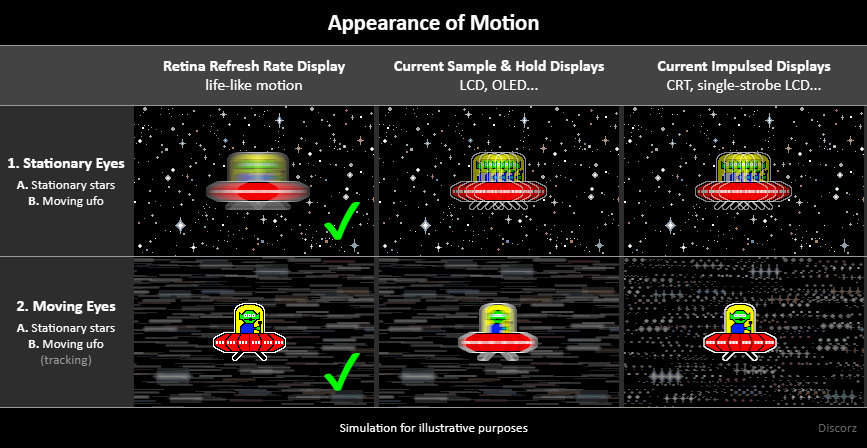
That's probably because you're testing for motion smoothness aka
blurrity where eyes are mostly fixated, and not clarity (scenario 1B vs 2B on the image). Strobing doesn't improve smoothness directly as higher refresh & frame rate does. Strobing mainly benefits eye tracking scenarios where eyes track moving images on screen (scenario 2B). Games you've mentioned are not the type where this happens immensely for you, therefore strobing benefits are less impactful.
For such games you'll want to go for highest possible refresh & frame rate. Sufficient GtG response times are still desirable for reducing frame transition errors. Also jumping from 300 to even 500Hz might not be that striking, so you'll want to wait for at least 1000Hz to notice genuine improvement. Although that does leave you with the task of pushing 1000fps and everything that comes along. This way you improve all possible eye-motion-vs-content-motion scenarios naturally, not just one.
Re: NVIDIA G-Sync Pulsar monitor - Asus ROG Strix XG27AQNGV
Posted: 28 Jan 2026, 09:26
by rnk0
olain wrote: ↑28 Jan 2026, 03:11
I have this monitor and I am not impressed, like at all.
A little background, I used to play pro CS and a lot of Q3 and have been playing FPS games since 1996. My CRT monitor was the legendary HP P1230 that ran 800x600 160hz or 2048x1536 @ 85 hz. I have almost always played FPS games at above 300 FPS, I run a low resolution, or lower the settings until I get that sort of performance.
I own a IPS 300hz display that I am fairly content with. But I recently ordered the 280hz OLED MO27Q28G monitor that monitors unboxed rated "S-tier" of 2025. I was not happy, the text rendering was bad even though it is 4.th gen WOLED, and the OLED instant pixel response time did not have an impact in FPS games compared to what I was already on.
So I ordered the Asus ROG Strix XG27AQNGV
This monitor is praised for its supreme motion clarity. Now I don't really know what that practically entails, but IRL, it made NO difference to me. YES, I could run the MPRT and UFO ghost tests and see how great the monitor was. But in game? Not an upgrade.
I thought the monitor was supposed to make 120 FPS / low fps seem like something 360 FPS. But it does not. Perhaps this is due to my understanding of performance from a monitor being different than that of the reviewers and the blurbusters lingo.
My best example of how I am not "WOW!-ed" by this monitor is to simply pan your camera from left to right at very high fps (+240 fps), and the cap your FPS to 120, and compare.. The difference is night and day on a normal display, on an OLED display and yes also on this Pulsar display. 120 FPS just looks BAD, when you pan the camera quickly.
I added these clips, not to document anything as my Iphone captures at 30 fps, but just to give some example of what I mean by quickly panning the camera.
EDIT: Seems the forum wont allow youtube shorts, and youtube wont allow my short videos not to be, of type short.

120 FPS
277 FPS
I just had a similar experience.
I bought the Asus ROG Strix XG248QSG Ace 610 Hz gaming monitor.
I already have a Dell Alienware AW2725DF (1440p@360Hz QD-OLED).
I thought I'd enjoy this a lot more for CS specifically. I was aware that colors etc. are a bit "bad" and such. But it advertises ELMB Sync, which is basically almost like Pulsar.
Yes, it's more fluid - due to it having a lot more Hz than the OLED. But the image quality is just so much worse. I haven't used a true 1080p Display in years, so I forgot how low the resolution actually is. Even at "full" resolution, it just looks very "edgy" and aliased. This is odd, because on my 1440p monitor, even when I lower the resolution to 1080p stretched, it still looks less "weird" when I turn quickly.
Yes, the higher Hz is definitely noticable as a CS player. But the blur reduction? I'm basically not really able to distinguish the difference. And I have good eyes already.
I'll have to return this monitor, as the bad contrast together with the uniformity issues (there's just spots of brighter/darker areas on the display that distract my eyes) are just not enjoyable to me. I'd rather spent an extra 300-400 Euros (I payed 730 for this) to get the new 540 Hz OLED from Asus.
Ultimate monitor would probably be:
32 inch 4k@240 with the new RGB stripe layouts, with a dual mode at 1080p to reach 600Hz or something like that. Or maybe even 1440p@540.
I'm not convinced of Pulsar anymore. If they can bring out an "OLED" Version of Pulsar, I'd consider it. With the CRT-Beam simulation, I do see noticable difference at 60Hz (which is 6x from my 360 Hz).
Re: NVIDIA G-Sync Pulsar monitor - Asus ROG Strix XG27AQNGV
Posted: 28 Jan 2026, 10:49
by SirParcival
I was similarly initially "non-wow'd" but after a good 8 hour gaming session, I'm not going back to OLED.
This MSI Pulsar has better colors, more vibrant colors, the best blacks I've ever seen on a non-OLED non-VA panel, the perceptible input delay is as low as any OLED monitor I've ever used, and my god... the motion clarity is just bananas. Now I'm starting to take it for granted I did some tests going back to my QD-OLED, and it's not even close. With every other flat panel monitor I've used, you always had to stop moving the camera to reveal the "max level" of detail for any scene. Now it just always exists as your eye naturally tracks.
Also, why dear god does everyone only ever consider Asus? They're a garbage brand that pushes 2.5GB of spy/shovelware just to use basic features of their motherboards, their GPUs are ludicrously overpriced and underbuilt, not to mention have serious flaws, thheir routers had an FBI/NSA warning against them letting known backdoors into your network that took them ages to fix (how many people will ever read that and update their router firmware? lol!), and their monitors use the same panels as everyone else.
Please, vote with your wallets, Asus is poo poo tier. People have already been talking about possibly defective Pulsar monitors in this thread, and some have audible noise that comes from it. My MSI is silent, has no cloudyness to the blacks in any corner, the colours look possibly the best I've ever seen in a monitor? That's counting against QD-OLED. /rant
BTW, I'm pretty sure that this isn't just THE BRIGHTEST MONITOR I've ever seen, I think it takes the crown for the BRIGHTEST SCREEN I've ever seen. Consumer-level at least. Seeing a 540 nit 100% white window is just... surreal. Everything else feels super dark now, even all the OLEDS. Even my 65" LG OLED TVs can't hold a candle. A bright scene is actually bright.
So NO this doesn't make 120hz feel like 360hz, but what it does is make 120hz feel as playable as 360hz to me. I can react quickly, as i would normally at high refreshes, and yes there's fewer frames, that's easily seen, but I can see them perfectly clearly. And g-sync kinda takes care of perceived smoothness. You're just missing the ultra-fast feeling of a mouse being an extension of your body like you get with true high refresh, it's just updating faster. That part doesn't change, but genuinely at lower FPS even comp FPS games feel pretty good to play, better than they ever have before at those frames.
Only issue I can see if I'll have to sell this once they come out with a 240hz 4k panel. 240hz is actually "enough" for me, with the additional clarity of Pulsar. And I can't wait to see what that looks like revealing how crisp native 4k game content looks, now with no smearing.
BTW, did those Anno 1800 tests, even my wife could notice it. It was like you can appreciate every pixel of every house, tree, and person when the camera was still, but without Pulsar when you move the screen everything kinda feels like it goes from "4k" to 1080p, and then pops back to 4k once the camera stops. With Pulsar it stays at "4k". She even mentioned that she "usually kinda naturally glaze over my eyes when the camera is moving anyways, cause it's always been a bit blurry. You focus when the camera stops to see everything."
And now I just don't have to ever do that again.
It's a strange feeling to get used to, I'll say that much. It's not what I expected, but now that I'm growing used to it, there's no going back. This feels like a 60 to 120hz moment, where at first you're not really prepared for it, and you have to re-train your eyes and brain to process more information now. Maybe 4k resolution with this clarity could honestly be too much. I've been finding 240hz 4k OLED to be hitting that upper limit of what "too much" is for my brain.
Anyways, try out the Acer and the AOC. Let's hear how they are. Don't just blindly always buy the ASUS.
Re: NVIDIA G-Sync Pulsar monitor - Asus ROG Strix XG27AQNGV
Posted: 28 Jan 2026, 11:42
by whitespider999
That's how I see motion clarity as a net positive as well, when you move the camera you aren't actually seeing viable detail. It's more a navigation system to arrive at either a forward moving or stationary image. When there's motion clarity you tend to look around a lot more because you can temporally see things while looking around. Whereas if you play at 60hz/120/240, your temporal perspective of the world only really consists of the compilation of times you stopped looking. Rather than the entire looking process. With good motion clarity it gives you the option to constantly move your camera around and track detail at all times.
Re: NVIDIA G-Sync Pulsar monitor - Asus ROG Strix XG27AQNGV
Posted: 28 Jan 2026, 13:29
by MSIfanboy
rnk0 wrote: ↑28 Jan 2026, 09:26
olain wrote: ↑28 Jan 2026, 03:11
I have this monitor and I am not impressed, like at all.
A little background, I used to play pro CS and a lot of Q3 and have been playing FPS games since 1996. My CRT monitor was the legendary HP P1230 that ran 800x600 160hz or 2048x1536 @ 85 hz. I have almost always played FPS games at above 300 FPS, I run a low resolution, or lower the settings until I get that sort of performance.
I own a IPS 300hz display that I am fairly content with. But I recently ordered the 280hz OLED MO27Q28G monitor that monitors unboxed rated "S-tier" of 2025. I was not happy, the text rendering was bad even though it is 4.th gen WOLED, and the OLED instant pixel response time did not have an impact in FPS games compared to what I was already on.
So I ordered the Asus ROG Strix XG27AQNGV
This monitor is praised for its supreme motion clarity. Now I don't really know what that practically entails, but IRL, it made NO difference to me. YES, I could run the MPRT and UFO ghost tests and see how great the monitor was. But in game? Not an upgrade.
I thought the monitor was supposed to make 120 FPS / low fps seem like something 360 FPS. But it does not. Perhaps this is due to my understanding of performance from a monitor being different than that of the reviewers and the blurbusters lingo.
My best example of how I am not "WOW!-ed" by this monitor is to simply pan your camera from left to right at very high fps (+240 fps), and the cap your FPS to 120, and compare.. The difference is night and day on a normal display, on an OLED display and yes also on this Pulsar display. 120 FPS just looks BAD, when you pan the camera quickly.
I added these clips, not to document anything as my Iphone captures at 30 fps, but just to give some example of what I mean by quickly panning the camera.
EDIT: Seems the forum wont allow youtube shorts, and youtube wont allow my short videos not to be, of type short.
120 FPS
277 FPS
I just had a similar experience.
I bought the Asus ROG Strix XG248QSG Ace 610 Hz gaming monitor.
I already have a Dell Alienware AW2725DF (1440p@360Hz QD-OLED).
I thought I'd enjoy this a lot more for CS specifically. I was aware that colors etc. are a bit "bad" and such. But it advertises ELMB Sync, which is basically almost like Pulsar.
Yes, it's more fluid - due to it having a lot more Hz than the OLED. But the image quality is just so much worse. I haven't used a true 1080p Display in years, so I forgot how low the resolution actually is. Even at "full" resolution, it just looks very "edgy" and aliased. This is odd, because on my 1440p monitor, even when I lower the resolution to 1080p stretched, it still looks less "weird" when I turn quickly.
Yes, the higher Hz is definitely noticable as a CS player. But the blur reduction? I'm basically not really able to distinguish the difference. And I have good eyes already.
I'll have to return this monitor, as the bad contrast together with the uniformity issues (there's just spots of brighter/darker areas on the display that distract my eyes) are just not enjoyable to me. I'd rather spent an extra 300-400 Euros (I payed 730 for this) to get the new 540 Hz OLED from Asus.
Ultimate monitor would probably be:
32 inch 4k@240 with the new RGB stripe layouts, with a dual mode at 1080p to reach 600Hz or something like that. Or maybe even 1440p@540.
I'm not convinced of Pulsar anymore. If they can bring out an "OLED" Version of Pulsar, I'd consider it. With the CRT-Beam simulation, I do see noticable difference at 60Hz (which is 6x from my 360 Hz).
backlight strobing looks terrible in cs2, its 1% lows are awful, 800fps with 300% 1 % lows
Re: NVIDIA G-Sync Pulsar monitor - Asus ROG Strix XG27AQNGV
Posted: 28 Jan 2026, 15:07
by brownvim
SirParcival wrote: ↑28 Jan 2026, 10:49
With every other flat panel monitor I've used, you always had to stop moving the camera to reveal the "max level" of detail for any scene. Now it just always exists as your eye naturally tracks.
This is the reason I bought the Acer, I have missed doing this since losing my CRT. Since then I’ve had to train my brain to not look at the whole screen.
High frame rates help with the blur but it wasn’t a proper fix.
Re: NVIDIA G-Sync Pulsar monitor - Asus ROG Strix XG27AQNGV
Posted: 29 Jan 2026, 02:06
by SirParcival
brownvim wrote: ↑28 Jan 2026, 15:07
SirParcival wrote: ↑28 Jan 2026, 10:49
With every other flat panel monitor I've used, you always had to stop moving the camera to reveal the "max level" of detail for any scene. Now it just always exists as your eye naturally tracks.
This is the reason I bought the Acer, I have missed doing this since losing my CRT. Since then I’ve had to train my brain to not look at the whole screen.
High frame rates help with the blur but it wasn’t a proper fix.
You bought the Acer Pulsar?
How is it? Let's hear the juice!
I'm really interested in what each brand's monitor crosshair looks like.
I got MSI cause their dynamic crosshair on their 240hz 27" 4k QD-OLED is FANTASTIC! It's always changing colors depending on surrounding pixel values, so it's essentially a rainbow.
With the MSI Pulsar I get access to the same crosshair shapes, but I can only pick static white, or static red. This was a big dissapointment.
I really hope they add the rainbow dynamic crosshair in a firmware update. I should contact them to request this feature. It's so next-level.
Asus crosshairs from my experience are always too thicc, they obscure too much of my target.
MSI and Alienware ones I've had much better luck with.
No idea what an Acer modern crosshair even looks like.
Re: NVIDIA G-Sync Pulsar monitor - Asus ROG Strix XG27AQNGV
Posted: 29 Jan 2026, 03:26
by g1nk0123
Hey all.
I have also bought a Pulsar monitor, the Acer one to be exact.
Coming from a 500hz qd-oled at1440p, a Zowie 540hz at 1080hz and a dual mode 240hz / 480hz at 4k/1080p I am really excited for this new tech.
I have realized since using the fast oleds that this is "kinda the wrong path" for motion clarity.
Brute forcing it with fps. Since not nearly all games will be able to run at these framerates I think this new tech will be the one to look forward to.
Of course in an ideal world somehow a similar tech will come to oleds for the ultimate in picture quality as well.
I will give my thoughts on it, once it arrives!