Page 4 of 17
Re: Realtek Gaming 2.5gbe Family Controller Network Lag/Delay
Posted: 26 May 2024, 18:41
by JimCarry
jassine wrote: ↑26 May 2024, 09:09
can someone with RSS enabled share the result of:
Get-NetAdapterRss
i did
Re: Realtek Gaming 2.5gbe Family Controller Network Lag/Delay
Posted: 26 May 2024, 18:45
by JimCarry
JimCarry wrote: ↑26 May 2024, 18:41
jassine wrote: ↑26 May 2024, 09:09
can someone with RSS enabled share the result of:
Get-NetAdapterRss
Re: Realtek Gaming 2.5gbe Family Controller Network Lag/Delay
Posted: 26 May 2024, 18:45
by JimCarry
jassine wrote: ↑26 May 2024, 09:09
can someone with RSS enabled share the result of:
Get-NetAdapterRss
Re: Realtek Gaming 2.5gbe Family Controller Network Lag/Delay
Posted: 26 May 2024, 18:57
by Unreazz
jassine wrote: ↑26 May 2024, 15:40
Unreazz wrote: ↑26 May 2024, 13:34
as you requested

what driver are u using ? and Could you please tell us your setup (MB, cpu) ?
because my results are as same as
BlurWickd, IndirectionTable and RssProcessorArray are empty and we have same network card; im confused.
BlurWickd wrote: ↑26 May 2024, 12:23
After entering your script - now I see number of rss queues, receive side scaling and rss load balancing profile in the advanced settings in device manager. Its set to 4 and rss load balancing profile set to numastatic is this right?
I'm not sure if its working because the indirection table is empty though.

Mainboard: Asus Prime H310M-E
CPU: I5 - 8400 @2.8 GHz 6 core
GPU: Nvidia Geforce GTX 1070
RAM: 16 GB 2800 Mhz
Windows 10 Pro 2H22
JimCarry wrote: ↑26 May 2024, 14:35
Unreazz wrote: ↑25 May 2024, 23:44
JimCarry wrote: ↑25 May 2024, 20:07
Unreazz wrote: ↑25 May 2024, 19:12
What do you mean ? you can just simply activate it via powershell command. there is no reg edit needed
do you even read what he type ? he dont even have it ?
i was not talking about him, i mean, what do you mean with "if rss works its day and night difference" why is it in your case then not activated ? or does it not working out for you ?
i give you example there is tweak in the internet.
https://www.youtube.com/watch?v=OzEOUUmtzRY
at 5:28 you see you can change the msi limit for example mine max is 2048
i found my max with go GoInterruptPolicy.exe and after setting it to 2048 you see in msinfo32
my realtek going from one irq to 4 maybe because my realtek can make only 4 ? but after this tweak rss enabled makes huge diffrence i dont know how but in my case does.
Im gonna try that out, thanks
Re: Realtek Gaming 2.5gbe Family Controller Network Lag/Delay
Posted: 27 May 2024, 09:28
by JimCarry
JimCarry wrote: ↑26 May 2024, 18:45
jassine wrote: ↑26 May 2024, 09:09
can someone with RSS enabled share the result of:
Get-NetAdapterRss
I forgot to mention this if there is here someone who know about this please tell me wich profile on rss i choose ?
Some say numa static is the best profile for rss,some say is conservative?
Re: Realtek Gaming 2.5gbe Family Controller Network Lag/Delay
Posted: 27 May 2024, 13:23
by jassine
JimCarry wrote: ↑27 May 2024, 09:28
I forgot to mention this if there is here someone who know about this please tell me wich profile on rss i choose ?
Some say numa static is the best profile for rss,some say is conservative?
i have no idea which one is better, im gonna test and let you know.
Re: Realtek Gaming 2.5gbe Family Controller Network Lag/Delay
Posted: 27 May 2024, 15:13
by JimCarry
jassine wrote: ↑27 May 2024, 13:23
JimCarry wrote: ↑27 May 2024, 09:28
I forgot to mention this if there is here someone who know about this please tell me wich profile on rss i choose ?
Some say numa static is the best profile for rss,some say is conservative?
i have no idea which one is better, im gonna test and let you know.
ok thanks,can you test this thing that i show on the screen as well,so this is default on the picture but when you change msi limit to more then one in my case max is 4 ,when i change it to 4 i have from 1 "irq 4294967290 Realtek PCIe GbE Familly Controller"
to 4 irqs "irq 4294967290 Realtek PCIe GbE Familly Controller"
wich in theory is better but can you test it as well?
Re: Realtek Gaming 2.5gbe Family Controller Network Lag/Delay
Posted: 28 May 2024, 13:46
by jassine
JimCarry wrote: ↑27 May 2024, 15:13
ok thanks,can you test this thing that i show on the screen as well,so this is default on the picture but when you change msi limit to more then one in my case max is 4 ,when i change it to 4 i have from 1 "irq 4294967290 Realtek PCIe GbE Familly Controller"
to 4 irqs "irq 4294967290 Realtek PCIe GbE Familly Controller"
wich in theory is better but can you test it as well?
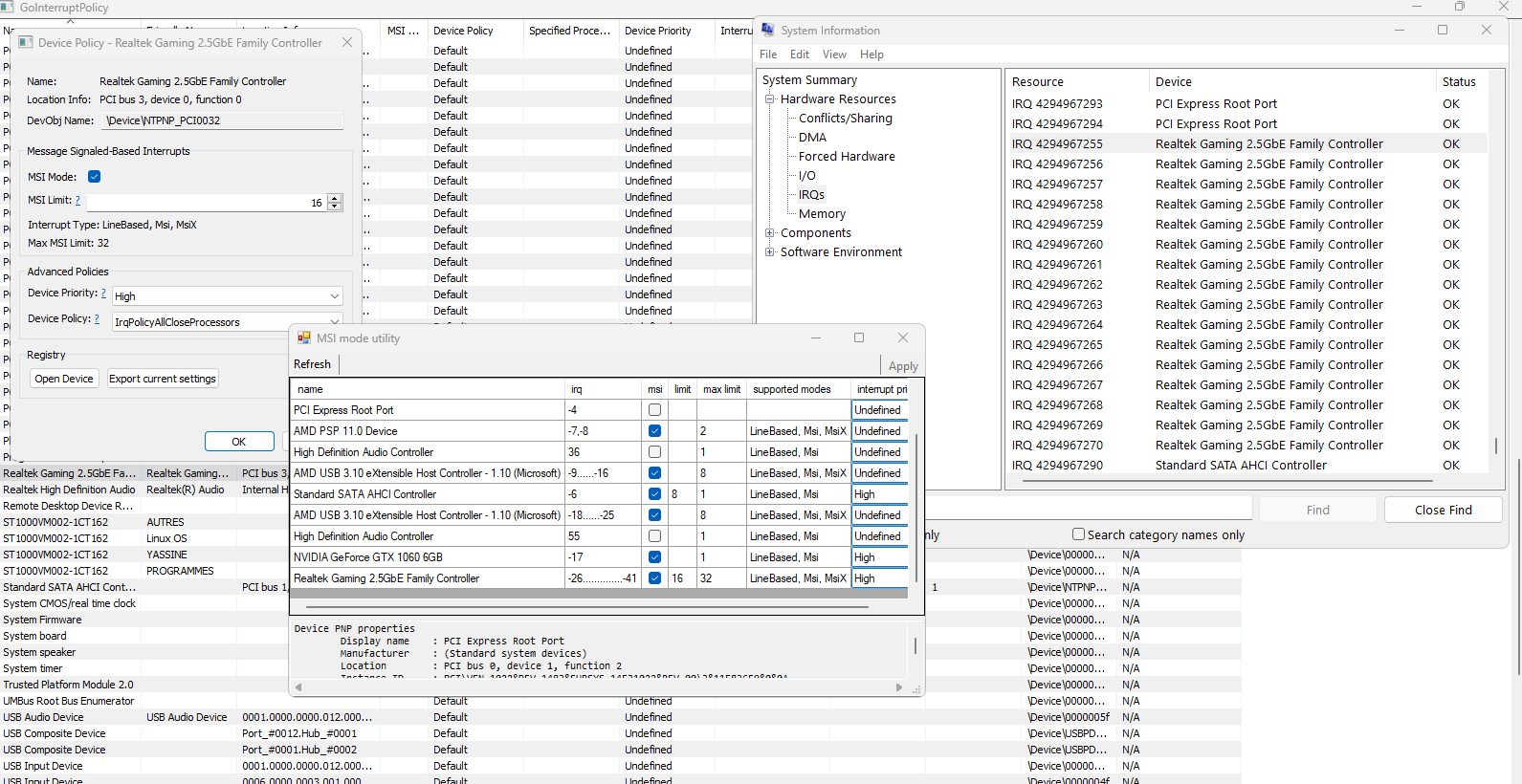
as u see in the image below, i have limit = 16, so i have 16 irqs, according to chatgpt this is how to get your best value :
For most gamers, starting with an MSI limit of 8 and adjusting to 16 as needed can strike the right balance between performance and stability. Always tailor the settings to your specific hardware and gaming requirements, and perform thorough testing to ensure the best possible gaming experience.
- Capture d'écran 2024-05-28 191811.png (167.76 KiB) Viewed 14211 times
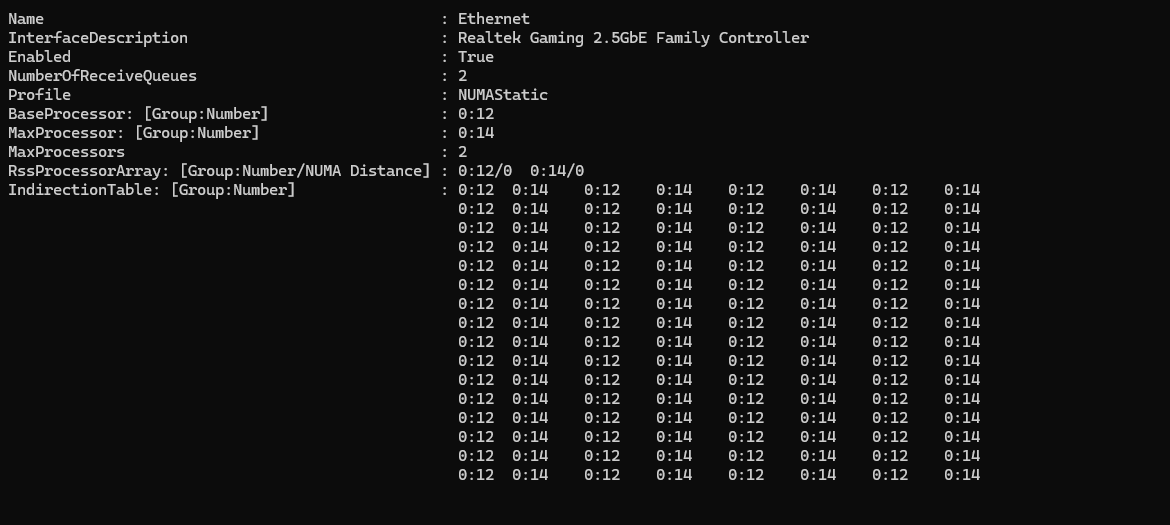
and for RSS, these are my settings:
Using 2 queues with 2 cores: 12 and 14 and NUMAStatic as profile, till now, my gaming experience has changed, no more delay.
- Capture d'écran 2024-05-28 194347.png (41.2 KiB) Viewed 14211 times
Re: Realtek Gaming 2.5gbe Family Controller Network Lag/Delay
Posted: 29 May 2024, 04:22
by Kyouki
Personally, had tested with RSS for some while as well until I read somewhere it created more problems or doesn't work as well as it does and adds nothing to Gaming specifically.
I took it off, and it resolved some of the packetloss problems or issues I was experiencing.
Take it with a grain of salt and do experiment (which is why I wanted to follow this thread if I did something incorrectly)
Re: Realtek Gaming 2.5gbe Family Controller Network Lag/Delay
Posted: 29 May 2024, 12:49
by JimCarry
jassine wrote: ↑28 May 2024, 13:46
JimCarry wrote: ↑27 May 2024, 15:13
ok thanks,can you test this thing that i show on the screen as well,so this is default on the picture but when you change msi limit to more then one in my case max is 4 ,when i change it to 4 i have from 1 "irq 4294967290 Realtek PCIe GbE Familly Controller"
to 4 irqs "irq 4294967290 Realtek PCIe GbE Familly Controller"
wich in theory is better but can you test it as well?
as u see in the image below, i have limit = 16, so i have 16 irqs, according to chatgpt this is how to get your best value :
For most gamers, starting with an MSI limit of 8 and adjusting to 16 as needed can strike the right balance between performance and stability. Always tailor the settings to your specific hardware and gaming requirements, and perform thorough testing to ensure the best possible gaming experience.
Capture d'écran 2024-05-28 191811.png
Capture d'écran 2024-05-28 194347.png
In my opionion this is not the right way to do it,first download "GoInterruptPolicy.exe" and then when you press twice on your net adapter
it will open the window on the screen i provide,when you hold the up arrow it will run untill its max,for example as you see my realtek goes to 2048 "limit" but my max limit is 4 so i will have maximum 4 irqs.
On your screenshot your "max limit is 32" wich is maximum 32 irqs but ,but the limit value can go above,so as you seen in my case maximum "limit" value is 2048,even tho in "msi_util" "max limit" is 4 ,so i think in your case lets say if you put your max limit value like i find it out threw "GoInterruptPolicy.exe" and it lets say in my case 2048>4 ,if the irqs move from to 32 it works but, i am not sure should me 2048 limit even tho it goes only to 4 irqs.