Page 5 of 154
Re: NVIDIA G-Sync Pulsar monitor - Asus ROG Strix XG27AQNGV
Posted: 07 Jan 2026, 14:43
by nuninho1980
Fixed Pulse Width of 25%!?? No, what silly! It should be possible we reduce there PW to 5% for get higher than 1k pixel/s at low vertical frequency - PAL/NTSC!
Re: NVIDIA G-Sync Pulsar monitor - Asus ROG Strix XG27AQNGV
Posted: 07 Jan 2026, 16:01
by radeko
Re: NVIDIA G-Sync Pulsar monitor - Asus ROG Strix XG27AQNGV
Posted: 07 Jan 2026, 16:37
by FlameOnion
liquidshadowfox wrote: ↑07 Jan 2026, 10:30
FlameOnion wrote: ↑07 Jan 2026, 10:22
Does all the features of the g sync monitor work on other gpus than nvidia?
No, Gsync pulsar is exclusive to the DP 1.4 connector AND nvidia GPUs at this time.
For me that is absolute garbage, and I heard in Hardware Unboxed video that it needs the latest nvidia driver. With these restrictions this is not for me. I may want to do some gaming with clear motion(or usage) on different mini pc(igpu), maybe some WinXP gaming, try dos etc. . Restricting the monitor on certain gpu vendor and latest driver(I may want older driver for different reasons) is bad.
I don't know much about g sync, early when it came out I read that it works only with nvidia, this still being the same today is bad and stupid. And another thing, looking up videos and hearing about this monitor I did not hear mentions about not working on intel or amd gpu(exception is hardware unboxed video). Even on the asus monitor page I could not find information that it only works on Nvidia GPUS, I consider this disturbing and wrong.
Re: NVIDIA G-Sync Pulsar monitor - Asus ROG Strix XG27AQNGV
Posted: 07 Jan 2026, 16:41
by kyube
whitestar wrote: ↑07 Jan 2026, 13:08
I'll be mostly in the 75-85Hz range myself (i.e. effective 300-340Hz). I wonder how clear that will be compared to the XG2431 at those frequencies, which seem very clear in my eyes.
Let's assume you're going to run your XG2431@80Hz.
Based on
Discorz' XG2431 analysis
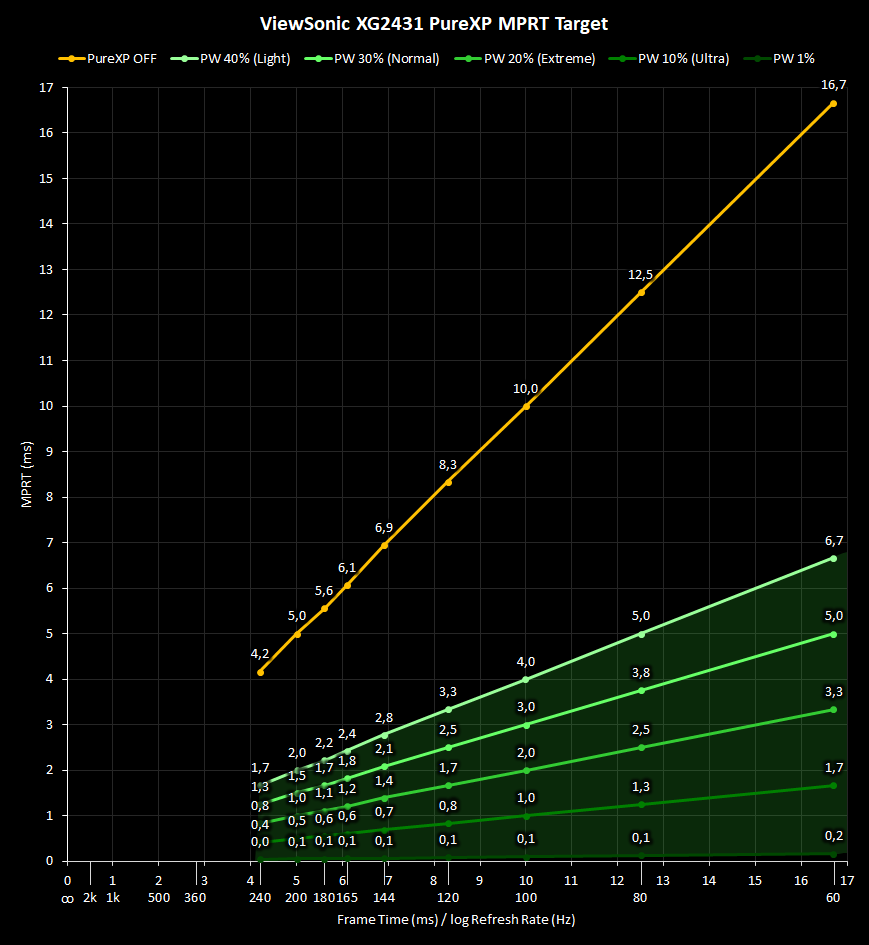
You're roughly getting ~1,3ms MPRT (“effective ~770 Hz”), with a brightness level of ~52cd/m² on your XG2431@80Hz with PureXP Ultra.
Which would be twice as clear in eye-tracked motion as a G-SYNC Pulsar model.
whitestar wrote: ↑07 Jan 2026, 13:08
You would think that it would affect brightness, but according to the Digital Foundry clip I saw Pulsar didn't affect brightness at all. Also, the HW Unboxed video didn't mention it at all, which makes me think it's not an issue, since they are usually very thorough. But we will soon find out I guess.
I might've gotten my intent lost with my rambling above, but I didn't suggest (or atleast I didn't think during the time of writing) that Pulsar visibly affects brightness to the naked-eye when within the variable refresh rate window.
It's merely a estimation on my part on what the brightness will be when GSYNC Pulsar is enabled, though I might be completely wrong in my formulas.
I assume there could be some voltage boosting going on (which I completely omitted the possibility of at the time of writing my post above), where the upper amplitude could be ~1000cd/m².
When PW=25%, we'd get ~250cd/m², which could be treated as the maximum brightness when G-SYNC Pulsar is enabled.
There isn't any specific mention of G-SYNC Pulsar disallowing brightness adjustments, therefore we can assume that we'll be able to adjust it to our liking while keeping a PW=25% (amplitude is touched, not the PW)
Re: NVIDIA G-Sync Pulsar monitor - Asus ROG Strix XG27AQNGV
Posted: 07 Jan 2026, 16:44
by t2na
liquidshadowfox wrote: ↑07 Jan 2026, 10:30
FlameOnion wrote: ↑07 Jan 2026, 10:22
Does all the features of the g sync monitor work on other gpus than nvidia?
No, Gsync pulsar is exclusive to the DP 1.4 connector AND nvidia GPUs at this time.
Is that 100% confirmed? I thought Nvidia had said it would work across both DP and HDMI.
Re: NVIDIA G-Sync Pulsar monitor - Asus ROG Strix XG27AQNGV
Posted: 07 Jan 2026, 17:19
by mackrozhkoff
Information from the Asus website
Re: NVIDIA G-Sync Pulsar monitor - Asus ROG Strix XG27AQNGV
Posted: 07 Jan 2026, 17:34
by kyube
mackrozhkoff wrote: ↑07 Jan 2026, 17:19
Information from the Asus website
Wow, ASUS, MSI & likely ACER & AOC have managed to nerf their "HDMI 2.1" bandwidth to HDMI 2.0 TMDS levels.
Impressive cost cutting!... What a great release...
Re: NVIDIA G-Sync Pulsar monitor - Asus ROG Strix XG27AQNGV
Posted: 07 Jan 2026, 19:39
by radeko
None of the three Pulsar reviewers mention brightness. They probably had to get these monitors from the manufacturers earlier. Did the manufacturers forbid them from talking about brightness?

whether the pulsar caused no brightness loss that they didn't notice it and forgot to mention it.
Pulsar at 360hz has litte crosstalk. But without Pulsar crosstalk is not visible. 240hz Pulsar has no visible crosstalk.

- Zrzut ekranu 2026-01-08 015225.png (592.64 KiB) Viewed 4078 times
Re: NVIDIA G-Sync Pulsar monitor - Asus ROG Strix XG27AQNGV
Posted: 08 Jan 2026, 02:26
by stolen
radeko wrote: ↑07 Jan 2026, 19:39
None of the three Pulsar reviewers mention brightness. They probably had to get these monitors from the manufacturers earlier. Did the manufacturers forbid them from talking about brightness?
whether the pulsar caused no brightness loss that they didn't notice it and forgot to mention it.
I have the XG27AQNGV and the brightness hit feels equal to previous non pulsar ULMB2 monitors. My guess is the reviewers just didn't think about potential brightness loss when testing.
Re: NVIDIA G-Sync Pulsar monitor - Asus ROG Strix XG27AQNGV
Posted: 08 Jan 2026, 03:28
by J1mmyEgg
stolen wrote: ↑08 Jan 2026, 02:26
I have the XG27AQNGV and the brightness hit feels equal to previous non pulsar ULMB2 monitors. My guess is the reviewers just didn't think about potential brightness loss when testing.
Do you feel a difference between the rolling shutter vs global shutter between technologies? I have played with normal old Dyac and I can feel nausea after a couple hours but that BFI is different compared to the new G-sync Pulsar.
I also wonder if you feel if lower hz is better since the technology auto adjusts to make sure there is no crosstalk on all hz instead of only a golden refresh rate.