
Same thing happens with me but it is same with waht i play which are Battlefield and Apex. So this input lag/deysnc issue is not Game servers or game related at at all when exact thing happens with multiple games.caponew0w wrote: ↑06 Jun 2024, 15:07Trust me, I would normally agree with you 1000%, but for me everything is way too inconsistent.. And funny enough, the only consistent thing is the inconsistency. Sometimes everything works amazing but just after applying certain tweaks / making certain changes, only in the beggining. Then it goes bad and never ever goes to the same good way as initially was. I used to try the same deathmatch servers from popular providers while trying to determine if the server variance / conditions is what makes my game bad, but had same resuls. Things were amazing they they would not be, on the same exact server. Since I tested this quite a lot and saw no benefits I am not struggling anymore, I just launch cs2 on valve servers. Same ping, 0 packets lost, 0 rubberbanding, low jitter, literally not a single network stat anywhere that could indicate network issues, but somehow making changes not even related in any way to the network makes things good, for a short brief period. Again, this is the spot I am in and does no mean that for everyone is the same.joseph_from_pilsen wrote: ↑04 Jun 2024, 07:20
You should compare your results to one server which is always the same with stable performance.
Valve servers are trash and the floatyness depends mostly on server variance. A parameter which was always a shame at valve servers so valve solved it (by their typical way of pride pricks company) - they blocked players from viewing server variance values.
...
Fix for input lag
-
MontyTheAverage
- Posts: 170
- Joined: 11 Nov 2021, 06:39
Re: Fix for input lag
-
joseph_from_pilsen
- Posts: 255
- Joined: 01 Apr 2022, 23:51
Re: Fix for input lag
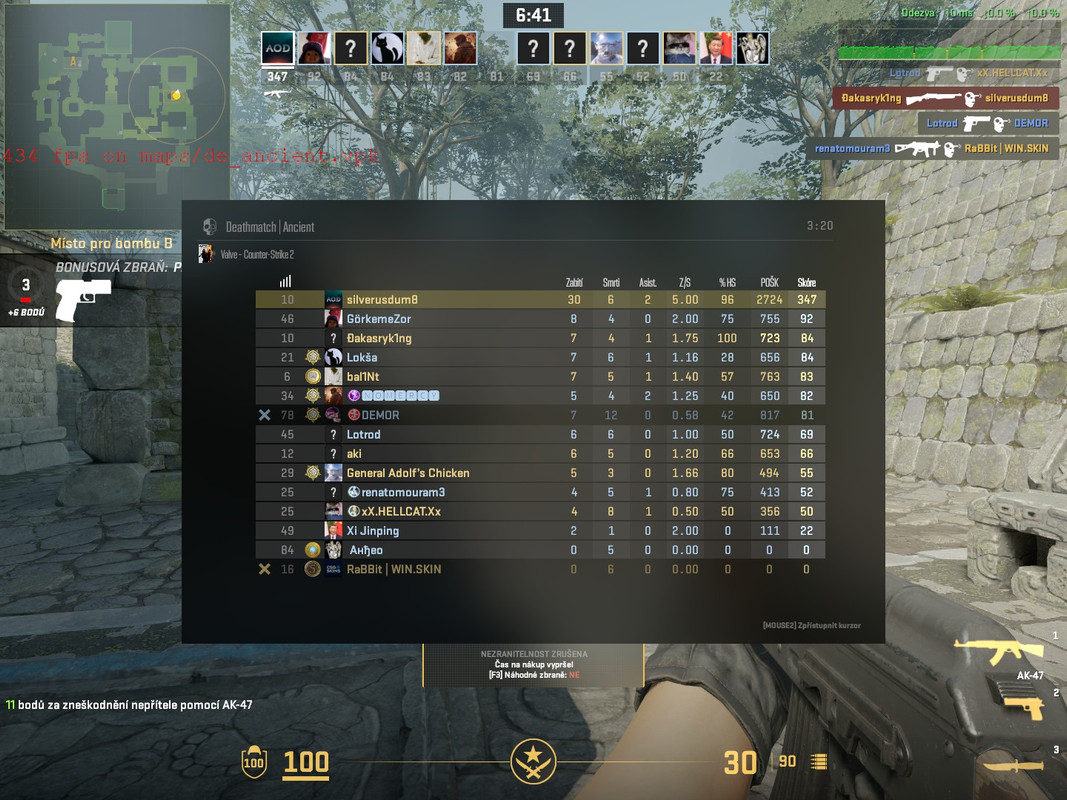
Back to the server difference... Both screenshots when leveling fresh accounts to prevent effect of inventory lag + old acc lag:
This is netraph of relatively OK EU server at night (still not perfect but for a pug its decent) :
This is netgraph of typical valve trash server at weekend (EU), with occasional red 20+ms server tick time warnings.
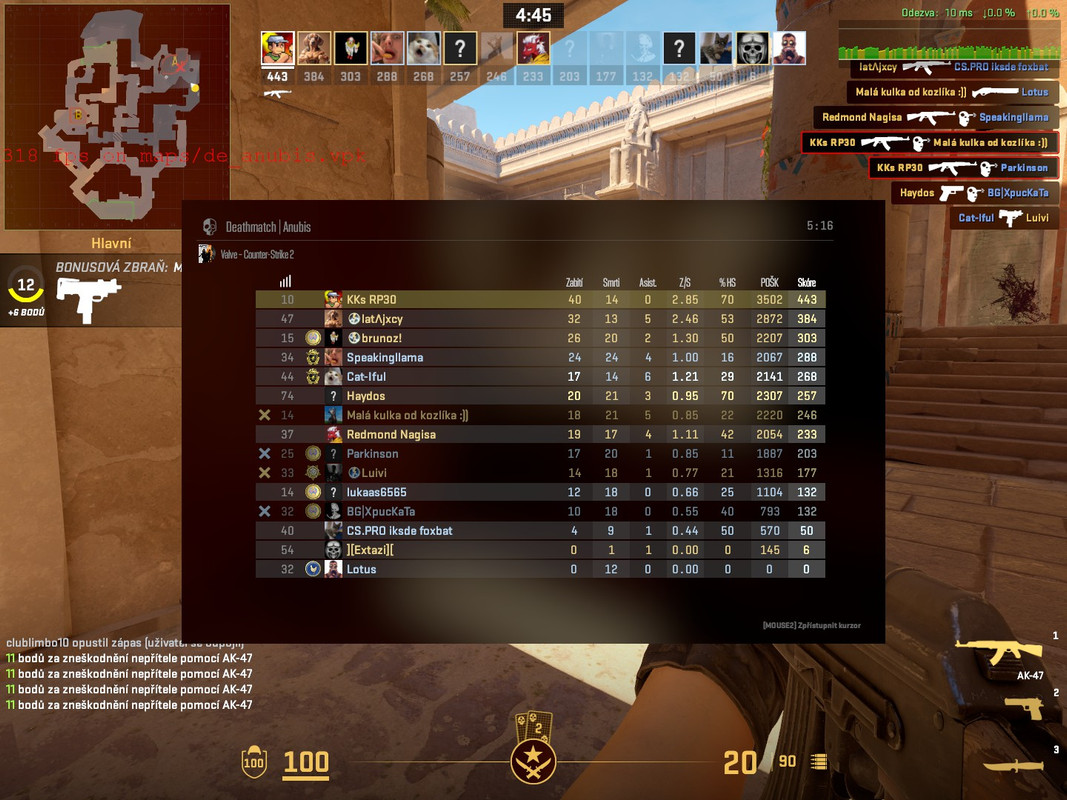
The difference in gameplay is like day and night, at garbo server it permanently stutters, fps are also unstable, movement has unstable speed, game is not fully smooth and enemies have more time to react + movement and shooting is muddy due to delays in every aspect of "game". Also 30+ms server tick times are "funny".
Most players dont even realize that over day 90+ percent of servers are garbage tier (99+ when we talk about DM). And try to find issues on their end.
This is netraph of relatively OK EU server at night (still not perfect but for a pug its decent) :
This is netgraph of typical valve trash server at weekend (EU), with occasional red 20+ms server tick time warnings.
The difference in gameplay is like day and night, at garbo server it permanently stutters, fps are also unstable, movement has unstable speed, game is not fully smooth and enemies have more time to react + movement and shooting is muddy due to delays in every aspect of "game". Also 30+ms server tick times are "funny".
Most players dont even realize that over day 90+ percent of servers are garbage tier (99+ when we talk about DM). And try to find issues on their end.
-
Maf_91
- Posts: 3
- Joined: 16 Jun 2024, 22:38
Re: Fix for input lag
I have been using the guide from the last page I made (LasseF) consistently and I am 100% sure all forms of input lag and desync is because of bad monitor settings. Thats why a clean Windows with no changes; just pure OOBE, always feel the best. I have tried so much to fix the bad hitreg... almost everything except for moving to another country lol. I seriously do not need to tweak anything except for the things in the post.
However, the problem is that for some god forsaken ##$## reason, Windows adds either drivers or syncs some random monitor or mouse setting that breaks the perfect balance between the monitor and the server. Its insane how one tiny change to the display resolution, color, brightness, Hz and everything can impact the hitreg and input-feel of a game so dramatically.
I am plagued by sync... Every godd@#@# app has syncing now and its so easy for these apps and systems to completely break between each other. My monitor for example is getting synced settings from my laptop that changes the display. I can easily tell from how brightness, colors and how the mouse-feel changes from screen dpi-changes. This happens even when I have turned all that off.
Theoretically it shouldnt be hard to avoid syncing settings but I need my laptop and phone and other apps too and I dont feel like having to buy and setup a pc just for 1 game lol. Luckily the system works and disabling the monitor and deleting registry makes it better. But after a while and when Nvidia, blizzard, steam etc. all have made their @#@$ hardware profiles about your pc it stops working and I need to basically reset the pc and install with an offline account to fix my own drivers.
I really hope someone can figure this out soon.
However, the problem is that for some god forsaken ##$## reason, Windows adds either drivers or syncs some random monitor or mouse setting that breaks the perfect balance between the monitor and the server. Its insane how one tiny change to the display resolution, color, brightness, Hz and everything can impact the hitreg and input-feel of a game so dramatically.
I am plagued by sync... Every godd@#@# app has syncing now and its so easy for these apps and systems to completely break between each other. My monitor for example is getting synced settings from my laptop that changes the display. I can easily tell from how brightness, colors and how the mouse-feel changes from screen dpi-changes. This happens even when I have turned all that off.
Theoretically it shouldnt be hard to avoid syncing settings but I need my laptop and phone and other apps too and I dont feel like having to buy and setup a pc just for 1 game lol. Luckily the system works and disabling the monitor and deleting registry makes it better. But after a while and when Nvidia, blizzard, steam etc. all have made their @#@$ hardware profiles about your pc it stops working and I need to basically reset the pc and install with an offline account to fix my own drivers.
I really hope someone can figure this out soon.
-
Goran
- Posts: 4
- Joined: 19 Jun 2024, 06:32
Re: Fix for input lag
This fix doesn't make sense why it works, but at least for me it improves mouse feel and hitreg in CS2.
-
Hyote
- Posts: 673
- Joined: 09 Jan 2024, 18:08
Re: Fix for input lag
No, the monitor makes just as much of a difference as anything else. Go into the factory menu and turn off every kind of bloat things like logo display. It is going to make a difference. And if you tweak the hell out of Windows it also makes a huge difference. I don't know why a lot of people say that a fresh Windows install feels good for a while when in reality it feels like garbage even at the install phase.Maf_91 wrote: ↑16 Jun 2024, 23:08I have been using the guide from the last page I made (LasseF) consistently and I am 100% sure all forms of input lag and desync is because of bad monitor settings. Thats why a clean Windows with no changes; just pure OOBE, always feel the best. I have tried so much to fix the bad hitreg... almost everything except for moving to another country lol. I seriously do not need to tweak anything except for the things in the post.
However, the problem is that for some god forsaken ##$## reason, Windows adds either drivers or syncs some random monitor or mouse setting that breaks the perfect balance between the monitor and the server. Its insane how one tiny change to the display resolution, color, brightness, Hz and everything can impact the hitreg and input-feel of a game so dramatically.
I am plagued by sync... Every godd@#@# app has syncing now and its so easy for these apps and systems to completely break between each other. My monitor for example is getting synced settings from my laptop that changes the display. I can easily tell from how brightness, colors and how the mouse-feel changes from screen dpi-changes. This happens even when I have turned all that off.
Theoretically it shouldnt be hard to avoid syncing settings but I need my laptop and phone and other apps too and I dont feel like having to buy and setup a pc just for 1 game lol. Luckily the system works and disabling the monitor and deleting registry makes it better. But after a while and when Nvidia, blizzard, steam etc. all have made their @#@$ hardware profiles about your pc it stops working and I need to basically reset the pc and install with an offline account to fix my own drivers.
I really hope someone can figure this out soon.
-
Slender

- Posts: 1845
- Joined: 25 Jan 2020, 17:55
Re: Fix for input lag
try to install os without rj45, make this reg, connect eth and install nic and gpu driver onlyMaf_91 wrote: ↑16 Jun 2024, 23:08I have been using the guide from the last page I made (LasseF) consistently and I am 100% sure all forms of input lag and desync is because of bad monitor settings. Thats why a clean Windows with no changes; just pure OOBE, always feel the best. I have tried so much to fix the bad hitreg... almost everything except for moving to another country lol. I seriously do not need to tweak anything except for the things in the post.
However, the problem is that for some god forsaken ##$## reason, Windows adds either drivers or syncs some random monitor or mouse setting that breaks the perfect balance between the monitor and the server. Its insane how one tiny change to the display resolution, color, brightness, Hz and everything can impact the hitreg and input-feel of a game so dramatically.
I am plagued by sync... Every godd@#@# app has syncing now and its so easy for these apps and systems to completely break between each other. My monitor for example is getting synced settings from my laptop that changes the display. I can easily tell from how brightness, colors and how the mouse-feel changes from screen dpi-changes. This happens even when I have turned all that off.
Theoretically it shouldnt be hard to avoid syncing settings but I need my laptop and phone and other apps too and I dont feel like having to buy and setup a pc just for 1 game lol. Luckily the system works and disabling the monitor and deleting registry makes it better. But after a while and when Nvidia, blizzard, steam etc. all have made their @#@$ hardware profiles about your pc it stops working and I need to basically reset the pc and install with an offline account to fix my own drivers.
I really hope someone can figure this out soon.
Code: Select all
Windows Registry Editor Version 5.00

; Exclude drivers from Windows Update

[HKEY_LOCAL_MACHINE\SOFTWARE\Microsoft\PolicyManager\current\device\Update]
"ExcludeWUDriversInQualityUpdate"=dword:00000001

[HKEY_LOCAL_MACHINE\SOFTWARE\Microsoft\PolicyManager\default\Update]
"ExcludeWUDriversInQualityUpdate"=dword:00000001

[HKEY_LOCAL_MACHINE\SOFTWARE\Microsoft\WindowsUpdate\UX\Settings]
"ExcludeWUDriversInQualityUpdate"=dword:00000001

[HKEY_LOCAL_MACHINE\SOFTWARE\Policies\Microsoft\Windows\WindowsUpdate]
"ExcludeWUDriversInQualityUpdate"=dword:00000001

[HKEY_LOCAL_MACHINE\SOFTWARE\Microsoft\PolicyManager\default\Update\ExcludeWUDriversInQualityUpdate]
"value"=dword:00000001

[HKEY_LOCAL_MACHINE\SOFTWARE\Microsoft\Windows\CurrentVersion\Device Metadata]
"PreventDeviceMetadataFromNetwork"=dword:00000001

[HKEY_LOCAL_MACHINE\SOFTWARE\Microsoft\Windows\CurrentVersion\DriverSearching]
"SearchOrderConfig"=dword:00000000
"DontSearchWindowsUpdate"=dword:00000001
-
-Takeda-
- Posts: 3
- Joined: 22 Jul 2024, 07:25
Re: Fix for input lag
Guys I've had this issue for almost 3 years now. I used to compete at a really high level of valorant. It changed one day when I noticed that I wasn't hitting the shots I used to. I've changed all my PC specs even monitor from 60 to 144hz and everything is still the same and it hurts to say that I hit even more shots and played so smoothly on 60hz. I've heard about everything at this point. But the one thing that stood out to me for all this time that I haven't done (will do it in the next month), is to have an electrician come check if your house is well grounded, something about your power that is. It sparked even more hope in me that we had someone come check a broken A/C a few days ago and he said the power on our house is not working properly. So yeah... if everything adds up, then yes it is a power issue which shouldn't surprise many, as it's so hard to find a PERMANENT fix to this problem. I'm sorry for not having the forums at hand but there were two. One guy said that he tried his PC at a friend's house and all of a sudden he was hitting shots and playing well just like before. He made sure he wasn't crazy so he took it to his parent's too and said the same. When he went back to his home he said it was slow and disgustingly slow again. The other said he just hired an electrician which he said was quite expensive but it fixed his issue. I think it's about time we stop wasting time on looking for temporary fixes. It's weird for me to say all this after having this problem for 3 years but I have other things to do in my life. If you guys want to try a permanent fix i'd say hire an electrician. I do not guarantee a fix but from what i've seen it's the only thing that will work permanently. Let me know if anything.
-
Vocaleyes
- Posts: 486
- Joined: 09 Nov 2021, 18:10
Re: Fix for input lag
Can I ask if the day it changed, anything your end changed?-Takeda- wrote: ↑22 Jul 2024, 07:36Guys I've had this issue for almost 3 years now. I used to compete at a really high level of valorant. It changed one day when I noticed that I wasn't hitting the shots I used to. I've changed all my PC specs even monitor from 60 to 144hz and everything is still the same and it hurts to say that I hit even more shots and played so smoothly on 60hz. I've heard about everything at this point. But the one thing that stood out to me for all this time that I haven't done (will do it in the next month), is to have an electrician come check if your house is well grounded, something about your power that is. It sparked even more hope in me that we had someone come check a broken A/C a few days ago and he said the power on our house is not working properly. So yeah... if everything adds up, then yes it is a power issue which shouldn't surprise many, as it's so hard to find a PERMANENT fix to this problem. I'm sorry for not having the forums at hand but there were two. One guy said that he tried his PC at a friend's house and all of a sudden he was hitting shots and playing well just like before. He made sure he wasn't crazy so he took it to his parent's too and said the same. When he went back to his home he said it was slow and disgustingly slow again. The other said he just hired an electrician which he said was quite expensive but it fixed his issue. I think it's about time we stop wasting time on looking for temporary fixes. It's weird for me to say all this after having this problem for 3 years but I have other things to do in my life. If you guys want to try a permanent fix i'd say hire an electrician. I do not guarantee a fix but from what i've seen it's the only thing that will work permanently. Let me know if anything.
The reason I’m interested, is because back when I could game properly, I was on 60hz. I then took a break and when I returned, everything was off.
Now I’ve tried 60, 144 and 240hz which should be smoother.. but back when stuff worked at 60hz, I vividly remember picture quality and game video playback looked way smoother than it even does at 240 now.
So a follow up question, did you notice after whatever changed, changed, that 60fps no longer ‘looked’ as smooth or fluent as it used to also?
-
silverhandle
- Posts: 1
- Joined: 18 Aug 2024, 11:09
Re: Fix for input lag
I am trying to delete the EDID in windows 11, but I am unable to find the location of this, and the image you displayed is hard to read. Please help me do this in windows 11, much appreciated!ccfan wrote: ↑01 Apr 2024, 11:06Ok so disabling the monitor in device manager really does work for me but it does so very inconsistently however I messed around a lot and figured out a way to get it to consistently feel good (on my system at least).
Step 1- Disable monitor in device manager
11.PNG
Step 2- Restart PC
FROM HERE ON OUT THESE STEPS NEED TO BE REPEATED ON EVERY BOOT (FOR MY SYSTEM AT LEAST), steps 1 and 2 don't need to be repeated every boot as long as the driver remains disabled
Your monitor driver should still be disabled after the restart however windows re-initiates the driver's folder in the registry every boot. Even though the driver is disabled/unloaded windows re-initiates the monitor's EDID on boot which is what's causing the fix not remaining consistent for me.
1.PNG
This entire DISPLAY folder gets re-initiated on every boot even if you click uninstall in device manager instead of disable (uninstall in device manager deletes this entire display folder but it reappears on pc boot)
Step 3- Delete the EDID entry in the image above. It can get pretty annoying to navigate to this every boot so what you can do instead (this is what i prefer to do) is using Custom Resolution Utility to delete the monitor profile.
22.PNG
After deleting that profile, it should delete the EDID entry in regedit. If you try to reopen CRU after deleting the profile it should display an error which reads "No displays found in the registry"
Step 4 - Now we need to refresh the monitor driver using shift+ctrl+windows key+b OR toggling a setting in the nvidia control panel that leads to the display turning on and off again briefly (i just toggle reference mode colors but scaling and refresh rate should work fine, idk tho). DON'T USE RESTART64.EXE from CRU as this re-initiates the monitor driver and EDID.
So to recap, you need to boot into windows with the monitor driver disabled, delete the EDID via registry or CRU then refresh the gpu driver in such a way that the EDID remains deleted.
This method has been working consistently for me for about 2 weeks now so i figure i'd share it to see if you guys find similar results.
-
RamenRider

- Posts: 67
- Joined: 25 Jul 2018, 07:14
Re: Fix for input lag
Thank you OP. I used to do this a long time ago and I have forgotten. I wonder what else we can disable?
It does make sense. Windows has tons of psuedo overlayers for it's numerous features. I personally use Night Mode on my PC so it reduces the amount of blue light automatically when it's night time. However using this tweak actually disables that feature so it confirms you are getting faster frames without any extra layers from the OS. So depending on a day if I want to play seriously or chill, I use the tweak.
Thank you, will try this.Slender wrote: ↑05 Jul 2024, 23:42
try to install os without rj45, make this reg, connect eth and install nic and gpu driver only
Code: Select all
Windows Registry Editor Version 5.00

; Exclude drivers from Windows Update

[HKEY_LOCAL_MACHINE\SOFTWARE\Microsoft\PolicyManager\current\device\Update]
"ExcludeWUDriversInQualityUpdate"=dword:00000001

[HKEY_LOCAL_MACHINE\SOFTWARE\Microsoft\PolicyManager\default\Update]
"ExcludeWUDriversInQualityUpdate"=dword:00000001

[HKEY_LOCAL_MACHINE\SOFTWARE\Microsoft\WindowsUpdate\UX\Settings]
"ExcludeWUDriversInQualityUpdate"=dword:00000001

[HKEY_LOCAL_MACHINE\SOFTWARE\Policies\Microsoft\Windows\WindowsUpdate]
"ExcludeWUDriversInQualityUpdate"=dword:00000001

[HKEY_LOCAL_MACHINE\SOFTWARE\Microsoft\PolicyManager\default\Update\ExcludeWUDriversInQualityUpdate]
"value"=dword:00000001

[HKEY_LOCAL_MACHINE\SOFTWARE\Microsoft\Windows\CurrentVersion\Device Metadata]
"PreventDeviceMetadataFromNetwork"=dword:00000001

[HKEY_LOCAL_MACHINE\SOFTWARE\Microsoft\Windows\CurrentVersion\DriverSearching]
"SearchOrderConfig"=dword:00000000
"DontSearchWindowsUpdate"=dword:00000001
Twitch:https://www.twitch.tv/ramenrider
BB Thread: viewtopic.php?f=10&t=7168
Steam Input lag guide. https://steamcommunity.com/app/1364780/ ... 499/?ctp=3
BB Thread: viewtopic.php?f=10&t=7168
Steam Input lag guide. https://steamcommunity.com/app/1364780/ ... 499/?ctp=3