Page 67 of 154
Re: NVIDIA G-Sync Pulsar monitor - Asus ROG Strix XG27AQNGV
Posted: 25 Mar 2026, 15:18
by Morphy
liquidshadowfox wrote: ↑24 Mar 2026, 15:04
Morphy wrote: ↑24 Mar 2026, 13:24
I'm having an issue with Pulsar: Pulsar has stopped working altogether, it only engages very briefly for a view seconds after adjusting the pulsar low fps setting. This is on the AOC version and I'm using smoothfrog to observe it. Anyone have any ideas as to what might be causing it? Thanks
Have you checked the monitor OSD listing consistent fps? if the fps is too erratic it will disengage pulsar and make things look blurry, double imaging is currently a bug in current firmware from 120 fps - 180ish fps but below 120 it should be fairly clear
Thanks, turned out the issue occurred when I was playing around with resolutions, the monitor needs to be turned off and on again when you change it for pulsar to work.
I'm now using 2304x1440/16:10. As someone coming from a 24inch to a 27inch it feels very imposing. Not only are pulsar monitors thick, AOC seems to be the thickest. I have a desk mount arm but the vesa attachment they give you increases the distance from monitor to wall even further. I was looking at the Acer version where you can directly mount it and it is thinner so I'm considering sending this back. I would avoid AOC if anyone has similar concerns.
Re: NVIDIA G-Sync Pulsar monitor - Asus ROG Strix XG27AQNGV
Posted: 25 Mar 2026, 15:42
by liquidshadowfox
kyube wrote: ↑25 Mar 2026, 14:05
Fun fact:
The
MSI 274QPF X30MV (300Hz MiniLED VA QD; rolling scan) has a
better fixed refresh rate better backlight strobing implementation @ 300–240Hz than ULMB2 @ 360–240Hz on the 4 Pulsar models

Memes write themselves...
Do you have the motion pursuits for that monitor somewhere? Interested in seeing it

sorry, I know it's off topic here, PM me
Edit: Nvm I found it! It looks really good! Still can't stand the slight black smear but MPRT mode looks great
Re: NVIDIA G-Sync Pulsar monitor - Asus ROG Strix XG27AQNGV
Posted: 25 Mar 2026, 17:35
by brownvim
Morphy wrote: ↑25 Mar 2026, 15:18
liquidshadowfox wrote: ↑24 Mar 2026, 15:04
Morphy wrote: ↑24 Mar 2026, 13:24
I'm having an issue with Pulsar: Pulsar has stopped working altogether, it only engages very briefly for a view seconds after adjusting the pulsar low fps setting. This is on the AOC version and I'm using smoothfrog to observe it. Anyone have any ideas as to what might be causing it? Thanks
Have you checked the monitor OSD listing consistent fps? if the fps is too erratic it will disengage pulsar and make things look blurry, double imaging is currently a bug in current firmware from 120 fps - 180ish fps but below 120 it should be fairly clear
Thanks, turned out the issue occurred when I was playing around with resolutions, the monitor needs to be turned off and on again when you change it for pulsar to work.
I'm now using 2304x1440/16:10. As someone coming from a 24inch to a 27inch it feels very imposing. Not only are pulsar monitors thick, AOC seems to be the thickest. I have a desk mount arm but the vesa attachment they give you increases the distance from monitor to wall even further. I was looking at the Acer version where you can directly mount it and it is thinner so I'm considering sending this back. I would avoid AOC if anyone has similar concerns.
Pulsar might not work with custom resolutions, not sure though.
Re: NVIDIA G-Sync Pulsar monitor - Asus ROG Strix XG27AQNGV
Posted: 26 Mar 2026, 12:25
by Morphy
brownvim wrote: ↑25 Mar 2026, 17:35
Morphy wrote: ↑25 Mar 2026, 15:18
liquidshadowfox wrote: ↑24 Mar 2026, 15:04
Morphy wrote: ↑24 Mar 2026, 13:24
I'm having an issue with Pulsar: Pulsar has stopped working altogether, it only engages very briefly for a view seconds after adjusting the pulsar low fps setting. This is on the AOC version and I'm using smoothfrog to observe it. Anyone have any ideas as to what might be causing it? Thanks
Have you checked the monitor OSD listing consistent fps? if the fps is too erratic it will disengage pulsar and make things look blurry, double imaging is currently a bug in current firmware from 120 fps - 180ish fps but below 120 it should be fairly clear
Thanks, turned out the issue occurred when I was playing around with resolutions, the monitor needs to be turned off and on again when you change it for pulsar to work.
I'm now using 2304x1440/16:10. As someone coming from a 24inch to a 27inch it feels very imposing. Not only are pulsar monitors thick, AOC seems to be the thickest. I have a desk mount arm but the vesa attachment they give you increases the distance from monitor to wall even further. I was looking at the Acer version where you can directly mount it and it is thinner so I'm considering sending this back. I would avoid AOC if anyone has similar concerns.
Pulsar might not work with custom resolutions, not sure though.
It was working. Turns out i still have issues with pulsar turning off even rolled back firmware and no custom res. Turns off within 5 minutes or even seconds as observed in smoothfrog and testufo. Brightness of screen remains consistent oddly enough. I've submitted a ticket as my return window is closing. If I had to guess it overheated when I first used it as side of monitor was hot and it hasnt been since.
Re: NVIDIA G-Sync Pulsar monitor - Asus ROG Strix XG27AQNGV
Posted: 26 Mar 2026, 12:37
by Discorz
brownvim wrote: ↑24 Mar 2026, 16:34
Why does it seem like adjusting the PW on ULMB 2 at 360, 240 and 120 Hz only slightly improves clarity, if it even does, hard to tell.
Compared to the 60hz mode where the clarity difference is very noticeable going down the range?
Usually that's normal at higher refresh rates because there's less motion blur to reduce. PG27AQN PW 10-100 used to target 0.07-0.7 ms at 360Hz or 0.21-2.1 ms at 120 Hz. But yeah it's a bit affected here. The backlight diffusion seems to be a limiting factor. You can only shorten the rolling pulse as far as diffusion allows. You can think of it as a kind of backlight GtG response.
As for the 60Hz being different, I'm not sure. Maybe QFT has something to do with it.
kyube wrote: ↑25 Mar 2026, 14:05
Fun fact:
The
MSI 274QPF X30MV (300Hz MiniLED VA QD; rolling scan) has a
better fixed refresh rate better backlight strobing implementation @ 300–240Hz than ULMB2 @ 360–240Hz on the 4 Pulsar models
Memes write themselves...
Did u see the
ufos? I'd say quite the opposite. And that's at half the motion speed (~960pps) of some of the Pulsar ufos online (~1920pps).
Re: NVIDIA G-Sync Pulsar monitor - Asus ROG Strix XG27AQNGV
Posted: 26 Mar 2026, 14:04
by kyube
Discorz wrote: ↑26 Mar 2026, 12:37
Did u see the
ufos? I'd say quite the opposite. And that's at half the motion speed (~960pps) of some of the Pulsar ufos online (~1920pps).
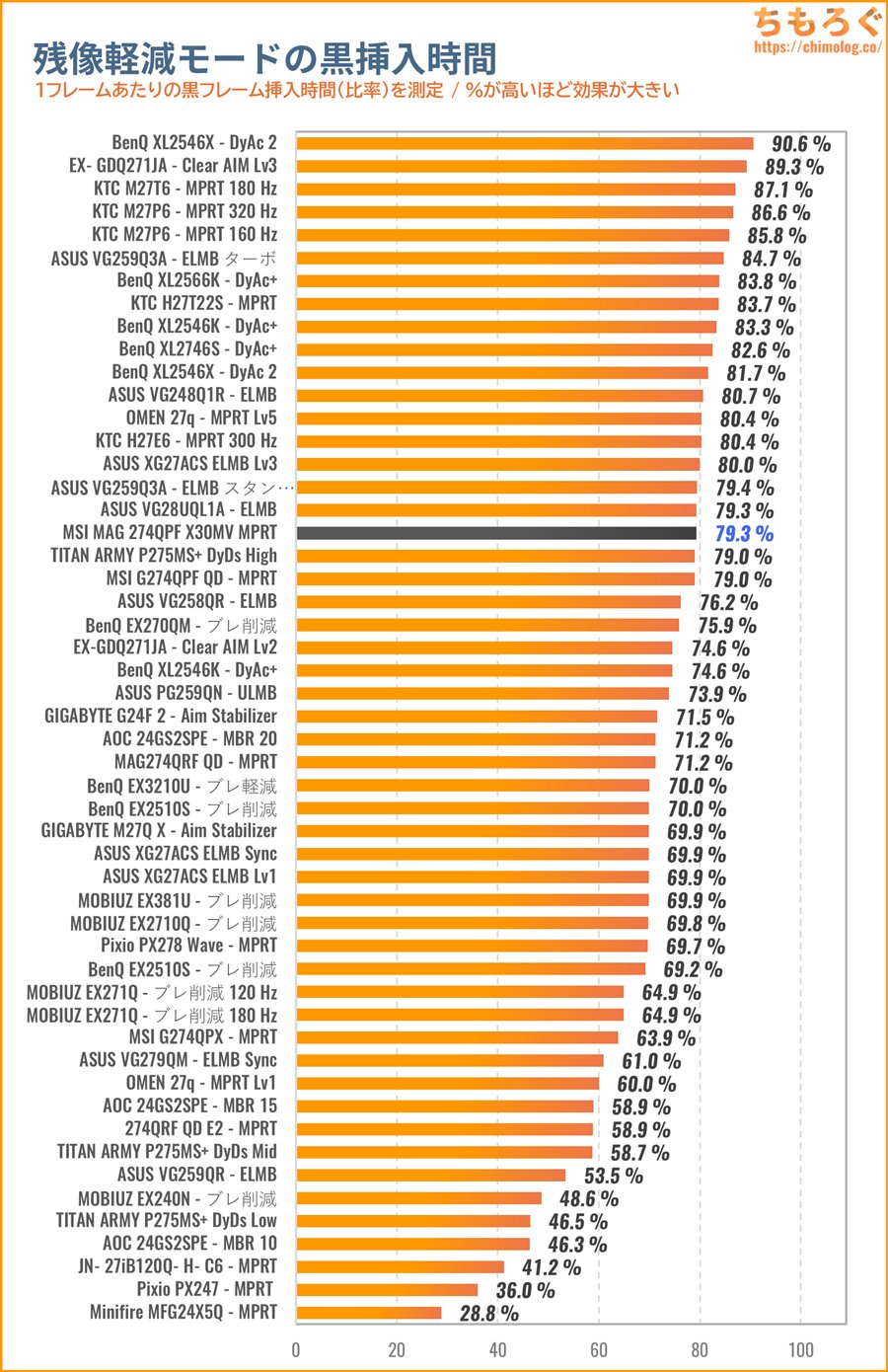
Source:
https://chimolog.co/msi-x30mv/
When “MSI MPRT” is enabled, 240 Approximately 3.30 ms (approximately 79%) is a black frame at Hz is。
Aka 20,7% duty cycle @ 240Hz
Which means a the X30MV has a strobe 'on' period of ~0,86250 ms.
The ULMB2 implementation of these Pulsar models is clearly worse at the same or higher refresh rate.
One could also do the contrast reduction trick, which would help in (perhaps) eliminating the black trailing on the UFOs to extent of being invisible.
The only other QD-based +240Hz options are:
•
Acer XB273U GX (270Hz @ VRB Extreme should be <0,6 ms MPRT)
•
Acer XB273U KF (300Hz QD, which I'm expecting to have similar behavior as the panel above)
Both of which are IPS + global scan behavior, unlike the X30MV & Pulsar models which are rolling scan.
There's nothing else on the market which satisfies the QD + good strobe 'on' period @ max refresh rate subset of displays.
Note: This disregards models such as the P245MS Pro, P275MS+, P275MS Pro & other Asia-centric QD models
I still don't see a viable use-case for these Pulsar models. I'm hoping the firmware update actually fixes something substantial.
Re: NVIDIA G-Sync Pulsar monitor - Asus ROG Strix XG27AQNGV
Posted: 26 Mar 2026, 14:28
by brownvim
Discorz wrote: ↑26 Mar 2026, 12:37
brownvim wrote: ↑24 Mar 2026, 16:34
Why does it seem like adjusting the PW on ULMB 2 at 360, 240 and 120 Hz only slightly improves clarity, if it even does, hard to tell.
Compared to the 60hz mode where the clarity difference is very noticeable going down the range?
Usually that's normal at higher refresh rates because there's less motion blur to reduce. PG27AQN PW 10-100 used to target 0.07-0.7 ms at 360Hz or 0.21-2.1 ms at 120 Hz. But yeah it's a bit affected here. The backlight diffusion seems to be a limiting factor. You can only shorten the rolling pulse as far as diffusion allows. You can think of it as a kind of backlight GtG response.
As for the 60Hz being different, I'm not sure. Maybe QFT has something to do with it.
kyube wrote: ↑25 Mar 2026, 14:05
Fun fact:
The
MSI 274QPF X30MV (300Hz MiniLED VA QD; rolling scan) has a
better fixed refresh rate better backlight strobing implementation @ 300–240Hz than ULMB2 @ 360–240Hz on the 4 Pulsar models
Memes write themselves...
Did u see the
ufos? I'd say quite the opposite. And that's at half the motion speed (~960pps) of some of the Pulsar ufos online (~1920pps).
Thanks for the detailed technical explanation, the backlight diffusion point makes a lot of sense now.
Still would like Nvidia to improve things, are you in touch with them?
I agree the MSI 274QPF X30MV UFOs look really bad, when things a super clear clarity wise things like that black trail stick out like a sore thumb. Pulsar looks clean.
I think the Pulsar mode is great (waiting for fix on ghosting) and the 60hz mode makes consoles so much better to play on.
Re: NVIDIA G-Sync Pulsar monitor - Asus ROG Strix XG27AQNGV
Posted: 26 Mar 2026, 17:09
by Chief Blur Buster
brownvim wrote: ↑15 Mar 2026, 11:21
It was mentioned Nvidia were finding it tricky, plus Chief has been quiet so maybe he’s still testing a newer firmware, can you say anything yet Chief?
Apologies -- I am busy on a different top secret project -- I can only battle so many Blur Busting battles simultaneously.
New public win, I convinced Microsoft to add 5000 Hz support (
www.blurbusters.com/5000hz) but I have too many battles going on right now to even look at the pulsar firmware upgrade that I tipped the domino on.
I need a cloning machine to make a few duplicate clones of myself, to have a Blur Busters Army, but Calvin & Hobbes refused to sell me his cloning machine, and the nearest suitable one is in Andromeda Galaxy. A bit too far to drive my UFO to, even on a Sunday drive. For now you'll just have to hang tight.
I am happy that this Blur Busters battlefront was won (in teamwork with others like Digital Foundry), in convincing our favourite neighborhood multitrillion dollar company on Planet Earth to become a 60Hz ally, and has earned them karma points on massive improvements to Pulsar. With all the path tracing goodness we want (and sometimes we love DLSS framegen, while others hate it) sometimes 60fps is all we have, and we totally appreciate the ability to blur bust that via strobe means.
I only wish 60Hz+VRR was possible, but what we got was actually a very decent 60Hz single-strobe effort. It definitely will help their Pulsar sales, as I told them it would -- look at people considering Pulsar now thanks to 60Hz!
Now, I have to keep operating the Wizard of Oz machine, so I'm going back behind the curtain.
Re: NVIDIA G-Sync Pulsar monitor - Asus ROG Strix XG27AQNGV
Posted: 26 Mar 2026, 17:32
by brownvim
Chief Blur Buster wrote: ↑26 Mar 2026, 17:09
brownvim wrote: ↑15 Mar 2026, 11:21
It was mentioned Nvidia were finding it tricky, plus Chief has been quiet so maybe he’s still testing a newer firmware, can you say anything yet Chief?
Apologies -- I am busy on a different top secret project -- I can only battle so many Blur Busting battles simultaneously.
New public win, I convinced Microsoft to add 5000 Hz support (
www.blurbusters.com/5000hz) but I have too many battles going on right now to even look at the pulsar firmware upgrade that I tipped the domino on.
I need a cloning machine to make a few duplicate clones of myself, to have a Blur Busters Army, but Calvin & Hobbes refused to sell me his cloning machine, and the nearest suitable one is in Andromeda Galaxy. A bit too far to drive my UFO to, even on a Sunday drive. For now you'll just have to hang tight.
I am happy that this Blur Busters battlefront was won (in teamwork with others like Digital Foundry), in convincing our favourite neighborhood multitrillion dollar company on Planet Earth to become a 60Hz ally, and has earned them karma points on massive improvements to Pulsar. With all the path tracing goodness we want (and sometimes we love DLSS framegen, while others hate it) sometimes 60fps is all we have, and we totally appreciate the ability to blur bust that via strobe means.
I only wish 60Hz+VRR was possible, but what we got was actually a very decent 60Hz single-strobe effort. It definitely will help their Pulsar sales, as I told them it would -- look at people considering Pulsar now thanks to 60Hz!
Now, I have to keep operating the Wizard of Oz machine, so I'm going back behind the curtain.
Haha, I’d happily help fund the cloning machine if it means getting a few extra versions of you to tackle the Pulsar firmware
The new 60 Hz ULMB2 mode is brilliant by the way — I really appreciate you nudging them towards that.
My Switch 2 is calling me to play Super Mario Bros Wonder (released today). It must look amazing on this display.
That said, 60 Hz + VRR would have been perfect. It would mean less messing about with the OSD, and it would be ideal for games that drop to 60 Hz in menus, maps, and cutscenes.
Thanks again for all the hard work!
Re: NVIDIA G-Sync Pulsar monitor - Asus ROG Strix XG27AQNGV
Posted: 26 Mar 2026, 20:40
by liquidshadowfox
Sounds like 60 hz pulsar isn't coming, that makes me sad not gonna lie. I was hoping to have it available for pulsar so I wouldn't have to touch any buttons and just play 60 fps locked games without changing anything, bummer. I hope they improve pulsar more than just fixing the image duplicates between 100 - 200 fps