Page 1 of 2
Please help me solve the power management of the mouse "Allow the computer to turn off this device to save power" is gra
Posted: 08 Aug 2023, 16:36
by Syykfk
Hey everyone, in the power management of my mouse, "Allow the computer to turn off this device to save power" is gray and cannot be checked, I tried many methods but could not solve it, do you have a way? Any answer will help me, thank you very much. I tried: reset bios, reinstall system, install latest chipset driver. None of them can be solved.
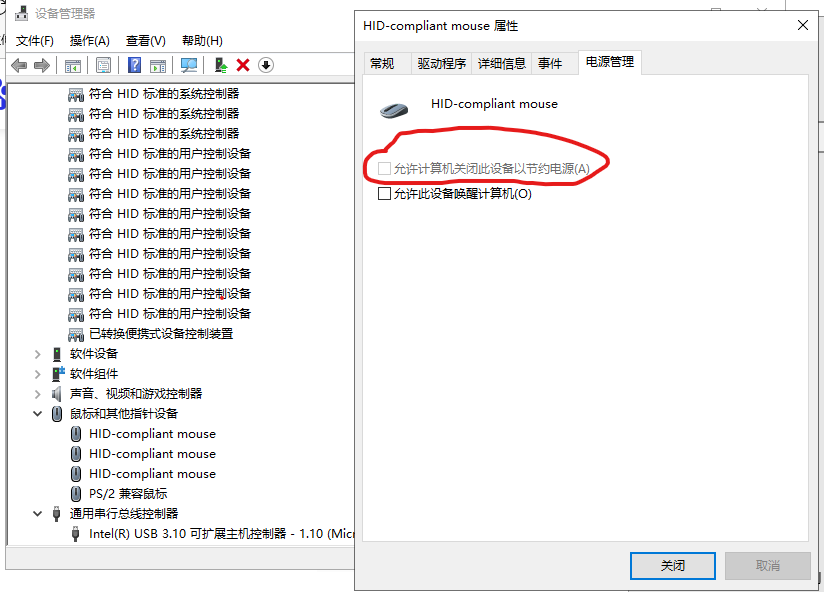
- 批注 2023-08-09 052834.png (74.8 KiB) Viewed 7255 times
Re: Please help me solve the power management of the mouse "Allow the computer to turn off this device to save power" is
Posted: 08 Aug 2023, 17:31
by F1zus
So this setting is disabled through the registry or the mouse driver does not support power saving management.
All power saving options must be disabled, they affect mouse latency!
Re: Please help me solve the power management of the mouse "Allow the computer to turn off this device to save power" is
Posted: 08 Aug 2023, 19:02
by Syykfk
F1zus wrote: ↑08 Aug 2023, 17:31
So this setting is disabled through the registry or the mouse driver does not support power saving management.
All power saving options must be disabled, they affect mouse latency!
How do I disable it via the registry? Thank you for your answer
Re: Please help me solve the power management of the mouse "Allow the computer to turn off this device to save power" is
Posted: 09 Aug 2023, 04:59
by eropsy
Syykfk wrote: ↑08 Aug 2023, 16:36
Hey everyone, in the power management of my mouse, "Allow the computer to turn off this device to save power" is gray and cannot be checked, I tried many methods but could not solve it, do you have a way? Any answer will help me, thank you very much. I tried: reset bios, reinstall system, install latest chipset driver. None of them can be solved.批注 2023-08-09 052834.png
https://imgur.com/k4d2I6H 
Everyone have like this by default, why you need to enable it?
Re: Please help me solve the power management of the mouse "Allow the computer to turn off this device to save power" is
Posted: 09 Aug 2023, 10:26
by Syykfk
eropsy wrote: ↑09 Aug 2023, 04:59
Syykfk wrote: ↑08 Aug 2023, 16:36
Hey everyone, in the power management of my mouse, "Allow the computer to turn off this device to save power" is gray and cannot be checked, I tried many methods but could not solve it, do you have a way? Any answer will help me, thank you very much. I tried: reset bios, reinstall system, install latest chipset driver. None of them can be solved.批注 2023-08-09 052834.png
https://imgur.com/k4d2I6H
Everyone have like this by default, why you need to enable it?
Does gray mean not enabled?
Re: Please help me solve the power management of the mouse "Allow the computer to turn off this device to save power" is
Posted: 09 Aug 2023, 11:27
by Syykfk
eropsy wrote: ↑09 Aug 2023, 04:59
Syykfk wrote: ↑08 Aug 2023, 16:36
Hey everyone, in the power management of my mouse, "Allow the computer to turn off this device to save power" is gray and cannot be checked, I tried many methods but could not solve it, do you have a way? Any answer will help me, thank you very much. I tried: reset bios, reinstall system, install latest chipset driver. None of them can be solved.批注 2023-08-09 052834.png
https://imgur.com/k4d2I6H
Everyone have like this by default, why you need to enable it?
Is this option grayed out for everyone?
Re: Please help me solve the power management of the mouse "Allow the computer to turn off this device to save power" is
Posted: 09 Aug 2023, 11:59
by eropsy
Syykfk wrote: ↑09 Aug 2023, 11:27
eropsy wrote: ↑09 Aug 2023, 04:59
Syykfk wrote: ↑08 Aug 2023, 16:36
Hey everyone, in the power management of my mouse, "Allow the computer to turn off this device to save power" is gray and cannot be checked, I tried many methods but could not solve it, do you have a way? Any answer will help me, thank you very much. I tried: reset bios, reinstall system, install latest chipset driver. None of them can be solved.批注 2023-08-09 052834.png
https://imgur.com/k4d2I6H
Everyone have like this by default, why you need to enable it?
Is this option grayed out for everyone?
yes
Re: Please help me solve the power management of the mouse "Allow the computer to turn off this device to save power" is
Posted: 09 Aug 2023, 12:07
by eropsy
Syykfk wrote: ↑09 Aug 2023, 10:26
eropsy wrote: ↑09 Aug 2023, 04:59
Syykfk wrote: ↑08 Aug 2023, 16:36
Hey everyone, in the power management of my mouse, "Allow the computer to turn off this device to save power" is gray and cannot be checked, I tried many methods but could not solve it, do you have a way? Any answer will help me, thank you very much. I tried: reset bios, reinstall system, install latest chipset driver. None of them can be solved.批注 2023-08-09 052834.png
https://imgur.com/k4d2I6H
Everyone have like this by default, why you need to enable it?
Does gray mean not enabled?

this is from "imprecise" guide, if you want to disable usb power savings
Re: Please help me solve the power management of the mouse "Allow the computer to turn off this device to save power" is
Posted: 09 Aug 2023, 15:05
by Syykfk
eropsy wrote: ↑09 Aug 2023, 11:59
Syykfk wrote: ↑09 Aug 2023, 11:27
eropsy wrote: ↑09 Aug 2023, 04:59
Syykfk wrote: ↑08 Aug 2023, 16:36
Hey everyone, in the power management of my mouse, "Allow the computer to turn off this device to save power" is gray and cannot be checked, I tried many methods but could not solve it, do you have a way? Any answer will help me, thank you very much. I tried: reset bios, reinstall system, install latest chipset driver. None of them can be solved.批注 2023-08-09 052834.png
https://imgur.com/k4d2I6H
Everyone have like this by default, why you need to enable it?
Is this option grayed out for everyone?
yes
Thank you for your answer, thank you very much!
Re: Please help me solve the power management of the mouse "Allow the computer to turn off this device to save power" is
Posted: 09 Aug 2023, 20:16
by Chief Blur Buster
Syykfk wrote: ↑08 Aug 2023, 16:36
Hey everyone, in the power management of my mouse, "Allow the computer to turn off this device to save power" is gray and cannot be checked, I tried many methods but could not solve it, do you have a way? Any answer will help me, thank you very much. I tried: reset bios, reinstall system, install latest chipset driver. None of them can be solved.批注 2023-08-09 052834.png
Hi!
Just FYI, Syykfk,
Please keep this question to just one per thread -- I saw you crossposted this question a few times with the same question.
I'm keeping this thread, it's useful to anyone diagnosing power management related issues (even though this topic is somewhat peripheral, various power mangement effects can create lag)