Page 1 of 1

Eystrain, so many montitors

Posted: 23 Jul 2024, 21:16
by Pochly
I've been on and off trying to purchase a new monitor for a bit over a year now. So far, I have had bad luck with my choices it seems.

Monitors I'm currently using that don't cause issues:
  • Lenovo Legion Y27gq-20
  • Dell S2522HG
  • ASUS VS247H-P
  • Dell S2725DS
Monitors that I have tried so far:
  • Dell S2721DGF
  • ASUS TUF VG27AQL1A
  • LG 27GL850
  • Dell AW3423DWF
  • Dell AW2725DF
I'm not sure how much it translates, but I use an LG OLED48C1PUB TV every day and have no issues with that.

The most recent monitors I have tried were the two QD-OLEDs: AW3423DWF and the AW2725DF. I didn't buy two to test; I actually purchased the AW3423DWF first because the AW2725DF wasn't on sale at the time. Then I noticed the AW2725DF went on sale after, and I still wanted a 27" monitor, so I bought that later. I ended up using the AW3423DWF for a couple of days, but I did notice my eye strain starting on the second day. Once the AW2725DF arrived, I tried using that for five days, but I'm still experiencing eye strain which can hurt a fair bit. It's not as severe as it was when I first got it, but it's still quite noticeable. I feel like the IPS monitors I listed above caused more strain, but it was a while ago when I bought and tried them.

I have tested the last two OLEDs at every refresh rate listed in the NVIDIA control panel, all the way down to 60Hz. My current main monitor (Lenovo Legion Y27gq-20) runs at 165Hz.

It doesn't seem to matter whether I'm just reading a static webpage or playing a game; the eye strain comes on regardless.

Other things I have tried:
  • Changing the output dynamic range and color depth
  • Changing the brightness/contrast
  • Changing the sharpness
  • Changing color values in the monitor settings
I thought that going OLED was a good idea since I already had the OLED TV, but I guess not.

Re: Eystrain, so many montitors

Posted: 24 Jul 2024, 06:11
by kyube
Pochly wrote: ↑
23 Jul 2024, 21:16
I've been on and off trying to purchase a new monitor for a bit over a year now. So far, I have had bad luck with my choices it seems.

Monitors I'm currently using that don't cause issues:
  • Lenovo Legion Y27gq-20
  • Dell S2522HG
  • ASUS VS247H-P
  • Dell S2725DS
Monitors that I have tried so far:
  • Dell S2721DGF
  • ASUS TUF VG27AQL1A
  • LG 27GL850
  • Dell AW3423DWF
  • Dell AW2725DF
I'm not sure how much it translates, but I use an LG OLED48C1PUB TV every day and have no issues with that.

The most recent monitors I have tried were the two QD-OLEDs: AW3423DWF and the AW2725DF. I didn't buy two to test; I actually purchased the AW3423DWF first because the AW2725DF wasn't on sale at the time. Then I noticed the AW2725DF went on sale after, and I still wanted a 27" monitor, so I bought that later. I ended up using the AW3423DWF for a couple of days, but I did notice my eye strain starting on the second day. Once the AW2725DF arrived, I tried using that for five days, but I'm still experiencing eye strain which can hurt a fair bit. It's not as severe as it was when I first got it, but it's still quite noticeable. I feel like the IPS monitors I listed above caused more strain, but it was a while ago when I bought and tried them.

I have tested the last two OLEDs at every refresh rate listed in the NVIDIA control panel, all the way down to 60Hz. My current main monitor (Lenovo Legion Y27gq-20) runs at 165Hz.

It doesn't seem to matter whether I'm just reading a static webpage or playing a game; the eye strain comes on regardless.

Other things I have tried:
  • Changing the output dynamic range and color depth
  • Changing the brightness/contrast
  • Changing the sharpness
  • Changing color values in the monitor settings
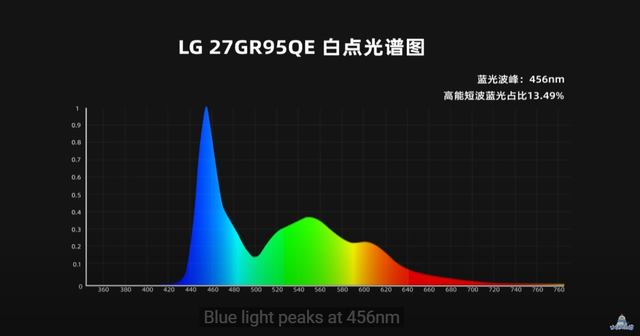
It's interesting to me that you've also tried a (presumably) nano-ips panel such as on the Lenovo, yet you don't have a issue as with the Asus, LG & Dell (same backlight type employed)
  • Lenovo Legion Y27gq-20
  • Dell S2522HG
  • ASUS VS247H-P
  • Dell S2725DS
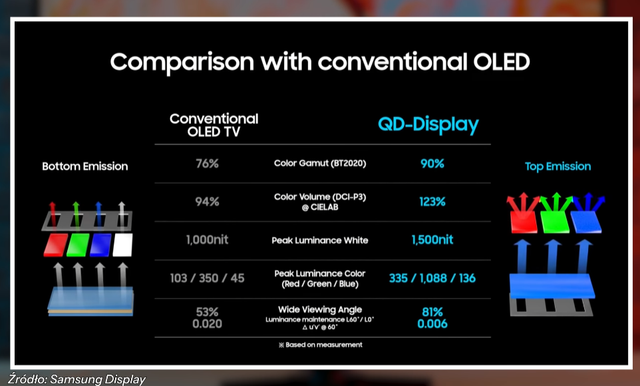
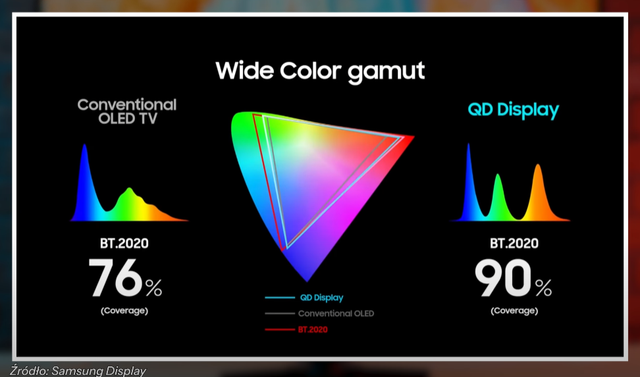
The OLED part is perplexing to me however. You could also have issues with QD-OLED monitors in particular (some people have reported this), due to subpixel layout itself, rendering or the sharp spectrum peaks.

SPD of QD-OLED vs WOLED
Image

Image

Image

Image

The only common denominator I can think of otherwise is dithering technique employed.
The near black reproduction on QD-OLED is way better than WOLED monitors (patented dithering technique)
More info (check bottom of page):
http://www.lagom.nl/lcd-test/black.php

I know for a fact that the S2522HG (LM245WF9-SSA3, same as XG259CM) uses a static dithering technique, thus the green tint which is apparent in subpixel shots.
(Source: parkggoki's review of the S2522HG)


For example, this is how S2522HG vs AW2521HF (6bit+HiFRC vs true 8-bit) looks like
Image

Image

I want to say it could be the dithering technique that's causing your issue, but this is such a rabbit hole that we've got barely any info on.

Could you find out the panel your Lenovo employs?
I assume the usual "Turn off -> Hold menu button while powering on the monitor" trick should reveal the service menu.

You could also take a look at QDEF panels, such as the 274URF-QD, 274QRF-QD, XL2586X, XB273U GX etc. but I worry that you might have the same troubles as with the QD-OLED's (same tech used)
WOLED monitors could also be a potential idea to try, such as the LG 27GR95QE-B, XG27AQDMG & others

Info on backlight's used in monitors: https://pcmonitors.info/articles/the-ev ... acklights/

Re: Eystrain, so many montitors

Posted: 24 Jul 2024, 07:52
by Pochly
kyube wrote: ↑
24 Jul 2024, 06:11
It's interesting to me that you've also tried a (presumably) Nano-IPS panel such as on the Lenovo, yet you don't have a issue as with the Asus, LG & Dell (same backlight type employed)
  • Lenovo Legion Y27gq-20
  • Dell S2522HG
  • ASUS VS247H-P
  • Dell S2725DS
Just to be clear, the Lenovo isn't Nano-IPS or even IPS. The Y27gq-20 is actually a TN panel. When you google it, it's a bit hard to find since the IPS panel (Y27q-20) normally shows up, but there is a slight difference in the name. Since it's a totally different panel, I assume trying to get the information from the service menu wouldn't help, but I tried anyway. Sadly, I wasn't able to get it via the "Turn off -> Hold menu button while powering on the monitor" method. I tried looking online, and the only post I saw suggested unplugging and trying the menu button, but that didn't do anything either.

Thank you for the other information and links you sent over. I was looking through some other posts and noticed something that may or may not help me. One thing I just realized after reading some posts was that all the monitors I have this issue with feel "saturated." Even when manually changing settings to try and reverse that feeling, I still feel it to a degree. Last night, I tried using an sRGB clamp for my NVIDIA GPU that I saw on the forums. This helped with the saturated feeling, but whether this actually helped, I won't really know for a while. It takes about 4-5 days for my eyes to get back to baseline, so I won't know until then. I'll keep the post updated with any new developments, but I wouldn't be surprised if this was dead end in my path.

I will say the LG 27GR95QE-B was actually an option I was considering when I got the Dell QD-OLED. I decided against it due to the brightness, but it's likely I will end up looking at it again.

Re: Eystrain, so many montitors

Posted: 24 Jul 2024, 08:51
by kyube
Pochly wrote: ↑
24 Jul 2024, 07:52

Just to be clear, the Lenovo isn't Nano-IPS or even IPS. The Y27gq-20 is actually a TN panel. When you google it, it's a bit hard to find since the IPS panel (Y27q-20) normally shows up, but there is a slight difference in the name. Since it's a totally different panel, I assume trying to get the information from the service menu wouldn't help, but I tried anyway. Sadly, I wasn't able to get it via the "Turn off -> Hold menu button while powering on the monitor" method. I tried looking online, and the only post I saw suggested unplugging and trying the menu button, but that didn't do anything either.

Thank you for the other information and links you sent over. I was looking through some other posts and noticed something that may or may not help me. One thing I just realized after reading some posts was that all the monitors I have this issue with feel "saturated." Even when manually changing settings to try and reverse that feeling, I still feel it to a degree. Last night, I tried using an sRGB clamp for my NVIDIA GPU that I saw on the forums. This helped with the saturated feeling, but whether this actually helped, I won't really know for a while. It takes about 4-5 days for my eyes to get back to baseline, so I won't know until then. I'll keep the post updated with any new developments, but I wouldn't be surprised if this was dead end in my path.

I will say the LG 27GR95QE-B was actually an option I was considering when I got the Dell QD-OLED. I decided against it due to the brightness, but it's likely I will end up looking at it again.
That's interesting, so you seem to only like typical LED backlights (assuming the Lenovo is)
That's good to know, now you can look for monitors which match the SPD of monitors you like.

If possible, could you try this combination once you got time? I'm curious on this g-sync module TN.
https://www.youtube.com/watch?v=YkSwV-Ganog

And if possible, could you also do some pursuit shots of your Lenovo? A TN with g-sync module is rare to find.

Re: Eystrain, so many montitors

Posted: 25 Jul 2024, 11:07
by technicalitch
AOC Q24G2A/BK

try this one if you can. it have high ppi and i also have problems like you and on this monitor i have less eyestrain problems than any other.

its 23.8 inch 1440 165hz with high ppi

Re: Eystrain, so many montitors

Posted: 25 Jul 2024, 21:13
by Pochly
kyube wrote: ↑
24 Jul 2024, 08:51
That's interesting, so you seem to only like typical LED backlights (assuming the Lenovo is)
That's good to know, now you can look for monitors which match the SPD of monitors you like.

If possible, could you try this combination once you got time? I'm curious on this g-sync module TN.

And if possible, could you also do some pursuit shots of your Lenovo? A TN with g-sync module is rare to find.
I tried the video you linked and couldn't get it working. I'll try messing around with it a bit more and maybe I'll get lucky. I'll post any updates.

I did a pursuit video with my phone based on the post on here viewtopic.php?t=4782. I don't think I can post it since it doesn't allow me to post external links.

Re: Eystrain, so many montitors

Posted: 26 Jul 2024, 06:44
by kyube
Pochly wrote: ↑
25 Jul 2024, 21:13
kyube wrote: ↑
24 Jul 2024, 08:51
That's interesting, so you seem to only like typical LED backlights (assuming the Lenovo is)
That's good to know, now you can look for monitors which match the SPD of monitors you like.

If possible, could you try this combination once you got time? I'm curious on this g-sync module TN.

And if possible, could you also do some pursuit shots of your Lenovo? A TN with g-sync module is rare to find.
I tried the video you linked and couldn't get it working. I'll try messing around with it a bit more and maybe I'll get lucky. I'll post any updates.

I did a pursuit video with my phone based on the post on here viewtopic.php?t=4782. I don't think I can post it since it doesn't allow me to post external links.
Unfortunate that the code didn't work.
Just DM me your pursuit once you're free, I'll post it.