Everything about latency. This section is mainly user/consumer discussion. (Peer-reviewed scientific discussion should go in Laboratory section). Tips, mouse lag, display lag, game engine lag, network lag, whole input lag chain, VSYNC OFF vs VSYNC ON, and more!
Input Lag Articles on Blur Busters.
-
Kanipshun
- Posts: 27
- Joined: 09 Jul 2022, 10:48
Post
by Kanipshun » 18 Dec 2024, 04:34
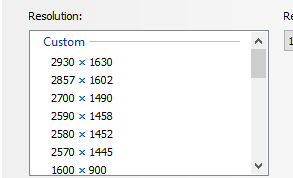
- unkres1.PNG (4.69 KiB) Viewed 2015 times
Does anyone know why I am able to create these custom resolutions on a 2560x1440 display?
I cannot choose any of them in Nvidia CP but I can in windows display settings. DRS factors are off and have been and I can confirm that game ini files are showing resolution of 2930x1630 (which was as high as I could go).
Is this using DSC? The resolution does not look any different and seems to have no impact on performance.
-
Slender
- Posts: 1848
- Joined: 25 Jan 2020, 17:55
Post
by Slender » 26 Dec 2024, 08:42
Kanipshun wrote: ↑18 Dec 2024, 04:34
unkres1.PNG
Does anyone know why I am able to create these custom resolutions on a 2560x1440 display?
I cannot choose any of them in Nvidia CP but I can in windows display settings. DRS factors are off and have been and I can confirm that game ini files are showing resolution of 2930x1630 (which was as high as I could go).
Is this using DSC? The resolution does not look any different and seems to have no impact on performance.
use cru.exe and sre.exe
-
Kanipshun
- Posts: 27
- Joined: 09 Jul 2022, 10:48
Post
by Kanipshun » 26 Dec 2024, 23:21
Yes I use both but what I cannot understand is how I can create a resolution greater than my monitor display. I understand how DSR works but somehow I am able to use the higher resolutions in windows display, it's not using DSC or DSR.
-
RealNC
- Site Admin
- Posts: 4660
- Joined: 24 Dec 2013, 18:32
-
Contact:
Post
by RealNC » 27 Dec 2024, 15:14
Kanipshun wrote: ↑26 Dec 2024, 23:21
Yes I use both but what I cannot understand is how I can create a resolution greater than my monitor display. I understand how DSR works but somehow I am able to use the higher resolutions in windows display, it's not using DSC or DSR.
You can create whatever resolution you want. But whether or not the display will actually accept the resolution is a completely different matter. Some displays will accept higher than native res and downscale them. My 240Hz 1440p display for example accepts 4K input at 60Hz.
Steam •
GitHub •
Stack Overflow
The views and opinions expressed in my posts are my own and do not necessarily reflect the official policy or position of Blur Busters.