Page 1 of 2
what usb ports are better?
Posted: 17 Apr 2025, 15:23
by yarusskiy228
what usb ports are better to choose on msi pro b650 m-p? My mouse, keyboard and microphone have USB. and I don't know where it's better to insert them into my motherboard for less latency. please help me.

Re: what usb ports are better?
Posted: 18 Apr 2025, 10:14
by RealNC
10 or 11 if you want it on the CPU's USB controller, or one of the ports labeled "3" if you want it on the chipset's controller.
Does it matter? I have never seen a difference. But I'm on a 1000Hz mouse. Maybe with higher polling rate mice it makes a difference, I don't know.
But anyway, also take a look at this:
viewtopic.php?f=10&t=7618
Re: what usb ports are better?
Posted: 18 Apr 2025, 11:15
by kyube
You're limited by a
single driver which handles both the CPU & chipset interrupts from peripherals.
Meaning, wherever you plug in your USB devices on this motherboard, your USB devices will increase overall jitter.
What are some solutions to this?
One of the better things which you can do is to use 3.5mm headphones & microphone, to alleviate overhead from USB microphones and to lower overall audio latency severely.
USB DACs are notorious to adding that.
Next up, try purchasing a ASMedia-based USB PCIe card, such as this one:
https://www.aliexpress.com/item/1005005010778591.html
This, along with the ASMedia driver, can help you achieve less stuttering caused by DPC/ISR driver performance.
You can then place the mouse on the ASMedia card and keyboard on the CPU port or vice-versa.
It's best to visualize latency by looking at Nvidia's easy-to-grasp graph:
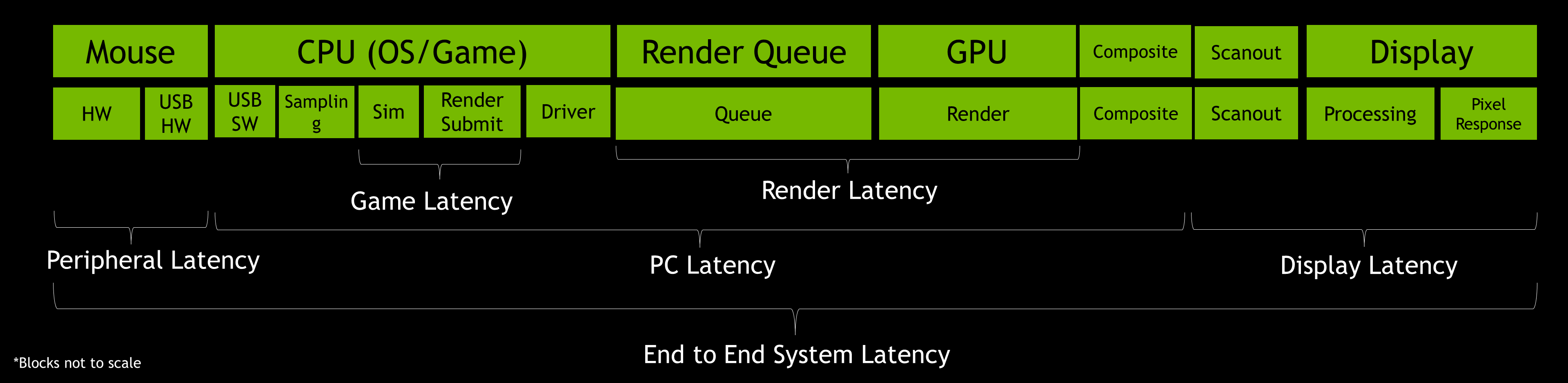
What you're optimising is the 2nd block.
Re: what usb ports are better?
Posted: 18 Apr 2025, 20:02
by JimCarry
on my mb when i asked chatgpt,it says that the blue ones are connected to the cpu,so i plug my 8k mouse and my keyboard into them
,and i disable all other usb port in bios,i cant say there is diffrence between usb 2.0 ports but maybe its better \

Re: what usb ports are better?
Posted: 19 Apr 2025, 04:35
by RealNC
JimCarry wrote: ↑18 Apr 2025, 20:02
on my mb when i asked chatgpt,it says that the blue ones are connected to the cpu
Blue indicates it's USB 3, not that it's connected to the CPU's controller:
https://www.corsair.com/us/en/explorer/ ... explained/
Re: what usb ports are better?
Posted: 19 Apr 2025, 14:39
by JimCarry
ok so can you tell me on my mb wich are the ones to the cpu please?
https://www.asus.com/motherboards-compo ... e-b650m-r/
Re: what usb ports are better?
Posted: 19 Apr 2025, 16:20
by yarusskiy228
RealNC wrote: ↑18 Apr 2025, 10:14
10 or 11 if you want it on the CPU's USB controller, or one of the ports labeled "3" if you want it on the chipset's controller.
Does it matter? I have never seen a difference. But I'm on a 1000Hz mouse. Maybe with higher polling rate mice it makes a difference, I don't know.
But anyway, also take a look at this:
viewtopic.php?f=10&t=7618
thanks for the answer, but why do you advise me to use usb labeled "3" and not 12?
Re: what usb ports are better?
Posted: 19 Apr 2025, 16:26
by yarusskiy228
JimCarry wrote: ↑19 Apr 2025, 14:39
RealNC wrote: ↑19 Apr 2025, 04:35
JimCarry wrote: ↑18 Apr 2025, 20:02
on my mb when i asked chatgpt,it says that the blue ones are connected to the cpu
Blue indicates it's USB 3, not that it's connected to the CPU's controller:
ok so can you tell me on my mb wich are the ones to the cpu please?
I looked at your motherboard and it also seems to me that the USB from the CPU are the blue ports
Re: what usb ports are better?
Posted: 20 Apr 2025, 02:34
by RealNC
yarusskiy228 wrote: ↑19 Apr 2025, 16:20
thanks for the answer, but why do you advise me to use usb labeled "3" and not 12?
Those are USB 3. You can try those as well, but I'm not aware of any benefits in using USB 2 devices on USB 3 ports.
No idea. It doesn't say. Maybe you can find out with HWinfo or some other tool.
Re: what usb ports are better?
Posted: 20 Apr 2025, 03:38
by JimCarry
RealNC wrote: ↑20 Apr 2025, 02:34
yarusskiy228 wrote: ↑19 Apr 2025, 16:20
thanks for the answer, but why do you advise me to use usb labeled "3" and not 12?
Those are USB 3. You can try those as well, but I'm not aware of any benefits in using USB 2 devices on USB 3 ports.
No idea. It doesn't say. Maybe you can find out with HWinfo or some other tool.
where exactly i should look in hwinfo i can upload screen?