New Mouse Plotter tool
-
soul4kills
- Posts: 108
- Joined: 01 Aug 2025, 01:30
New Mouse Plotter tool
https://github.com/XBAB-Tech/MousePlotter
https://mouseplotter.xbabtech.com/
Found this new mouse plotter tool. I like it a lot better than the old mouse plotter tool that everyone uses.
It's better to use the standalone exe. Gives you cleaner results as the browser can interfere with the readings.
These are my readings for my G Pro 2 wireless mouse @ 2000hz.
https://mouseplotter.xbabtech.com/
Found this new mouse plotter tool. I like it a lot better than the old mouse plotter tool that everyone uses.
It's better to use the standalone exe. Gives you cleaner results as the browser can interfere with the readings.
These are my readings for my G Pro 2 wireless mouse @ 2000hz.
-
Templar_Warden
- Posts: 69
- Joined: 04 May 2026, 07:56
Re: New Mouse Plotter tool
I tested it, i also tried fixing it to no avail.soul4kills wrote: ↑12 Aug 2026, 15:23https://github.com/XBAB-Tech/MousePlotter
https://mouseplotter.xbabtech.com/
Found this new mouse plotter tool. I like it a lot better than the old mouse plotter tool that everyone uses.
It's better to use the standalone exe. Gives you cleaner results as the browser can interfere with the readings.
These are my readings for my G Pro 2 wireless mouse @ 2000hz.
MousePlotter_Windows_logger(1).png

- Attachments
-
- Screenshot 2026-08-12 183046.png (240.48 KiB) Viewed 1180 times
-
soul4kills
- Posts: 108
- Joined: 01 Aug 2025, 01:30
Re: New Mouse Plotter tool
have you tried turning off vsync and gsync?
-
DudeBeFishing
- Posts: 42
- Joined: 30 Oct 2022, 14:14
Re: New Mouse Plotter tool
It needs to display 99.9 percentile deviation like how MouseTester does. The graph looks nice, but it's faster to look at the actual values.
I tested with a Logitech MX518 Legendary 1000Hz.
XBAB-Tech MousePlotter is giving me about +-0.05ms to +-0.10ms worst case. MouseTester is +-0.10ms. Occasionally I get a slight spike, about 0.2ms in both. The spike in the beginning is from me bumping the mouse.

I tested with a Logitech MX518 Legendary 1000Hz.
XBAB-Tech MousePlotter is giving me about +-0.05ms to +-0.10ms worst case. MouseTester is +-0.10ms. Occasionally I get a slight spike, about 0.2ms in both. The spike in the beginning is from me bumping the mouse.

-
Templar_Warden
- Posts: 69
- Joined: 04 May 2026, 07:56
Re: New Mouse Plotter tool
So your saying i finally have factual proof thats somethings wrong with my mouse/all of inputs of course. since clearly mine doesnt like like either ops or yours?DudeBeFishing wrote: ↑13 Aug 2026, 01:47It needs to display 99.9 percentile deviation like how MouseTester does. The graph looks nice, but it's faster to look at the actual values.
I tested with a Logitech MX518 Legendary 1000Hz.
XBAB-Tech MousePlotter is giving me about +-0.05ms to +-0.10ms worst case. MouseTester is +-0.10ms. Occasionally I get a slight spike, about 0.2ms in both. The spike in the beginning is from me bumping the mouse.
![]()
- kyube
- Posts: 1031
- Joined: 29 Jan 2018, 12:03
Re: New Mouse Plotter tool
A web-based tool for evaluating bInterval stability (what's referred to as "polling rate" by the masses or ISR interval by Windows) is a oxymoron.
ETW-based tooling & testing in-game of choice is the only proper way to measure how your mouse behaves in games.
As long as people here act as if there's some Casper that's haunting their PCs & refuse to tackle their problem in a more concrete & sophisticated way, ignorance will continue to prevail in this subforum.
ETW-based tooling & testing in-game of choice is the only proper way to measure how your mouse behaves in games.
As long as people here act as if there's some Casper that's haunting their PCs & refuse to tackle their problem in a more concrete & sophisticated way, ignorance will continue to prevail in this subforum.
Last edited by kyube on 21 Aug 2026, 07:18, edited 1 time in total.
evaluating xhci controller performance | audio latency discussion thread | "Why is LatencyMon not desirable to objectively measure DPC/ISR driver performance" | AM4 / AM5 system tuning considerations | latency-oriented HW considerations | “xhci hand-off” setting considerations | #1 tip for electricity-related topics | ESPORTS: Latency Perception, Temporal Ventriloquism & Horizon of Simultaneity | good lcd backlight strobing implementation list | display vs gpu scaling
-
soul4kills
- Posts: 108
- Joined: 01 Aug 2025, 01:30
Re: New Mouse Plotter tool
@kyube
Clearly 1 person here already was able to get quantitative info from the tool to show that he has frametime issues.
There are some apps/services that I run where it will show up in the mouse plotter test as instability. When I close/disable them, the readings become more stable. Whether or not it's sophisticated enough for your liking, it's still a good enough tool for everyone else to surface any issues they may be having.
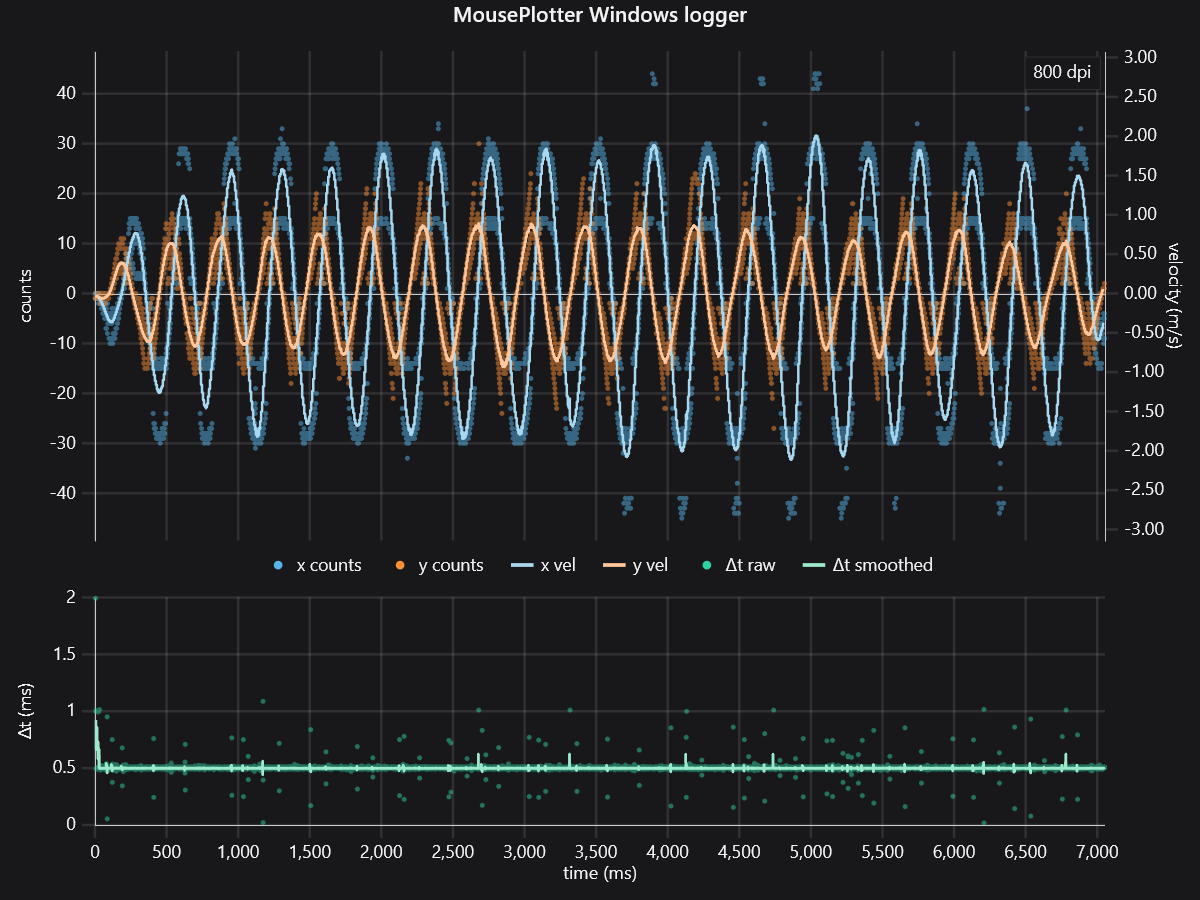
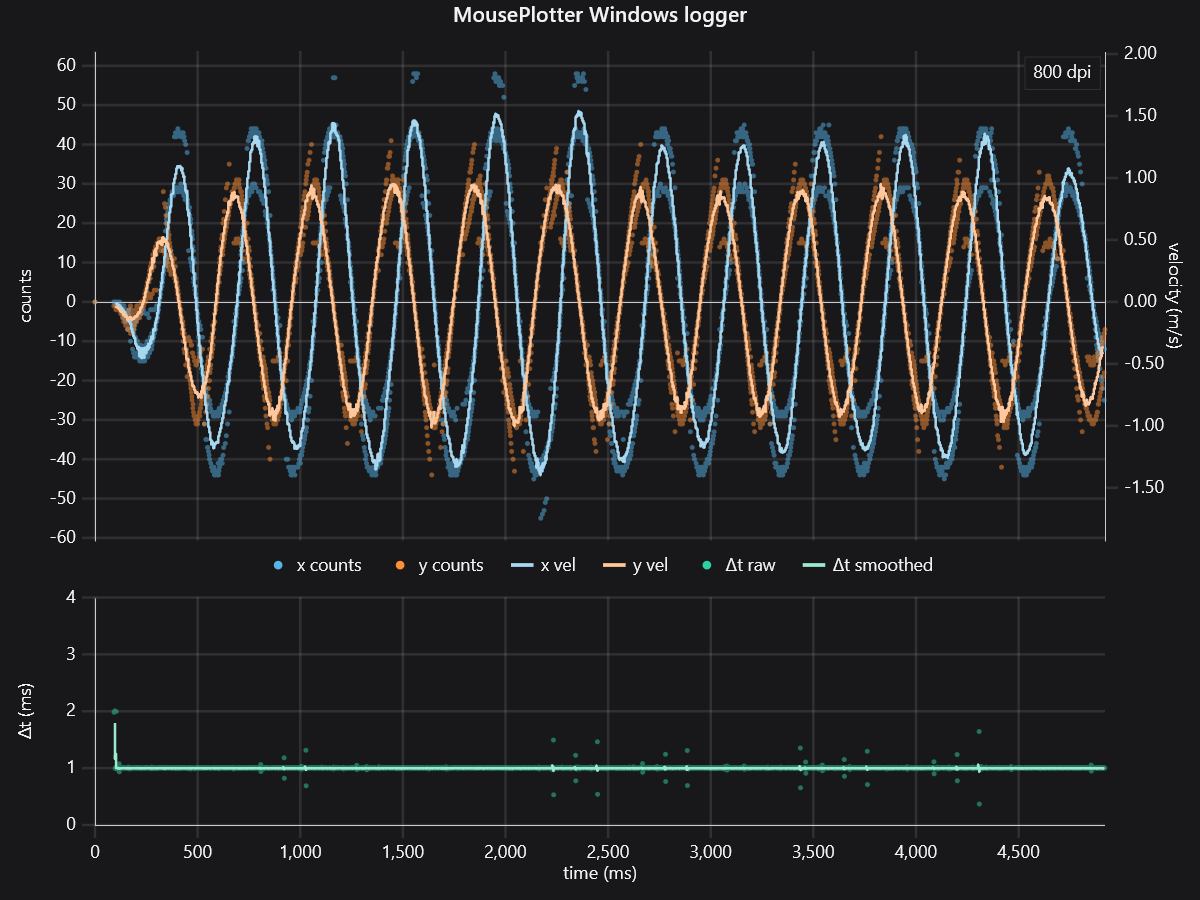
edit: in my original test, i didn't close the usual apps i close when i play a game. here's a test where i did do that, and the readings are a lot more stable and less noisy. These are my readings with it wired @ 1000hz, it's capped at 1000hz wired for some reason. My previous tests were using the wireless receiver @ 2000hz. I'm curious to see other peoples wireless receivers performance with the test.
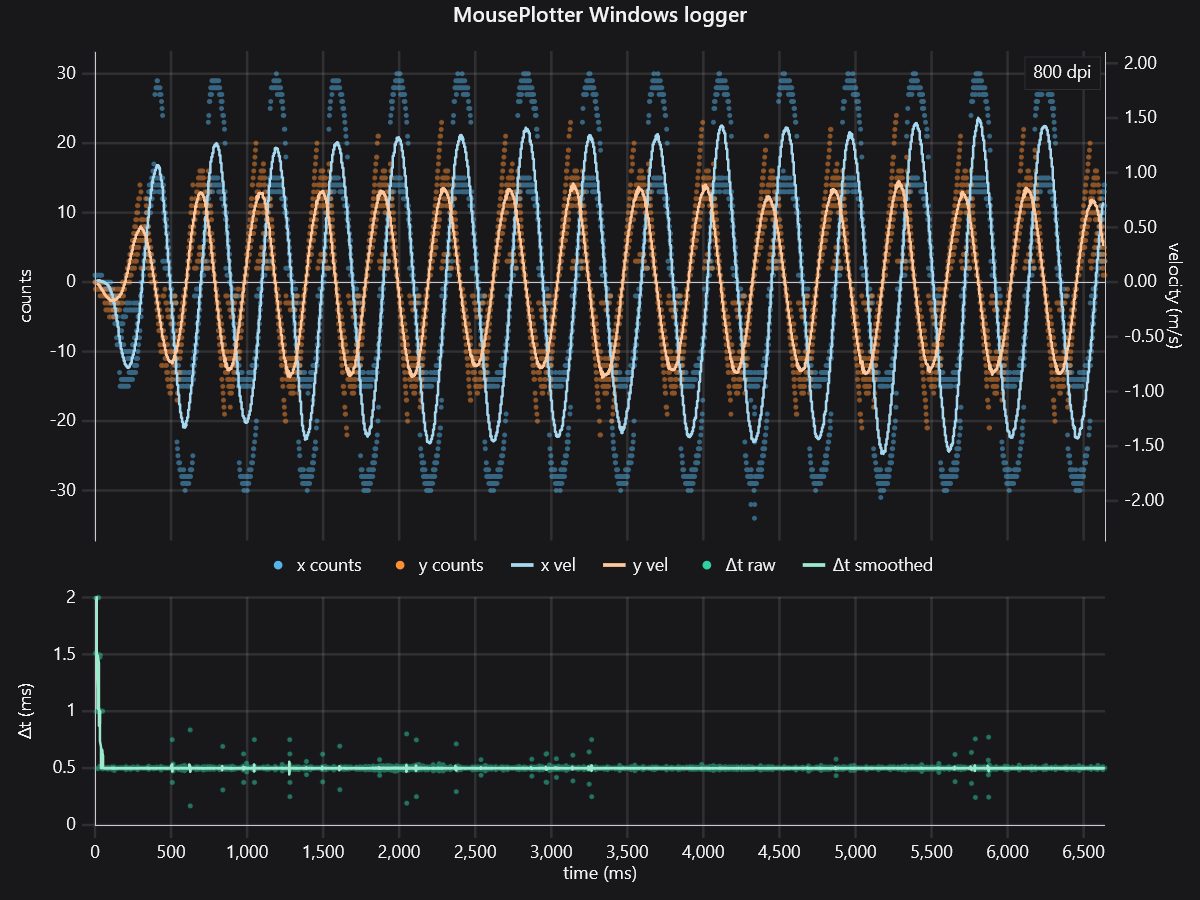
edit 2: I decided to go over my bios settings. Then I noticed some settings were set to AUTO. So I set all the AUTO settings to something definitive. And it cleaned up my mouse reports and made them more stable. The test below is wireless @ 2000hz. These were the settings I changed.
PCIE_E1 to gen 4
Chipset to gen 4
Global c-states to Enabled
Idle Current Power Supply to low idle
The x & y plot is a lot more stable and less erratic. And the ms plot has less deviations. Looking more like my wired test.
Clearly 1 person here already was able to get quantitative info from the tool to show that he has frametime issues.
There are some apps/services that I run where it will show up in the mouse plotter test as instability. When I close/disable them, the readings become more stable. Whether or not it's sophisticated enough for your liking, it's still a good enough tool for everyone else to surface any issues they may be having.
edit: in my original test, i didn't close the usual apps i close when i play a game. here's a test where i did do that, and the readings are a lot more stable and less noisy. These are my readings with it wired @ 1000hz, it's capped at 1000hz wired for some reason. My previous tests were using the wireless receiver @ 2000hz. I'm curious to see other peoples wireless receivers performance with the test.
edit 2: I decided to go over my bios settings. Then I noticed some settings were set to AUTO. So I set all the AUTO settings to something definitive. And it cleaned up my mouse reports and made them more stable. The test below is wireless @ 2000hz. These were the settings I changed.
PCIE_E1 to gen 4
Chipset to gen 4
Global c-states to Enabled
Idle Current Power Supply to low idle
The x & y plot is a lot more stable and less erratic. And the ms plot has less deviations. Looking more like my wired test.
Last edited by soul4kills on 15 Aug 2026, 06:29, edited 2 times in total.
-
Templar_Warden
- Posts: 69
- Joined: 04 May 2026, 07:56
Re: New Mouse Plotter tool
soul4kills wrote: ↑13 Aug 2026, 14:10@kyube
Clearly 1 person here already was able to get quantitative info from the tool to show that he has frametime issues.
There are some apps/services that I run where it will show up in the mouse plotter test as instability. When I close/disable them, the readings become more stable. Whether or not it's sophisticated enough for your liking, it's still a good enough tool for everyone else to surface any issues they may be having.
edit: in my original test, i didn't close the usual apps i close when i play a game. here's a test where i did do that, and the readings are a lot more stable and less noisy.MousePlotter_Windows_logger(2).png
These are my readings with it wired @ 1000hz, it's capped at 1000hz wired for some reason. My previous tests were using the wireless receiver @ 2000hz. I'm curious to see other peoples wireless receivers performance with the test.
MousePlotter_Windows_logger.png
this is wireless This is wired
-
Templar_Warden
- Posts: 69
- Joined: 04 May 2026, 07:56
Re: New Mouse Plotter tool
Templar_Warden wrote: ↑13 Aug 2026, 22:58soul4kills wrote: ↑13 Aug 2026, 14:10@kyube
Clearly 1 person here already was able to get quantitative info from the tool to show that he has frametime issues.
There are some apps/services that I run where it will show up in the mouse plotter test as instability. When I close/disable them, the readings become more stable. Whether or not it's sophisticated enough for your liking, it's still a good enough tool for everyone else to surface any issues they may be having.
edit: in my original test, i didn't close the usual apps i close when i play a game. here's a test where i did do that, and the readings are a lot more stable and less noisy.MousePlotter_Windows_logger(2).png
These are my readings with it wired @ 1000hz, it's capped at 1000hz wired for some reason. My previous tests were using the wireless receiver @ 2000hz. I'm curious to see other peoples wireless receivers performance with the test.
MousePlotter_Windows_logger.png
this is wireless
Screenshot 2026-08-13 205526.png
This is wired
Screenshot 2026-08-13 205438.png
Oh my god bro, nvm. scratch all this. I just realized the reason im getting spikes and you guys arent is beacuse you guys are moving your mouse in a circular motion and i was moving my mouse horizontally, the spikes are just when i pause and go in the opposite direction.
- lyrill
- Posts: 387
- Joined: 06 Oct 2020, 10:37
Re: New Mouse Plotter tool
the only one you need is hamsterwheel
subtract me from everyone.